Inkpad Notepad & To do list
- 52.07K
- 4.5
- Installs
- 10.00M
- Price
- Free
Screenshots
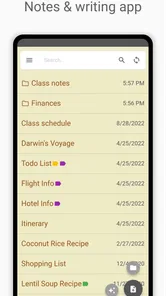
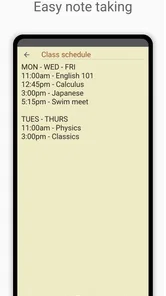
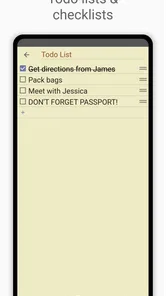
Analysis by Reviewed
I often need to write something down before it disappears: a short shopping reminder, a task I will forget after lunch, or a few lines of information that do not deserve a full document. The problem with many productivity tools is that capturing one small thought can become a project of its own. Inkpad Notepad is built around removing that interruption. It is a free productivity app from Workpail that keeps the focus on creating and reading text notes, to-do notes, and shopping notes without making the process feel heavier than the note itself.
After using it as a simple everyday notepad, I found its main strength easy to explain: it gives small pieces of information a clear place to live. I do not have to open a large document editor or turn a quick reminder into a carefully organized system. That simplicity is also the reason I would not recommend it to everyone. People who need advanced project management, detailed collaboration, or a deep knowledge base will probably outgrow it. For quick personal capture, though, it has a practical rhythm that makes sense.
Why a small note can become a productivity problem
The recurring problem is not usually a lack of places to write. Phones already offer messaging drafts, email drafts, calendar entries, browser bookmarks, and full note-taking suites. The trouble is deciding which place to use. A shopping item may end up in a chat with myself, a temporary reminder may be buried in a calendar, and a useful sentence may be lost among screenshots. Inkpad Notepad approaches that mess by giving these lightweight thoughts a dedicated home.
That distinction matters because a note is not always a task. “Buy rice” is different from a paragraph of ideas, while “call the repair shop” is different from an appointment with a fixed time. I like that the app’s purpose stays close to these ordinary situations instead of forcing every thought into a formal productivity method. It works best when I want to capture something now and return to it later with very little ceremony.
The app has been available since February 13, 2011, and its long presence helps explain its straightforward character. It is not trying to turn a plain notepad into a social platform or a complicated work hub. Its audience is people who want a familiar writing surface on a mobile device. The Everyone age rating also fits that broad, uncomplicated purpose.
Its reception suggests that this approach has connected with a large audience. Inkpad Notepad holds a 4.5 average from around 251 thousand ratings, with roughly 52 thousand written reviews, and it has passed 10 million installs. Those figures do not replace personal testing, but they do show that the basic note-taking idea has remained useful to many people over time.
The first setup should stay deliberately small
My advice is not to begin by trying to design a complete personal organization system. Start with three note types that match real situations: one for loose thoughts, one for tasks, and one for shopping. The point is to create recognizable destinations, not a maze of categories. If I have to stop and debate where a note belongs, the app has already lost some of its time-saving value.
More From Our News Desk

Weather by Xiaomi Review: Clear at a Glance, Less Clear Up Close

X Under Pressure: Can It Recover When Posting Goes Wrong?

Clash of Clans Is Won Between the Battles

Android Auto Makes the Case for Quieter Car Software

MobiOffice: Transforming Mobile Productivity with Seamless Integration

EA SPORTS FC™ Mobile Soccer: Redefining Mobile Sports Gaming
A useful first test is to write three notes immediately. I might create a short idea, a small to-do list, and a shopping list for the next trip. Then I check how quickly I can find each one again. This simple exercise reveals whether the app fits my habits better than a more feature-heavy alternative. For a basic notepad, retrieval matters as much as writing.
I also prefer keeping one thought per note when the information may need a different outcome later. A list of errands can remain together, but a temporary phone number, a recipe adjustment, and a work idea should not automatically share the same page. Separating them makes old notes easier to recognize and discard. The trade-off is that too many tiny notes can become clutter, so I use separate notes only when the information has a different purpose.
Because the app is free, there is little risk in trying this setup. It does include in-app purchases ranging from $1.99 to $239.99 per item, so I would still pay attention to any purchase screen and decide whether an optional upgrade is relevant to my use. For someone who only needs quick text capture, the sensible approach is to begin with the free experience rather than assuming every available option is necessary.
A realistic day with the app
Imagine leaving home in the morning and remembering that the kitchen is almost out of coffee, that a package needs collecting, and that a colleague asked for a short idea before the afternoon. These are related only because they arrived close together. I would put the coffee in a shopping note, the package in a to-do note, and the idea in a regular text note. That separation prevents one long mixed list from becoming difficult to scan.
At the store, the shopping note has a clear job: help me remember what to buy without opening a larger planning system. Later, the package reminder can be checked as part of my errands. The idea can stay untouched until I have enough time to develop it. This is a small workflow, but it illustrates where the app saves time: not through elaborate automation, but by reducing the number of decisions between remembering and recording.
Another useful scenario is travel preparation. I can keep a note with packing reminders, another with addresses or reference text, and a separate list for items to purchase. A full travel-planning app may be better for reservations and schedules, but Inkpad Notepad is convenient for the informal scraps that surround a trip. I would not use it as my only source for time-sensitive bookings; I would use it beside a calendar or travel service.
It also suits household routines. I can keep a recurring cleaning list, a note for measurements, or a running list of things to discuss at home. These are not necessarily projects that need deadlines, owners, or progress dashboards. They simply need to be available when the thought becomes relevant. That is where a lightweight note app can outperform a system designed for teams.
What it removes from the daily process
The biggest friction it removes is over-organization. Many productivity tools ask me to choose a workspace, project, label, due date, priority, or format before I can finish a simple thought. Those controls are valuable when the work truly needs them, but they slow down capture when I only want to preserve a sentence. Here, the central action remains writing.
It also reduces the temptation to use one giant note for everything. Dedicated notes for tasks and shopping keep information closer to the way I will use it. A shopping list should be scannable while moving through a store; a text note can be longer and less structured. Treating both exactly the same is possible, but it is not always convenient.
One non-obvious benefit is that the app can act as a temporary holding area rather than a permanent archive. I use it for thoughts that need a decision later, not necessarily for information I will preserve forever. Once an errand is finished or an idea has moved into a proper document, I can remove the temporary note. That habit keeps the app useful instead of allowing it to become another crowded digital drawer.
A second practical insight is to write notes for future scanning, not just for present capture. I put the important word near the beginning, use short lines for separate actions, and avoid vague titles. “Call dentist about Tuesday” is more useful later than “Dentist.” The app does not need to provide elaborate organization when the note itself is written clearly.
A third trade-off concerns the boundary between a notepad and a task manager. I can write a to-do note quickly, but a simple note does not automatically replace a system that handles recurring deadlines, reminders, assignment, or progress reporting. If a task has consequences when missed, I would place it in a calendar or dedicated task tool as well. Inkpad Notepad is strongest for capture and reference, not for managing every commitment.
How it compares with familiar alternatives
Compared with a paper notebook, the app is easier to keep with me and easier to use for separate shopping or task notes. Paper still has advantages: instant visual freedom, no battery concern, and a satisfying space for sketches. I prefer Inkpad Notepad when I expect to revise a list or need several kinds of notes available in one pocket-sized device.
Compared with a built-in phone notes app, the difference depends on what I value. A default notes tool may already be enough for someone who wants occasional text capture. Inkpad Notepad makes more sense when I specifically want a notepad-centered workflow for ordinary notes, to-dos, and shopping lists rather than a broader collection of document features. If my phone’s built-in option already feels effortless, switching may not produce a dramatic improvement.
Compared with a full productivity suite, Inkpad Notepad is less demanding and less capable. A larger service is the better choice for shared documents, structured databases, attachments, team workflows, and complex projects. The advantage here is that those extra layers do not get in the way of a quick personal reminder. I would choose the app for low-stakes, individual organization and a more advanced tool when information must be coordinated with other people.
That comparison also clarifies who should skip it. Students managing research sources, professionals coordinating several projects, and users who depend on reminders or detailed task states may find a plain note workflow too limited. People who want handwriting, drawing, or a rich document editor should also look elsewhere. The app is not a universal replacement for every productivity category; it is a focused answer to the small-note problem.
Where the simplicity can become a limitation
Simplicity saves time only when the information is simple enough. As my notes accumulate, I need a personal cleanup habit. I review old lists, delete completed errands, and rewrite notes that have grown into something more substantial. Without that maintenance, even a lightweight notepad can become a pile of forgotten fragments.
I would also avoid relying on it alone for information that must be protected by a formal workflow. A shopping list and a casual idea are forgiving if misplaced or forgotten. A deadline, an important record, or a shared work instruction may require a calendar, cloud document, backup routine, or team tool. The right choice depends less on how attractive the interface feels and more on the cost of losing the information.
Another limitation is psychological rather than technical: a note can make me feel organized without guaranteeing that I will act. Writing “renew insurance” is not the same as scheduling it. I use the app to remove the first barrier—remembering and recording—but I move important commitments into a system that will bring them back at the right time. That division of labor keeps expectations realistic.
My recommendation after using it as a daily notepad
Inkpad Notepad is a good fit if you want a free, approachable place for short text, personal to-do notes, and shopping lists. Workpail has kept the concept clear, and the app’s broad audience, strong average rating, and more than 10 million installs reflect how useful that clarity can be. I especially recommend it to people who feel that larger productivity apps create more setup than value for everyday reminders.
I would not choose it as the center of a complex planning system. If you need collaboration, formal deadlines, deep organization, or a rich workspace, another category of app will serve you better. The best results come from treating this as a quick capture and reference tool, then moving important or growing information into a more suitable place.
My practical verdict is simple: install it when the recurring problem is “I need somewhere fast to put this,” not “I need to manage an entire project.” Keep the first notes small, give each one a clear purpose, and clean out finished items regularly. Used that way, Inkpad Notepad earns its place by saving tiny amounts of time repeatedly—and those small reductions in friction are exactly what make a personal productivity app worth keeping.
Inkpad Notepad & To do list Frequently Asked Questions
Can Inkpad Notepad & To Do List replace a dedicated calendar or project-management app?
Inkpad is best approached as a straightforward place to write notes and keep to-do or shopping lists, rather than as a complete planning suite. It can help gather everyday tasks and ideas in one spot, but users who depend on detailed calendars, team workflows, or elaborate project tracking should consider whether those tools are essential to their routine before downloading.
What kinds of notes can I make with Inkpad Notepad & To Do List?
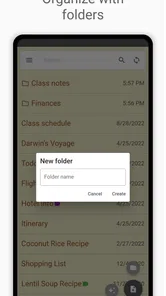
The app is suited to text notes, to-do notes, and shopping notes, making it useful for capturing quick thoughts as well as keeping practical lists. You can use it for everyday writing and task organization, whether you are recording an idea or collecting items to buy. Its focus is on keeping these basic note-taking needs accessible in one app.
Is Inkpad Notepad & To Do List suitable for beginners?
Yes. Inkpad Notepad & To Do List is aimed at straightforward note-taking and task organization, so it can suit users who want a simple place to jot things down rather than learn a complicated productivity system. You can use it for text notes, to-do notes, and shopping notes, with familiar list-making and writing tasks at its core. Its free-to-download status also makes it easy to try before deciding whether it fits your routine.
What is Inkpad Notepad & To Do List used for?
Inkpad Notepad & To Do List is a practical note-taking and task-management app for Android and iOS. It lets you create quick notes, shopping lists, reminders, checklists, and longer pieces of text in one place. During use, its simple layout makes it suitable for everyday planning, school notes, work ideas, personal journaling, and organizing tasks without the complexity of a full productivity suite.
Does Inkpad Notepad & To Do List synchronize notes across devices?
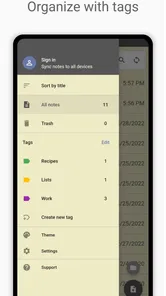
Inkpad is designed to make your notes available across supported devices through account-based synchronization, although the exact options can depend on the platform, app version, and subscription plan. Before relying on it for important information, users should sign in and confirm that synchronization is active. It is also sensible to check whether notes can be exported or backed up, especially before changing phones or reinstalling the application.
Pros
- Clean
- distraction-free interface for quick notes and lists.
- Supports checklists
- making it useful for errands and daily tasks.
- Notes are easy to organize and find when needed.
- Lightweight app that opens quickly on most Android devices.
- Useful for capturing ideas without unnecessary features or complexity.
Cons
- Some advanced tools may require an in-app purchase.
- Cloud syncing options may be limited compared with larger note apps.
- The interface can feel basic for users wanting rich formatting.
- Not ideal for collaborative notes or shared task management.
- Backup and export options may not meet heavy productivity needs.











