INDYCAR
- 2.28K
- 4.2
- Installs
- 500.00K
- Price
- Free

Screenshots


Analysis by Reviewed
I installed INDYCAR because I wanted a practical way to follow the championship without relying entirely on television coverage or a general sports app. It is the official sports app from INDYCAR, and my first impression was that it makes the most sense as a quick companion for race weekends rather than as a complete replacement for every other way of watching motorsport. I could check in, get closer to the series I follow, and keep the app available for short visits when I did not want to search through unrelated sports news.
That distinction matters in a shared household. On a phone used by several people, one person may want racing information while someone else wants football scores, weather, or a streaming service. A dedicated INDYCAR app keeps that purpose clear. It is free, rated for Everyone, and its audience is broad enough to include curious newcomers as well as established fans. Still, I would not install it expecting a general-purpose sports hub. Its value comes from being focused.
How it works in a shared household
My most realistic use case was a busy race day. One person in the house was watching a program, another was preparing food, and I wanted to keep up with INDYCAR without taking over the main screen. Opening the app on a phone gave me a separate place to follow the series. That small separation is useful: the household does not need to agree on one television channel or one shared sports routine for everyone to stay informed.
It also works well for the person who follows the championship casually. I could open it for a short check rather than committing to a long session. That makes it suitable for a quick look before leaving home, during a break, or after hearing that something important happened in a race. A dedicated app is often easier in those moments than searching the web, where results may be surrounded by unrelated headlines, advertisements, or older stories.
The trade-off is that a shared device can blur personal habits. If several people use the same phone or tablet, the app does not become a personalized household dashboard simply because it is installed there. I would treat it as a common reference point, not as a private account space for every member of the family. If two people want different sports, separate apps remain the cleaner arrangement.
For children, the Everyone rating makes the app approachable from an age-label perspective, but I would still introduce it according to the child’s interest and reading ability. A rating does not automatically make every sports story equally engaging or explain every racing detail. A younger fan may enjoy looking at race information with an adult, while an older child can use it more independently. The useful boundary is conversation and supervision, not assuming that an age label replaces parental judgment.
What I noticed during setup
Getting started felt straightforward because the app has a very specific purpose. I did not need to learn a complicated productivity system or configure a large collection of unrelated leagues. That simplicity is one of its strongest qualities for a household: the person installing it knows what it is for immediately.
More From Our News Desk

Clash of Clans Is Won Between the Battles

Android Auto Makes the Case for Quieter Car Software

MobiOffice: Transforming Mobile Productivity with Seamless Integration

EA SPORTS FC™ Mobile Soccer: Redefining Mobile Sports Gaming

How Microsoft OneDrive Became a Mobile Productivity Giant

How Google Translate Breaks Language Barriers Effortlessly
At the same time, I would set expectations before handing the device to someone else. The app is not a family organizer, a messaging tool, or a shared calendar. It does not turn race interest into a coordinated household plan by itself. If one family member wants to remember a race, another wants to watch coverage, and a third wants to discuss the result, those arrangements still need to happen outside the app through the household’s normal calendar or conversation.
That boundary is easy to overlook because official sports apps can feel like complete ecosystems. In practice, I see this one as the information layer. It can support a plan, but it is not the plan. For example, I might check the app before deciding whether to reserve the television for a race, then use a separate calendar or group chat to tell everyone else. Keeping those jobs separate makes the experience less confusing.
The app is free, which removes an important barrier when several people are deciding whether it is worth trying. I would feel comfortable installing it for a family member who is only beginning to explore INDYCAR because there is no purchase decision required before testing the experience. That does not mean every household will want it permanently installed; a casual viewer may prefer to remove it between major racing periods and return when interest picks up.
Coordinating around race interest
The most useful household workflow I found was simple: one person checks the app, then shares the relevant information verbally or through the household’s existing communication method. This works particularly well when the family has one committed fan and several occasional viewers. The committed fan gets a focused source, while everyone else can ask for the important update without installing several sports services.
I would not use it as the only source for a complicated viewing plan. A race weekend can involve different kinds of information, and a dedicated series app may not replace a television guide, a streaming service, or a general calendar. That is not a flaw so much as a reminder to match the tool to the task. INDYCAR helps me stay close to the series; it does not manage the logistics of getting everyone in front of a screen at the same time.
There is also a useful coordination habit for mixed-interest households: agree on what counts as a quick check. One person may want only the latest race context, while another may spend longer reading. On a shared phone, that difference can create friction if someone is waiting to use the device. I would keep the app for short visits when the device is communal, and move deeper browsing to a personal phone or tablet.
Another practical tip is to use the app as a conversation starter rather than assuming everyone understands the same racing terms. A newcomer may recognize a driver or circuit name but not know why a result matters. Looking at the information together gives the experienced fan a chance to explain the series without turning the app into a classroom. That is where the official focus is especially helpful: the conversation stays on INDYCAR instead of drifting through a broad sports feed.
Age, trust, and independent use
Because the app is marked for Everyone, I see it as reasonable for a family device where adults and younger fans share access. However, I would still make a distinction between suitability and independence. A child who enjoys racing can explore it, but an adult should decide how much screen time is appropriate and whether the child is ready to interpret sports coverage without help.
I also prefer not to treat a shared installation as proof that everyone has the same access or preferences. If an adult and child use the same device, the adult may want to check what the child is reading, while the child may simply want to look up racing information. Clear household expectations are more reliable than assuming the app will provide every boundary a family needs.
Trust matters in another way: official branding can make an app feel automatically complete, but I still compare what I need with the alternatives I already use. A general sports app may be better if I follow several leagues and want everything in one place. A browser may be faster for one isolated search. Live television or a streaming platform remains the better choice when the main goal is watching the race itself. I choose this app when I want a focused INDYCAR reference, not when I need one tool to handle every sports activity.
For an older relative who follows racing but dislikes crowded interfaces, the narrow subject could be an advantage. There are fewer unrelated teams and leagues to sift through. For someone who is not interested in INDYCAR specifically, the same focus becomes a reason to skip it. A household should not install it on every device just because one person enjoys the series.
What the app is best at, and where it falls short
INDYCAR has been available since Aug 19, 2010, and the current version is 18.0.11. Those details tell me that this is an established official app rather than a temporary companion built for one event. It supports Android 8.0 and later, so compatibility is worth checking before installing it on an older household phone. On a reasonably current device, I found the appeal less about novelty and more about having the series represented in one dedicated place.
The app’s public reception is encouraging: it holds a 4.2 average from around 9.4 thousand ratings, with roughly 2.3 thousand written reviews and over 500 thousand installs. I would read those figures as evidence of a substantial audience, not as a guarantee that every fan will have the same experience. Sports apps are judged differently depending on whether someone wants quick updates, detailed context, or a substitute for live coverage.
One of my strongest takeaways is that focus can be more useful than abundance. A general sports application may offer more categories, but that can slow down a person who only wants INDYCAR. On the other hand, the general alternative wins for a household where several people follow different competitions. The right choice depends on whether the phone is being used as a dedicated racing companion or as a shared all-sports dashboard.
I would also avoid installing it with the expectation that it will solve every notification problem. A phone full of sports alerts can become noisy, especially when several household members use the same device. My practical approach is to decide who actually needs racing updates and whether the shared device is the right place for them. If everyone receives every alert, the app may create more interruption than value. A personal device is better for a committed fan who wants a more individual routine.
Another trade-off is depth versus speed. A focused official app can make it easier to find relevant material, but a reader who wants broad analysis, historical research, or comparisons across many motorsport series may still prefer specialist websites and broader motorsport platforms. I would use INDYCAR for immediate series-focused checking, then move elsewhere when I want a wider editorial perspective. That combination is more realistic than expecting one app to cover every angle.
The app is also not the right choice for someone whose priority is simply watching live video. I would confirm that the viewing service available in my region meets that need instead of assuming an official information app replaces it. Likewise, a person who only wants occasional final results may find a web search quicker. The dedicated installation earns its place when the user expects to return to INDYCAR repeatedly.
Three habits that make it more useful
First, I would install it before interest peaks rather than waiting until a race is already underway. That gives me time to become familiar with the layout and decide whether the app fits my routine. In a shared household, it also avoids the last-minute scramble where several people are trying to find information on one device at once.
Second, I would separate information checking from viewing decisions. I can use the app to stay oriented, but I would use the household’s television or streaming setup for the actual viewing plan. This prevents a common disappointment: opening a sports app expecting it to function like a complete broadcast service, then discovering that its real value is following the series rather than replacing the screen in the living room.
Third, I would explain the app’s role to anyone sharing the device. “This is the INDYCAR reference” is clearer than presenting it as a general sports app. That small explanation helps children, guests, and casual fans understand why it is installed and prevents them from searching through it for unrelated competitions.
There is a fourth habit I found valuable: use it as a shared prompt for questions. A household member who does not normally follow racing can ask what a result means, why a driver matters, or what to look for next. The app then becomes more than a private score-checking tool without pretending to be a social network or family communication system.
My household verdict
I recommend INDYCAR to a household with at least one genuine fan, especially when that person wants a focused source that can sit alongside the family’s existing viewing and communication tools. Its free price and Everyone rating make it easy to try, and its dedicated identity keeps the experience more purposeful than a crowded all-sports feed. I also appreciate that it can support a shared conversation without requiring every person to become a serious follower.
I would skip it for a device whose users mainly want several sports in one place, for anyone looking primarily for live broadcasts, and for people who only need a one-time result. In those situations, a general sports service, a browser, or a viewing platform may be more efficient. The app is strongest when the question is specifically about staying connected to INDYCAR.
After using it, my opinion is positive but measured. It is not a household control center and it should not be treated as one. Instead, it is a focused official companion that gives a racing fan a clear place to return to while leaving calendars, conversations, viewing arrangements, and family boundaries to the tools and habits the household already trusts. For a shared device, that clear division of responsibility is the feature I value most.
INDYCAR Frequently Asked Questions
Who develops the INDYCAR app, and is it the official series app?
The app is developed by INDYCAR and is described as the official IndyCar Series mobile application. That makes it a direct mobile companion for fans who want to keep up with the series rather than a general motorsports app. It is listed in the Sports category and is free to download, so you can try its core experience without paying to install it.
What is the INDYCAR app used for?
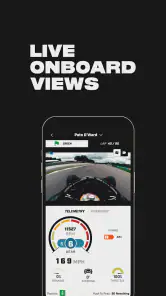
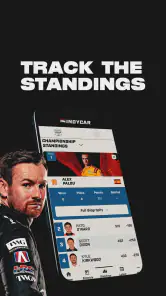
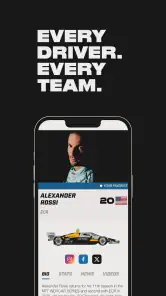
The INDYCAR app is the official mobile companion for the NTT INDYCAR SERIES. It provides race schedules, event information, live timing, standings, news, results, driver details, and championship updates. During race weekends, it can help fans follow on-track action more closely, even when they are away from a television or computer. Available features may vary by region and app version.
Can I watch live INDYCAR races through the app?
The app may offer live timing, race updates, statistics, highlights, and links to official viewing options, but it does not necessarily provide unrestricted live video streaming of every race. Broadcast and streaming rights depend on your country, the specific event, and the current agreements with television or digital providers. Check the app’s event information and your regional availability before downloading.
Does the INDYCAR app require an account or subscription?
Many basic features, such as reading news, checking schedules, viewing standings, and exploring driver information, may be available without creating an account. Some personalized functions, alerts, or premium viewing options can require registration or a separate subscription through an authorized provider. Requirements can change after updates, so review the sign-in and subscription details shown in your version of the app.
Does the INDYCAR app provide live timing and race notifications?
A major benefit of the INDYCAR app is its focus on race-day information. Depending on the event and your device settings, you may be able to follow timing data, positions, lap information, results, and championship standings. Push notifications can also keep you informed about sessions, race starts, major incidents, and final results, although notification availability may vary by region.
Pros
- Official schedules
- results
- standings
- and race updates in one place.
- Live timing helps fans follow gaps
- positions
- and key race developments.
- Video content offers highlights
- interviews
- and behind-the-scenes coverage.
- Push notifications can keep you informed about upcoming sessions and news.
- Clean design makes it easy to switch between drivers
- teams
- and events.
Cons
- Some live features may require a paid subscription or vary by location.
- Video availability can differ because of regional broadcasting restrictions.
- Notifications may become frequent during busy race weekends.
- The app focuses heavily on racing
- with limited general motorsport content.
- Live timing may use significant battery and mobile data during sessions.
- Category
- Sports
- Version
- 18.0.11





