

Included Health
- 1.29K
- 4.8
- Installs
- 100.00K
- Price
- Free

Screenshots
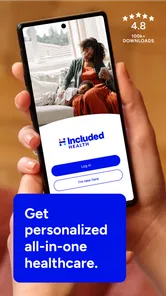
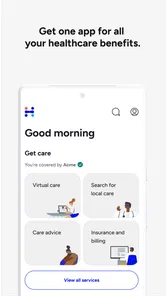
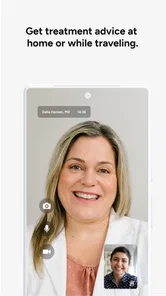
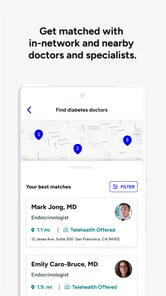

Analysis by Reviewed
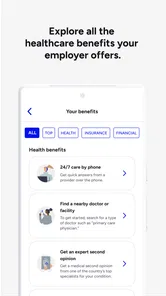
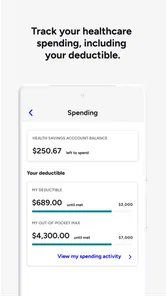
Healthcare is stressful enough without making the digital part harder than it needs to be. I approached Included Health as a practical medical app rather than a replacement for every healthcare service, and that distinction matters. It brings virtual care, healthcare navigation, and advocacy support into one place, with the aim of helping people figure out where to go, what to do next, and how to get assistance when the system feels confusing.
What stood out to me most was the app’s potential value for people who find traditional healthcare processes tiring, difficult to interpret, or physically inconvenient. A person managing appointments, referrals, insurance questions, or a new health concern may benefit from having guidance gathered in one digital space. At the same time, the experience is not equally suitable for every situation. Urgent emergencies still require immediate local help, and people who strongly prefer face-to-face communication may find a virtual-first approach less comfortable.
Included Health is a free medical app from Included Health. It is available for everyone from an age-rating perspective, and its current version is 2026.34.3 for devices running operating system 10 or later. The app has been available since August 25, 2014, and its broad adoption is reflected in an average rating of 4.8 from around twelve thousand ratings, with over one hundred thousand installs.
How Included Health handles readability and navigation
For me, the strongest idea behind the app is not simply “talk to a clinician online.” It is the combination of care access and healthcare navigation. Those are different needs. Virtual care can help when I already know what kind of appointment I need, while navigation and advocacy are more useful when I am unsure which service, specialist, or next step makes sense.
That distinction can make a real difference for people with limited health literacy, people using healthcare in a new country or employer system, or anyone who becomes overwhelmed by medical terminology. Instead of treating every problem as a simple appointment request, the app’s broader purpose is to help organize the decision-making process. I found that more meaningful than a basic telehealth tool that only places a video call.
The app’s readability is especially important in medical contexts. A healthcare interface should not make users decode dense instructions while they are worried, tired, or in pain. When using a service like this, I would look for clear labels separating virtual care from navigation and advocacy, because those functions answer different questions. A user seeking help with a bill or coverage issue should not have to treat it like a clinical consultation, and someone with symptoms should not mistake general guidance for emergency treatment.
One useful habit is to prepare the purpose of the visit before opening the app. I would write a short description in everyday language, note when the issue began, and gather relevant questions. This reduces the mental effort of explaining everything from memory. It also helps when a user has communication difficulties, anxiety, fatigue, or a fluctuating condition that makes spontaneous conversation harder.
More From Our News Desk

 Instagram
Instagram’s Power Comes From Its Place in Your Phone
A close look at how Instagram turns Meta’s reach, recommendation systems and everyday camera habits into durable platform power—and what that costs users.

 Gmail
GmailGmail in a Busy Inbox: Who Benefits Most?
From first account to crowded workday, Gmail earns its place through dependable search and flexible sorting—but its best fit depends on how much inbox maintenance you can tolerate.

 Prime Video
Switching to Prime Video: What Changes in Your Viewing Routine
Prime Video can make a compelling second home for streaming, but switching means learning a different catalog, rental layer, and route from browsing to playback.

 Universal TV Remote Control
Universal TV Remote Control Works Best as a Reliable Backup
A phone remote earns its place through quick setup and reliable habits. Here is how to get more from Universal TV Remote Control—and where its limits show.

 Weather - By Xiaomi
Weather by Xiaomi Review: Clear at a Glance, Less Clear Up Close
Xiaomi’s weather app makes everyday forecasts quick to scan, but its calm surface can leave useful details and recovery paths harder to find than they should be.

 X
XX Under Pressure: Can It Recover When Posting Goes Wrong?
A resilience-focused review of X, examining setup, mistaken posts, interruptions, weak connections, and the gaps that matter when recovery needs to be dependable.
Latest News



The app is likely most comfortable for people who can read and respond to on-screen prompts without assistance, but that does not mean it is only for confident technology users. The healthcare-navigation angle can make the experience less intimidating because the user does not have to understand the whole system before asking for direction. In my view, that is an important inclusive strength: the app can serve as a starting point rather than assuming the user already knows the correct medical pathway.
Why navigation matters more than a simple appointment button
Many healthcare apps are built around a narrow workflow: choose a clinician, select a time, and attend the appointment. That works when the problem is clearly defined. It is less helpful when I am unsure whether I need primary care, a specialist, an urgent visit, or support with a healthcare administration problem.
Included Health’s navigation and advocacy focus addresses that uncertainty more directly. A person with a complicated care history may need help understanding how different parts of the system connect. Someone supporting an older relative may need a clearer route through unfamiliar services. A worker returning from a leave of absence may need practical help coordinating care rather than another isolated consultation.
There is also a cognitive benefit to separating “medical advice” from “system guidance.” Those tasks can overlap, but they should not be confused. I would use the app to clarify what kind of support I need, then keep any instructions or follow-up tasks in a personal note. That small workflow can be valuable for users with memory difficulties, attention-related challenges, or brain fog.
Motor, sensory, and communication considerations
Digital healthcare can remove some physical barriers, but it can also introduce new ones. A virtual appointment may spare someone a trip, a crowded waiting room, or the physical strain of navigating a clinic. That is a meaningful advantage for people with chronic pain, limited mobility, fatigue, or conditions that make travel unpredictable.
It can also help people who need to remain in a familiar environment. Being at home may reduce sensory overload and make it easier to keep medication lists, mobility aids, communication tools, or a trusted support person nearby. For someone who becomes distressed in unfamiliar clinical spaces, that change in setting may make the conversation more manageable.
However, virtual care does not automatically solve accessibility problems. A user still needs a compatible device, enough battery, a usable connection, and a way to interact with the screen. People with tremors, reduced dexterity, limited reach, or difficulty typing may find account setup, form completion, or appointment preparation tiring. I would not assume that a remote appointment is effortless simply because no travel is involved.
Voice, hearing, and vision needs also deserve attention. A person with hearing loss may need communication methods that work better than ordinary audio. Someone with low vision may depend on the device’s own text enlargement or screen-reading tools. A person with speech differences may prefer typing or another communication method. Since individual needs vary, I would test the basic workflow before relying on it for an important consultation, rather than discovering during a stressful appointment that the format is unsuitable.
The same applies to sensory sensitivity. Video calls can involve lighting, movement, background noise, and visual distractions. A quieter room, headphones, reduced screen brightness, and a plain background may make the experience easier. These are not special features of Included Health, but they are practical ways to adapt a virtual-care setting. The app’s value depends partly on whether the surrounding environment can be made comfortable.
A realistic everyday situation
Imagine that I wake up with a non-emergency health concern while also managing a long-term condition. I am not sure whether the new symptom belongs with routine care, needs prompt attention, or should be discussed with a specialist. Traveling to a clinic would take time and energy, and I may not have the confidence to search a health system on my own.
In that situation, I would use Included Health first to organize the problem rather than immediately searching random medical websites. I would describe the symptom plainly, keep my medication information nearby, and use the navigation side of the service to understand the next appropriate step. If virtual care is suitable, I could continue from home. If the issue requires another type of service, the value would be in avoiding an unproductive appointment or a confusing chain of calls.
For a family member helping someone else, preparation becomes even more important. I would make a short list of the person’s main concern, relevant diagnoses, current medicines, and the exact questions that need answering. If the user has difficulty speaking, remembering details, or staying focused, a trusted person could help organize the information, while still respecting the patient’s control over their care.
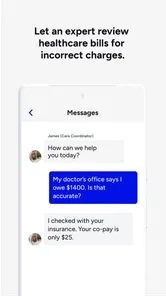
This is where advocacy support can be particularly useful in principle. Healthcare problems are not always clinical. A person may understand their diagnosis but still struggle with referrals, coverage questions, or coordinating several providers. Having a place intended for that kind of guidance may reduce the burden of repeatedly explaining the same situation to different offices.
When situational access is the real advantage
Included Health makes the most sense when access is limited by time, distance, energy, or uncertainty. Someone working irregular hours may appreciate not having to begin with a physical visit for every question. A caregiver may find remote support easier to fit around another person’s needs. A student, traveler, or recently relocated patient may value help understanding where to begin.
Virtual access can also be useful for people who are uncomfortable in waiting rooms or who have conditions affected by exposure to busy public spaces. Staying at home may reduce practical and sensory demands. For people with episodic disabilities, the ability to seek guidance on a better day can be more realistic than arranging travel in advance.
Still, situational convenience should not be confused with universal access. A person in an area with unreliable connectivity may have a poor experience. Someone without a private place to discuss health information may prefer a clinic. A user who shares a device or has limited digital confidence may need help from another person, which creates its own privacy and independence concerns.
I would also avoid using a virtual service as the only plan for a serious or rapidly changing condition. If symptoms feel life-threatening, immediate emergency assistance is more appropriate than opening an app. If a physical examination, testing, imaging, or hands-on treatment is necessary, an online conversation may only be an initial step. The app can help with direction, but it cannot remove the need for in-person medicine when the situation calls for it.
Compared with a general symptom-search website, Included Health offers a more guided route into care and support. Compared with a traditional clinic portal, its broader navigation and advocacy purpose may be more helpful when the problem is not limited to one appointment. Compared with a direct telehealth service, it appears better suited to users who need help deciding what to do next. The trade-off is that a broad service can feel less immediate than a narrowly focused appointment app when I already know exactly which clinician or service I want.
Remaining barriers and practical ways to reduce friction
The biggest limitation is that a digital healthcare experience still asks the user to manage several steps while possibly unwell. Logging in, describing symptoms, choosing the right path, preparing documents, and remembering follow-up instructions can become a lot. The app’s breadth is useful, but breadth can also create decision fatigue if I am looking for one simple answer.
I would approach the first use as a low-pressure setup task rather than waiting until a crisis. Becoming familiar with the main areas, checking that the device works comfortably, and deciding how to store notes can prevent avoidable stress later. A trusted support person can also help with preparation, especially for users who have memory, concentration, motor, or communication challenges.
Another barrier is the difference between guidance and resolution. Advocacy support may help a user understand a healthcare problem, but the user may still need to contact a provider, insurer, pharmacy, or public service. I would treat the app as a coordinator and source of direction, not as a guarantee that every administrative issue disappears after one conversation.
Privacy also requires personal judgment. Medical conversations should take place in a setting where the user feels comfortable speaking freely. Shared phones, public Wi-Fi, family members nearby, or automatic notifications can affect how private the experience feels. I would use a personal device when possible, review who may be present during a virtual visit, and avoid discussing sensitive matters where others can overhear.
People who need highly specialized care should be realistic about the app’s role. Navigation may help them locate the right route, but it is not a substitute for an established specialist relationship. Likewise, someone who prefers a familiar local doctor, paper instructions, or in-person reassurance may find a traditional practice more suitable. The best choice depends on whether convenience and coordination outweigh the comfort of a physical setting.
One non-obvious strength is that the app can be useful before and after a consultation, not only during it. Beforehand, I can turn a vague concern into a short list of questions. Afterwards, I can separate clinical instructions from administrative tasks and identify what needs follow-up. That makes the service more valuable for people who often leave appointments unsure about the next step.
Another practical insight is to use advocacy support for system friction rather than spending a clinical appointment on paperwork questions. If the concern is about finding a provider, understanding a process, or coordinating care, it may be more efficient to frame it as a navigation problem. That preserves clinical time for symptoms, treatment, and decisions that require medical attention.
A third trade-off concerns independence. Remote access can give some users more control because they avoid travel and choose their surroundings. For others, digital forms and video communication create dependence on a caregiver or technically confident relative. I would judge the app by whether it increases the user’s control in their particular situation, not by assuming that “online” automatically means more accessible.
An inclusive verdict for different kinds of users
After reviewing Included Health through the lens of different abilities and circumstances, I see it as a strong option for people who want more than a basic virtual appointment. Its combination of care access, healthcare navigation, and advocacy support is most valuable when the difficult part is figuring out the system. People managing chronic conditions, caregivers, users with limited mobility, and anyone facing complicated healthcare administration may find that broader focus genuinely helpful.
I would recommend trying it to a friend who often postpones care because arranging the next step feels exhausting. I would also suggest preparing questions in advance and testing the app in a calm setting, especially if typing, hearing, vision, speech, attention, or sensory comfort affects digital communication. Those small preparations can determine whether the experience feels empowering or burdensome.
I would not recommend relying on it for emergencies, for every condition requiring physical examination, or for someone who strongly prefers in-person care and already has a simple local route. A specialist relationship, primary-care office, urgent clinic, or emergency service may be the better choice depending on the problem. The app works best as a practical layer around healthcare, not as a universal replacement for healthcare itself.
Overall, Included Health earns my recommendation because it recognizes that healthcare access involves more than speaking with a clinician. The navigation and advocacy perspective can reduce confusion, while virtual care can remove travel and waiting-room barriers. Its inclusive value is real but conditional: the user still needs a workable device, a suitable communication environment, and a clear understanding of when online support is not enough.
For a free medical app from Included Health with an Everyone age rating, it offers a thoughtful starting point for people trying to make healthcare easier to approach. My final judgment is positive, particularly for users who need coordination and guidance. I would simply use it with realistic expectations, good preparation, and the willingness to move to in-person or emergency care whenever the situation demands it.
Included Health Frequently Asked Questions
What should I check before installing Included Health on my phone?
Included Health is a medical app from Included Health, designed around virtual care, healthcare navigation, and advocacy support. Before downloading, check that your device meets the app’s minimum operating-system requirement and consider whether you have access through an employer or health plan. The app is free to download, and it is rated for Everyone.
How do I know whether the app is a good fit for me?
The app may be useful if you want a digital starting point for virtual healthcare and help navigating care or benefits. Its usefulness depends on the services available through your membership, so people with access through a participating employer or health plan are most likely to benefit. Included Health is a medical app, rather than a general wellness tracker or a substitute for every type of healthcare.
What is Included Health, and what services does it provide?
Included Health is a digital healthcare platform that connects members with virtual care, medical guidance, benefits support, and care navigation services. Depending on your employer or health plan, you may be able to speak with doctors, mental health professionals, or specialists, receive help understanding treatment options, and get assistance finding appropriate in-person care. Available features can vary by membership.
Can anyone download and use the Included Health app?
Anyone may be able to download the Included Health app, but access to its healthcare services generally depends on eligibility through an employer, insurance provider, or participating health plan. After installing the app, you may need to verify your identity and coverage. If your organization is not supported, some features may be unavailable, so checking eligibility before relying on the app is recommended.
Does Included Health replace a primary care doctor or emergency services?
Included Health can make it easier to access virtual consultations, care recommendations, and help coordinating medical services, but it should not automatically replace your regular doctor or established care team. It is also not intended for life-threatening emergencies. For severe symptoms, chest pain, breathing difficulties, or other urgent situations, contact local emergency services or visit an emergency department immediately.
Pros
- Combines virtual care
- mental health
- and primary care in one platform.
- Personalized care navigation can help users find suitable benefits and providers.
- Offers convenient access to support without requiring an in-person visit.
- May help simplify healthcare decisions through guided recommendations.
- Useful for employees with Included Health coverage from participating employers.
Cons
- Most features require eligibility through an employer or health plan.
- Available services and providers can vary significantly by location.
- Some appointments may have limited availability during busy periods.
- Certain treatments or specialist services may still require in-person care.
- The app’s usefulness depends heavily on the benefits included in your plan.











