

IHSS EVV Mobile App
- 493.00
- 4.4
- Installs
- 100.00K
- Price
- Free

Screenshots
Analysis by Reviewed
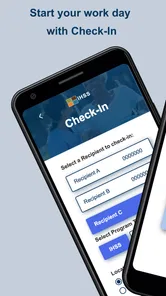
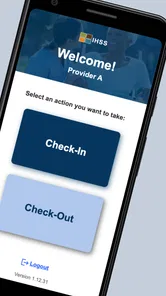
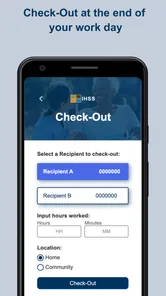
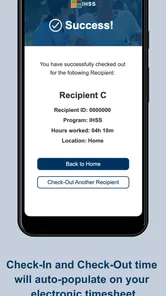
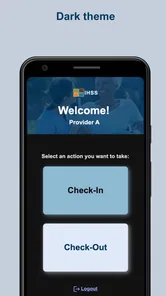
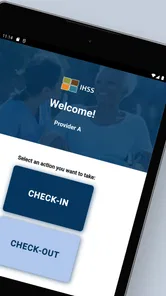
I found IHSS EVV Mobile App most useful when I treated it as a focused work tool rather than a general health app. Its job is narrow but important: it helps California IHSS and WPCS providers check in and check out during service visits. That makes it especially relevant in homes where care is shared between relatives, providers, or a small group of trusted people who need a clear record of when assistance begins and ends.
In my experience, the value comes from reducing uncertainty around a routine task. Instead of relying on memory, paper notes, or a separate message to explain a visit, the provider has a dedicated mobile app for the electronic visit verification process. It is free, rated for Everyone, and developed by CalHHS OTSI. The app has reached over 100 thousand installs and holds a 4.4 average from around 1.2 thousand ratings, which suggests that many people find it practical enough to keep using.
How IHSS EVV fits into a shared household routine
A realistic example is a household in which one provider helps an older adult in the morning while another trusted person covers part of the afternoon. The first provider can use the app at the start and end of the visit, then the next person follows the same basic routine. That creates a more consistent handoff than asking everyone to remember separate notes or send informal updates.
This is where the app feels more useful than a generic calendar or notes application. A calendar can show that a visit was planned, but it does not serve the same purpose as recording the provider’s check-in and check-out. A note can describe what happened, but it is easy to forget, edit accidentally, or write down later. IHSS EVV Mobile App is built around the visit event itself, so the workflow stays connected to the care task.
Shared-device households should think carefully about who is actually using the phone. If a family keeps one phone in the home for several people, passing it from one provider to another may be convenient, but it can also blur account boundaries. Each person should use the appropriate account and follow the procedure required for their own provider role rather than treating the device as one shared identity.
I would not hand the phone to a child simply because the content rating is Everyone. That rating makes the app suitable from an age-classification perspective, but the work it supports belongs to adults or authorized caregivers who understand the visit process. A household can share hardware without sharing responsibility for the account or the recorded visit.
Why a dedicated visit app beats informal reminders
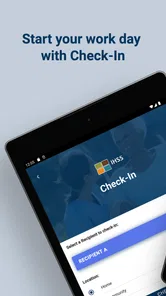
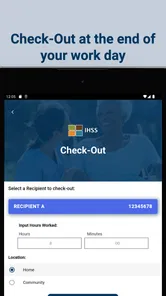
The strongest advantage is consistency. Care work often happens during busy transitions: getting someone ready in the morning, preparing a meal, helping with personal routines, or leaving for another appointment. Those are exactly the moments when a provider may forget to write something down. A check-in and check-out tool puts the administrative action next to the visit instead of leaving it for later.
More From Our News Desk

 Instagram
Instagram’s Power Comes From Its Place in Your Phone
A close look at how Instagram turns Meta’s reach, recommendation systems and everyday camera habits into durable platform power—and what that costs users.

 Gmail
GmailGmail in a Busy Inbox: Who Benefits Most?
From first account to crowded workday, Gmail earns its place through dependable search and flexible sorting—but its best fit depends on how much inbox maintenance you can tolerate.

 Prime Video
Switching to Prime Video: What Changes in Your Viewing Routine
Prime Video can make a compelling second home for streaming, but switching means learning a different catalog, rental layer, and route from browsing to playback.

 Universal TV Remote Control
Universal TV Remote Control Works Best as a Reliable Backup
A phone remote earns its place through quick setup and reliable habits. Here is how to get more from Universal TV Remote Control—and where its limits show.

 Weather - By Xiaomi
Weather by Xiaomi Review: Clear at a Glance, Less Clear Up Close
Xiaomi’s weather app makes everyday forecasts quick to scan, but its calm surface can leave useful details and recovery paths harder to find than they should be.

 X
XX Under Pressure: Can It Recover When Posting Goes Wrong?
A resilience-focused review of X, examining setup, mistaken posts, interruptions, weak connections, and the gaps that matter when recovery needs to be dependable.
Latest News



There is also a useful psychological benefit. When several people coordinate care, everyone has a clearer understanding that the visit was handled through the expected process. That does not replace communication about the person receiving care, but it separates two different needs: discussing care details and recording the provider’s attendance.
Compared with a paper log, the mobile approach is easier to carry and less likely to be left in a kitchen drawer. Compared with a general time-tracking app, it is more relevant to IHSS and WPCS provider work because its purpose is tied to EVV. The trade-off is that it is not a flexible household organizer. I would not choose it to manage medication reminders, grocery lists, family calendars, or broad care planning.
Setting up the right boundaries before the first visit
The most important preparation is not technical; it is organizational. Before using the app, the household should decide which provider is responsible for checking in and checking out, which phone will normally be used, and what the backup plan is if that phone is unavailable. These decisions prevent the common mistake of assuming that any family member can complete the action on behalf of someone else.
I also recommend keeping the app’s purpose separate from the rest of the household’s conversations. A family group chat may be useful for saying that someone arrived late or needs help covering a visit, but it should not become the substitute for the app’s check-in and check-out workflow. The app records the formal action; messages handle coordination around it.
On Android, the current version is 1.7.0 and the minimum operating system is Android 7.0. That makes the app accessible on many older Android phones, which matters in households that do not replace devices frequently. Still, an older compatible phone can be less comfortable to use if its battery is weak, its connection is unreliable, or several people depend on it throughout the day.
Because the app is free, the financial barrier is low. That does not mean every device arrangement is equally sensible. A shared phone may create delays when one person takes it out of the home, and a provider who regularly works across different locations may prefer having dependable access on their own device. The better choice depends on whether convenience or strict separation is the household’s bigger concern.
Small workflow habits that prevent avoidable confusion
One practical habit is to make the check-in part of the arrival routine rather than something done after unpacking, greeting family members, or starting other tasks. The same applies to checking out: I would do it before leaving the care setting, not once I am already in the car or several blocks away. The closer the action is to the actual transition, the less likely it is to be forgotten.
Another useful habit is to avoid passing the phone around while the app is open unless the correct provider is clearly identified and ready to complete their own action. Shared devices invite shortcuts. A person may think they are merely helping, but using the wrong account or completing the action for someone else can make the household record harder to understand.
I would also keep a simple household reminder about responsibility, not about private care details. For example, a note near the charging area could say that the arriving provider handles check-in and the departing provider handles check-out. That is a modest change, but it removes the awkward question of who was supposed to do what when several people are present.
These habits are not extra features of the app. They are ways to use a focused tool correctly in a complicated home environment. The app can support coordination, but it cannot decide which person is responsible for a visit or repair a misunderstanding between relatives.
Coordination without turning the app into a family control center
IHSS EVV Mobile App works best when everyone understands its limited role. It is designed for provider check-in and check-out, not for supervising every part of a household’s care. I would use it alongside direct conversation, a calendar, or another agreed method for discussing schedule changes. Trying to force all coordination into one app would make the process less clear, not more.
For a household with alternating providers, a basic sequence can help: confirm the day’s coverage, make sure the responsible provider has access to the correct account, complete the arrival action, and communicate any unusual change separately. At departure, the provider completes the closing action and tells the next person anything that needs attention. This keeps the EVV record and the human handoff connected without confusing their purposes.
The app is also not a replacement for judgment. If a provider arrives but cannot immediately complete the expected action, the household should not casually improvise by having another person do it. The right response is to follow the applicable IHSS or WPCS procedure and resolve the issue through the proper support channel. A mobile tool is helpful precisely when it is used within the rules of the program it supports.
This is one area where a general time tracker may appear more forgiving. A flexible tracker might let anyone add a shift later, but that flexibility can weaken accountability. Conversely, a household that only needs a private reminder may find a calendar simpler. My preference is the dedicated EVV app when the goal is recording provider visits, because a broader tool can be too vague for that responsibility.
Trust, privacy, and age context in a home with several users
The Everyone rating should not be mistaken for a signal that every household member should access the app. The more important question is trust and authorization. A provider may share a phone with a spouse or relative, but that does not automatically mean the other person should open the account, view the workflow, or complete visit actions.
For families supporting an older adult, the phone may be physically located in the care recipient’s home while the account belongs to the provider. That distinction is worth explaining to everyone involved. The device location, the person receiving care, and the provider responsible for the visit are not necessarily the same thing.
I would also avoid leaving the phone unlocked in a common area when several people use it. This is not because the app is presented as a social or family application; it is because account boundaries become harder to protect on a shared device. A household can agree on where the phone is charged and who may use it, while still keeping each provider’s responsibility separate.
For younger family members, the best role is usually practical support rather than account access. They might remind an adult to bring the phone or help locate the charger, but the provider should remain the person who performs the visit action. That approach respects the age rating while recognizing that EVV records are connected to adult work responsibilities.
Where the app can feel limited
The focused design is both its strength and its limitation. If you expect a complete care-management platform, you may find it too narrow. It does not replace a shared calendar, a conversation about changing needs, or a detailed record of what happened during a visit. Its usefulness depends on everyone following the same check-in and check-out discipline.
Shared-device use can also introduce friction. A phone may be charging, carried by another person, or unavailable when the provider arrives. A household that regularly has several providers moving in and out may find separate, reliable device access easier than maintaining one communal phone. On the other hand, a dedicated device for every person may be unnecessary when the schedule is simple and the household already has clear routines.
Older Android support is welcome, but compatibility alone does not guarantee a smooth experience on every older handset. Battery condition, screen responsiveness, and dependable connectivity still matter in everyday use. I would test the complete arrival and departure routine before relying on the app during a busy week, especially if the phone is shared.
There is also a human limitation that no app can solve: people may still forget to complete the action. The best safeguard is to attach it to a physical transition, such as entering the home or preparing to leave. Relying on memory after the visit is the weakest approach, regardless of how simple the app appears.
Who should use it and who should choose something else
I would recommend IHSS EVV Mobile App to California IHSS and WPCS providers who need a direct mobile way to complete their visit check-in and check-out responsibilities. It is particularly suitable for households that want a repeatable routine without paying for another general scheduling service.
It is also a sensible fit when relatives coordinate around one care recipient but understand that each provider must keep their own account and responsibility clear. In that setting, the app becomes one dependable step in a larger routine rather than an attempt to manage the entire household.
I would hesitate to recommend it as the main tool for someone looking for broad medical tracking, family messaging, appointment management, or detailed care notes. A general health organizer, calendar, or communication tool may be better for those needs. The important distinction is that those alternatives can complement EVV, but they should not be assumed to serve the same purpose.
Likewise, a household with no IHSS or WPCS provider workflow has little reason to install it. Its narrow focus is valuable for the people it serves, but unnecessary for someone simply looking for a personal wellness app or a way to track ordinary working hours.
My household verdict
After looking at the app through the reality of shared phones, rotating providers, and family coordination, I see IHSS EVV Mobile App as a practical specialist rather than an all-purpose care solution. Its free price and Everyone rating make it easy to consider, while the support for Android 7.0 or later helps households using older phones. The developer, CalHHS OTSI, has kept the purpose clear instead of turning it into a crowded collection of unrelated tools.
My recommendation is strongest when the household establishes boundaries first: the right provider uses the right account, the phone is available at the beginning and end of the visit, and schedule conversations happen separately from the formal EVV action. Those details make more difference than any shortcut.
The best reason to use this app is simple: it gives a specific provider task a specific place in the household routine. If that is what you need, IHSS EVV Mobile App is a sensible choice. If you need a complete family care hub, it will feel incomplete, and you should pair it with other tools rather than expecting it to handle every part of coordination.
IHSS EVV Mobile App Frequently Asked Questions
Is the IHSS EVV Mobile App free, and what devices can run it?
The IHSS EVV Mobile App is free to download and is listed for Android devices running version 7.0 or later. Before installing, check your device’s operating system version and make sure you have enough space for the app. The app is California’s EVV solution for IHSS and WPCS providers to check in and check out, so it is intended for those program-related tasks.
Who develops the IHSS EVV Mobile App?
The app is developed by CalHHS OTSI and is categorized as a medical app. Its audience is providers using California’s IHSS and WPCS services for Electronic Visit Verification tasks. If you are comparing apps before downloading, make sure you select the IHSS EVV app rather than an unrelated app with a similar name, and obtain it from an official app store.
What is the IHSS EVV Mobile App used for?
The IHSS EVV Mobile App is designed to help In-Home Supportive Services (IHSS) providers record and submit Electronic Visit Verification information for authorized care services. Depending on the program and location, providers may use it to check in and out, confirm the service recipient and location, review visit details, and submit required timesheet information through a mobile device.
Who can use the IHSS EVV Mobile App?
The app is generally intended for eligible IHSS providers who are required to use Electronic Visit Verification for covered services. You may need an active provider account, enrollment in the applicable IHSS program, and valid login credentials before using it. Service recipients, authorized representatives, or other users may have different access options, so eligibility should be confirmed with the official IHSS support channel.
What information or permissions does the app require?
To complete EVV tasks, the IHSS EVV Mobile App may request access to your device’s internet connection, location services, and sometimes notifications or other basic functions. Location information can be important for verifying where a visit begins or ends. Before installing, review the permissions carefully and make sure your phone’s date, time, and location settings are accurate.
Pros
- Quick mobile check-in and check-out for approved IHSS services.
- Captures visit details directly from a caregiver’s smartphone.
- GPS and time records can support accurate visit verification.
- Reduces paperwork and manual entry for participating providers.
- Useful for reviewing visit status before submitting service records.
Cons
- Requires a compatible device
- internet access
- and location services.
- Login or verification issues may delay recording a scheduled visit.
- Battery and data usage can be noticeable during frequent shifts.
- GPS accuracy may vary indoors or in areas with weak signals.
- Not all IHSS recipients or providers may be eligible to use it.











