igloohome
- 67.00
- 4.2
- Installs
- 100.00K
- Price
- Free

Screenshots
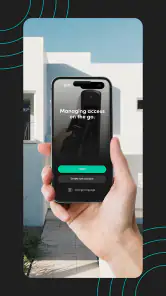

Analysis by Reviewed
Managing a smart lock sounds simple until the door is waiting, the phone is in your hand, and the app does not behave as expected. That is where igloohome becomes worth examining closely. Developed by Igloohome, this free House & Home app is designed for smart lock and smart access management, but its real value depends on how carefully you prepare the lock, the phone, and the access plan before someone needs to enter.
I approached it as the kind of tool a homeowner, host, or small property manager might use in ordinary life rather than as a novelty. The useful question is not merely whether the app can sit on a phone. It is whether it makes entry easier than handing over a physical key, and what happens when the expected workflow breaks. My overall impression is positive, especially for people who regularly coordinate access, but I would not treat it as a magic replacement for basic preparation.
Where the experience usually gets stuck
The first source of friction is the difference between owning a smart lock and having a smooth access routine. The app is the control point, but a control point is only helpful when the correct lock is selected, the phone is ready, and the person arriving understands what they are supposed to do. A rushed setup can make a capable system feel unreliable.
That matters most when access is being arranged for another person. Imagine leaving home while a cleaner, repair worker, or guest is due to arrive later. You may think the task is finished once access has been arranged in the app, but the practical handoff still needs clear instructions. The recipient needs to know which door is involved, when to use the access, and what to do if the first attempt does not work. A short message with those details is often as important as the app itself.
Another common sticking point is assuming that a phone screen alone solves every problem. A smart-access workflow still depends on the lock being installed correctly and the person using it following the intended method. If the door is difficult to close, the lock is under pressure, or the user is trying to operate it too quickly, an app cannot compensate for that physical issue.
I also found that people can confuse three separate tasks: connecting the app to the lock, preparing access for another person, and actually opening the door. Keeping those tasks mentally separate makes troubleshooting much easier. If the lock is not visible in the app, that is a setup problem. If the lock is visible but another person cannot use the arranged access, that is an access workflow problem. If the app appears ready but the mechanism does not move, the door or lock may be the real issue.
The app has a 4.2 average from around 670 ratings, with roughly 67 written reviews, and its 100K-plus installs suggest that it is being used beyond a tiny group of early adopters. Those figures do not remove the need for care, but they do make it easier to view the app as an established access-management tool rather than an experiment.
Why preparation matters more than the first impression
On a quiet afternoon, adding a lock and exploring the controls can feel straightforward. The real test comes when access is time-sensitive. I recommend completing a full practice routine before relying on it for a guest or service visit. Open the app, identify the correct lock, check the intended access arrangement, and confirm that the door can physically lock and unlock without resistance.
This rehearsal reveals problems that a quick glance at the interface will not. You may discover that a family member is using the wrong phone, that someone has misunderstood the door instructions, or that the lock needs a firmer closing action. These are not necessarily failures of the app, but they become app-related frustration when discovered at the worst possible moment.
A less obvious benefit of this approach is that it creates a clear fallback decision. If the planned digital entry does not work during the rehearsal, you still have time to use another arrangement. If you wait until a visitor is outside, every small uncertainty feels much larger.
Setup checks that prevent avoidable problems
The app runs on Android from version 7.0 onward, which makes it accessible to a broad range of compatible Android phones. That does not mean every older phone will provide the same experience in practice. A device may technically meet the minimum requirement while still being inconvenient because of battery condition, background restrictions, or general sluggishness. For important access, I would use a phone that behaves reliably in everyday use rather than the oldest available handset.
Before pairing or managing anything, I would check four basics: the correct app is installed, the phone has enough battery for the planned task, the user is working with the intended lock, and the door itself operates smoothly. These checks sound ordinary, but they prevent a surprising number of false diagnoses. If a lock is hard to turn manually, digital management should not be the first thing blamed.
It is also worth giving the setup your full attention instead of trying to complete it while walking between errands. Read each screen carefully, especially when the app asks you to identify or select a lock. Choosing the wrong device can create confusion later because the interface may appear normal while you are managing a different entry point than the one you intended.
For a shared household, decide who should manage access and who should simply use it. Giving every person responsibility for configuration can create conflicting changes and unclear ownership. A smaller number of people handling setup usually makes the routine easier to explain. Other users can receive the practical instructions they need without being asked to understand every management step.
A useful setup routine for hosts and families
Start beside the door, not from another room. This lets you compare what the app shows with what the lock is physically doing.
Identify the intended lock before changing any access arrangement. If there is more than one smart entry point, slow down at this stage.
Test the door’s movement manually and then through the normal app workflow. Resistance or misalignment should be dealt with before inviting someone else to use it.
Explain the entry routine in plain language to the next user. Avoid assuming that a person familiar with smartphones will automatically understand smart-lock access.
Run the complete process once before the appointment, arrival, or handoff becomes urgent.
The most important habit here is testing the whole access journey, not just the app screen. A successful setup is not merely a lock appearing in the application. It is a person being able to reach the correct door, follow the instructions, and complete entry without guesswork.
The current version is 3.4.0, and the app has been available since August 21, 2015. Those details place it in a mature product category, but they should not encourage complacency. Updates can change how screens are arranged or how a workflow feels, so I would take a moment to review the interface after an update before using it for an important visit.
What to check when another person cannot get in
When a guest reports a problem, asking them to repeat “try again” is rarely useful. I would first ask whether they are at the correct door, whether the lock is physically closed in the expected position, and whether they are following the access instructions exactly. This turns a vague failure into a sequence of observable checks.
Next, compare the person’s situation with the access arrangement you prepared. Was the access intended for the current visit? Is the guest using the phone or method you expected? Did you explain what successful entry should look and feel like? These questions are practical because they distinguish a communication mistake from a lock or app problem.
If the user is standing outside, keep the instructions short. Long technical explanations increase stress and make it harder to notice a simple issue such as being at the wrong entrance. I would guide them through one step at a time, asking what they see and what the lock does after each action.
Recovering the workflow without making it worse
Good troubleshooting starts by changing one thing at a time. Closing and reopening the app may be reasonable, but repeatedly changing access settings while someone is waiting can make the situation harder to understand. I prefer to pause, record what is currently happening, and then test the simplest explanation first.
If the app does not show the expected lock, I would check the phone and account context before assuming the lock has failed. Confirm that the user is in the intended app session, that the phone is the one normally used for management, and that the correct lock has been selected. Avoid making several unrelated changes together, because you may not know which action helped or created a new problem.
If the lock appears in the app but the physical result is wrong, move attention to the door. Check whether it is fully closed, whether the latch is catching, and whether the lock is under pressure from a misaligned frame. A person pulling or pushing the door while the mechanism is working can also make a normal operation appear unsuccessful. The safest general response is to stop forcing the door and inspect its position calmly.
For a remote host, the most useful preparation is a written recovery note. Keep the lock location, the usual user instructions, and the preferred fallback arrangement in one place. This is not a feature of the app; it is a practical layer around it. It prevents you from trying to remember every detail while travelling or dealing with a visitor by phone.
One subtle trade-off is convenience versus control. Digital access can reduce the need to meet someone in person, but it also means the manager must think ahead about timing, identity, and communication. If you routinely arrange entry for several people, the app can be more convenient than physical keys. If you only need to open one door for yourself, the additional management may feel unnecessary.
When restarting helps and when it does not
Basic recovery actions can help when the phone has temporarily lost its normal connection to the app or when a screen has become unresponsive. Restarting the app, checking the phone’s battery, and moving to a position where you can operate the lock carefully are sensible first steps. They are low-risk and easy to explain to another user.
However, restarting the app will not fix a door that is rubbing against the frame, a lock that was installed poorly, or instructions that do not match the person’s actual access. Repeating the same digital action against a physical obstruction is more likely to create frustration than progress. I would use the app to observe and manage the workflow, but I would never ignore the mechanical condition of the door.
It is equally important not to improvise complicated changes during an urgent entry attempt. If the visitor is safe and there is a separate way to provide access, using that fallback may be wiser than experimenting with several settings. The app is most valuable when it supports a prepared routine, not when it is treated as an emergency puzzle.
When the app is not the cause
Smart locks sit at the intersection of software, hardware, the door, and human instructions. That combination makes blame easy and diagnosis difficult. In my experience, the app should be considered one part of the system rather than the entire system.
A door that has gradually shifted can create symptoms that look like an application fault. The lock may work when the door is open but struggle when it is closed. A user may describe this as the app failing, even though the software is sending the expected command and the mechanism is meeting resistance. Checking the door’s alignment is therefore one of the most valuable non-digital tests.
Human timing also matters. A visitor may press, pull, or turn at the wrong moment because the instructions were too brief. Someone unfamiliar with the lock may expect a traditional key action and keep applying force when a different sequence is required. Clear, calm guidance is more useful than telling them that the technology is simple.
Phone condition is another overlooked factor. A nearly empty battery, a phone that is struggling generally, or a user who has switched devices can complicate access. The minimum Android requirement is 7.0, but compatibility on paper is not the same as a comfortable, dependable phone experience. For a household with an older spare phone, I would test it well before making it the main access device.
There is also a social limitation. A smart-access system can make sharing entry easier, but it does not remove the need to decide who should be trusted with access and how quickly that access should be changed when plans shift. For a busy rental or service arrangement, that responsibility is manageable. For someone who dislikes digital administration, a conventional key exchange may be less stressful.
How it compares with ordinary alternatives
Compared with a physical key, igloohome offers a more flexible way to coordinate entry without being in the same place as the visitor. That is the strongest reason to choose it. A key is familiar and does not depend on an app session, but copying, collecting, and tracking keys can become awkward when several people need access at different times.
Compared with a basic keypad-style arrangement, the app adds a management layer on the phone. That can be helpful for the person responsible for the lock, especially when access needs to be organized rather than simply shared with everyone. The trade-off is that the manager must be comfortable maintaining the digital workflow and explaining it to others.
Compared with a traditional lock and a trusted neighbour, the app reduces the need for a third party to be present. Yet a neighbour may still be the better solution during a phone problem, a door alignment issue, or an unexpected visit. I would choose the app for repeatable access coordination, while keeping a human fallback for situations where software and hardware do not cooperate.
The free price and Everyone content rating make it approachable for ordinary households, and the app is clearly aimed at access management rather than entertainment. Still, “free” applies to the application itself; the useful experience depends on having the relevant smart-lock setup. Someone who does not own a compatible lock should not install it expecting a standalone home-security solution.
Who should use it and who should skip it
I would recommend it to people who manage access repeatedly: hosts, families with changing schedules, landlords handling a property, or anyone who wants to reduce physical key handoffs. It is particularly useful when the person arranging entry is often away from the door but still needs a structured way to prepare access.
It is also a sensible fit for users willing to rehearse the process and keep instructions clear. The strongest results come from treating the app as part of a routine: prepare access, check the door, explain the steps, and maintain a fallback. That small amount of discipline turns a potentially confusing tool into a practical one.
I would skip it if your needs are limited to opening your own door and you strongly prefer the simplicity of a conventional key. I would also hesitate if nobody in the household wants responsibility for setup and troubleshooting. A smart lock can reduce one kind of inconvenience while introducing another, and the balance depends on how often access is shared.
Users who expect every problem to be solved remotely should be cautious as well. The app can manage the digital side, but it cannot repair a misaligned door or guide an unprepared visitor without communication. If the physical lock is unreliable, resolve that first rather than expecting the application to hide the problem.
My practical verdict after using it
igloohome is a useful access-management companion when the goal is to coordinate smart-lock entry rather than merely operate a lock once. I like the way it can fit into real situations where a guest, cleaner, family member, or contractor needs access while I am elsewhere. The app’s value is strongest when I prepare the workflow in advance and keep the instructions understandable.
Its main weakness is not a single missing convenience; it is the possibility that users will underestimate the surrounding setup. The application may be ready while the door is not, or the lock may be fine while the visitor is confused. That is why my best advice is to test the complete journey before relying on it, especially if someone else will be standing outside.
The app is free, rated for Everyone, and supports Android devices beginning with version 7.0. Its current version is 3.4.0, and its long availability gives it a more established feel than a brand-new home utility. Those points make it easy to try for owners of the relevant smart-lock hardware, but they should be weighed against your willingness to manage digital access responsibly.
My final recommendation is straightforward: choose it if shared or remote entry is a recurring problem and you are prepared to maintain a clear routine. Keep a fallback for physical or phone-related trouble, and do not confuse a software action with proof that the door mechanism is healthy. For the right household, igloohome makes access coordination more practical than passing around keys. For a person who wants zero setup and no troubleshooting, a conventional lock may still be the better answer.
Pros
- Works with selected igloohome smart locks and keyboxes
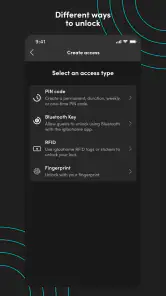
- PIN codes can be created remotely for convenient guest access
- Bluetooth access allows unlocking without an internet connection
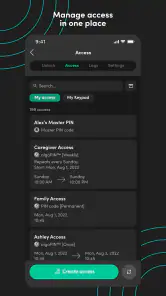
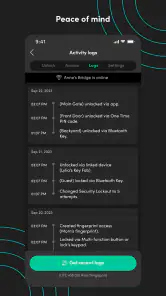
- Activity logs help track access and usage history
- Useful for rentals
- property managers
- and shared spaces
Cons
- Compatible hardware must be purchased separately
- Some features depend on the specific igloohome device
- Bluetooth unlocking requires being near the lock
- Battery level and maintenance still need regular attention
- Guests may need clear instructions to use temporary access

- Category
- House & Home
- Version
- 3.4.0