Hushed: US Second Phone Number
- 5.47K
- 4.1
- Installs
- 10.00M
- Price
- Free

Screenshots
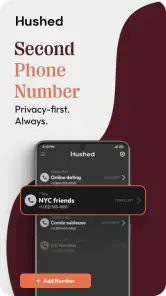
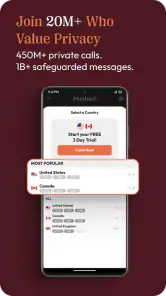
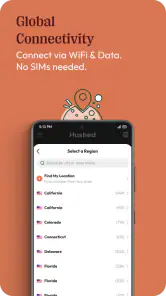
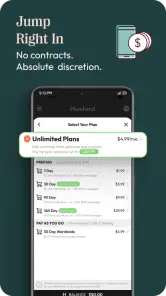
Analysis by Reviewed
I’d treat a second number as a boundary, not a magic privacy shield: it gives you another contact point, but you still need to decide who gets it and what you use it for. That’s the role Hushed: US Second Phone Number is meant to fill, with calling, texting, and voicemail in one communication app. If you’re new to this kind of service, the simplest way to judge it is to start with one clear purpose rather than trying to replace your everyday mobile number right away.
What to expect from a second number
A separate number can be handy when you want to keep work, temporary projects, or public-facing contact details away from your personal line. It can also be useful for selling something locally or coordinating a short-term activity. The practical benefit is separation: you can share one number for a particular context without giving out the number friends and family already use.
That separation is useful, but it is not the same as anonymity. A second number does not remove the need to use good judgment about messages, account details, or the people you contact. I’d also avoid assuming it can substitute for every function of a carrier-provided line. If your priority is dependable everyday service tied to your main phone plan, that familiar option may suit you better.
Making the first setup purposeful
Before installing, I’d decide what the number is for and who needs it. That small choice makes setup less confusing: a number for client calls has a different job from one used to arrange a one-off sale. The app is free to download, but optional in-app purchases range from $0.99 to $284.99 per item, so check the purchase details before choosing anything. Hushed is developed by AffinityClick Inc.; it is rated for Everyone, and the app has a 4.1 average from around 54,000 ratings, with over 10 million installs.
Once you have a number, make its purpose clear in your own contact list and in any message you send from it. For example, a brief first text that identifies you and why you’re reaching out can prevent the recipient from mistaking the new number for spam. I’d also test the basic action you care about—placing a call, sending a text, or setting up voicemail—before relying on it for a time-sensitive conversation.
Where it fits, and where it doesn’t
Compared with carrying a second physical SIM or another phone, an app-based number can be a simpler way to keep contact channels separate. Compared with using your regular number for everything, it gives you a dedicated line for a narrower purpose. The trade-off is that it adds another app and another number to manage; it won’t feel like a benefit if you rarely need that separation or prefer all calls and messages to stay in your standard phone setup.
A realistic use might be arranging a pickup after listing an item for sale. I’d share the Hushed number with the interested buyer, use it to coordinate the time, and keep my personal number private. After the exchange, I could stop using that contact channel. For ongoing work, though, I’d first make sure the arrangement and plan I choose fit the duration I need rather than assuming a short-term setup will serve indefinitely.
You May Like

Clash of Clans Is Won Between the Battles

Android Auto Makes the Case for Quieter Car Software

MobiOffice: Transforming Mobile Productivity with Seamless Integration

EA SPORTS FC™ Mobile Soccer: Redefining Mobile Sports Gaming

How Microsoft OneDrive Became a Mobile Productivity Giant

How Google Translate Breaks Language Barriers Effortlessly
Getting Started with Hushed
First things first, downloading and setting up Hushed: US Second Phone Number was a breeze. Available on both Android and iOS, the app is lightweight and installs in no time. Upon launching, the interface greets you with a clean and intuitive design that's easy to navigate. Setting up an account is straightforward, and within minutes, I was ready to claim my new number.
Features That Stand Out
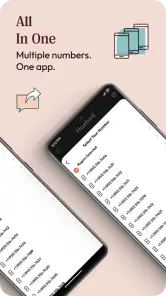
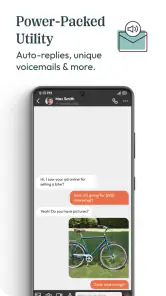
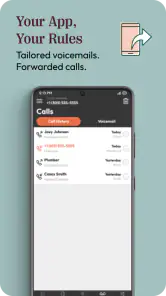
One of the standout features of Hushed is its ability to provide multiple phone numbers. You can easily choose a number from various area codes across the US. This is particularly useful if you want to maintain privacy or need a number for business purposes. The app also allows you to send texts, make calls, and even set up voicemail. Pretty much everything you’d expect from a regular phone number.
Moreover, the app supports international calling and texting, making it a great choice for those who travel frequently or have friends and family abroad. The call quality is impressive, and I didn’t experience any noticeable delays or drops during my testing.
Privacy and Security
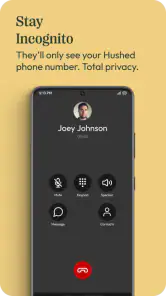
If privacy is your main concern, Hushed has got you covered. The app doesn't require any personal information beyond what is necessary to set up your account. Plus, all communications are encrypted, so you can rest easy knowing your conversations are secure. I found this particularly reassuring, especially in today's world where data privacy is a major concern.
Subscription Plans
Now, let’s talk about the cost. Hushed offers a variety of subscription plans depending on your needs. Whether you need a number for just a few days or longer, there are options available. While the app isn't free, I found the pricing to be reasonable considering the convenience and flexibility it offers. You can try it out with a short-term plan to see if it fits your needs before committing to a longer subscription.
For a first-time user, the key question is what happens after the first call or text. I’d keep the new number in the app’s own context—label it by purpose in my contacts, and tell people when I’m switching back to my usual line. That simple habit reduces missed replies and helps avoid sending a work message from the wrong number. If you travel or contact people abroad, check the applicable plan and destination details before relying on international calling or texting; a feature being available does not automatically mean every use will have the same cost or terms.
One limitation to keep in mind is that a second number only helps if you consistently use it for the boundary you intended. Replies can arrive in a separate place from your regular calls, and forgetting to check that channel can mean overlooking a message. I’d skip this approach if you need one universally recognized number for banking, account recovery, or constant personal availability. For those jobs, your main carrier number is usually the more straightforward choice.
The app has been available since January 18, 2013, and its current version is 5.30.0, with support for Android 7.0 and later. That makes it worth checking your device compatibility before you start. For someone who wants a distinct line for a defined task, the strongest approach is to begin with one number and one use case, test the calling or texting flow, then decide whether managing another channel feels worthwhile.
Choosing the right next step
In my experience, Hushed makes most sense for people who want a practical buffer between personal contact details and a specific activity, without carrying another handset. It is less compelling if you only need a number once, dislike handling communications in a separate app, or expect it to work exactly like a traditional carrier line in every situation. With around 5,500 written reviews, it has a substantial user history, but the right fit still depends on your own routine and the plan you select.
In conclusion, using Hushed: US Second Phone Number was a delightful experience. The app delivers on its promises, providing a seamless way to manage additional phone numbers without the hassle. Whether you need it for privacy, business, or personal use, Hushed is an excellent choice. Give it a try, and you might just find it to be the perfect solution for your needs.
A sensible first test before you rely on it
I’d make the first use deliberately low-stakes. After choosing a number, send a text to someone you know and ask them to reply, then confirm that you can see the incoming message in the app. If calls are the main reason you installed it, try a brief call as well. This checks the whole loop—not only that you can start a conversation, but that the other person can reach you back through the new channel.
That small test is especially useful if you plan to put the number on a listing, a business card, or a public profile. It gives you a chance to spot confusion about which line you are using before a stranger is waiting for an answer. I’d also decide in advance how often to check the app. A second number is only a useful contact route if you remember that people may send replies there rather than to your main inbox.
Keeping separate conversations manageable
When one number serves a specific purpose, I find it helpful to make the context visible wherever I save it. A contact label such as “marketplace pickup” or “project enquiries” is more useful than simply saving the number without a note. If a conversation continues over several days, that label can remind you why the person has this number and which commitments you made, without blending the exchange into unrelated personal messages.
For people juggling more than one purpose, I’d be cautious about adding numbers before the first one has settled into a routine. Multiple lines can be useful when each has a distinct audience, but they also create more places to check and more chances to reply from the wrong identity. Start with one clear boundary; add another only if you can explain what separate job it will do. That is a practical way to keep the convenience from turning into inbox clutter.
Choosing between an app number and familiar alternatives
The usual alternatives solve different problems. A second physical SIM or handset may feel more natural if you want a separate device or prefer your communications to sit outside an app. A regular carrier number is often the simpler choice for an established personal identity that needs to stay reachable. Hushed is most appealing in the middle: it offers a distinct contact channel without asking you to carry another phone, which can be a useful compromise for a defined project or a public-facing activity.
That compromise has a cost in routine, even before considering any purchase. You have to remember which number you shared, open the right app to follow up, and explain the new line to people who know your usual one. If your work depends on uninterrupted availability or a single number that everyone already recognizes, I would not switch the centre of your communication to an app-based second line just for the sake of separation. Keep your carrier number as the anchor and use Hushed only where the boundary adds real value.
Who is likely to get the most from it
I can see it working well for a freelancer who wants enquiries to arrive on a separate line, someone coordinating a temporary community project, or a person selling an item who would rather not publish a personal number. In each case, the advantage is not that every risk disappears; it is that the person can share a contact point tied to a clear task. The line can make it easier to keep that activity distinct when deciding where to respond and what number to give next time.
It is less suited to someone who rarely needs a second contact route, dislikes checking separate communication apps, or wants a number that behaves exactly like the line supplied by a mobile carrier in every context. I would also think twice before using it as the sole contact for urgent or essential communication. If missing a reply would create a serious problem, the familiar number and service you already monitor may be the safer everyday arrangement.
Before paying, match the plan to the job
Because optional purchases vary, I would treat the plan choice as part of the setup rather than a detail to postpone. First estimate how long you need the number and how often you expect to call or text; then read the terms shown for the option you are considering. A number for a brief sale arrangement has a different purpose from a line you expect clients to use over time. Choosing with that distinction in mind can prevent paying for a setup that does not match the real duration or type of use.
I would not assume that every plan includes the same period, destinations, or allowances, nor that an international feature makes every overseas conversation equivalent in cost. Check the purchase screen and relevant plan details before you commit, particularly if travel or frequent international contact is part of the reason you downloaded the app. The most reassuring first step is to understand the arrangement you are selecting, then test one ordinary interaction before sharing the number widely.
My practical recommendation
My recommendation is to approach Hushed as a focused extra line, not as a wholesale replacement for your phone service. Pick one audience, make one successful call or text, and establish a habit for checking replies. If that modest workflow feels natural, the app can be a useful way to separate a particular part of life from your personal number. If you find yourself forgetting to check it or constantly wondering which line to use, that friction is a good sign that the simpler alternative may suit you better.
Hushed: US Second Phone Number Frequently Asked Questions
What devices and operating systems can run Hushed?
Hushed is available for Android and iOS, so it can suit users on either major mobile platform. The current version is 5.30.0, and the minimum operating-system requirement is version 7.0. Before downloading, check that your device meets the requirement and has enough space for an app used to manage calls, texts, and voicemail.
Who develops Hushed?
Hushed is developed by AffinityClick Inc. It is a communication app centered on private second phone numbers for calling, texting, and voicemail. Knowing the developer can help you identify the app when browsing an app store and distinguish it from similarly named services. The app is free to download, although some uses involve in-app purchases.
Can I use Hushed without giving out my personal phone number?
Yes. Hushed provides a second phone number you can use for calls, texts, and voicemail instead of sharing your personal number. This can be handy for online transactions, work contacts, or other situations where you want a separate point of contact. It helps keep your primary number private, while the app gives you a dedicated number to manage those conversations.
What is Hushed and how does it work?
Hushed is an app that provides users with a secondary phone number for privacy and security reasons. It works by allowing you to choose a number from various countries, including the US, and use it for calls, texts, and voicemails without revealing your personal number. This is particularly useful for managing work-life balance or for online transactions where you want to protect your privacy.
Is Hushed available for both Android and iOS devices?
Yes, Hushed is available for both Android and iOS devices. Users can download the app from Google Play Store for Android devices or the Apple App Store for iOS devices. This cross-platform availability ensures that a wide range of users can benefit from the app's privacy features regardless of their preferred mobile operating system.
Pros
- Easy to set up and use.
- Supports call forwarding.
- Offers texting and MMS.
- Multiple numbers available.
- No contract required.
Cons
- Limited free trial period.
- Call quality may vary.
- Some features are premium.
- App can occasionally crash.
- Limited international numbers.

- Category
- Communication
- Version
- 5.30.0











