

Hubzu - Real Estate Auctions
- 71.00
- 3.9
- Installs
- 100.00K
- Price
- Free

Screenshots
Analysis by Reviewed
Buying a foreclosed or bank-owned home is very different from browsing ordinary property listings, and Hubzu is built around that difference. I found it most useful as a focused way to discover real estate auctions, review opportunities, and keep an eye on properties that may not appear in the usual home-search routine. It is free, aimed at everyone, and belongs in the House & Home category, but it is not a complete replacement for an agent, a lender, a title professional, or an in-person inspection.
My overall impression is that the app works best as an early-stage research tool. It can help you spot auction properties while you are away from a computer, compare possibilities, and decide which listings deserve deeper investigation. The important phrase is deeper investigation: an attractive listing inside the app is only the beginning of the buying process, especially when the property is being sold through foreclosure or a bank-owned sale.
How Hubzu fits into an auction-focused home search
Hubzu.com is the developer behind the app, whose store summary describes real estate auctions involving foreclosure and bank-owned homes. That focus gives it a clearer purpose than a general property-search app. Instead of treating every home as a standard listing, it puts attention on properties where the sale process, timing, condition, and buyer responsibilities can be different from a normal purchase.
I would use it alongside, rather than instead of, familiar real estate apps. Standard services are usually better for understanding neighborhoods, comparing ordinary asking prices, checking broad market activity, and following a conventional offer process. Hubzu becomes more interesting when I specifically want to look for auction-style opportunities or properties connected with foreclosure and bank ownership.
That distinction matters for expectations. A typical home-search app encourages casual browsing: save a house, arrange a viewing, speak with an agent, and make an offer. An auction-oriented workflow demands more discipline. I need to read the listing carefully, understand the sale terms, check what is known about access and condition, and make sure I can act within the required timeframe. The app can support that research, but it cannot remove the legal and financial complexity.
The current version is 3.2.3, and the app runs on devices using Android 8.0 or later. It has passed the stage of being an obscure experiment, with over one hundred thousand installs and an average rating of 3.9 from around two hundred sixty ratings. Those figures suggest a real user base, while also telling me not to expect the polish or breadth of the biggest property platforms.
What the first few minutes feel like
When I open an app like this, speed is less about rapid scrolling through entertainment content and more about whether I can get from discovery to useful property details without friction. Hubzu’s value depends on quickly finding relevant listings, narrowing my attention, and returning to properties I have already considered. If those steps feel clear, the app earns a place in my property-search routine.
More From Our News Desk

 Instagram
Instagram’s Power Comes From Its Place in Your Phone
A close look at how Instagram turns Meta’s reach, recommendation systems and everyday camera habits into durable platform power—and what that costs users.

 Gmail
GmailGmail in a Busy Inbox: Who Benefits Most?
From first account to crowded workday, Gmail earns its place through dependable search and flexible sorting—but its best fit depends on how much inbox maintenance you can tolerate.

 Prime Video
Switching to Prime Video: What Changes in Your Viewing Routine
Prime Video can make a compelling second home for streaming, but switching means learning a different catalog, rental layer, and route from browsing to playback.

 Universal TV Remote Control
Universal TV Remote Control Works Best as a Reliable Backup
A phone remote earns its place through quick setup and reliable habits. Here is how to get more from Universal TV Remote Control—and where its limits show.

 Weather - By Xiaomi
Weather by Xiaomi Review: Clear at a Glance, Less Clear Up Close
Xiaomi’s weather app makes everyday forecasts quick to scan, but its calm surface can leave useful details and recovery paths harder to find than they should be.

 X
XX Under Pressure: Can It Recover When Posting Goes Wrong?
A resilience-focused review of X, examining setup, mistaken posts, interruptions, weak connections, and the gaps that matter when recovery needs to be dependable.
Latest News



I would not judge it by how many homes I can skim in a short burst. Auction listings deserve slower reading than ordinary listings because the headline price can be misleading if I ignore conditions, deadlines, deposits, occupancy questions, or other sale requirements. A fast interface is helpful, but fast decisions are not necessarily wise here.
My practical approach is to begin with a broad search only when I am exploring. Once I see an area or property type that interests me, I narrow the search and keep a short list. This prevents the app from becoming an endless stream of tempting prices. The most useful workflow is not “find the cheapest property”; it is “find the properties whose terms and location justify further research.”
Where the app helps during serious browsing
Hubzu is particularly useful when I am comparing several potential auction properties in the same general area. I can use the app as a screening layer before spending time on external research. For each candidate, I would note the location, apparent property type, sale format, visible details, and any questions that need answers before I consider bidding.
That last step is one of the less obvious benefits of an auction-focused app: it can help me build a question list. Instead of remembering only the advertised price, I can ask whether I understand the occupancy situation, whether an inspection is possible, what costs may sit outside the purchase amount, and whether I have enough time to arrange financing or professional advice. The app does not answer every question, but it helps reveal which questions I should be asking.
A realistic example would be a buyer who works during the day and has only a few minutes in the evening to monitor properties. The app can serve as a quick first pass: check for new opportunities, remove listings outside the target area, and save the remaining candidates for detailed review later. The buyer should then move to documents, local records, an agent, or a legal professional before treating any listing as a genuine opportunity.
For an investor, the trade-off is similar. Hubzu may make discovery more convenient, but convenience can encourage overconfidence. An investor who already has a process for estimating repairs, checking title concerns, calculating carrying costs, and confirming exit options may find the app useful at the top of the funnel. Someone hoping that the app alone will identify a safe bargain is likely to be disappointed.
What happens during heavy use
The demanding moments are not necessarily technical. They are the periods when I am reviewing many listings, switching between candidates, revisiting a property after new information appears, or trying to keep track of auction opportunities while also researching them elsewhere. In those situations, the app’s usefulness depends on clear organization and predictable recovery when I leave and return.
I prefer to work in short sessions rather than leave the app open indefinitely. I might browse on a phone, make notes separately, inspect public property information through another source, and then return to Hubzu. That workflow reduces the risk of relying on memory, which is especially important when several properties have similar prices or descriptions.
Heavy use also exposes a human limitation: auction browsing can become emotionally persuasive. A low-looking figure can make a property feel urgent before I have checked the full obligations. I recommend creating a personal maximum budget before becoming attached to a listing. That budget should include more than the amount I hope to bid, because repairs, professional checks, financing costs, taxes, insurance, and legal work can change the calculation.
Another useful habit is to separate “interesting” from “ready.” I may mark a property as interesting after a quick look, but I should not treat it as ready for action until I have reviewed the available terms and confirmed that the location, condition, and timing fit my situation. This distinction makes the app more useful and reduces impulsive decisions.
Stability and returning to a property
For a real estate tool, reliability is not just about whether the screen opens. I also care about whether I can return to a listing and continue my research without losing track of why it mattered. Auction opportunities can change quickly, so a dependable browsing routine is more valuable than flashy presentation.
In my use, I would treat every important detail as something to verify again before taking action. A listing viewed earlier may not be the final word on availability, terms, timing, or property condition. That is not a criticism unique to this app; it is a basic reality of auction-based real estate. The app is a convenient viewing point, not the legal source I would rely on for a major financial commitment.
If the app feels slow or stops responding during a busy session, I would close and reopen it, then retrace the listing from my notes rather than assuming the last screen tells the whole story. Recovery is easier when I record the property address or another identifying detail, the reason it interested me, and the next verification step. This is a simple but important safeguard for any property-search workflow.
I also recommend avoiding a last-minute research strategy. If I discover an auction property shortly before a deadline, there may not be enough time to investigate title issues, arrange funds, consult an expert, or understand the sale conditions. Hubzu can help me notice opportunities earlier, but it cannot create extra time for due diligence.
Phone resources, operating system, and everyday practicality
The Android requirement of version 8.0 or later makes the app accessible to many existing phones, although people using older devices will need a newer handset or another way to browse. On a modern phone, I would expect the basic browsing experience to be more comfortable than on an outdated device with limited storage or memory, but I would not choose a phone solely for this app.
Property research can involve repeated image loading, scrolling through details, switching between apps, and returning to earlier screens. Those activities are more demanding than reading a short message, particularly on an older phone or a device with many apps competing for resources. If the experience feels sluggish, the cause may be the handset, the connection, or the amount of work being done in the session rather than Hubzu alone.
For that reason, I see the phone app as a companion to a larger research setup. A mobile screen is excellent for discovery and alerts to my own workflow, but a larger display is often more comfortable for comparing documents, mapping locations, calculating budgets, and taking careful notes. I would not make a major auction decision from a quick glance on a small screen.
People should also consider their own internet habits. If I am browsing while travelling or moving between weak connections, I prefer to wait until I can review important information carefully. A property listing is not the kind of content where I want to assume that a partially loaded page or interrupted session contains everything I need.
Who should use it, and who should skip it
Hubzu is a reasonable choice for buyers who specifically want to explore foreclosure and bank-owned home auctions. It may also suit investors who already understand auction risks and need a mobile way to discover candidates. Curious homeowners can use it to learn how these opportunities differ from ordinary listings, provided they treat the process as research rather than a shortcut to a cheap home.
I would be more cautious recommending it to a first-time buyer who wants a simple, predictable purchase. If the goal is to tour a home, make a conventional offer, obtain standard financing, and rely on familiar protections, a traditional real estate platform and a qualified local professional may be a better starting point. The app’s specialized focus is its strength, but that same focus makes it less suitable for casual home shopping.
It is also not the right primary tool for someone who cannot tolerate uncertainty around condition, timing, or transaction requirements. Auction properties can demand more preparation and a stronger financial cushion than a normal listing. No app can turn an unsuitable property into a safe purchase merely by making it easy to view.
Useful habits that make the app safer to use
I would begin by creating a written screening checklist before browsing. My version would include location, intended use, maximum total budget, acceptable repair uncertainty, financing position, and the professionals I can contact. This keeps the app from setting my priorities through whatever listing happens to look most attractive first.
Next, I would use a two-stage review. In the first stage, I would collect possibilities without making assumptions. In the second, I would revisit only the strongest candidates and verify every important point through appropriate sources. This saves time and prevents a common mistake: spending an hour researching a property simply because its headline number looked appealing.
A third habit is to keep a property log outside the app. I would record when I viewed a listing, what caught my attention, what remains unclear, and what would disqualify it. This is especially valuable when several auction homes share similar descriptions. It also gives me a recovery plan if I need to restart the app or switch devices.
Finally, I would calculate a “walk-away” point before I become involved in the auction process. The point is not only a maximum bid. It should reflect the total risk I am willing to accept. If the available information no longer supports that calculation, I would stop and seek advice rather than letting the convenience of mobile browsing push me forward.
My performance verdict
As a free House & Home app, Hubzu has a clear and useful role: it brings auction-oriented real estate discovery to a mobile screen and gives buyers a practical starting point for foreclosure and bank-owned opportunities. Its value is strongest when I use it to organize research, not when I treat it as a complete transaction platform.
The average rating of 3.9 shows a mixed but generally workable reception, and the app’s audience is substantial enough to make it worth considering for this specialized search. I would describe the experience as purpose-driven rather than luxurious. It is the kind of tool I open with a plan, a budget, and a willingness to verify what I see.
My final recommendation is conditional but positive. If you understand that an auction listing is an invitation to investigate rather than a guaranteed bargain, Hubzu can save time during property discovery. If you want uncomplicated browsing and a conventional buying journey, a mainstream real estate app will probably feel more natural. Use Hubzu to find possibilities, then slow down before you commit. That balance is what turns it from a tempting listing browser into a genuinely useful part of a responsible home-search process.
Hubzu - Real Estate Auctions Frequently Asked Questions
Is Hubzu free to download, and what devices can run it?
Hubzu is a free app in the House & Home category, developed by Hubzu.com. It is rated Everyone and requires Android 8.0 or later. The app is intended for browsing real estate auction listings and related property information, while the costs involved in buying a property are separate from downloading or using the app.
What can I do in the Hubzu app before deciding to bid?
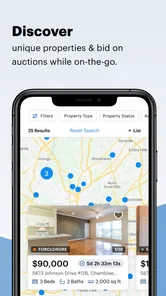
You can use Hubzu to browse real estate auction listings and review property information before deciding whether to participate. The app focuses on foreclosure and bank-owned homes, and listings may include details relevant to an auction or sale. Take time to examine the terms for a specific property and consider your budget and due diligence before placing a bid.
What is Hubzu, and how does its real estate auction process work?
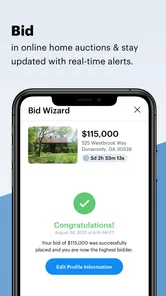
Hubzu is an online marketplace for buying residential and commercial properties through auctions and other sale formats. After creating an account, you can browse listings, review property details, check auction deadlines, and submit bids when eligible. Each listing may have different rules, deposits, fees, and closing requirements, so reading the complete property information before bidding is essential.
Can I inspect a property before placing a bid on Hubzu?
In many cases, Hubzu listings provide photographs, descriptions, documents, and contact information for arranging a viewing, but access depends on the property, seller, occupancy status, and local regulations. Some homes may be occupied or sold without interior access. Never assume that online images show the full condition of a property; arrange an inspection whenever possible and research title, liens, taxes, and neighborhood conditions independently.
What additional costs should I expect when buying a property through Hubzu?
The winning bid is not always the total amount you will pay. Depending on the listing, buyers may be responsible for a buyer’s premium, platform or transaction charges, earnest-money deposits, financing costs, inspection expenses, title services, recording fees, property taxes, insurance, repairs, and closing costs. Review the auction terms and purchase agreement carefully, because fees and payment deadlines can vary significantly between properties.
Pros
- Wide selection of foreclosure and bank-owned properties
- Online bidding makes auctions accessible from anywhere
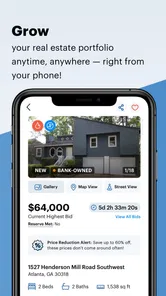
- Property pages include photos
- details
- and auction information
- Helpful search filters simplify finding suitable listings
- Useful for investors seeking below-market opportunities
Cons
- Some properties require significant repairs or renovation
- Auction deposits and fees can increase the total purchase cost
- Winning bids may involve strict
- nonrefundable deadlines
- Property access and inspections are not always guaranteed
- Availability and auction rules vary by location and listing







