HotSchedules
- 9.94K
- 3.5
- Installs
- 1.00M
- Price
- $2.99

Screenshots
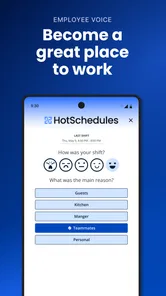
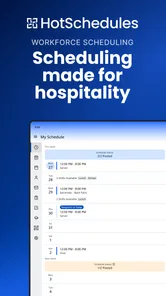
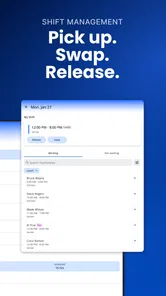
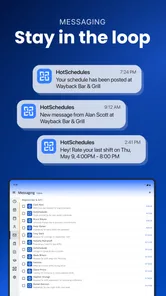
Analysis by Reviewed
I judge a shift-work app less by how polished its calendar looks and more by whether it helps me make the right decision when a shift changes. HotSchedules is built around that practical problem: checking a rota, asking about coverage, and keeping up with work messages. I see its strongest case in workplaces where staff actually use it as part of their scheduling routine. If your manager and coworkers do not, it risks becoming one more place to check without replacing the system that matters.
Where a work-focused schedule earns its place
A personal calendar is good at reminding me about an appointment, but it does not inherently connect that appointment to a shift request or a conversation with the people I work with. HotSchedules brings those work-related tasks closer together. That difference is useful when my availability changes from week to week, or when I need to understand a schedule in the same context as a team update.
The useful habit is to treat the schedule as the reference, messages as coordination, and a request as only a request until it is accepted. That sounds simple, but it avoids a common planning mistake: assuming that asking a coworker to cover a shift means the rota has already changed. For shift workers, that small distinction can matter more than a long list of features.
What I would check before relying on it
Before making the app part of my routine, I would ask my workplace which channel is considered authoritative for the rota and how staff are expected to confirm a swap. If HotSchedules is where the schedule is maintained, it can be a useful daily reference. If requests are handled elsewhere or a manager requires a separate confirmation, I would follow that process rather than treating an in-app conversation as final approval.
I would also think about when I tend to check my schedule. Someone who looks at it before leaving home has a different need from a worker who checks during a commute or between tasks. Since access depends on a working connection, it is sensible to review important changes while online and refresh the schedule after coordinating with someone. That is not a reason to avoid the app; it is a realistic way to avoid acting on information that may not be current.
Streamlining Your Schedule Like Never Before
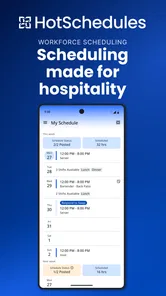
The first thing that caught my eye was how intuitive the app is. You know how some apps make you feel like you need a manual just to get started? Well, this isn’t one of them! With HotSchedules, everything is laid out in a way that just makes sense. The interface is clean, user-friendly, and navigating through your schedule is as easy as pie.
For a realistic use case, picture finishing a shift and learning that you have a family commitment on a day you are next scheduled. I would check the rota, send a shift request, and then keep an eye on messages or notifications rather than relying on a coworker to pass news along. The important practical point is that a request is not the same as a confirmed change: I would wait for the team’s response and check the schedule again before making plans. That simple habit prevents an optimistic swap request from turning into a missed shift.
More From Our News Desk

Weather by Xiaomi Review: Clear at a Glance, Less Clear Up Close

X Under Pressure: Can It Recover When Posting Goes Wrong?

Clash of Clans Is Won Between the Battles

Android Auto Makes the Case for Quieter Car Software

MobiOffice: Transforming Mobile Productivity with Seamless Integration

EA SPORTS FC™ Mobile Soccer: Redefining Mobile Sports Gaming
Features That Make Life Easier
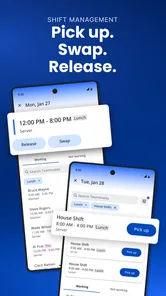
One of the standout features is the ability to swap shifts. We’ve all been there, right? Something pops up out of nowhere, and you need to switch your shift. This app makes it super easy to do just that. You can send out requests, and with a little luck, you’ll have your shift covered in no time.
There is a useful trade-off here: shift swapping is most valuable when coworkers are active in the same scheduling routine. If a team rarely checks requests, the convenience of sending one cannot guarantee a quick solution. I would treat the app as a clearer way to ask and coordinate, not as an automatic replacement for confirming a change through whatever process your workplace expects. For workers who often need to coordinate availability, that distinction is more helpful than assuming every request will be accepted.
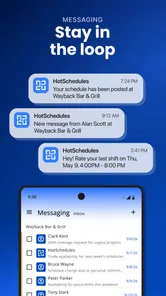
Another feature that I find incredibly handy is the messaging function. It's like having a direct line to your team. Whether you need to update them on something urgent or just share a quick laugh, the communication is seamless. Plus, you get notifications, so no more missing out on important updates!
In a busy service environment, a short message can be easier to act on than a string of separate texts, particularly when it concerns a shift or a team update. I would still check that an important message has reached the right people and avoid treating a notification as proof that a schedule has changed. Keeping the schedule itself as the reference point is a sensible workflow, especially when several coworkers are discussing coverage at once.
Making the routine work for you
A small routine can make a scheduling app more useful without turning it into a constant distraction. I would check the rota at a predictable point, such as when planning the week, then revisit it when I receive a work update or submit a request. That gives me a chance to notice a change without repeatedly opening the app just to see whether something has happened.
For a worker balancing variable shifts with childcare, classes, or another job, I would keep personal commitments in a separate calendar and use HotSchedules to verify work obligations. The two tools have different jobs: the personal calendar helps avoid conflicts across life, while the work schedule helps track the team’s rota and related coordination. Putting every detail into one place can feel tidy, but it is not worth it if that source is not the one your workplace uses to confirm shifts.
Another practical point is to make requests early whenever possible. A shift request is more useful when coworkers have time to consider it; sending one at the last minute can leave little room for a response, regardless of how easy the app makes the action. I would keep a backup plan for urgent conflicts and follow workplace expectations for notifying a manager, rather than assuming a message or request alone settles the issue.
A Few Quirks Here and There
Of course, no app is perfect, and HotSchedules has its quirks. Sometimes, syncing issues can pop up, especially if your internet connection is flaky. But honestly, that's a minor hiccup compared to the convenience it offers. Another thing is, while the app is mostly intuitive, there might be a slight learning curve for those who aren’t tech-savvy. But hey, a bit of exploring and you’re good to go!
That connection issue matters most at the wrong moment: when you are checking a change while travelling or trying to confirm what you should work. I would open the app when I have a stable connection and recheck the schedule after a request or conversation instead of assuming an old view is current. If you need a tool that works mainly as a personal calendar, a standard calendar app may be simpler; if your workplace relies on coordinated shift requests and team communication, this purpose-built approach is more relevant.
How it compares with familiar alternatives
Compared with a shared spreadsheet or a paper rota, a work-focused app can make it more convenient to check the schedule and coordinate a request without depending on someone to relay every update. The trade-off is that a paper schedule can be easy to glance at on site, while a digital workflow depends on access and on the team keeping the schedule current. I would not assume that changing the tool alone fixes inconsistent communication; the team still needs a clear routine for confirming changes.
Compared with a general calendar, the advantage is the connection to shift-related requests and team messages. A general calendar is usually the better choice for personal reminders, recurring appointments, and planning across different parts of life. HotSchedules is more compelling when the question is “What am I working, and how do I coordinate around it?” rather than “How do I organize everything on my phone?” The two approaches can complement each other instead of competing.
The app is from Fourth Enterprises, LLC, and it sits in the productivity space rather than serving as a general-purpose planner. It costs $2.99, is rated for Everyone, and its current version is 5.22.1, with Android 6.0 as the minimum operating-system requirement. Its average rating is 3.4 from around 25,000 ratings, with roughly 9,900 written reviews and over a million installs. Those figures suggest a widely used tool with mixed reactions, so I would weigh the practical fit for your workplace more heavily than assuming it will suit every shift worker.
Who Gets the Most From It
I would recommend it most to employees who regularly need to check shifts, ask coworkers about coverage, and follow workplace updates in one place. It is less compelling if your hours rarely change, your team already handles everything through another reliable system, or you want a flexible calendar for personal projects and appointments. Before depending on it, find out whether your workplace uses it for the official rota and how it expects staff to confirm swaps; that determines whether it can become part of your everyday routine or merely another inbox to check.
It is also a better fit for someone comfortable checking a phone for work updates than for someone who wants a completely passive planner. Notifications can draw attention to new information, but I would still build the habit of checking the actual schedule when planning around a shift. If you do not want work messages on your phone, or your employer already has a process you trust and expects everyone to use, adding another channel may create more friction than value.
What the price and reputation mean in practice
At $2.99, the price is worth considering alongside how your workplace uses the app. If it becomes the place you regularly check shifts and coordinate coverage, the cost may feel reasonable for that focused role. If you only need an occasional rota lookup, or the rest of your team does not use it, it is harder to justify paying for a tool that does not become part of the shared workflow. I would decide based on everyday usefulness, not on the assumption that a scheduling app will automatically save time.
The 3.4 average from around 25,000 ratings is a reminder to keep expectations measured. A rating cannot tell me whether a particular workplace has set up a smooth scheduling routine, and that local experience is central to the app’s value. It has been available since Aug 17, 2010, and is currently at version 5.22.1; its longevity and more than a million installs indicate that many people have used it, but neither fact guarantees that every team’s process will feel seamless.
Wrapping It Up
All in all, HotSchedules is a robust app that does exactly what it sets out to do. It simplifies the headache of scheduling and keeps you connected with your team. If you’re in the hospitality or retail business, or any industry that relies heavily on shift work, this app is a must-have. It’s like having a personal assistant in your pocket, ready to keep your work life organized and stress-free. So, if you haven’t tried it yet, give it a go. You might just wonder how you ever managed without it!
My recommendation is more specific: try it when your workplace genuinely uses it to manage the rota and when you need a shared place for shift-related communication. Keep your personal calendar for life outside work, confirm swaps before changing plans, and recheck the rota after important updates. If those habits match your team’s process, this can be a practical companion to shift work. If not, a simpler calendar or the system your workplace already trusts may serve you better.
HotSchedules Frequently Asked Questions
Can HotSchedules help me keep track of schedule changes and shift requests?
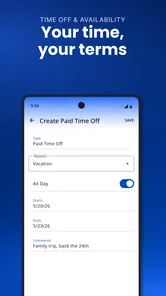
HotSchedules is intended to bring workplace scheduling tasks together for staff and managers. Employees can use it to view schedules, swap shifts, and request time off, while managers can create and distribute schedules. If your workplace uses the service, check with your manager about how your team handles schedule updates and requests so you know what to expect before downloading.
What type of app is HotSchedules, and who is it designed for?
HotSchedules is a productivity app focused on scheduling and labor management, particularly for restaurant and hospitality workplaces. It is designed for employees who need to check shifts and managers who coordinate schedules. Its usefulness depends on your organization’s adoption of the service, so it is best suited to people whose workplace already uses HotSchedules rather than someone looking for a general personal calendar.
Do I need a workplace account to use HotSchedules?
HotSchedules is built around workplace scheduling, so it is most useful when your employer or organization uses the service and provides access. Before downloading, check with your manager or workplace about how employees sign in and whether your team uses HotSchedules. The app is not a substitute for a workplace account; its scheduling tools are intended to connect staff and managers within an organization.
What is HotSchedules and how does it work?
HotSchedules is a scheduling and labor management app designed primarily for the restaurant and hospitality industries. It simplifies and automates the scheduling process, allowing managers to create and distribute schedules efficiently. Employees can view their schedules, swap shifts, and request time off directly from the app, making it a convenient tool for both managers and staff. The app also offers features like labor forecasting and reporting, which help businesses optimize their workforce management and reduce labor costs.
Is HotSchedules available on both Android and iOS devices?
Yes, HotSchedules is available as a mobile application for both Android and iOS devices. It can be downloaded from the Google Play Store for Android users and the Apple App Store for iOS users. The app is designed to provide a seamless experience on both platforms, ensuring that users can access their schedules and manage their shifts anytime, anywhere, directly from their smartphones. Android users should also check that their device meets the app’s minimum operating-system requirement before installing.
Pros
- User-friendly interface for easy scheduling
- Real-time updates on schedule changes
- Efficient communication with team members
- Access to schedules from any device
- Time-off requests are simple to manage
Cons
- Occasional syncing issues with other calendars
- Limited offline functionality
- Subscription may be expensive for small businesses
- Customer support can be slow at times
- User interface may feel cluttered for new users











