

Horse Anatomy: Equine 3D
- 25.00
- 3.0
- Installs
- 10.00K
- Price
- $6.99
Screenshots
Analysis by Reviewed
Choosing a horse anatomy reference is less simple than it sounds. A useful tool needs to do more than show attractive images: it should help me locate a structure, understand how that structure sits in the body, and return to the same area without turning study into guesswork. That is the standard I used with Horse Anatomy: Equine 3D, a medical reference app from Real Bodywork.
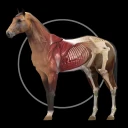
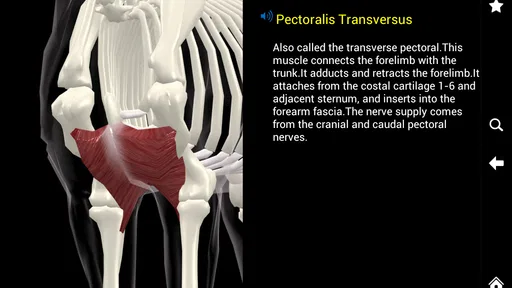
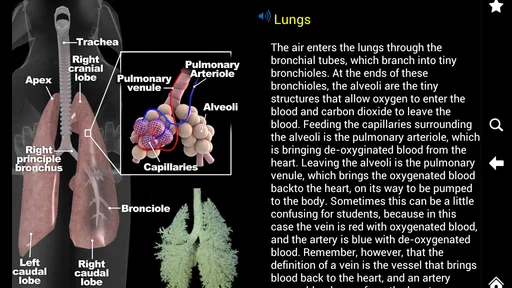
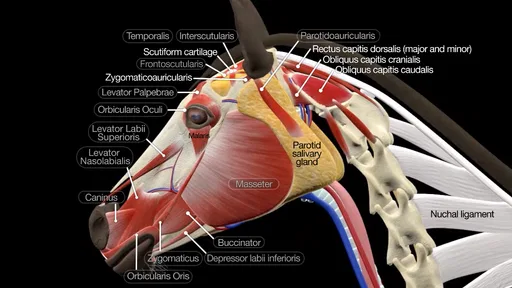
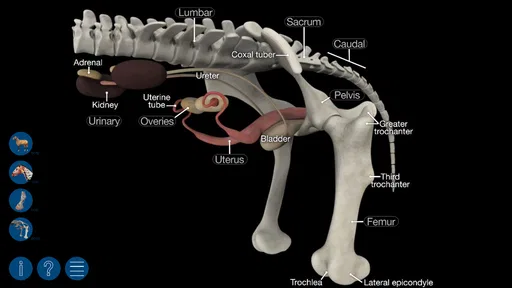
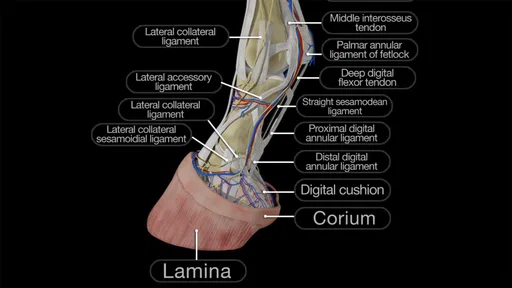
The app is aimed at people who want a visual way to study the horse’s body. Its central appeal is a three-dimensional reference containing over three hundred structures, supported by a quiz function. I found that combination more practical than a collection of isolated illustrations because it encourages me to move between recognition and testing rather than simply read labels.
It is available as a paid app for $6.99, carries an Everyone age rating, and has reached over 10K installs. Its average rating is 3.0 from around 142 ratings, with roughly 25 written reviews. Those figures suggest a modest, mixed reception rather than universal approval, so I would not recommend buying it blindly. The important question is whether its visual study method matches the way you need to learn.
How I judged the app as a study tool
I judge a study app by whether it helps me build understanding I can retrieve later, not just by how impressive it feels on the first visit. Here, I’ll look at how the model and quiz can fit into a repeatable learning routine, where they may save effort, and what habits make the reference more useful over time.
The first decision is visual learning versus reference reading
If I were choosing between this app and a traditional horse anatomy book, I would begin with my preferred learning style. A book is usually better when I want long explanations, carefully sequenced chapters, or a permanent paper reference beside me. This app makes more sense when the problem is spatial: I know the name of a muscle or bone, but I cannot picture where it lies in relation to the rest of the horse.
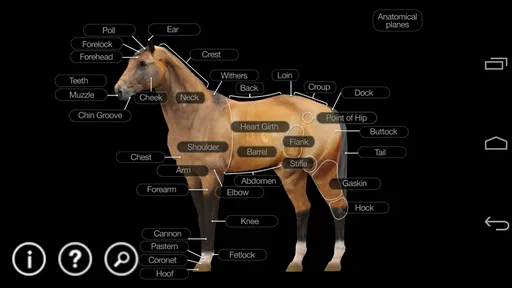
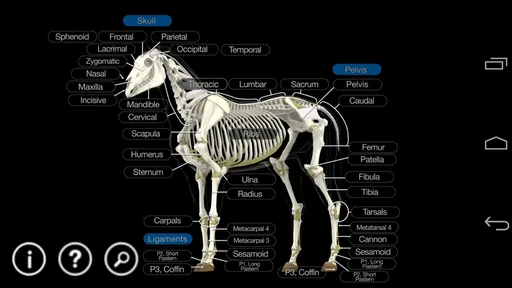
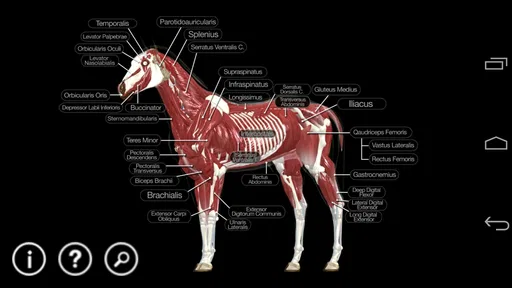
The three-dimensional presentation is the feature that gives the product its identity. Instead of treating the body as a flat diagram, I can use it as a navigable visual model. That matters when studying overlapping structures, because a flat picture can make several layers look as if they occupy the same space. The model encourages me to think in terms of depth and position.
I also considered how quickly a user can move from curiosity to a useful answer. A reference app should not require a full study session every time I want to check one area. Horse Anatomy: Equine 3D is most valuable for short, focused visits: reviewing a region before a lesson, checking terminology after reading, or testing myself while a particular structure is still fresh in my mind.
More From Our News Desk

 Gmail
GmailGmail in a Busy Inbox: Who Benefits Most?
From first account to crowded workday, Gmail earns its place through dependable search and flexible sorting—but its best fit depends on how much inbox maintenance you can tolerate.

 Prime Video
Switching to Prime Video: What Changes in Your Viewing Routine
Prime Video can make a compelling second home for streaming, but switching means learning a different catalog, rental layer, and route from browsing to playback.

 Universal TV Remote Control
Universal TV Remote Control Works Best as a Reliable Backup
A phone remote earns its place through quick setup and reliable habits. Here is how to get more from Universal TV Remote Control—and where its limits show.

 Weather - By Xiaomi
Weather by Xiaomi Review: Clear at a Glance, Less Clear Up Close
Xiaomi’s weather app makes everyday forecasts quick to scan, but its calm surface can leave useful details and recovery paths harder to find than they should be.

 X
XX Under Pressure: Can It Recover When Posting Goes Wrong?
A resilience-focused review of X, examining setup, mistaken posts, interruptions, weak connections, and the gaps that matter when recovery needs to be dependable.

 Clash of Clans
Clash of Clans Is Won Between the Battles
Its raids are quick; its community is a long-term project of coordination, teaching, rivalry, and shared responsibility—with all the friction that entails.
Latest News



Who will get the most from it
I see the strongest fit for students beginning horse anatomy, equine bodywork learners, trainers who want a visual refresher, and horse owners who learn better from models than from dense text. It can also suit someone preparing notes for a class, provided the app is used as a visual aid rather than treated as the only educational source.
The quiz function changes the experience in a useful way. A reference can create the illusion of understanding because recognition feels easy when the label is already visible. Testing removes that support. I would study a region first, close the explanatory material mentally, and then use the quiz to discover which structures I can identify without prompts. That workflow turns the app from a passive picture viewer into a simple recall exercise.
It is less suitable for a veterinary professional who needs detailed clinical documentation, diagnostic guidance, or a comprehensive treatment reference. The app belongs to the anatomy-learning category, not to the category of professional veterinary decision systems. I would also skip it if I mainly want exercise plans, rehabilitation instructions, or advice about diagnosing pain. A 3D model can improve orientation, but it should not be mistaken for clinical supervision.
What the structure count means in practice
The inclusion of over 300 structures gives the app a useful breadth for introductory and intermediate study. Still, a large collection does not automatically mean every structure is explained with equal depth. I would judge the app by how easily I can connect labels to location and relationships, not by the number alone.
One practical tip is to study by body region rather than jumping randomly from one label to another. For example, I would choose a limb or the back, inspect the visible structures, then quiz myself before moving elsewhere. This reduces the common problem of remembering isolated names without understanding the anatomy around them.
A second tip is to use the model for comparison, not just identification. After locating one structure, I would ask myself what lies superficial to it, what lies deeper, and which neighboring parts could be confused with it. Even when the app gives me a straightforward visual reference, that extra questioning creates a more durable mental map.
Where the 3D approach wins
The app’s clearest advantage is spatial understanding. In a conventional labelled illustration, I may recognize a structure because an arrow points directly to it. In a model, I have to pay more attention to how the parts occupy the body. That makes the tool particularly helpful when I am trying to connect anatomy with palpation, movement, or a lesson about muscular action.
It is also convenient for revision. I can use a short session to revisit an area I studied earlier instead of opening a large textbook and searching through several pages. The quiz gives that revision a definite purpose: identify weak spots, return to the model, and test again.
Another strength is that it keeps the horse at the center of the learning experience. Generic human anatomy software would not be an adequate substitute here, and a general medical atlas would not provide the same equine focus. The dedicated subject makes the app more relevant to horse-related study than broad anatomy products.
The developer, Real Bodywork, has positioned the app around reference and learning rather than entertainment. That focus is useful because the interface does not need to compete with unrelated content. When I open it, the task is clear: inspect equine structures and check my recall.
A realistic everyday study session
Imagine that I am attending an equine bodywork class in the evening and want to review before the next lesson. I might spend a few minutes examining the relevant region in the model, noting the structures that are easiest to confuse, and then use the quiz without looking back at my notes. If I miss a label, I would return to that area immediately rather than continuing with a false sense of confidence.
The same workflow could help a horse owner who has heard anatomical terms during a conversation with a professional and wants to understand them visually. I would use the app to build vocabulary and orientation, then ask the professional to explain how that information applies to the individual horse. The app supports better questions; it does not replace the person answering them.
Limits that affect the buying decision
The average rating of 3.0 indicates that the experience will not satisfy everyone. I would interpret that as a reason to keep expectations realistic. A visual model can feel less helpful if I want extensive written teaching, if navigation is not intuitive for me, or if I expect a polished clinical reference rather than a study companion.
The paid price also changes the decision. At $6.99, this is not a casual free download that I would install merely to browse once. I would buy it when I already have a clear use for equine anatomy and expect to return to the material. If I only need a single definition, a book, class handout, or trusted educational resource may be more sensible.
The app’s age is another consideration. It was released on December 5, 2013, and the current version is 2.15. It supports Android from version 4.1 onward, which makes it accessible to older devices, but that broad compatibility should not be confused with a guarantee that every modern phone will feel equally comfortable. On a smaller screen, detailed 3D study may be less convenient than on a larger device.
I would also plan for the possibility that a 3D reference takes more active effort than a page of labelled art. That is not necessarily a flaw, but it is a trade-off. The same interaction that helps me understand depth can slow me down when I simply want to confirm a term quickly.
How it compares with the usual alternatives
Compared with a printed anatomy textbook, this app wins on interaction and quick visual exploration. A book wins on sustained reading, written context, and the ease of placing sticky notes or handwritten explanations beside an image. If my course depends heavily on prose, I would use the book as the main resource and the app as a companion.
Compared with flat anatomy diagrams, the app offers a better chance to understand layers and spatial relationships. Diagrams may still be faster for memorizing a clean list of labels, especially when I need to reproduce those labels in an exam. I would use diagrams for rapid overview and the model for the parts that remain confusing in two dimensions.
Compared with general-purpose anatomy apps, this product has the advantage of being specifically equine. A broader app may offer more educational depth in another area, but it will not automatically solve the problem of learning horse structures. The right alternative depends on whether species-specific orientation or broad medical detail matters more to me.
Compared with free online videos and articles, the app offers a more focused object for repeated practice. Free resources may provide explanations from different teachers, which is valuable, but they can also scatter the learning process across unrelated pages. I would choose those resources when I need demonstrations or expert commentary, while using this app when I need to inspect and quiz myself.
Questions I would settle before paying
Would I need an internet connection? I would check the app’s current device behavior before relying on it during travel or at a stable, because the practical value of any reference depends on being available when study happens. I would also install it on the device I actually plan to use, rather than assuming that an older phone will provide a comfortable view of a detailed model.
Can it replace a teacher? No. I would use it to learn names, positions, and relationships, then rely on qualified instruction for palpation, movement analysis, pain interpretation, and treatment decisions. That boundary is especially important for anyone who may be tempted to turn an anatomy picture into a diagnosis.
Is it appropriate for children? The Everyone rating makes it broadly age-appropriate from a content perspective, but younger learners may still need an adult or teacher to explain terminology and keep the activity educational. The rating does not determine whether the material matches a child’s reading level.
Will it suit advanced study? It may serve as a visual refresher, but I would not make it my only advanced reference. A student facing detailed examinations or professional work should compare the model with course materials and authoritative texts. Its best role is reinforcement and spatial revision, not a complete curriculum.
How should I use the quiz? I would avoid taking it immediately after reading every label. First, study a small region, look away, name what I remember, and then use the quiz to expose gaps. Repeating that cycle is more useful than chasing a perfect result through recognition alone.
The cost of switching between study methods
Choosing this app does not have to mean abandoning books, diagrams, or instruction. In fact, the most effective arrangement is likely to combine them. The app handles the three-dimensional question, while a textbook or teacher supplies the explanations and context that a model may not provide as fully.
The cost of switching is mainly time and habit. If I already have a well-organized paper reference, learning a new interface may not save me much for simple lookups. If I struggle to picture anatomy from pages, however, the initial adjustment could pay off quickly because the model changes how I organize the information in my head.
I would also avoid buying it solely because the subject sounds interesting. The price is modest, but the value depends on repeated use. A student with scheduled anatomy study can build it into weekly revision. A casual horse owner who rarely needs anatomical terms may find that a single conversation with a professional or a good book answers the immediate question more efficiently.
My recommendation for different users
I recommend Horse Anatomy: Equine 3D to learners who want an equine-focused visual reference and are willing to study actively. The combination of a 3D model, a substantial set of structures, and quizzes gives it a clear purpose. I especially like it for checking spatial relationships and turning revision into recall practice rather than passive scrolling.
I would recommend it with reservations to instructors and professionals who want a quick visual aid. It can help introduce a region or prompt discussion, but I would pair it with more detailed teaching materials. For clinical work, I would choose a recognized professional reference instead of depending on this app.
I would skip it if I want treatment advice, rehabilitation programming, diagnosis, or long-form lessons. I would also hesitate if I dislike interactive models or rarely study anatomy. Those users are likely to get more from a traditional book, structured course, or expert-led resource.
Overall, I see this as a specialized study companion rather than an all-purpose medical application. Its strongest case is simple: when a flat picture leaves me unsure about where a horse’s structures sit, a navigable model and a quiz can make the subject easier to organize. Buy it for spatial learning and active revision, not as a substitute for veterinary expertise.
Horse Anatomy: Equine 3D Frequently Asked Questions
What does Horse Anatomy: Equine 3D include?
Horse Anatomy: Equine 3D is an educational reference app that presents horse anatomy through interactive three-dimensional models. Its reference includes over 300 structures and a quiz function, giving learners ways to explore anatomical details and check their understanding. The app is listed in the medical category and may suit people who want a visual companion for studying equine anatomy.
How much does Horse Anatomy: Equine 3D cost, and what devices can run it?
The app costs $6.99. It runs on Android devices with version 4.1 or later, so check your device’s operating system before downloading. It is rated for Everyone, making it accessible to a broad audience, although its anatomy material is primarily useful to people interested in horses, animal science, or veterinary learning.
What is Horse Anatomy: Equine 3D?
Horse Anatomy: Equine 3D is an educational reference app that presents the anatomy of a horse through interactive three-dimensional models. It is designed to help users explore major body systems, bones, muscles, organs, and other anatomical structures from different angles. The app can be useful for veterinary students, horse owners, riders, trainers, and anyone interested in learning more about equine biology.
Who can benefit from using Horse Anatomy: Equine 3D?
The app is suitable for a wide range of users, including veterinary and animal science students, equine professionals, horse owners, and curious beginners. Its visual approach makes complex structures easier to understand than static textbook illustrations. However, it should be treated as a learning aid rather than a replacement for professional veterinary instruction, clinical training, or advice from a qualified veterinarian.
Does Horse Anatomy: Equine 3D require an internet connection?
Internet requirements may depend on the version of the app and the content included after installation. Basic anatomical models and reference material may be available offline once downloaded, while updates, additional media, advertisements, or online features could require a connection. It is best to check the app store description and test the main sections after installation if you plan to use it at a stable, clinic, classroom, or other location with limited connectivity.
Pros
- Detailed 3D models make complex equine anatomy easier to understand.
- Useful reference for veterinary students
- riders
- and horse owners.
- Interactive rotation helps examine structures from different angles.
- Covers multiple body systems in one convenient mobile resource.
- Visual learning can improve retention compared with textbook diagrams.
Cons
- Some advanced content may be difficult for complete beginners.
- High-quality 3D graphics can consume considerable device storage.
- Older phones may experience slower loading or reduced performance.
- Medical terminology may require additional veterinary references.
- The app’s usefulness is limited if you need anatomy for other animals.












