

Horizon Blue
- 1.13K
- 4.7
- Installs
- 100.00K
- Price
- Free

Screenshots
Analysis by Reviewed
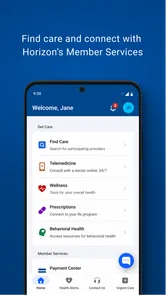
Managing a health plan is rarely something I want to turn into a long administrative task. I usually open an insurance app because I need one answer quickly: whether my coverage is active, where to find plan information, or what to do next with a health-related question. Horizon Blue is built for that kind of practical access. Developed by Horizon Blue Cross Blue Shield, this free medical app brings health plan information into a mobile format instead of making me depend entirely on paper documents, a desktop browser, or a phone call.
My overall impression is that it works best as a convenient companion for existing members, not as a replacement for every healthcare service. Its purpose is focused, and that focus is useful. The app is available to Everyone, runs on Android versions from 7.0 onward, and has reached over one hundred thousand installs. With a 4.7 average from around ten thousand ratings and roughly one thousand reviews, it has clearly earned a strong response from the people who use it.
What using Horizon Blue feels like day to day
The first thing I notice about an app like this is not visual excitement but how quickly it gets me oriented. A health-plan application should make routine information easier to reach, and Horizon Blue is most valuable when I already know the kind of information I need. Rather than treating the phone as a general health encyclopedia, it gives me a more direct route into my plan details.
That distinction matters. If I am looking for medical advice, symptom interpretation, or emergency help, this is not the tool I would choose. If I need to manage or consult information connected to my Horizon Blue Cross Blue Shield plan, the app makes more sense. It reduces the need to search through emails or keep every document immediately at hand, which is especially helpful when I am away from home.
The app’s short store description is simply “Horizon Blue,” while its broader purpose is access to health plan information. I prefer that narrow identity to an app that tries to promise everything at once. Still, the experience depends heavily on whether I am already a member and whether my account information is ready to use. Someone shopping for insurance or looking for a general wellness application should not expect this to be the right starting point.
Speed expectations before opening it
Because this is a plan-management app rather than an entertainment title, I judge speed by how little effort it takes to reach useful information. I do not need elaborate animation or a large collection of visual features. I want the app to open without making a simple task feel like paperwork, and I want screens related to my plan to remain understandable when I am checking them under pressure.
The current version is 2.11.1, which tells me that the application has gone through ongoing version changes rather than remaining a completely untouched release. It first appeared on September 5, 2018, so it is not a brand-new service trying to establish its basic identity. That history is reassuring in one sense: a health-plan app benefits from time spent refining ordinary account access. At the same time, an older app lineage means I would not expect every part of the experience to feel as modern as a newly designed consumer app.
More From Our News Desk

 Instagram
Instagram’s Power Comes From Its Place in Your Phone
A close look at how Instagram turns Meta’s reach, recommendation systems and everyday camera habits into durable platform power—and what that costs users.

 Gmail
GmailGmail in a Busy Inbox: Who Benefits Most?
From first account to crowded workday, Gmail earns its place through dependable search and flexible sorting—but its best fit depends on how much inbox maintenance you can tolerate.

 Prime Video
Switching to Prime Video: What Changes in Your Viewing Routine
Prime Video can make a compelling second home for streaming, but switching means learning a different catalog, rental layer, and route from browsing to playback.

 Universal TV Remote Control
Universal TV Remote Control Works Best as a Reliable Backup
A phone remote earns its place through quick setup and reliable habits. Here is how to get more from Universal TV Remote Control—and where its limits show.

 Weather - By Xiaomi
Weather by Xiaomi Review: Clear at a Glance, Less Clear Up Close
Xiaomi’s weather app makes everyday forecasts quick to scan, but its calm surface can leave useful details and recovery paths harder to find than they should be.

 X
XX Under Pressure: Can It Recover When Posting Goes Wrong?
A resilience-focused review of X, examining setup, mistaken posts, interruptions, weak connections, and the gaps that matter when recovery needs to be dependable.
Latest News



In practical use, I would open it before leaving for an appointment rather than waiting until I am standing at a reception desk. That small habit gives the app time to load and gives me a chance to confirm that I can reach the information I need. It also avoids blaming the app for a weak mobile connection in a clinic, parking garage, or large medical building.
The most useful speed tip is to prepare before the moment you need the information. I would check the app at home, while connected to a dependable network, if I knew an appointment or billing conversation was coming. That is not a dramatic hidden feature, but it is an important trade-off with any account-based medical app: the phone is convenient, yet convenience is greatest when I do not make it carry the entire burden at the last second.
Where heavier use can become frustrating
Light use is straightforward in concept: open the app, find plan information, and close it. Heavier use is different. A person may be comparing details before care, switching between the app and messages from a provider, or trying to interpret information while also dealing with an appointment. In those moments, even a small delay or unclear screen can feel more serious than it would in a shopping app.
I would also be cautious about treating the app as the only place where I keep important health-plan information. A mobile app is excellent for quick reference, but I would still retain any documents or account messages that I may need for a formal conversation. This is particularly sensible when the issue involves a claim, a coverage question, or a time-sensitive appointment. The app can help me find information, but my own records provide a second layer of protection.
Another realistic use case is helping a family member prepare for care. If I am assisting someone who is less comfortable with smartphones, I would open the app together with them before the appointment and explain where the relevant plan information appears. That is more reliable than handing over the phone at the counter and expecting them to navigate it while stressed. The limitation is that the app does not remove the need to understand what the information means; it mainly makes access more convenient.
For repeated daily health tracking, I would choose a dedicated health or fitness application instead. Horizon Blue is not the app I would open to record exercise, monitor habits, or organize general wellness goals. Its strength comes from its connection to plan information, so using it for unrelated routines would make the experience feel unnecessarily narrow.
Stability and recovery when something goes wrong
Reliability in medical software is about more than whether the app launches. I want to know that I can return to a task after an interruption, especially if I receive a call, lock the screen, or move between a waiting room and another location. A good account app should not make me restart mentally every time the phone changes state.
My recommended approach is to treat Horizon Blue as a quick-access reference rather than a place to leave an unfinished task indefinitely. If I am interrupted, I would reopen it and verify the information on screen instead of assuming that the previous page is still current. That habit is useful for any health-plan service because account details can matter at a particular point in time, and a stale screen may not answer the question I am now asking.
Connection quality is another part of perceived reliability. A mobile app that depends on current account information may feel slower or less responsive when the network is poor. I would not interpret every delay as an application failure, particularly inside hospitals or other buildings where reception can be inconsistent. If a page does not appear, I would first try a stronger connection, then restart the app, and only afterward move to another support channel if the issue continues.
That recovery path is one of the app’s practical limitations: it is not a substitute for direct assistance when an account problem blocks access. I would not keep retrying indefinitely if I needed an immediate answer about care. In that situation, the usual alternative is contacting Horizon Blue Cross Blue Shield through the appropriate support route or speaking with the provider’s office. The app is helpful when access works; it should not be treated as the only safety net.
Device limits and everyday practicality
The minimum operating-system requirement of Android 7.0 makes the app approachable for people who do not own a recent phone. That is a meaningful advantage for a medical service, since replacing a device simply to access plan information would be unreasonable. The free price also removes a direct financial barrier to downloading it, although membership and healthcare costs are separate matters that the app itself does not change.
Older phones can still create a different kind of limitation. Even when an operating system is supported, an aging device may open apps more slowly, have less available storage, or struggle when many other applications are running. I would therefore keep the phone reasonably clear of unnecessary background activity before an appointment. I would also avoid judging the service solely by how quickly it behaves on a device that is already slow in general.
Resource demands matter less here than they would in a game or media app. I do not expect a health-plan utility to need the same processing power as a graphically intensive title, and its purpose does not require constant use throughout the day. The sensible trade-off is to use it when needed, close it when finished, and keep the phone available for calls and other urgent communication.
People using iPhones should also make sure they are selecting the correct platform version when looking for the app, while Android users should check that their device meets the minimum system requirement. I would not install an unofficial copy or rely on a similarly named application for health-plan information. With medical accounts, identifying the developer as Horizon Blue Cross Blue Shield is an important part of making the right choice.
Who will get the most value from it
I would recommend Horizon Blue to an existing Horizon Blue Cross Blue Shield member who regularly needs plan information while away from a computer. It is especially practical for someone who has appointments in different places, helps coordinate care for a family member, or dislikes carrying a folder of insurance paperwork. The app’s mobile format turns a plan-related task into something I can attempt from the same device I already carry.
It is also a reasonable choice for people who prefer checking information themselves before calling support. That can make a conversation with a provider or insurer more focused, because I can begin with the details already visible in the app. The benefit is not that every healthcare question disappears; it is that basic plan access becomes less dependent on memory and physical documents.
I would skip it if I am not connected to Horizon Blue Cross Blue Shield, if I want a general-purpose health tracker, or if I expect an app to provide diagnosis and treatment guidance. I would also choose a direct support channel when the matter is urgent, confusing, or blocked by an account problem. A high rating does not change that boundary. The app can be well regarded and still be the wrong tool for a specific medical need.
How it compares with the usual alternatives
The closest alternative is usually a mobile browser. A browser can reach an insurer’s website and may offer a broader desktop-style experience, but it can also involve more navigation, saved passwords, and pages that are not designed around quick phone use. Horizon Blue is preferable when I want a dedicated route to my plan information and already use the insurer’s service.
Paper documents have a different advantage: they remain available without a battery, login, or network connection. I would not discard them entirely, especially for information I may need during travel or an appointment. The app wins on portability and the possibility of checking current account information from the phone, while paper wins on simplicity when technology is unavailable.
A phone call remains better for unusual cases, explanations, and problems that require a person to investigate an account. The app is better for self-service and quick reference. These are not competing choices so much as different steps in the same workflow. I would use the app to prepare, then call when the question goes beyond what a screen can clarify.
General health apps are also not direct substitutes. They may be better for medication reminders, exercise logs, symptom journals, or personal measurements, depending on the product. Horizon Blue’s value is more administrative and plan-centered. Choosing it because it is a medical app would be too broad; choosing it because I need Horizon Blue Cross Blue Shield information is much more precise.
My performance verdict after weighing convenience and friction
Horizon Blue succeeds when I treat it as a focused access point rather than an all-purpose healthcare platform. Its free availability, support for Android 7.0 and later, and established presence make it approachable for a wide range of members. The strong 4.7 average and more than one hundred thousand installs suggest that many users find this focused job worthwhile, although those figures alone cannot guarantee the same experience on every phone or network.
The app’s main performance advantage is practical: it can reduce the number of steps between me and my health-plan information. Its main weakness is equally practical: when I need interpretation, urgent help, or recovery from an account or connection problem, I still need another option. That is not a flaw unique to this application, but it is important to understand before relying on it during a stressful appointment.
After considering speed expectations, heavier-use situations, reliability, and device constraints, I see Horizon Blue as a useful companion for the right audience. I would install it if I were a Horizon Blue Cross Blue Shield member and wanted a more convenient way to consult my plan information from an Android device. I would prepare it before an appointment, keep another record for important matters, and use direct support for anything urgent or unclear. Used with those expectations, it feels less like a replacement for healthcare assistance and more like a practical tool that makes ordinary plan management easier.
Horizon Blue Frequently Asked Questions
Who publishes Horizon Blue, and is it intended for a particular health plan?
Horizon Blue is published by Horizon Blue Cross Blue Shield and is a medical app focused on access to health plan information. Before downloading, consider whether Horizon Blue Cross Blue Shield is the provider connected to your coverage, since the app’s purpose is to make your plan information easier to access. The publisher name is also a useful way to distinguish the official app from similarly named apps.
What is Horizon Blue, and what can I do with it?
Horizon Blue is an app designed to provide users with a convenient digital experience centered on its available services and features. After installing it, users can explore the main interface, review the tools offered, and adjust available settings to suit their preferences. The exact experience may vary depending on the device, operating system, region, and version installed, so checking the official description before downloading is recommended.
Is Horizon Blue free to download and use?
Horizon Blue is free to download. It is designed to help users access health plan information, and downloading the app does not itself mean that any separate health care services or plan benefits are free. Review any terms shown when using a service or taking an action in the app, and make sure you understand the details before proceeding.
What permissions does Horizon Blue request?
During installation or first use, Horizon Blue may request access to certain device functions, depending on the features you use. These could include notifications, storage, location, camera, microphone, or network access. It is advisable to read each permission prompt rather than accepting everything automatically. You can usually manage permissions later through your phone’s settings, although restricting them may limit some app functionality.
Is Horizon Blue safe to install and use?
The safest way to install Horizon Blue is through the official Google Play Store or Apple App Store, where the publisher information, ratings, update history, and privacy details can be reviewed. Avoid modified APK files or unofficial download pages, since they may contain harmful software. Users should also keep the app and operating system updated and examine the privacy policy to understand how personal data may be handled.
Pros
- Simple interface makes plan details easy to find.
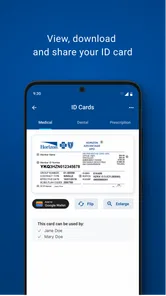
- Digital access to member cards and policy information.
- Useful tools for checking benefits and coverage on the go.
- Secure account access helps protect personal health information.
- Can reduce the need to carry printed insurance documents.
Cons
- Features may vary depending on your Horizon Blue plan.
- Some services require an internet connection to work properly.
- Account setup can be inconvenient without your member information.
- Certain actions may redirect you to external websites or services.
- App usefulness is limited for people without Horizon Blue coverage.











