

Hopper: Hotels, Flights & Cars
- 28.85K
- 4.5
- Installs
- 10.00M
- Price
- Free

Screenshots





Analysis by Reviewed
I judge travel apps by whether they help me make a better decision, not just whether they put a booking button within reach. Hopper: Hotels, Flights & Cars is most useful when I have some flexibility and can watch prices before committing. Its predictions and alerts give trip planning a more deliberate rhythm, though they work best as guidance rather than a promise that a fare will fall.
Where price watching earns its place
For a trip without fixed dates, I would start by looking at the calendar, comparing cheaper and more expensive travel days, then watching a few realistic options instead of searching the same route over and over. That workflow is the app’s clearest strength: it can turn “I might go sometime next month” into a shortlist worth monitoring. If the dates are fixed, the same tools can still help me understand the price pattern, but they cannot make an inflexible itinerary flexible.
A useful habit is to compare like with like. When I look at a flight or hotel in Hopper, I’d keep the destination, dates, and basic requirements consistent while checking another booking source. Otherwise, a lower-looking price may reflect a different itinerary or room choice, not a better deal. The app is a handy place to begin, but I would still check the final booking details before paying.
Good for planners, less so for urgent trips
Picture a weekend away that is still several weeks off: I can watch a flight, check which nearby dates are cheaper, and decide whether the savings are worth shifting my plans. For someone who enjoys planning ahead and has room to move dates, that is a practical use for Hopper. It also suits people who prefer keeping flight, accommodation, and car-rental searches in one travel-focused app rather than opening several separate tools.
On the other hand, if I need to leave tomorrow, monitoring a forecast is less useful than comparing currently available options and booking promptly. The same goes for complicated trips where exact flight times, particular hotel terms, or a specific car setup matter more than finding a predicted low price. In those cases, I would use Hopper for an initial comparison at most, then verify the details through the option that best matches my needs.
Hopper is a free Travel & Local app from Hopper Inc., rated for everyone and available on iOS version 10 or later. Its average rating is 4.6 from around 147,000 ratings, and it has more than 10 million installs. Those figures suggest a widely used service, but I would still judge a booking by its terms and itinerary rather than popularity alone.
Unpacking the Features
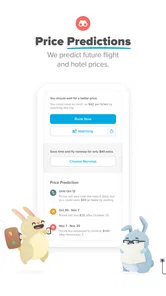
First things first, let's talk about what makes Hopper stand out from the crowd. The app uses a clever algorithm to predict the best time to purchase your travel tickets. Yes, you read that right! Hopper forecasts the future prices of flights and hotels with stunning accuracy. It’s like having a crystal ball for your travel plans.
More From Our News Desk

 Prime Video
Switching to Prime Video: What Changes in Your Viewing Routine
Prime Video can make a compelling second home for streaming, but switching means learning a different catalog, rental layer, and route from browsing to playback.

 Universal TV Remote Control
 Works Best as a Reliable Backup
A phone remote earns its place through quick setup and reliable habits. Here is how to get more from Universal TV Remote Control—and where its limits show.

 Weather - By Xiaomi
Weather by Xiaomi Review: Clear at a Glance, Less Clear Up Close
Xiaomi’s weather app makes everyday forecasts quick to scan, but its calm surface can leave useful details and recovery paths harder to find than they should be.

 X
X Under Pressure: Can It Recover When Posting Goes Wrong?
A resilience-focused review of X, examining setup, mistaken posts, interruptions, weak connections, and the gaps that matter when recovery needs to be dependable.

 Clash of Clans
 Is Won Between the Battles
Its raids are quick; its community is a long-term project of coordination, teaching, rivalry, and shared responsibility—with all the friction that entails.

 Android Auto
 Makes the Case for Quieter Car Software
The car interface is no longer judged by how much it can do, but by how quietly it helps. Android Auto shows what drivers now expect—and what still gets in the way.
Latest News



One feature I found particularly useful is the "Watch" option. You can set alerts for specific flights or hotels, and Hopper will notify you when prices drop. This means you can score some sweet deals without constantly checking your phone. I mean, who doesn't love a good bargain, right?
Booking Made Easy
Booking through Hopper is a breeze. The app’s interface is sleek and user-friendly, ensuring you don’t get lost in a maze of options. I especially appreciated the color-coded calendar that shows the cheapest and most expensive days to travel. It’s like the app is doing all the heavy lifting for you.
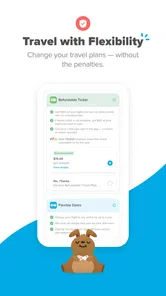
And let’s not forget about the flexibility. Hopper offers a "Price Freeze" feature, allowing you to lock in a great deal while you finalize your plans. This is a game-changer for those of us who need a little more time to make decisions.
Trustworthy and Transparent
What I love about Hopper is its transparency. The app doesn't just tell you what to book; it tells you why. You'll see a detailed breakdown of price predictions and how confident Hopper is in its forecasts. This kind of honesty is rare in the travel industry, and it's refreshing to see.
Moreover, the app has a solid reputation for reliability. I noticed that it consistently provides competitive rates compared to other travel apps, which gives me peace of mind knowing I’m getting a good deal.
In summary, Hopper: Hotels, Flights & Cars is a must-have travel companion for anyone looking to save money and time. With its intuitive design, predictive pricing, and commitment to transparency, Hopper makes planning your next adventure a whole lot easier. So, why not give it a try and see how much you can save on your next trip?
Where I would double-check
A prediction is not the same as a guaranteed fare, and travel prices can change while I’m deciding. I treat the forecast as a prompt to compare and set a sensible point at which I’m ready to book, not as a reason to wait indefinitely. The app’s confidence explanation helps frame the estimate, but I would not assume that a confident forecast removes the normal uncertainty of travel pricing.
Price Freeze can help when I need a little breathing room, but I would read its terms carefully before relying on it. A hold is useful only if its conditions suit my trip and the amount of time I need to decide. I would also review the itinerary, cancellation or change conditions, and total shown at checkout; a low headline price matters less if the booking details do not fit.
How it fits alongside other travel tools
Compared with a conventional travel search app, Hopper’s distinctive value is the emphasis on timing: watch a price, consider a forecast, and use the calendar to think about dates. A broad search service may be better when I want to scan many providers immediately or compare unusual route combinations. A hotel’s own booking channel can make more sense when I care most about a specific property’s room terms or want to deal directly with the provider. I see Hopper as a useful decision aid, not a reason to stop comparing.
For hotels and car rentals, I would apply the same careful approach as I do to flights. Check that the dates and essential requirements match, then read the terms attached to the actual option before booking. Keeping a watch list focused on trips I might genuinely take also makes alerts more useful; tracking every tempting destination can create noise rather than clarity.
Making a watch list useful
I get the most value from price tracking when I decide what would make me book before I start watching. For a flexible getaway, that might mean choosing a range of dates I can actually travel and deciding which flight times are acceptable. Then an alert has context: a drop is worth acting on only if the itinerary still works for my life. Without those boundaries, it is easy to treat every notification as an invitation to rethink the trip.
For a hotel search, I would narrow the choice to places I would genuinely stay in rather than tracking a broad destination and comparing unlike rooms later. Location, room arrangements, and the terms attached to the booking can matter more than a small difference in the displayed price. This is one reason I would use the app’s discovery and monitoring tools to focus my search, then inspect the specific offer rather than assume every result is interchangeable.
A practical planning routine
Here is how I would use it for an ordinary family visit with dates that can shift by a day or two. I would first compare the calendar around the intended weekend, then watch only the flights that fit the group’s schedule. If a cheaper date appears, I would check whether changing it creates a problem with work, school, or the accommodation plan. A modest fare saving is not a saving if it means losing a night or arranging awkward transport.
Once a suitable option looks promising, I would compare the same dates and requirements elsewhere and verify the final booking conditions. If I am still deciding, Price Freeze may be worth considering, but only after I understand what the hold allows and whether its terms fit my timeline. This sequence uses Hopper for what it does well—making timing easier to think about—without letting the forecast make the decision for me.
What the ratings can and cannot tell me
The app has around 28,000 written reviews alongside its average rating, which gives a prospective user a broad sense of how many people have shared feedback. I would read recent comments for recurring themes rather than treating a high average as a guarantee that every booking will be smooth. Travel is unusually dependent on the details of an individual itinerary, and a good experience for one person does not settle whether a particular fare, room, or rental is right for me.
I also see the app’s long presence in travel as context, not a substitute for checking the offer in front of me. Hopper launched in 2015, and version 5.98.1 is the current release. Updates can change an interface or the way a workflow feels, so I would make sure I understand the screens and terms during my own booking rather than relying on a remembered description of how an app used to work.
Who should choose another route
I would skip making Hopper my main booking path if I need a highly specific itinerary and already know exactly which provider or property I want. A direct airline or hotel channel may be easier when I want to focus on one provider’s conditions, while a broad comparison service may be more useful for surveying a complicated route. Hopper’s strength is not that it removes every other tool from the process; it is that it can help me think about timing before I commit.
It is also less compelling for travelers who have no flexibility and do not want to wait, or for anyone who prefers a straightforward search-and-book process without price watching. If I already have a firm departure date and need a particular arrival time, the forecast is secondary. I would compare live options, check the conditions, and book the itinerary that meets the requirement instead of delaying for a possible future change.
My verdict
Hopper is free, and its current version is 5.98.1; it first appeared on August 30, 2015. I’d recommend it to flexible planners who like price alerts and want a single place to explore flights, hotels, and car rentals. I would not make it my only tool for urgent, complex, or highly specific bookings. Used with a quick comparison and a careful checkout review, its strongest features can make planning feel more considered without turning a forecast into a guarantee.
Hopper: Hotels, Flights & Cars Frequently Asked Questions
Can I use Hopper just to track a trip before I am ready to book?
Yes. Hopper’s price predictions and notifications are useful if you are still planning and do not want to book immediately. You can explore hotel, flight, and car rental options, then use the app’s alerts to help decide when to make a reservation. Tracking prices does not replace checking the itinerary and booking terms before you confirm.
What devices and operating systems can run Hopper?
Hopper is available for Android and iOS devices. On Android, the minimum operating system requirement is version 10, so it is worth checking your device settings before downloading. The app is free to download, and its current version is 5.98.1. Make sure your device has enough space and that you install the app from the store for your platform.
Is Hopper suitable for first-time travelers?
Hopper is designed to make travel booking approachable, even for people who have not used a booking app before. Its interface brings hotel, flight, and car rental options together, while its price predictions and notifications can help users decide when to book. It is a Travel & Local app from Hopper Inc., and its content rating is Everyone.
What is Hopper and how does it work?
Hopper is a travel booking app that helps users find the best deals on hotels, flights, and car rentals. Using sophisticated data analytics, it predicts future prices and notifies users of the best times to book, ensuring they get the most cost-effective travel options available. The app's user-friendly interface simplifies the booking process, making it easy even for novice travelers to navigate and secure their reservations at competitive rates.
How accurate are Hopper's price predictions?
Hopper is known for its high accuracy in predicting price trends for travel bookings. The app uses advanced algorithms and extensive historical data to forecast whether prices will rise or fall. While no prediction system can be perfect, Hopper boasts a 95% recommendation accuracy, helping users make informed decisions on when to book their travel plans to save money.
Pros
- User-friendly interface simplifies booking.
- Great deals and discounts on trips.
- Real-time price predictions for savings.
- Easy comparison of flights and hotels.
- 24/7 customer support available.
Cons
- Occasional bugs in app performance.
- Limited filter options for searches.
- Flight cancellations may lack notifications.
- Some hidden fees during checkout.
- Requires internet for real-time updates.











