

Hometown Gate
- 15.00
- 4.2
- Installs
- 10.00K
- Price
- Free

Screenshots

Analysis by Reviewed
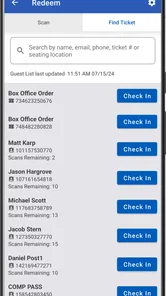
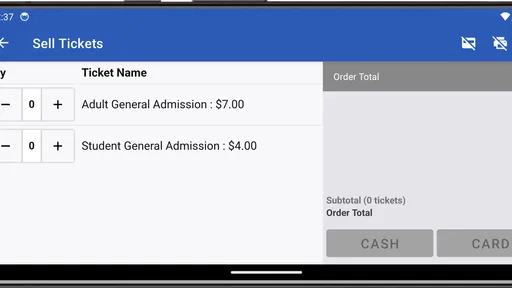
Running a busy event entrance is one of those jobs that looks simple until several people arrive at once, a ticket needs checking, and the box office still has sales to process. Hometown Gate is built for that specific pressure point. It is an Events app from HomeTown Ticketing, Inc. that brings ticket selling and ticket scanning into a mobile workflow connected to a Hometown box office. I see it less as a general event-discovery app and more as a practical tool for organizers, venue staff, and volunteers who need to manage admission from a phone.
That focus is important because it sets the right expectations. This is not the kind of app I would install to browse concerts or keep a personal calendar. Its value appears when I am on the operational side of an event: preparing a gate, handling arrivals, and keeping the admission process tied to the event’s ticketing setup. It is free to download, carries an Everyone age rating, and the current version is 4.9.0, so it is approachable for a wide range of staff members.
How the app feels when the entrance gets busy
In everyday use, the central idea is straightforward: the phone becomes a working point for the Hometown box office. Instead of separating ticket sales from admission checks, the app is intended to support both jobs in the same event workflow. That can reduce the amount of equipment a small school, club, or community organizer needs to bring to the entrance.
I find that especially useful for events where the people at the gate are not full-time ticketing professionals. A volunteer can work from a familiar mobile device rather than learning a complicated desktop terminal, while the organizer can position staff wherever the line is forming. The trade-off is that a phone is still a phone: screen size, battery condition, signal quality, and handling in a crowded environment all affect the experience.
The app’s identity as “Hometown Gate” also makes its role clear. It is most relevant when tickets already belong to a Hometown box-office process. If I were looking for a universal scanner that could accept tickets from unrelated services, I would not assume this is the right choice. The connection to that ticketing environment is the reason the app can be useful, but it also limits how broadly I would recommend it.
The store profile shows a 4.2 average from roughly fifty-six ratings, with about fifteen written reviews and more than ten thousand installs. Those figures suggest a focused tool with a real user base, rather than a mass-market consumer app. I would still judge it by the event workflow in front of me, because an app can be well suited to one organization and awkward for another.
Network-dependent moments matter most
The most important practical question is not how quickly I can open the app in a quiet room. It is what happens when several people are waiting and the phone needs to communicate with the box-office system. Ticket selling and scanning are connected tasks, so network availability can shape the entrance experience even when the app itself opens normally.
More From Our News Desk

 Gmail
GmailGmail in a Busy Inbox: Who Benefits Most?
From first account to crowded workday, Gmail earns its place through dependable search and flexible sorting—but its best fit depends on how much inbox maintenance you can tolerate.

 Prime Video
Switching to Prime Video: What Changes in Your Viewing Routine
Prime Video can make a compelling second home for streaming, but switching means learning a different catalog, rental layer, and route from browsing to playback.

 Universal TV Remote Control
Universal TV Remote Control Works Best as a Reliable Backup
A phone remote earns its place through quick setup and reliable habits. Here is how to get more from Universal TV Remote Control—and where its limits show.

 Weather - By Xiaomi
Weather by Xiaomi Review: Clear at a Glance, Less Clear Up Close
Xiaomi’s weather app makes everyday forecasts quick to scan, but its calm surface can leave useful details and recovery paths harder to find than they should be.

 X
XX Under Pressure: Can It Recover When Posting Goes Wrong?
A resilience-focused review of X, examining setup, mistaken posts, interruptions, weak connections, and the gaps that matter when recovery needs to be dependable.

 Clash of Clans
Clash of Clans Is Won Between the Battles
Its raids are quick; its community is a long-term project of coordination, teaching, rivalry, and shared responsibility—with all the friction that entails.
Latest News



Before an event, I would test the exact phone and location that staff will use. A strong connection in an office does not guarantee the same result near a gym entrance, sports field, basement corridor, or temporary outdoor gate. This simple test is one of the most valuable habits I can recommend: sign in, open the relevant event, and perform a harmless check before the first attendee arrives.
I would also avoid treating multiple phones as automatically interchangeable. If an organizer plans to place one person at sales and another at scanning, both devices should be prepared through the same event process. Staff need to know which screen represents a completed sale, which action checks admission, and how to recognize a response that is still loading rather than completed.
This is where Hometown Gate differs from a paper list or a basic manual count. A paper process may continue when connectivity is poor, but it is slower to update and easier to duplicate or misread. A connected mobile workflow can provide a more current view of ticket activity, but it depends more heavily on the quality of the connection at the moment of use. For me, that is the central trade-off rather than a minor technical detail.
Using it in real mobile situations
Imagine a school athletic event on a Friday evening. One volunteer stands near the entrance with a phone for ticket checks, while another handles people who still need to buy admission. The line grows just as the first group arrives. In that situation, the benefit is not merely having a scanner; it is being able to move the work closer to the people who need it instead of forcing every transaction through one fixed desk.
That mobility can also help at venues with more than one entrance. Staff can spread out, provided the event setup and connection are reliable enough for the chosen arrangement. I would keep one device assigned to a clear responsibility instead of having every volunteer improvise. A consistent role makes it easier to spot whether a delay comes from the ticket, the phone, the network, or a misunderstanding of the process.
Phone handling deserves attention too. At a crowded gate, a device may be passed between staff, exposed to bright light, or used while someone is wearing gloves. A short pre-event rehearsal can reveal awkward taps and reduce hesitation. I would also begin with a charged phone and keep a charging plan nearby, because mobile convenience disappears quickly when the device becomes the weak link.
For occasional volunteers, the best workflow is usually the simplest one: one person focuses on scanning, another focuses on sales or attendee questions, and a supervisor handles exceptions. Asking a single volunteer to sell, scan, explain policies, and troubleshoot the connection can create a bottleneck. The app may support the operational side, but good staffing still determines whether the entrance feels calm.
What to do when something goes wrong
A realistic review has to include failure points. A ticket may not scan on the first attempt, a buyer may show the wrong screen, or the phone may take longer than expected to respond. I would train staff not to repeatedly tap without checking what the app is showing. Repeated actions can create confusion about whether a transaction was accepted once, twice, or not at all.
When a scan appears unsuccessful, the first recovery step should be observation: confirm that the ticket is visible, the camera or scanning area has a clear view if applicable, and the event displayed is the correct one. If the connection seems slow, moving a few steps to a better signal area may help, although that is a venue workaround rather than a guaranteed app feature. Keeping the attendee informed is also important; silence at the gate often feels like a system failure even when the delay is temporary.
I would give staff a clear escalation plan before opening the doors. One person should know how to contact the event organizer, and the organizer should decide how to handle a case that cannot be resolved immediately. That might mean checking purchase details through the box-office process or directing the attendee to a separate help point. The key is not to invent a workaround during the busiest minute of the night.
Connectivity deserves special caution here. I would not promise that the app can scan or sell tickets without a network connection, because that capability is not established by the product information available. Instead, I would plan as though a live connection matters and prepare the venue accordingly. That means testing coverage, limiting unnecessary traffic on the same connection where possible, and having human support ready for exceptions.
This is also why I would not make the app the only part of an event’s contingency planning. Hometown Gate can be the main operational tool, but the organizer still needs basic knowledge of the event, a way to identify the correct box-office record, and a decision about what happens when a phone or connection fails. A digital gate works best when the people around it understand the process rather than expecting the app to solve every unusual case.
Keeping mobile data use sensible
Because the app is designed around ticket selling and scanning, I would use mobile data deliberately rather than casually. Before the event, I would connect to a trusted network for preparation when available, then check how the venue’s mobile signal behaves at the actual entrance. The goal is not to obsess over every small transfer; it is to avoid discovering a weak or congested connection after the queue has formed.
I would also avoid unnecessary app switching during active admission. Staff who move between unrelated apps, messaging threads, and camera screens are more likely to lose track of the current event or miss a status message. A dedicated device or a clearly assigned work phone can make the process more predictable, especially when several volunteers share responsibility.
For organizers watching costs, the sensible question is not simply whether the app is free. The app itself is free, but the event still relies on phones, connectivity, staff time, and the wider Hometown box-office arrangement. Those surrounding requirements can matter more than the download price. A small event may find the mobile approach economical, while a large venue with strict device management may prefer established hardware and a more formal ticketing operation.
Privacy and device discipline are practical considerations as well. I would use staff-controlled phones, lock the device when it is handed over, and avoid leaving an event screen visible after the shift. These are general operational safeguards, but they matter more when a personal phone becomes part of a ticketing workflow. The app’s Everyone rating makes it broadly accessible, yet accessibility does not remove the need for responsible event handling.
Who benefits and who should look elsewhere
I think Hometown Gate is a good fit for organizations already working with HomeTown Ticketing, Inc., particularly schools, local sports programs, community groups, and venues that need a flexible entrance setup. It makes the most sense when staff need to sell or scan tickets from mobile positions rather than from one permanent counter.
It is less compelling for someone who only wants to purchase tickets as an attendee. The app’s purpose is operational, and installing it will not turn it into a broad entertainment guide. I would also hesitate to recommend it to an organizer whose ticketing provider is unrelated, because the connection to the Hometown box office is central to its usefulness.
A venue with reliable wired terminals, dedicated scanners, and a large trained admissions team may prefer its existing equipment. That setup can offer larger displays, fixed power, and a more controlled environment. Hometown Gate’s advantage is flexibility, not necessarily superiority in every professional box office. The right choice depends on whether mobility and a lighter setup matter more than dedicated hardware.
For a small organizer, the most attractive trade-off is the ability to put the gate process in a phone without adding a separate consumer-facing ticket app. For a high-volume event, the main concern becomes coordination: enough prepared devices, enough trained people, and enough network capacity. The app can simplify the toolset, but it does not remove the need to design the entrance carefully.
Compatibility and the everyday setup decision
The app supports Android devices running version 8.0 or later. That gives many older phones a chance to participate, which is useful for organizations relying on a pool of existing devices rather than buying new hardware for every event. Still, minimum compatibility is not the same as a comfortable experience. A very old phone may have a small display, a tired battery, or slower performance, so I would test the actual device instead of judging it only by the operating-system requirement.
My preferred setup would include a short rehearsal with the people working the gate. They should open the event, understand the scanning flow, know how sales are handled, and practice identifying a delay before attendees arrive. I would assign one person to watch the overall line and redirect questions, because scanning staff should not have to stop every few minutes to solve unrelated problems.
Another useful tip is to label devices by role rather than by volunteer name. “Entrance scanner” and “Box office” are clearer during a shift than relying on memory, especially when staff change positions. It also makes handover easier if a phone needs to be replaced. That kind of small operational detail is where a mobile ticketing tool either feels dependable or becomes another source of confusion.
My connectivity verdict
After looking at the app through the reality of event work, I see Hometown Gate as a focused utility rather than a complete event-management platform. Its strength is the direct connection between mobile ticket activity and a Hometown box office, giving organizers a way to bring selling and scanning closer to the entrance. Its weakness is the same connection: the experience is tied to the right ticketing environment and should be planned around dependable connectivity.
I would recommend it to a Hometown-based organizer who wants a flexible gate setup and is willing to test devices, train staff, and prepare for connection problems. I would skip it as a casual attendee app, and I would compare it carefully with dedicated scanners if the event has very high traffic or strict hardware requirements.
For me, the deciding question is simple: do you need a mobile working point for a Hometown box office, and can your venue support that workflow? If the answer is yes, the free app is worth trying before the event rather than during the first rush. If the answer is no, a general ticketing solution or the provider’s own established equipment may be a better match. Used with realistic expectations, Hometown Gate can make a small or mobile entrance operation more manageable without pretending that network planning and human preparation are optional.
Hometown Gate Frequently Asked Questions
Who is Hometown Gate designed for?
Hometown Gate is an events app developed by HomeTown Ticketing, Inc. It is intended for people involved in selling or scanning tickets through a Hometown box office, making it a focused tool for event operations rather than a general community or event-discovery app. Before downloading, consider whether your event or organization uses Hometown ticketing, since the app’s usefulness depends on that connection.
What is Hometown Gate, and what can I do with it?
Hometown Gate is a community-focused app designed to help users stay connected with local information, events, services, and neighborhood updates. Depending on the features available in your area, you may be able to browse announcements, discover nearby activities, access useful local resources, and communicate with other members. The experience can vary by location, so the amount of content may depend on whether your community actively uses the platform.
Is Hometown Gate free to download and use?
Hometown Gate is free to download. Its core purpose is to support selling and scanning tickets from a Hometown box office, so whether it is useful to you depends on your role and your organization’s ticketing setup. The app itself has no purchase price, but users should follow any separate ticketing or event arrangements made by their organization.
Do I need to create an account to use Hometown Gate?
An account may be required to access personalized or interactive features in Hometown Gate, such as posting updates, receiving notifications, joining local groups, or contacting community representatives. Registration may request basic details such as your name, email address, phone number, or location. Before creating an account, check the privacy policy and make sure you understand how your information and community activity may be displayed.
Does Hometown Gate work in every city or neighborhood?
Hometown Gate’s usefulness depends heavily on whether your city, neighborhood, organization, or local community has been added to the service. You may be able to install the app from anywhere, but some sections can appear limited if there is little local content or if your area is not supported. It is a good idea to search for your hometown inside the app before relying on it for important updates.
Pros
- Simple interface makes neighborhood information easy to browse.
- Useful for discovering nearby local events and community activities.
- Can help residents stay connected with local updates.
- Location-focused content makes information more relevant to users.
- Convenient way to support and find nearby businesses and services.
Cons
- Content quality may vary depending on local community participation.
- Some areas may have limited listings or fewer active users.
- Location permissions may be required for the best experience.
- Notifications could become excessive if many updates are enabled.
- Availability and usefulness may differ significantly between regions.












