

Hometown Fan
- 728.00
- 4.6
- Installs
- 100.00K
- Price
- Free

Screenshots

Analysis by Reviewed
When I think about event apps, I usually want one thing: a simple path from “I need to get into this event” to actually being inside. Hometown Fan is built around that practical moment. It is an events app from HomeTown Ticketing, Inc., aimed at fans who need to handle admission for local and community events without relying entirely on paper tickets or a crowded box office line.
I approached it as I would before a school game or another hometown event: find the event, prepare the ticket, arrive with the phone ready, and see whether the handoff from the app to the entrance feels smooth. That focus matters because this is not trying to be a broad entertainment discovery service. Its value is tied to the specific events supported through the HomeTown system and to how well it handles the final few minutes before admission.
From planning the outing to reaching the entrance
The starting condition is familiar. You already know about an event, or someone has sent you toward a HomeTown ticketing page, and you want to avoid uncertainty at the door. A useful ticket app should reduce the number of things you have to remember: where the ticket is, how to display it, and what happens when another person in your group needs access.
That is where Hometown Fan makes sense. It is free, carries an Everyone content rating, and supports Android devices running version 8.0 or later. I would still install and open it before leaving home rather than treating the app as something to set up while standing in a line. Ticketing is one of those tasks where a small delay feels much larger when several people are waiting behind you.
The app has been available since May 20, 2021, and its current version is 4.15.1. Those details are useful less as decoration than as a reminder to keep the app updated before an important event. A ticketing workflow depends on compatibility and reliable access at the exact moment you need it, so I would not leave an update pending on the day of a championship game, concert, or school activity.
Finding the right event without second-guessing yourself
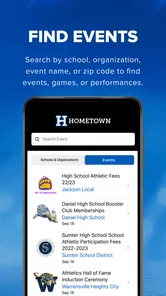
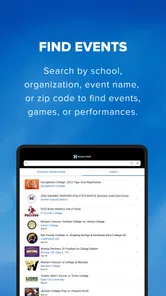
The first practical challenge is identification. Local events often have similar names, overlapping school abbreviations, or multiple sessions on the same day. I would check the event name, venue, date, and session before moving forward, especially if I were buying or opening tickets for a group. The app can be useful here, but it cannot remove the need for the user to verify that the selected event is the one they actually intend to attend.
This is an important difference from a general ticket marketplace. A large entertainment platform is often better when I am browsing artists, comparing venues, or discovering events across a city. Hometown Fan is more focused on the admission journey for participating local events. If I already know the school or community event I am attending, that narrower approach can feel more direct. If I am still deciding what to do on a weekend, a broader events service may be the better starting point.
More From Our News Desk

 Gmail
GmailGmail in a Busy Inbox: Who Benefits Most?
From first account to crowded workday, Gmail earns its place through dependable search and flexible sorting—but its best fit depends on how much inbox maintenance you can tolerate.

 Prime Video
Switching to Prime Video: What Changes in Your Viewing Routine
Prime Video can make a compelling second home for streaming, but switching means learning a different catalog, rental layer, and route from browsing to playback.

 Universal TV Remote Control
Universal TV Remote Control Works Best as a Reliable Backup
A phone remote earns its place through quick setup and reliable habits. Here is how to get more from Universal TV Remote Control—and where its limits show.

 Weather - By Xiaomi
Weather by Xiaomi Review: Clear at a Glance, Less Clear Up Close
Xiaomi’s weather app makes everyday forecasts quick to scan, but its calm surface can leave useful details and recovery paths harder to find than they should be.

 X
XX Under Pressure: Can It Recover When Posting Goes Wrong?
A resilience-focused review of X, examining setup, mistaken posts, interruptions, weak connections, and the gaps that matter when recovery needs to be dependable.

 Clash of Clans
Clash of Clans Is Won Between the Battles
Its raids are quick; its community is a long-term project of coordination, teaching, rivalry, and shared responsibility—with all the friction that entails.
Latest News



My advice is to treat the app as part of a chain rather than the entire chain. The event organizer, the ticket purchase process, the phone, and the entrance staff all contribute to the result. Hometown Fan can put the ticket in a convenient place, but the event details still deserve a quick check before payment or arrival.
Preparing the ticket before the trip
Once the correct event is selected, I would prepare the ticket while I still have time and a stable connection. I would also increase the phone’s readiness: charge it, close anything that might distract me, and avoid waiting until the entrance to sign in or search through screens. This is not a criticism unique to Hometown Fan; it is simply the reality of using a phone as the thing that proves admission.
A useful habit is to open the ticket once before leaving. That lets me confirm that I am looking at the correct event and gives me a chance to notice any account or access issue early. If I am responsible for tickets for children, relatives, or friends, I would decide in advance whether I am keeping everyone’s tickets on my phone or handing access to each person. That small decision prevents a group from stopping at the gate while people search through messages.
The app’s strongest role is convenience at this preparation stage. Instead of carrying a printed ticket or trying to remember which email contains the admission details, I can organize the process around the phone I am already carrying. For many local events, that is enough to make the experience feel less scattered.
The entrance handoff is the real test
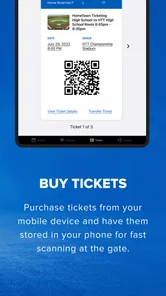
At the venue, the workflow changes hands. I move from managing my own ticket to presenting it to the people checking admission. This is where the app’s emphasis on fast scanning becomes meaningful, but speed is not only a software issue. Screen brightness, a locked phone, poor connectivity, a low battery, or an unclear ticket can all slow the handoff.
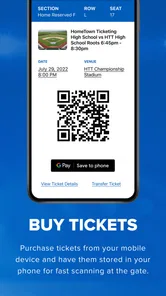
I would open the relevant ticket before reaching the front of the line and keep the phone screen facing the scanner or staff member. If I am carrying multiple tickets, I would avoid switching between unrelated apps or conversations at that moment. The goal is to make the handoff predictable: show the correct ticket, let it be checked, and move away from the entrance so the next person can approach.
This is one of the less obvious strengths of a dedicated fan-facing ticket app. It gives the event experience a clear digital checkpoint instead of leaving the ticket buried in a general inbox. That does not guarantee a perfect entrance, but it can reduce the mental clutter that often causes delays.
There is also a social handoff to consider. A parent may buy tickets for a family, a coach or organizer may direct attendees to the ticketing system, and a group leader may be the person holding every admission pass. The app works best when everyone understands who controls the tickets and when they will be shown. For a group that plans to arrive separately, keeping all tickets with one person may be less convenient than arranging access ahead of time.
What happens after the scan
The desired result is straightforward: the ticket is accepted, the group enters, and the phone is no longer the center of attention. In that sense, Hometown Fan succeeds by staying close to a single outcome rather than trying to become a social network, a calendar, and a full entertainment guide at the same time.
I can see it being especially useful for families attending recurring local activities, students going to school events, and supporters who regularly visit venues that use HomeTown Ticketing. The free price also removes a common barrier for people who only need the app occasionally. Someone attending one event may not want another paid utility on the phone, and this app is easier to justify when the ticketing service is already part of the event’s process.
The public response is encouraging: Hometown Fan has an average rating of 4.6 from around sixteen thousand ratings, with more than seven hundred written reviews and over one hundred thousand installs. I would read those figures as evidence that the app has found a real audience, not as a promise that every entrance will be effortless. Ticketing experiences depend heavily on event setup and venue operations, so individual results can vary.
What I appreciate most is that the app’s usefulness can be judged by a concrete question: did it help me get from ticket ownership to admission with less confusion? For a local event, that is more important than having a long list of extra features. If it keeps the ticket accessible and makes the scan handoff clear, it has done the job I needed.
A realistic family scenario
Imagine a parent taking two children to a school athletic event. The parent has purchased admission, the children are carrying snacks and jackets, and the entrance is busy. The best workflow is to check the event details at home, open Hometown Fan before arriving, and keep the phone ready while the family approaches the gate. The parent presents the tickets, waits for the scan, and then moves aside before finding seats.
The friction appears when the parent assumes the ticket will be easy to locate without preparation. A dead battery, a forgotten account step, or confusion between two sessions can turn a simple admission process into a stressful one. The app helps most when it is used as a preparation tool, not as a last-second rescue tool.
For a group of friends arriving at different times, the trade-off is different. One person holding all tickets may be efficient if everyone enters together, but inconvenient if someone is late or needs to enter separately. I would settle that arrangement before the event rather than trying to solve it while the first person is already at the gate. This is a practical limitation of phone-based group ticketing, and it is worth considering before purchase.
Where the workflow can break
The biggest weakness is that the smoothness of the experience depends on more than the app itself. A venue may have a crowded entrance, staff may be handling several ticket types, or the phone may not be ready to display the correct screen. In those situations, even a well-organized digital ticket can feel slower than expected.
I also would not choose Hometown Fan as my first option if I mainly want broad event discovery, detailed venue comparison, or a single app covering unrelated ticket providers. Its purpose is narrower. A general marketplace may be more suitable for comparing major events, while a venue-specific system may be more convenient if the organizer uses a different ticketing service.
Another trade-off is dependence on the phone. Paper tickets are easy to pass between people and do not require a charged screen. On the other hand, paper can be lost, damaged, or printed incorrectly. The digital approach is cleaner for many users, but it shifts responsibility toward battery management, account access, and knowing where the ticket is before arrival.
If you are troubleshooting, I would start with the basics in a sensible order: confirm the event and session, make sure you are using the intended account, reopen the ticket, and prepare the screen before reaching the entrance. If the issue concerns admission rules or an event-specific change, the organizer or venue may be the better point of contact because the app is only one part of the ticketing chain.
Who will get the most from it
I would recommend Hometown Fan to people who attend local events connected to HomeTown Ticketing and want a dedicated place for their admission passes. It is a particularly sensible choice for families, school supporters, and occasional attendees who prefer not to print tickets or search through email at the gate.
I would be more cautious if you rarely attend supported events, dislike managing tickets on a phone, or need a broad discovery platform. In those cases, the app may feel too specialized. It is also not the ideal answer for a group that has not decided how tickets will be shared between separate arrivals.
The developer, HomeTown Ticketing, Inc., has kept the product’s identity clear: this is a fan-side tool for getting through event admission. That clarity is a strength. I would rather use a focused app that handles its main task plainly than a crowded platform where the actual ticket is difficult to find.
After using it as part of the full journey, my recommendation is positive with one condition: prepare before you travel. Check the event, open the ticket, charge the phone, and agree who is holding admission for the group. Do that, and Hometown Fan can remove a surprisingly annoying part of attending local events. Expecting it to solve venue congestion, account confusion, or every organizer-specific problem is less realistic.
For the right audience, the result is simple and worthwhile: less paper, fewer searches, and a clearer handoff at the door. That makes this free events app a practical companion rather than an app I would open every day. If the events you attend use its ticketing system, I think it is worth keeping installed; if they do not, a different ticket provider will naturally be the better fit.
Hometown Fan Frequently Asked Questions
What type of app is Hometown Fan?
Hometown Fan is an events app from HomeTown Ticketing, Inc., with the short description “Hometown Fan” and the store summary “Fast Scans. Happy Fans. For Every Hometown!” It is intended for people interested in hometown events and fan information. The app is free to download and is rated for Everyone, making it suitable for a broad audience.
What should I check before downloading Hometown Fan?
Before downloading, consider whether the app fits the events and local organizations you want to follow, and make sure your device is compatible. Hometown Fan is available at no charge, so you can install it without an upfront download fee. It is also helpful to have an internet connection available for installation and for loading event-related content once you begin using the app.
What devices and operating systems can run Hometown Fan?
Hometown Fan is an events app from HomeTown Ticketing, Inc. If you are choosing a download, check that your device meets the minimum operating-system requirement: iOS 8.0 or later. The app is free to download and is rated for Everyone. Keeping your device’s software current can also help you get a smoother experience and access the app’s available features.
How much space or setup time should I expect before using Hometown Fan?
Getting started should be straightforward: download Hometown Fan, open it, and look for the teams, schools, or local events that matter to you. The amount of setup depends on what you want from the app, such as choosing teams or enabling alerts. Before downloading, make sure you have a usable internet connection for installation and for loading event-related content.
Who develops Hometown Fan, and is it widely used?
Hometown Fan is developed by HomeTown Ticketing, Inc. It has an average rating of 4.6 from around 16,000 ratings, with more than 700 written reviews and over 100,000 installs. Those figures offer a quick sense of its reach and user feedback, though individual experiences may vary depending on local coverage and the features people use.
Pros
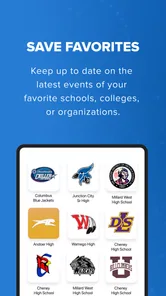
- Keeps local supporters connected with nearby team news and updates.
- Offers a focused experience for fans of community-based sports.
- Can help users discover local events
- fixtures
- and fan activities.
- Useful for following hometown teams without relying on general sports apps.
- May strengthen community spirit through shared fan content and discussions.
Cons
- Coverage may be limited if your local team is not supported by the app.
- Some features can depend on clubs regularly submitting updated information.
- Smaller communities may have less content and fewer active users.
- Notifications may become repetitive during busy match or event periods.
- The app’s usefulness can vary significantly from one hometown to another.












