ZEvents Invite Maker Hobnob
- 2.23K
- 4.5
- Installs
- 500.00K
- Price
- Free

Screenshots

Analysis by Reviewed
I usually start planning a gathering with a simple question: how do I get everyone the details without losing track of replies? That is where Hobnob - Invitation Card Maker makes sense to me. It is an events app from Hobnob Events built around creating invitations and keeping the guest conversation close to the event, rather than scattering plans across separate messages. I would reach for it for a birthday, shower, graduation, or casual get-together when a personal invite matters but designing one from scratch would be more work than the occasion needs.
Start with the guest list and the essentials
Before opening an invitation maker, I find it useful to decide who needs the information and what they need to act on it. A birthday dinner for close friends calls for a different tone and level of detail from a graduation party where relatives may be travelling. Sorting out the audience first helps me choose wording and avoid sending an invitation that looks finished but leaves guests unsure about the practicalities.
I would also decide how I want replies to shape the plan. If I need a reasonably reliable headcount for food, I would ask guests to respond by a particular point and make that request easy to spot. If people can drop by whenever, I would avoid making the RSVP feel like a commitment. That small choice affects the whole workflow: it tells guests what kind of answer is useful and helps me avoid chasing everyone unnecessarily.
From the event idea to an invitation
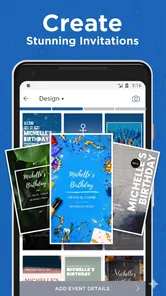
My practical approach is to settle the basics first: what the occasion is, when and where it will happen, and who needs to know. Then I can choose a suitable template, adjust its look, and add a photo if that makes the invitation feel more like ours. The useful trade-off is that a template gives me a head start, but I still need to check the wording and visual details carefully; a polished card cannot fix unclear logistics.
For example, if I were arranging a small birthday dinner, I would make the invite before sending anything, then review the date, address, and any useful note for guests in one pass. That simple check can prevent the familiar follow-up messages asking where to go or when to arrive. I would also think about what information belongs on a private event page before sharing it, especially if the gathering is meant for a limited group.
Creating Invitations Has Never Been Easier
With Hobnob, making invitations is as simple as pie. The app offers a wide range of templates that suit all kinds of events, from birthday bashes to fancy dinner parties. You can customize these templates to your heart’s content, changing colors, fonts, and even adding your own photos. It’s like having a mini design studio at your fingertips.
Choose a design that helps guests, not just the host
When I customize an invitation, I treat its appearance as a useful part of the message, not a substitute for one. A photo can make a family gathering feel personal, while a restrained design may suit a formal dinner better. The practical test is whether the event details remain easy to find after I change colors, fonts, or images. If the date gets lost in decoration, I would simplify the card rather than keep polishing it.
More From Our News Desk
 Instagram
’s Power Comes From Its Place in Your Phone
A close look at how Instagram turns Meta’s reach, recommendation systems and everyday camera habits into durable platform power—and what that costs users.

 Gmail
Gmail in a Busy Inbox: Who Benefits Most?
From first account to crowded workday, Gmail earns its place through dependable search and flexible sorting—but its best fit depends on how much inbox maintenance you can tolerate.

 Prime Video
Switching to Prime Video: What Changes in Your Viewing Routine
Prime Video can make a compelling second home for streaming, but switching means learning a different catalog, rental layer, and route from browsing to playback.

 Universal TV Remote Control
 Works Best as a Reliable Backup
A phone remote earns its place through quick setup and reliable habits. Here is how to get more from Universal TV Remote Control—and where its limits show.

 Weather - By Xiaomi
Weather by Xiaomi Review: Clear at a Glance, Less Clear Up Close
Xiaomi’s weather app makes everyday forecasts quick to scan, but its calm surface can leave useful details and recovery paths harder to find than they should be.

 X
X Under Pressure: Can It Recover When Posting Goes Wrong?
A resilience-focused review of X, examining setup, mistaken posts, interruptions, weak connections, and the gaps that matter when recovery needs to be dependable.
Latest News



One small but worthwhile habit is to read the finished invitation as if I were a guest seeing it for the first time. I would check that the occasion is clear, the location is understandable, and any arrival guidance is included. If there is a dress expectation or a detail about bringing something, I would state it plainly instead of assuming the design makes the tone obvious. This final read-through is especially useful when I have edited a template several times and become too familiar with it.
User-Friendly Interface
What I love most about Hobnob is its user-friendly interface. The app is intuitively designed, so even if you’re not tech-savvy, you’ll find it easy to navigate. Everything is laid out neatly, making the process of creating and sending invitations a breeze.
Seamless Event Management
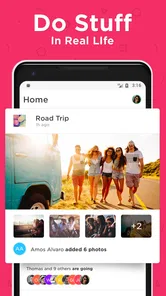
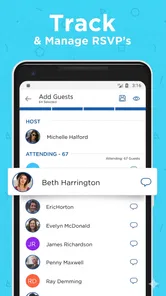
Beyond just making invites, Hobnob also helps you manage your events. You can track RSVPs effortlessly, send reminders to guests, and even communicate with them directly through the app. It’s like having your own event assistant, minus the cost!
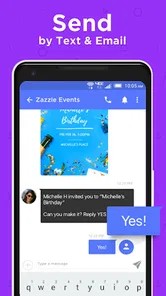
One feature that stands out is the ability to create private event pages. This is particularly handy if you’re organizing a more exclusive affair and want to keep details under wraps. Plus, you can share these pages via text or email, which is super convenient.
Passing the invitation along
The handoff matters as much as the card itself. A host can prepare a clear invite, but guests still need to notice it, understand what is being asked, and know how to respond. Text and email are familiar ways to share an event page, though a recipient may overlook a message in a busy inbox or conversation. I would choose the channel my guests actually check, rather than assuming a neatly designed invitation guarantees attention.
For a family celebration, I might send the invitation directly to each household so the right person can coordinate the reply. For a group of friends who already plan things in a chat, I would share the same event information there too, taking care not to create competing versions. If the time changes, the useful habit is to make the updated details unmistakable wherever guests are likely to look. The app can keep planning information together, but the host still has to manage those human handoffs.
Keeping replies useful
The real benefit of RSVP tracking is not just seeing who answered; it is having a clearer basis for decisions like how much food to prepare. I would set a reply deadline in the invitation text when the headcount matters, then send a reminder only to the people who have not responded if that fits the situation. For a relaxed drop-in, a firm deadline may feel unnecessary, so I would keep the wording light and avoid treating every maybe as a final count.
There is also a handoff to consider: guests need to notice the message, understand the invitation, and reply in a way I can act on. Sharing by text or email makes that familiar, but it still depends on recipients checking the channel and responding. For a group that coordinates mostly in a chat, I might share the invite there as well, while keeping the event details consistent so nobody ends up with an old time or address.
A realistic evening-planning workflow
Imagine I am hosting a birthday dinner at home and need to decide how many places to set. I would draft the event details, choose a template that suits the mood, and include the address and the time guests should arrive. Before sending it, I would check the card on its own for readability, then make sure the event page contains only the information guests need. I would ask for replies by a sensible point because the number attending affects food, rather than sending a vague invitation and trying to count reactions later.
After sharing, I would use the RSVP view to see where the headcount stands and send a reminder when it would genuinely help. A guest who has not replied may have missed the message, so a short, friendly nudge is more useful than assuming silence means no. If someone asks a practical question, I would keep the answer consistent with the invitation so details do not drift between channels. The outcome is not that every planning task disappears; it is that the invitation and responses have a clearer place in the process.
Where this approach fits—and where it does not
I see Hobnob as a good fit for someone who wants a designed invitation and a tidier way to handle responses without turning a small event into a full planning project. It is especially useful when guests are spread across different conversations or when the host expects several replies and reminders. If everyone already uses one group chat and the gathering is informal, a plain message may be quicker. And if the event needs complex schedules, ticketing, or detailed coordination, I would choose a tool made for those needs rather than expecting an invitation app to cover everything.
Compared with making a card in a general design app, Hobnob’s appeal is the connection between the invitation and the event response process. A design tool may give someone more freedom to build a visual layout, but the host then has to handle replies elsewhere. A group chat is fast and familiar, yet important details can disappear under later messages. Hobnob sits between those options: it keeps the invitation more purposeful than a casual chat note, without being the right answer for every kind of event.
It is also worth considering guests who are less comfortable with event pages or who prefer to answer by speaking directly to the host. I would not make the app the only route for essential information if I know some invitees may miss digital messages. A quick personal follow-up can be the better handoff for them. That does not undermine the value of RSVP tracking; it simply recognizes that an organized tool still has to fit the people being invited.
Cost, compatibility, and a sensible first try
The app is free to start, while in-app purchases range from $3.99 to $284.99 per item, so I would check what a paid option covers before committing. It has a 4.6 average from 6.1K ratings, with 2.2K written reviews and over 500K installs. Hobnob Events released it on June 22, 2016; version 4.3.15 supports Android 7.0 and later, and the content rating is Everyone. Those details make it approachable for a broad audience, but I would still make the invitation and confirm the sharing flow before relying on it for an event with tight deadlines.
My low-pressure way to evaluate it would be to prepare an invitation for a small, uncomplicated gathering before using it for something with many moving parts. That gives me a chance to see whether the templates suit my taste, whether the sharing method works for my guests, and whether tracking responses feels easier than my usual approach. I would also look carefully at any purchase prompt and decide whether the particular paid option solves a real need for me. The wide range in item prices makes checking the individual offering more sensible than assuming every extra has the same cost or purpose.
When another approach is the better choice
I would skip Hobnob if my main goal were to create a highly customized graphic and I did not need RSVP handling; a dedicated design app may be a better fit for that job. I would also look elsewhere for a gathering that depends on ticket sales, multiple timed activities, or detailed coordination among organizers. For a spontaneous coffee or a last-minute dinner with a few friends, a direct text is probably the least fussy option. Hobnob makes most sense when the invitation itself and the response follow-up are both worth organizing.
Even for a suitable event, there is a little host work left to do: decide which details are appropriate to share, keep the event information accurate, and follow up with people who have not answered when the count matters. Templates can make a card attractive, but they cannot make a vague location clear or guarantee a guest sees a message. I would treat the app as a helpful structure for the invitation workflow, not as an automatic event planner that takes responsibility away from me.
Why You Should Try Hobnob
If you’re still on the fence about trying out Hobnob, consider this: it saves you time, reduces stress, and adds a personal touch to your events. Plus, it’s free to use, although they do offer premium features if you’re looking for something extra.
In a world where everything is moving towards digital, having an app like Hobnob makes so much sense. It brings ease to event planning, keeps everything organized, and most importantly, ensures your guests receive a warm, personalized invitation.
So, next time you’re planning an event, big or small, give Hobnob a whirl. I promise you won’t regret it!
ZEvents Invite Maker Hobnob Frequently Asked Questions
What kinds of events can I create invitations for with Hobnob?
Hobnob is suited to a range of occasions, including birthday parties, weddings, graduations, and baby showers. Its focus on digital invitations makes it a practical option when you want to invite people without relying on printed cards. You can choose an occasion, prepare an invitation, and share it with guests from your device.
What is Hobnob and how can it help me create invitation cards?
Hobnob is a user-friendly invitation card maker app designed for creating beautifully crafted invitations for any occasion. It offers a variety of customizable templates, allowing you to personalize designs with your own images, texts, and themes. Whether you're planning a birthday party, wedding, or any special event, Hobnob simplifies the process of sending elegant digital invitations directly from your device.
Is Hobnob available for both Android and iOS devices?
Yes, Hobnob is available for both Android and iOS platforms, making it accessible to a wide range of users. You can download it from the Google Play Store for Android devices or the Apple App Store for iOS devices. This cross-platform availability ensures you can create and send invitations regardless of your device preference.
Can I send invitations via text and email using Hobnob?
Absolutely! Hobnob allows you to send your customized invitations through various channels, including text messages and email. This flexibility ensures that you can reach your guests easily, regardless of their preferred communication method. You can also track RSVPs directly through the app, making event planning more efficient.
Does Hobnob offer any free features, or is it a paid app?
Hobnob provides both free and premium features. While you can access a selection of basic templates and tools for free, there are advanced features and premium templates available via in-app purchases. This tiered approach allows users to choose the level of customization they need without any upfront cost, making it accessible to everyone.
Pros
- Intuitive design for easy use
- Customizable templates available
- No design skills required
- Share invites via multiple platforms
- Wide range of themes
Cons
- Limited free features
- In-app purchases necessary
- Occasional app crashes
- Limited customer support
- Requires constant internet