

Hilton Honors: Book Hotels
- 59.15K
- 4.4
- Installs
- 10.00M
- Price
- Free

Screenshots

Analysis by Reviewed
I tend to judge a hotel app less by the excitement of its first search than by whether it remains useful once a trip is booked. Hilton Honors: Book Hotels is most compelling when Hilton is already part of your travel routine: it brings reservations, loyalty activity, hotel offers, and a phone-based room key into one place. For a one-off stay, its value is more modest, but regular guests may find that having those tasks together saves small amounts of effort every time they travel.
The first week: useful tools, with a learning curve
On first use, the appeal is easy to understand. You can search for a stay, check available offers, and keep the booking close at hand instead of switching between a hotel website, email confirmations, and a separate rewards page. The app is free, rated for Everyone, and developed by Hilton, so it is clearly aimed at travelers who expect to book within that hotel group rather than compare every property on the market.
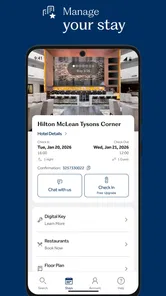
A practical tip is to use the app before you start a trip, not just when you arrive. Reviewing your reservation details in advance gives you a chance to spot a date or location mistake while there is still time to address it. If a Digital Key is available for your stay, it can also make arrival simpler; I would still keep the booking information accessible and follow the hotel’s check-in instructions rather than assume a phone key replaces every part of arrival.
A Seamless Booking Experience
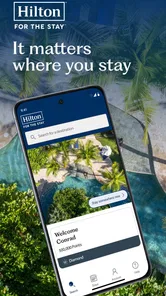
Starting with the basics, the Hilton Honors: Book Hotels app is available for both Android and iOS, which means it's got you covered regardless of your device preference. The interface is sleek and intuitive, which is a big win in my book. The minute you open the app, you're greeted with an easy-to-navigate home screen that showcases all the necessary features without overwhelming you.
Features That Stand Out
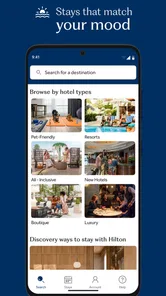
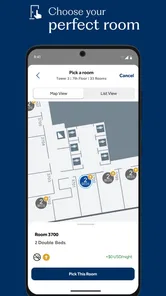
One of the standout features of this app is the ability to book rooms at over 6,000 hotels worldwide. That's a lot of options! Whether you're planning a luxurious getaway or a quick business trip, there's something for everyone. Plus, the app allows you to filter your search based on location, price range, and amenities, making it easier to find your perfect stay.
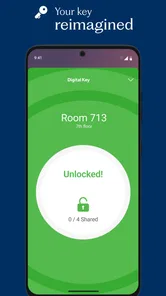
Another cool feature is the digital key option. No more fumbling around with keycards—just use your phone to unlock your room. This feature alone is worth checking out, especially if you're someone who tends to misplace things easily.
Points, Perks, and More
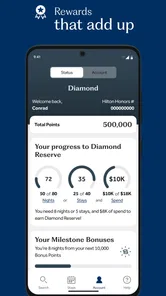
If you're part of the Hilton Honors loyalty program, the app is a treasure trove of perks. You can easily track your points and see how close you are to your next reward night. The app also keeps you updated on exclusive member discounts and promotions, ensuring you're always in the loop.
More From Our News Desk

 Prime Video
Switching to Prime Video: What Changes in Your Viewing Routine
Prime Video can make a compelling second home for streaming, but switching means learning a different catalog, rental layer, and route from browsing to playback.

 Universal TV Remote Control
Universal TV Remote Control Works Best as a Reliable Backup
A phone remote earns its place through quick setup and reliable habits. Here is how to get more from Universal TV Remote Control—and where its limits show.

 Weather - By Xiaomi
Weather by Xiaomi Review: Clear at a Glance, Less Clear Up Close
Xiaomi’s weather app makes everyday forecasts quick to scan, but its calm surface can leave useful details and recovery paths harder to find than they should be.

 X
XX Under Pressure: Can It Recover When Posting Goes Wrong?
A resilience-focused review of X, examining setup, mistaken posts, interruptions, weak connections, and the gaps that matter when recovery needs to be dependable.

 Clash of Clans
Clash of Clans Is Won Between the Battles
Its raids are quick; its community is a long-term project of coordination, teaching, rivalry, and shared responsibility—with all the friction that entails.

 Android Auto
Android Auto Makes the Case for Quieter Car Software
The car interface is no longer judged by how much it can do, but by how quietly it helps. Android Auto shows what drivers now expect—and what still gets in the way.
Latest News



Booking through the app can also earn you extra points, which is a nice touch. It's like getting rewarded just for planning your next adventure. Who doesn't love that?
Putting it to work on a real trip
Imagine arranging a work stay during a busy week: you can search ahead, compare the available choices for your destination, then keep the reservation and loyalty details together while you travel. If plans shift, having the booking readily available is more convenient than digging through an inbox. For a family trip, the same routine can help you confirm the hotel and room details before setting off, though I would still compare the total stay cost and practical location against other options before committing.
This is where the app differs from a general travel-booking service. A broader service can be better when your main goal is to compare many hotel groups in one search. Hilton Honors makes more sense when you have already narrowed your choice to Hilton: its advantage is the connection to your Honors account and Digital Key, not a neutral overview of the entire lodging market. I would use both approaches when destination, budget, or hotel brand is still undecided.
Month-to-month value depends on your habits
The app is likely to earn a lasting place on your phone if you stay with Hilton often enough to care about your account and rewards progress. A useful habit is to check offers while planning, then review the reservation and points activity after booking, rather than opening the app only at check-in. That makes it easier to keep track of the trip without turning loyalty tracking into another daily chore.
Hilton Honors has an average rating of 4.5 from around 165,000 ratings, and it has been installed over 10 million times. Those figures suggest broad adoption, but they do not guarantee that it suits every traveler. Its current version is 2025.11.11, and it requires Android 11 or later; that matters if you are deciding whether an older phone can run it. The app first appeared on May 12, 2014, and the long-running service is a better fit for repeat use than for someone who books a hotel only once in a while.
Making the routine work for you
A useful way to judge whether the app is worth keeping is to notice what you actually return to between trips. If you regularly check upcoming reservations, offers, or points, the account has a practical role even when you are not traveling. If you only open it once to make a booking and then forget it, the benefit may be limited to having the confirmation in one more place. I would not keep notifications or loyalty checks as a habit just because the app makes them available; use the parts that solve a real planning problem for you.
For a traveler with several stays to coordinate, the app can serve as a Hilton-specific home base. Before leaving, I would open each reservation and verify the property, dates, and details rather than assume that seeing a booking card is enough. That small check is especially useful when arranging separate stays for a work trip or combining a hotel night with a longer holiday. It helps prevent a common planning mistake: remembering the destination correctly but overlooking which night belongs to which reservation.
When another approach is better
There is a meaningful trade-off between convenience and breadth. A general travel service is usually the stronger first stop if you are still weighing several hotel groups, need a wide view of available lodging, or do not have a preferred brand. Once you decide on a Hilton property, the Hilton app becomes more relevant because the reservation and Honors account sit together. I see these tools as complementary rather than competing: compare broadly first, then use the hotel’s own app when its account-specific features matter.
That distinction matters for occasional travelers too. If you choose hotels mainly by location, accessibility, or the lowest suitable total cost, loyalty points should be a secondary consideration. A slightly better points outcome is not necessarily a better trip if it means a longer commute or a property that does not suit your needs. The app helps you manage a Hilton choice; it cannot make that choice the right one for every itinerary.
Where the routine can get tiring
The main trade-off is the brand focus. If you regularly choose whichever hotel has the best location or price, maintaining a Hilton-centered account may offer little practical benefit. Rewards are only useful when your travel choices naturally lead to stays where you can use them. I would not let the promise of points outweigh a more convenient property or a better-fitting booking elsewhere.
There is also a small but important arrival-day consideration: a Digital Key depends on your phone being available and usable. I would not treat it as a reason to leave every other check-in detail behind. Keep your reservation information handy, and be prepared to follow the property’s normal arrival process if using the phone key is not convenient. That backup-minded approach keeps a helpful shortcut from becoming a source of stress.
Maintenance without making travel another task
The maintenance burden is low if you keep the app for occasional planning and use it when you have an actual Hilton stay. The more relevant effort is keeping your account and reservation details organized, then checking the booking before travel. I would avoid turning points monitoring into a constant background activity: it is more useful to review progress when choosing a hotel or planning a future stay, when it can inform a decision.
There is also a practical phone question: will the app run on the device you intend to travel with? The minimum Android requirement is version 11, so an older Android phone may be a reason to rely on another way to access booking details. If your phone is compatible, I would still make sure you can retrieve the reservation information without depending entirely on a Digital Key. That is sensible preparation, not a criticism of the feature.
Room for Improvement
Of course, no app is perfect, and there are a few areas where the Hilton Honors app could improve. For instance, while the app is generally fast, there are times when it lags, particularly when loading images. It's not a deal-breaker, but something to be aware of if you're in a hurry.
Additionally, while the app offers a lot of features, some users might find the plethora of options a bit overwhelming at first. A more streamlined onboarding process might help new users get acquainted with the app more quickly.
Who will keep using it?
I would recommend it most to people who already book Hilton stays more than occasionally and want one place for reservations and Honors activity. It also suits travelers who value a phone-based key when it is available and appreciate checking member offers during the planning process. A business traveler who returns to the same hotel group may get more lasting value from the account than someone who books a single leisure stay every few years.
I would skip it as a primary booking tool if your hotel choices change from trip to trip and you want to compare the whole market before deciding. You can still install it for a specific Hilton reservation, but its loyalty features are less compelling if you rarely return to the brand. The same applies if you do not want to maintain another account or would rather keep all travel planning in a general booking service.
Does it deserve a place on your phone?
For someone who books Hilton stays repeatedly, I think it does: the combination of booking access, account tracking, offers, and a Digital Key can make the same travel routine easier to manage over time. If you are loyal to no particular hotel group, or prefer to compare every available brand before each trip, a broad booking app may be the better everyday starting point, with Hilton Honors reserved for when you choose a Hilton property.
In conclusion, the Hilton Honors: Book Hotels app is a solid choice for anyone looking to make their hotel booking process easier and more rewarding. With its range of features and seamless integration with the Hilton Honors program, it’s a must-have for frequent travelers. Give it a try and see how it fits into your travel routine. Happy travels!
Hilton Honors: Book Hotels Frequently Asked Questions
Can I install Hilton Honors: Book Hotels on both Android and iOS?
Hilton Honors: Book Hotels is available as a mobile app for Android and iOS users. Before downloading, check that your device meets the operating-system requirement; the listed minimum is iOS 11. The app is free to download and is rated for Everyone. It is developed by Hilton and is intended for travelers who want to manage Hilton stays from a phone.
Is Hilton Honors: Book Hotels free to download, and which devices can run it?
Hilton Honors: Book Hotels is free to download and is intended for people who want to plan and manage Hilton stays from a mobile device. It requires iOS 11 or later, so it is worth checking your device’s operating system before installing. The app is rated for Everyone, and Hilton is its developer.
What is Hilton Honors: Book Hotels app used for?
Hilton Honors: Book Hotels is a mobile app designed to provide a seamless hotel booking experience for users. It allows members to find, book, and manage their stays at Hilton properties worldwide. Users can also explore hotel amenities, view real-time pricing, and access exclusive member discounts, making travel planning convenient and efficient.
How do I join the Hilton Honors program through the app?
Joining the Hilton Honors program through the app is straightforward. Users can download the app, create an account by providing personal details, and then enroll in the Hilton Honors program. Membership is free and offers various benefits, such as earning points for every stay, which can be redeemed for free nights, room upgrades, and more.
Can I use the app to check-in and access my hotel room?
Yes, the Hilton Honors app offers a Digital Key feature that allows users to check-in online and access their hotel rooms using their smartphones. Once checked in, users can skip the front desk and go directly to their rooms, unlocking their doors with the app, providing a seamless and contactless hotel experience.
Pros
- Easy booking process for hotels.
- Access to exclusive member discounts.
- Earn points for each stay.
- User-friendly interface.
- 24/7 customer support available.
Cons
- Limited to Hilton properties only.
- Requires internet for most features.
- Occasional app crashes.
- Loyalty points may expire.
- Limited customization options.











