Heat Safety: Heat Index & WBGT
- 47.00
- 4.7
- Installs
- 10.00K
- Price
- Free

Screenshots
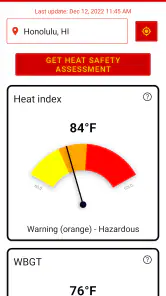
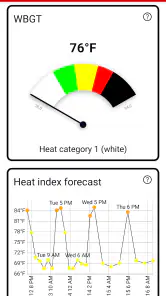
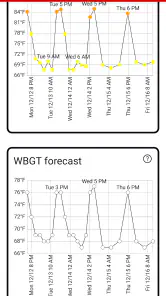
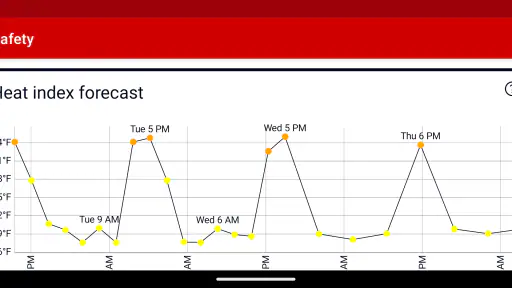
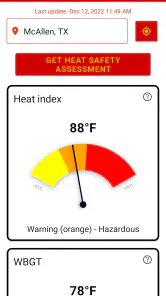
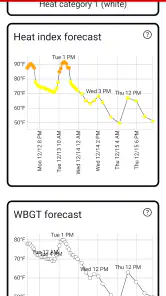
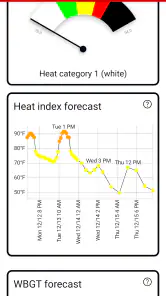
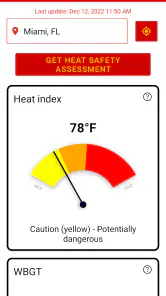
Analysis by Reviewed
Heat Safety: Heat Index & WBGT is a weather app with a narrower purpose than the usual forecast tools: helping me judge whether outdoor conditions may be unsafe for work or strenuous activity. Developed by Qvyshift LLC, it focuses on heat index, wet bulb temperature, and forecasts rather than trying to become an all-purpose weather dashboard. That focus is its main appeal. If I am planning a shift outside, checking conditions for exercise, or deciding whether a hot afternoon needs extra caution, the app gives me a more relevant starting point than a simple temperature reading.
I also appreciate that it is free to install and rated for Everyone, which makes it easy to try without a financial commitment. Its average rating is 4.7 from over 300 ratings, and the app has passed the 10K-install mark. Those figures suggest a modest but engaged audience rather than a mass-market weather service. The current version is 3.2.4 and runs on Android 8.0 or later, while optional in-app purchases range from $0.99 to $5.99 per item. I would treat those purchases as something to inspect before relying on the app regularly, especially if I only need occasional heat checks.
Readable information for a fast safety decision
My first impression is that the concept is easier to understand than many technical heat tools. Instead of making me interpret a long weather report, it puts attention on measures that relate more directly to how heat can affect the body. The heat index helps communicate how hot conditions may feel when humidity is involved, while wet bulb temperature is useful for understanding the combined burden of heat and moisture. That distinction matters because a dry, hot day and a humid, slightly cooler day can create very different risks.
The app’s strongest readability choice is its subject matter. It does not bury the reason for opening it under unrelated weather features. Someone who already knows that outdoor heat safety depends on more than the air temperature can get to the relevant information quickly. Someone who does not know the terms may need a little time to understand them, but the focused layout gives the learning process a clear direction.
For me, the most useful habit would be to open the forecast before leaving for an outdoor task, then compare the expected conditions with the work I actually intend to do. A short walk, slow gardening, roofing, road work, and competitive sport do not place the same demands on the body. The app can inform that decision, but it cannot make the decision for me. That is an important boundary: these measurements are guidance, not a personal medical assessment.
Navigation is likely to feel most comfortable for people who prefer a compact tool over a feature-heavy weather application. There are fewer competing subjects to scan, and the heat-safety purpose gives each screen a practical context. On the other hand, users who expect radar, detailed hourly precipitation, air-quality layers, or a broad collection of weather maps may find the experience limited. I would use this alongside a conventional forecast app rather than automatically replacing one.
Why the terminology deserves attention
The words “heat index” and “wet bulb temperature” are not interchangeable, and that is one of the first things a responsible user should understand. Heat index is commonly used to express the effect of humidity on perceived heat. Wet bulb temperature is a different way of examining heat and moisture together, and it becomes especially meaningful when the body’s ability to cool through evaporation is reduced. Looking at both can prevent the overly simple habit of asking only, “What is the temperature?”
More From Our News Desk

Weather by Xiaomi Review: Clear at a Glance, Less Clear Up Close

X Under Pressure: Can It Recover When Posting Goes Wrong?

Clash of Clans Is Won Between the Battles

Android Auto Makes the Case for Quieter Car Software

MobiOffice: Transforming Mobile Productivity with Seamless Integration

EA SPORTS FC™ Mobile Soccer: Redefining Mobile Sports Gaming
This is also where the app may be less immediately accessible to people who have difficulty processing technical language. A clear number is not automatically a clear instruction. If I were introducing the app to a new worker, older relative, or young athlete, I would explain the terms in plain language before asking them to use the readings independently. The tool becomes more inclusive when the person using it understands what each measure is intended to tell them.
Motor, visual, and sensory considerations
From an interaction standpoint, a weather app for quick checks should not demand elaborate gestures or precise timing. Heat Safety: Heat Index & WBGT is best suited to a simple routine: open it, locate the relevant forecast, read the conditions, and decide what to change. That workflow is naturally friendlier to people who have limited dexterity than an interface built around repeated swipes across dense charts. Still, I would not assume that every user will find the controls equally comfortable, because the experience depends on screen size, system text settings, and how much information is presented at once.
Users with low vision may benefit from the app’s focused subject, since fewer unrelated cards can mean less visual searching. The practical test is whether the important heat readings remain understandable when text is enlarged or when the phone is viewed outdoors in glare. Bright sunlight is itself part of the use case, and a display that is technically readable indoors may be difficult to use during a midday job. I would check the app in the actual environment where it will matter, not only from a sofa under ideal lighting.
For users with color-vision differences, I would be cautious about relying on color alone to communicate danger. Heat-safety tools often use visual levels, but a safe decision should remain possible from text and numerical context rather than from red, orange, or yellow shading by itself. I cannot recommend treating a color boundary as a complete explanation. Reading the value, checking the forecast period, and applying common-sense precautions is a stronger workflow.
People with hearing loss should find the core concept suitable because the important information is visual rather than dependent on spoken alerts. Conversely, people who rely on screen readers or other assistive technology should test the labels and reading order on their own device before making the app part of a workplace safety process. I would not claim a formal accessibility certification for it. The fair conclusion is that its narrow purpose may reduce cognitive clutter, while the exact usability of its controls and labels still needs to be judged by the individual.
There is another sensory issue that is easy to overlook: heat itself makes phone use harder. Sweaty hands, gloves, dust, glare, and the need to check the screen briefly between tasks all affect access. A worker with reduced grip strength may prefer to prepare the forecast before starting rather than operate the phone repeatedly on site. That small change turns the app from a tool requiring constant interaction into a planning aid.
Using the app in real outdoor situations
A realistic example would be a person preparing for a long afternoon of landscaping. Rather than checking only the ordinary temperature, I would open the app in the morning and look at the heat-related forecast for the hours when the work is scheduled. If the conditions are becoming more demanding later in the day, I might move heavy tasks earlier, add more breaks, arrange shade, carry more water, and make sure a coworker knows what signs of heat illness to watch for. The app does not perform those actions, but it can make the planning conversation more concrete.
The same approach works for a coach organizing outdoor practice. The relevant question is not simply whether practice can happen, but whether intensity, duration, clothing, rest periods, and supervision should change. A heat index reading may be easier to explain to families, while wet bulb temperature can encourage a more careful discussion of humidity and the body’s cooling limits. I would avoid turning either number into a rigid universal rule without considering local guidance and the people involved.
For a delivery driver, construction worker, festival volunteer, or street vendor, the forecast can be useful before leaving home because the person may not have time to study conditions once the shift begins. For a runner or cyclist, it can help compare the planned route and timing with the expected heat burden. In each case, the most valuable workflow is anticipatory: check early, adjust the plan, and keep monitoring how people actually feel.
That last point is essential. A person can become ill even when a reading does not look extreme, particularly if they are unacclimatized, dehydrated, ill, taking certain medicines, or working unusually hard. Older adults, children, and people with some medical conditions may need a more conservative approach. I would never use this app to overrule symptoms. Confusion, faintness, unusual weakness, nausea, severe headache, or other warning signs call for immediate action and appropriate medical help, regardless of what the screen says.
How it fits beside ordinary weather apps
Compared with a standard weather app, this one is more specialized and potentially more useful for heat planning. A conventional forecast usually gives temperature, humidity, wind, and precipitation, leaving me to combine those pieces mentally. Heat Safety: Heat Index & WBGT puts the heat-safety question closer to the front. That saves interpretation time when the main concern is outdoor exposure rather than whether it will rain.
The trade-off is breadth. If I need a detailed storm track, a week of general weather, sunrise information, or a broad travel forecast, a mainstream weather service will probably be the better primary app. I would keep the ordinary forecast for logistics and use this tool for the heat-specific layer. That combination is more practical than expecting a specialist app to handle every weather decision.
It also differs from relying on a thermometer alone. A thermometer can tell me the air temperature at one location, but it does not by itself express how humidity changes the body’s cooling challenge. The app’s value is therefore not just another temperature display. It encourages a more complete question: how stressful might these conditions be for outdoor work, and what should I change because of that?
Where access and clarity still have limits
The biggest barrier is that useful information still requires interpretation. A person who wants a single instruction such as “safe” or “unsafe” may be frustrated, because heat risk depends on exertion, exposure time, clothing, shade, hydration, acclimatization, and individual health. That complexity is real, but it means the app is not a substitute for workplace procedures, local heat guidance, or informed supervision.
Another limitation is dependence on the phone as a viewing device. Small screens, glare, low battery, poor connectivity, and gloves can all make a quick check less convenient. I would download and inspect the forecast before entering a remote work area, and I would avoid making the app the only communication method for a team. A shared plan and a human check-in remain more reliable than assuming every worker will consult the same screen.
People who need highly customized accessibility settings should evaluate it personally before recommending it across a group. The app’s focused topic may reduce mental overload, but that does not guarantee ideal contrast, text scaling, screen-reader labeling, or touch targets on every phone. A good practical test is to ask the intended user to complete the whole task without assistance: find the forecast, identify the relevant measure, and explain what action they would take. If that fails, the problem is not solved merely because the numbers are present.
The optional purchase model may also create a small point of friction. The app is free to start, but individual in-app items cost between $0.99 and $5.99. I would check exactly what is included before paying, especially if I am choosing it for a family, volunteer group, or workplace. A specialist tool can be worthwhile, but its value depends on whether the paid elements support the specific workflow I need rather than simply adding information I will not use.
Finally, the app is not the right choice for someone seeking a full emergency-management system. It can support awareness and planning, but it does not replace trained supervision, water and shade arrangements, rest policies, first-aid knowledge, or a clear response plan. Its best role is as one accessible point of information within a larger safety routine.
My inclusive verdict on Heat Safety: Heat Index & WBGT
I see Heat Safety: Heat Index & WBGT as a focused Android weather companion for people who spend meaningful time outdoors. Its emphasis on heat index, wet bulb temperature, and forecasts makes it more relevant to outdoor work safety than a basic temperature widget. The app can help me notice risks earlier, explain why humidity matters, and make practical changes to timing, effort, breaks, and supervision.
Its accessibility story is strongest in its purpose. A narrow, safety-oriented tool can be easier to approach than a crowded weather platform, and the free entry point makes testing straightforward. The Everyone rating also makes it suitable to consider for a broad audience. Still, I would judge visual clarity, touch comfort, assistive-technology behavior, and terminology comprehension on the actual device and with the actual user. Focused information is helpful, but inclusive access depends on whether the person can turn that information into a decision.
I would recommend it to outdoor workers, coaches, event organizers, gardeners, runners, and families who want a clearer heat-specific check before activity. I would skip it if I only need rain alerts or a complete general forecast, or if I want the app alone to determine whether an activity is medically safe. For me, the sensible setup is to pair it with ordinary weather information and a human safety plan. Used that way, it offers a practical layer of context without pretending that one reading can describe every person’s risk.
Heat Safety: Heat Index & WBGT Frequently Asked Questions
Is Heat Safety: Heat Index & WBGT free to download?
Heat Safety: Heat Index & WBGT is a free weather app from Qvyshift LLC. It also offers in-app purchases, so some options may involve an additional cost. The app is rated for Everyone and is available for devices running Android 8.0 or later. Check the app store on your device for the current download and purchase details before installing.
What information does Heat Safety: Heat Index & WBGT provide?
The app focuses on heat index, wet bulb temperature, and forecasts for outdoor work safety. These readings can help you consider how hot conditions may feel and how much heat stress outdoor activities could involve. It is designed as a practical weather reference, so it can complement your planning, but it should not be your only source when making decisions about heat exposure.
What is Heat Safety: Heat Index & WBGT used for?
Heat Safety: Heat Index & WBGT is designed to help users understand how hot conditions may feel and how stressful the environment can be for the body. It provides heat index and Wet Bulb Globe Temperature information, which can be useful for outdoor workers, athletes, hikers, travelers, and anyone planning activities during hot weather. It should support, not replace, official weather warnings or medical advice.
What is the difference between the Heat Index and WBGT?
The Heat Index estimates how hot the air feels by combining temperature and humidity, mainly for shaded conditions. WBGT is a broader heat-stress measurement that can account for humidity, radiant heat from the sun, and wind, making it particularly relevant for exercise, sports, military activities, and outdoor work. Because the two values describe different conditions, users should interpret each according to their situation.
Does the app provide accurate, real-time heat safety information?
The usefulness and accuracy of the information depend on the weather data, location settings, sensor readings, and permissions available on your device. Results may vary between regions and may not reflect sudden changes in shade, wind, sun exposure, clothing, or physical exertion. Before making safety decisions, compare the app’s readings with local forecasts, official heat advisories, and conditions observed at your location.
Pros
- Combines heat index and WBGT readings for broader risk awareness.
- Clear color-coded warnings make dangerous conditions easy to spot.
- Useful for outdoor workers
- athletes
- hikers
- and event organizers.
- Supports practical decisions about breaks
- hydration
- and activity levels.
- Compact design makes key heat information quick to check.]
- contras:[
- Accuracy depends heavily on reliable location and weather data.
- WBGT readings may be unavailable or limited in some regions.
- Some users may find the technical heat metrics difficult at first.
- Forecast conditions can change faster than the app’s displayed data.
- It is an advisory tool
- not a substitute for medical or safety guidance.
Cons
- Accuracy depends heavily on reliable location and weather data.
- WBGT readings may be unavailable or limited in some regions.
- Some users may find the technical heat metrics difficult at first.
- Forecast conditions can change faster than the app’s displayed data.
- It is an advisory tool
- not a substitute for medical or safety guidance.
- Category
- Weather
- Version
- 3.2.4











