

Hear Clear: Hear from Distance
- 321.00
- 4.1
- Installs
- 500.00K
- Price
- Free

Screenshots
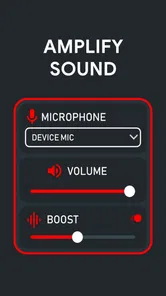
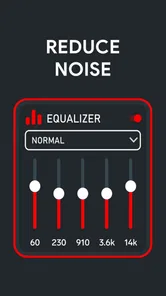
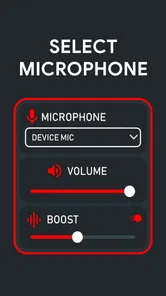
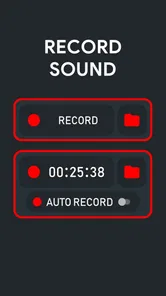
Analysis by Reviewed
I approached Hear Clear: Hear from Distance as a practical medical utility rather than a replacement for professional hearing equipment. Its purpose is easy to understand: use an Android phone as an aid for hearing conversations and nearby sounds more clearly. In my experience, that makes it most interesting as an occasional listening tool, especially when I am dealing with a quiet room, a soft-spoken person, or a conversation where moving closer is awkward.
The app is free to install, which lowers the barrier to trying it. It comes from Bizcraft Apps and sits in the Medical category, with an Everyone age rating. Its public reception is reasonably positive, with a 4.1 average from around 21 thousand ratings, while the app has passed half a million installs. Those figures suggest that many people are willing to test this kind of phone-based hearing solution, but they should not be confused with proof that it will work equally well for every hearing problem.
My main conclusion is cautious but useful: this can be worth trying for short, everyday situations, yet I would not rely on it for safety-critical listening, medical diagnosis, or a substitute for a properly fitted hearing aid. The difference matters. A phone can amplify or process sound, but hearing loss has many causes, and louder sound is not always clearer sound.
What the app is really useful for
The strongest use case is a simple one: placing the phone near the sound source and listening through connected audio equipment. That could help when someone is speaking from a short distance, when a television is difficult to follow, or when background noise makes a conversation tiring. The exact benefit depends heavily on the phone microphone, the listening device, the room, and the type of hearing difficulty involved.
I would think of it as a temporary bridge. If I forgot my usual hearing device, wanted to test whether amplification might help, or needed a little assistance during a quiet conversation, an app like this could be convenient. It is also less conspicuous than asking someone to repeat every sentence, although using a phone in the middle of a conversation can create its own social awkwardness.
The distance claim needs a realistic interpretation. A phone microphone does not magically make a faraway speaker sound as though they are standing beside me. Distance introduces room reflections, competing voices, handling noise, and microphone limitations. The farther the phone is from the person speaking, the more important its placement becomes. A phone resting on a table between several people may capture everyone, but that is not the same as isolating the person I want to hear.
For a one-to-one conversation, I would place the phone close to the speaker without covering the microphone. I would avoid putting it inside a pocket or under clothing, since that can muffle speech and add rubbing sounds. If the app is being used with headphones, I would begin at a low volume and raise it slowly. This is not just a comfort tip: excessive volume can make listening unpleasant and may put hearing at further risk.
More From Our News Desk

 Gmail
GmailGmail in a Busy Inbox: Who Benefits Most?
From first account to crowded workday, Gmail earns its place through dependable search and flexible sorting—but its best fit depends on how much inbox maintenance you can tolerate.

 Prime Video
Switching to Prime Video: What Changes in Your Viewing Routine
Prime Video can make a compelling second home for streaming, but switching means learning a different catalog, rental layer, and route from browsing to playback.

 Universal TV Remote Control
Universal TV Remote Control Works Best as a Reliable Backup
A phone remote earns its place through quick setup and reliable habits. Here is how to get more from Universal TV Remote Control—and where its limits show.

 Weather - By Xiaomi
Weather by Xiaomi Review: Clear at a Glance, Less Clear Up Close
Xiaomi’s weather app makes everyday forecasts quick to scan, but its calm surface can leave useful details and recovery paths harder to find than they should be.

 X
XX Under Pressure: Can It Recover When Posting Goes Wrong?
A resilience-focused review of X, examining setup, mistaken posts, interruptions, weak connections, and the gaps that matter when recovery needs to be dependable.

 Clash of Clans
Clash of Clans Is Won Between the Battles
Its raids are quick; its community is a long-term project of coordination, teaching, rivalry, and shared responsibility—with all the friction that entails.
Latest News



A realistic everyday test
Imagine sitting across from a family member in a quiet kitchen while they speak softly. I could place the phone on the table with its microphone facing them, start the app, and listen through headphones. That setup gives the phone a better chance of capturing speech than holding it loosely at my side. If the room becomes busy, several people start talking, or dishes are clattering, the result may become much less useful.
That scenario also shows why I would test the app before depending on it. I would compare normal listening with assisted listening, check whether speech becomes clearer rather than merely louder, and make sure I can stop the audio quickly. A few minutes of testing at home can reveal whether the phone and headphones introduce delay, uncomfortable volume, or distracting noise for me.
Another practical use is listening to a television in a quiet room without increasing the television volume for everyone else. However, the phone must be positioned where it can capture the television clearly, and the result can vary with room acoustics. If the phone is too close to the television speaker, the sound may be harsh; if it is too far away, voices may blend with other room noise.
Where it should not be trusted
I would not use this kind of app while crossing a road, cycling, operating machinery, or handling any situation where awareness of alarms and surrounding traffic is essential. Headphones and amplified audio can reduce awareness even when the app is working properly. I would also avoid relying on it during an emergency, a medical appointment where precise information matters, or an important public announcement.
It is equally unsuitable as a diagnostic tool. Difficulty hearing may come from earwax, infection, age-related changes, medication effects, noise exposure, or other conditions. An app cannot tell me why hearing is difficult. Sudden hearing loss, pain, discharge, dizziness, or a major change in one ear deserves medical attention rather than experimentation with amplification.
People with established hearing loss should also keep their expectations measured. A professionally fitted hearing aid can be adjusted to an individual hearing profile and may offer features designed around speech understanding, feedback control, and comfort. A general phone app cannot be assumed to provide that same level of personalization. For occasional convenience, that may be acceptable; for daily dependence, it is a serious limitation.
Trust, controls, and the moments that deserve care
Because this is a Medical app, I pay attention not only to whether it amplifies sound but also to how comfortable I feel using it. Any app that handles microphone input creates a sensitive moment: conversations, television audio, family discussions, and other sounds may pass through the phone while it is active. I would therefore read the permission prompts carefully and grant microphone access only when I intend to use the listening function.
I would not treat a permission request as a minor formality. Before tapping allow, I would check which access the phone presents, whether the permission can be denied, and whether it can later be revoked in Android settings. If the app cannot perform its central listening function without microphone access, that is understandable; it still does not mean I should grant unrelated access automatically.
The same caution applies to in-app purchases. The app is free, but optional purchases range from $0.99 to $99.99 per item. That is a wide span, so I would inspect each purchase screen rather than assuming every feature is included at no cost. I would also use the device’s purchase authentication and parental controls, particularly because the content rating is Everyone and the app may be used on a shared family phone.
I prefer to make a small, deliberate test before considering any purchase. First I would determine whether the basic listening experience is comfortable, whether it works with my phone and audio equipment, and whether it solves the particular problem I have. Paying for more options cannot fix a poor microphone position, an unsuitable headset, or hearing loss that needs professional treatment.
Data-sensitive situations in daily use
The most privacy-sensitive situation is not necessarily a formal medical discussion. It may be an ordinary conversation at home, in a waiting room, or in a workplace. If the phone is left listening after the conversation ends, it could capture sounds I did not intend to process. My habit would be to stop the app immediately after use, close it if appropriate, and review microphone access periodically.
I would also tell people nearby when I am using the phone as a listening aid. That is both considerate and practical. Someone may be uncomfortable speaking near an active microphone, and explaining the setup avoids the impression that I am recording secretly. The app’s purpose is listening assistance, but the presence of a microphone can still affect other people’s expectations.
I would avoid placing the phone in the middle of a confidential meeting unless everyone understands what it is doing. A hearing aid is normally worn as a personal device; a phone positioned on a table is more visible and may make others wonder whether audio is being stored or shared. I would not infer any particular data practice from the app’s category or its purpose. Instead, I would inspect the privacy information presented in the app and the operating system, then make a choice based on what I can see.
Android’s own controls are useful here. I can review which apps have microphone access, change permissions, and look for indicators that the microphone is active. I would use those controls as part of my normal routine rather than assuming that installing a medical utility means it should have permanent access. If I stop using the app, revoking its microphone permission is a sensible cleanup step.
How much control does the user have?
The most important form of agency is deciding when the app listens. I would start it only for a defined task, keep the phone positioned intentionally, and stop the session when the conversation ends. This approach makes the app easier to manage and reduces accidental exposure to background conversations.
Volume control deserves equal attention. I would begin quietly, increase in small steps, and lower the level if speech sounds sharp, distorted, or tiring. Louder is not automatically better. If a person has difficulty understanding speech even after amplification, continuing to raise the volume may create discomfort without improving comprehension.
I would also keep a backup plan. For an important appointment, I might ask the speaker to face me, request written information, bring a trusted person, or use a professional hearing device if I have one. The app should support communication, not become the only thing standing between me and information I cannot afford to misunderstand.
Device compatibility is another practical question. The current version is 2.1.2 and requires Android 8.0 or later, so an older phone may not be suitable. Even on a supported device, microphones and audio routing differ between models. Before using it outside the home, I would test whether sound comes through the intended headphones or speaker, whether the phone remains stable, and whether notifications interrupt the listening session.
How it compares with ordinary alternatives
Compared with simply turning up the television or asking someone to speak louder, a phone-based hearing app may offer a more personal way to adjust listening. It can be useful when other people in the room do not want the overall volume increased. It also avoids buying dedicated equipment immediately, which makes experimentation easier.
Compared with wired or wireless headphones connected directly to a television, the app adds flexibility but also adds another layer: the phone must capture the sound before I hear it. That can introduce placement problems, room noise, and possible delay. A direct television audio solution may be better for regular evening viewing, especially if the goal is consistent sound rather than occasional assistance.
Compared with a professional hearing aid, the trade-off is much clearer. This app is cheaper to try and uses hardware I may already own, but a fitted device is designed around my hearing needs and daily routine. If I need assistance every day, struggle in multiple environments, or keep increasing the volume, I would consider an audiology appointment instead of treating the app as a long-term replacement.
Compared with accessibility tools built into Android, this app may feel more focused on the hearing-assistance use case. Built-in features can be preferable when I want settings that are already integrated with the operating system, while a dedicated app may be more convenient if its workflow suits me. I would compare both on my own phone before paying for anything, because the best option is the one that gives clear speech with the least friction.
Who should try it, and who should skip it?
I think it is worth trying for Android users who want occasional help in quiet environments, understand that results will vary, and are comfortable managing microphone access. It may suit someone testing whether amplified listening helps before exploring more specialized options. It can also be useful for a family member who needs temporary assistance during a conversation, provided the setup is tested and everyone nearby is comfortable with the microphone being active.
I would skip it if I need dependable hearing support throughout the day, if I am looking for a diagnosis, or if my hearing changed suddenly. I would also skip it for hazardous activities and situations where missing an alarm or environmental sound could cause harm. People who dislike wearing headphones, experience strong feedback or discomfort, or need highly individualized sound processing may find a professional alternative more appropriate.
There is also a social trade-off. Holding a phone near another person can make conversation feel less natural, and wearing headphones may make it harder for others to know whether I am paying attention. A small dedicated hearing device can be less distracting in daily life. That does not make the app useless; it simply means convenience is not the same as seamlessness.
My verdict after weighing convenience against caution
Hear Clear: Hear from Distance is an accessible experiment for people who want to explore phone-assisted listening without an upfront purchase. I like the idea of using equipment already in the pocket for a short conversation or television session, and the free entry point makes that test straightforward. Bizcraft Apps has positioned it in a category where practical usefulness matters more than flashy presentation, so my evaluation comes down to clarity, control, and responsible use.
Still, I would keep the app in the “occasional aid” category. Its usefulness depends on the phone, microphone placement, audio equipment, room, and the listener’s particular hearing difficulty. The broad purchase range means I would inspect every paid option carefully, and I would not spend money until the basic experience had proved comfortable and genuinely clearer.
My recommendation is to try it deliberately, not depend on it blindly. Start in a quiet room, keep the volume low, test the microphone position, check Android’s permission controls, and stop listening as soon as the task is finished. If it helps with a narrow everyday problem, it may earn a place on the phone. If hearing difficulty is persistent, worsening, or affecting safety, a qualified hearing professional is the better next step.
With its free price, Everyone rating, and support for Android 8.0 or later, the app is easy for many people to test. Its latest listed version is 2.1.2, and its substantial install base shows that the concept appeals to a wide audience. My final view remains balanced: it is a convenient tool to investigate, but clear hearing, privacy awareness, and medical judgment should always come before convenience.
Hear Clear: Hear from Distance Frequently Asked Questions
Can I use Hear Clear: Hear from Distance without headphones?
Headphones or earbuds are strongly recommended when using Hear Clear: Hear from Distance. Playing amplified microphone audio through the phone’s speaker can create feedback, echo, or unpleasant noise. If you do not have headphones connected, the experience may be less comfortable and harder to control. For clearer listening, connect headphones and begin at a low volume before adjusting it to a comfortable level.
Who makes Hear Clear: Hear from Distance, and what kind of app is it?
Hear Clear: Hear from Distance is a medical-category app developed by Bizcraft Apps. Its purpose is to amplify sound captured by your phone, making nearby audio easier to hear through headphones or earbuds. It is listed for everyone, but that age classification does not make it a medical hearing aid or a substitute for advice from a hearing-care professional.
Is Hear Clear: Hear from Distance free to download, and are there in-app purchases?
Hear Clear: Hear from Distance is free to download, so you can try its sound-amplification features without an upfront purchase. The app also offers in-app purchases, with individual items priced from $0.99 to $99.99. Check the purchase options shown in the app before buying, and review your device’s payment settings if you want to prevent accidental purchases.
Will Hear Clear: Hear from Distance work on my phone?
Hear Clear: Hear from Distance is available for Android devices running Android 8.0 or later. Before downloading, check your phone’s operating-system version and make sure it meets that requirement. The app is developed by Bizcraft Apps and is listed for everyone. Compatibility with the required Android version is a sensible first check before trying microphone and headphone features.
What is Hear Clear: Hear from Distance, and how does it work?
Hear Clear: Hear from Distance is an audio amplification app designed to make nearby sounds easier to hear through your phone’s microphone and connected headphones. After granting microphone permission, the app captures surrounding audio and plays an amplified version through your earbuds or headphones. Its performance depends on microphone quality, headphone type, background noise, and the distance from the sound source.
Pros
- Amplifies distant voices without requiring specialized hearing hardware.
- Simple controls make it easy to start listening quickly.
- Useful for conversations
- lectures
- and monitoring sounds nearby.
- Portable solution that can be used wherever your phone is available.
- May help users notice quiet sounds in relatively calm environments.
Cons
- Performance depends heavily on your phone’s microphone quality.
- Background noise can make amplified audio difficult to understand.
- Using headphones at high volume may risk further hearing damage.
- Audio feedback can occur when the microphone is near the speaker.
- It is not a substitute for professional hearing aids or medical advice.












