MP3 Converter - Video to MP3
- 272.00
- 4.7
- Installs
- 1.00M
- Price
- Free

Screenshots
Analysis by Reviewed
I find a video-to-audio converter most useful when I already have a video on my device and want a separate audio file for a specific, legitimate purpose. MP3 Converter - Video to MP3 is aimed at that simple job: turning a clip into something I can listen to without keeping the video open. Before choosing it, I’d think about how often I do this, whether I need careful editing, and whether I’m comfortable managing the resulting files myself.
Start with the job you actually need done
Before installing a converter, I’d ask whether I need a new audio file or simply a more convenient way to play what I already have. If I want to listen to a video’s sound while walking, cooking, or commuting, an MP3 can be easier to manage than opening the video each time. If I only want to hear the clip once, converting it may create an extra file without solving a real problem.
I’d also consider what “finished” means for my particular clip. Someone saving a voice memo from a personal recording may care most about getting a usable file quickly. Someone preparing a polished podcast segment needs more control over noise, levels, and edits. A converter can be a sensible first step for the former, but it shouldn’t be mistaken for a complete audio-production setup.
Choose it for a focused conversion workflow
This is a free music and audio app from CCMA Soft - Smart Tools, and its appeal is its narrow purpose rather than a big collection of audio tools. It has a 4.7 average from around 55,000 ratings, and more than a million installs. That gives me a useful sense of its reach, but the practical question is still whether its straightforward approach suits the way you work.
A realistic use is saving an audio extract from a video you recorded yourself: perhaps a rehearsal, a spoken note, or a family clip you want to listen to while doing something else. I’d convert a copy, keep the original video, and give the output a clear filename so I can find it later. That small habit matters if you make several versions or use the same folder for other downloads.
A practical routine for personal recordings
For a rehearsal, I’d first choose a clip where the sound is already reasonably clear, then listen to the finished audio before relying on it. A phone recording may include room noise, people talking, or a few seconds of setup at the beginning. The conversion can make the audio easier to play, but it won’t turn a noisy recording into a clean studio track. Knowing that in advance helps me decide whether a quick extract is enough or whether I should use an editor afterward.
For a family recording, I’d keep the video as the source of truth and treat the MP3 as a convenient listening copy. That is useful if I want to replay a speech or a short moment without opening a large video, but it also means I should avoid deleting the original just because the audio file exists. If the clip matters, I’d check both files and make sure the new one contains the section I intended to keep.
More From Our News Desk

Clash of Clans Is Won Between the Battles

Android Auto Makes the Case for Quieter Car Software

MobiOffice: Transforming Mobile Productivity with Seamless Integration

EA SPORTS FC™ Mobile Soccer: Redefining Mobile Sports Gaming

How Microsoft OneDrive Became a Mobile Productivity Giant

How Google Translate Breaks Language Barriers Effortlessly
Where a converter is helpful—and where it isn’t
Compared with a general audio editor, a converter is usually the quicker choice when the task is simply to separate sound from a video. An editor makes more sense if I need detailed cleanup, mixing, or a carefully assembled track; a music player is better when I already have audio files and only want to organize or play them. This app is best considered a practical conversion tool, not a replacement for those other categories.
I’d also check the source before converting. A video’s sound may contain speech, background noise, or silence that an MP3 file won’t magically improve. If I only need a short passage, trimming can help avoid keeping unwanted sections, but I’d listen to the result before deleting or sharing anything. For material you don’t own, make sure you have the right to create and use an audio copy.
Getting Started with MP3 Converter
First things first, installing the MP3 Converter - Video to MP3 app is a breeze. Available on both Android and iOS, you can easily find it on your respective app stores. Once installed, the interface is super friendly. Even if you’re not tech-savvy, you’ll be navigating through it like a pro in no time. The app doesn’t bombard you with ads or unnecessary features, which is a huge plus in my book.
How It Works
Using the app is as straightforward as it gets. You just open your video file, tap on the convert button, and voila! Your MP3 file is ready. The conversion speed is impressive, taking only a few seconds for a standard video clip. I tried it with various video formats, and the app handled them all like a champ. The audio quality of the converted files is top-notch, retaining the original sound without any distortion.
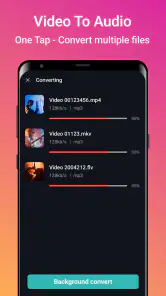
One of the features I found super handy is the batch conversion. Imagine having a playlist of videos and converting them all at once without breaking a sweat. It’s a real time-saver and makes the app stand out from others I’ve tried.
When batch conversion saves effort
Batch conversion is most useful when the clips are similar and I already know what I want from each one. For example, after recording several short practice takes, converting a selected group can be quicker than repeating the same action one by one. I would still avoid feeding in every video automatically: a clip with no useful sound, a long pause, or an accidental recording can clutter the output folder and make later sorting harder.
A helpful middle ground is to convert a small test group first. I can confirm that the selected videos are the right ones, check how the resulting files are named, and listen to at least one output before doing the rest. That workflow doesn’t add much effort, but it catches selection mistakes early. It is particularly valuable when the source clips look alike in a gallery and I might otherwise choose the wrong take.
Make the output useful
For a small batch, I’d start by selecting only the clips I genuinely want as audio, then check the converted files before moving on to the next group. This makes it easier to spot an unsuitable source or an extract that starts or ends in the wrong place. If the audio is for a playlist, consistent filenames also save time when searching later. Batch work is convenient, but reviewing a few outputs first is a sensible way to avoid repeating a mistake across several files.
File organization is the part I wouldn’t leave until later. I’d use names that distinguish the recording or occasion rather than relying on a generic label, and I’d keep converted audio in a folder that makes sense for how I listen. If I create multiple trims from the same video, a brief suffix can help me tell them apart. These simple choices matter more once the phone contains audio from different sources.
Trimming: useful for focus, not restoration
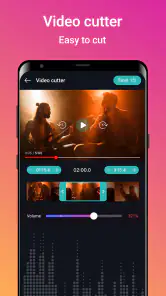
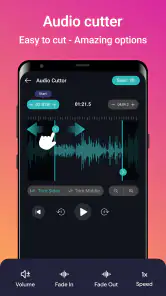
The app’s trimming option is handy when I want a passage rather than the full soundtrack. I might cut away the quiet lead-in before a spoken note or remove the tail after a rehearsal ends. The trade-off is that trimming is a selection step, not a way to improve what was recorded. I’d play the result from beginning to end, especially around the cut points, so a word or musical note hasn’t been clipped unintentionally.
If I need to remove a persistent hum, balance several voices, or combine separate recordings, I’d move to a dedicated editor instead of trying to force a converter into that role. That distinction saves time: use this app to create a convenient audio copy, and choose a specialist tool when the quality or arrangement itself needs work.
Why You Should Give It a Try
Now, you might be wondering why you’d need an app like this. Well, for starters, it’s perfect if you want to listen to your favorite music videos offline or create a personalized playlist from different sources. The app also supports editing features like trimming audio files, which is great if you want to cut out specific parts of a track.
Moreover, the app is lightweight and doesn’t hog your device’s resources. It runs smoothly in the background, allowing you to multitask without any hiccups. And did I mention that it’s free? There are some in-app purchases, but the free version is more than sufficient for everyday use.
Who gets the most from it
I’d recommend this kind of focused video-to-audio conversion to someone who occasionally makes listening copies from videos already on their device, especially personal recordings, rehearsals, or spoken material. The appeal is practical: the video remains available, while an audio version is easier to replay when I don’t need the picture. It can also suit someone assembling a casual collection of extracts, provided they are willing to check and organize the files afterward.
It is less suitable for a person whose main goal is building a carefully tagged music library, managing streaming playlists, or producing finished audio. Those needs involve different tools and habits. A music player is the natural choice for sorting and playing an existing collection; an audio editor is better for substantial changes. I’d skip this converter if I expect it to handle all of those jobs in one place.
Everyday decisions after conversion
Imagine I record a short talk at a family gathering and want to listen again while doing chores. I’d select the recording, make an audio copy, trim any obvious dead air if needed, and listen through the file before adding it to my regular listening folder. If the voices are too distant or the room is noisy, I’d keep the video and decide whether an editor is worth the extra work. This is a good example of where a simple conversion helps without pretending to solve every sound problem.
Another useful case is preparing a few audio extracts from your own videos for a commute. Before converting, I’d check that the clips are actually stored on the device and that I have enough room for both source and output. Afterward, I’d test playback outside the converter in the app I normally use. That confirms the file is convenient in my real routine, rather than merely showing that a conversion completed.
Costs, device fit, and the trade-off
The app is free to start, with optional in-app purchases ranging from $0.99 to $26.99 per item. I’d try the basic workflow before paying for anything: if you only convert an occasional clip, there may be no reason to spend. If you rely on conversion regularly, check what a purchase offers in the app and decide whether it solves a real annoyance for you rather than assuming every option is essential.
It is rated for Everyone, runs on Android 7.0 or later, and its current version is 5.8. Those details make it easier to judge basic compatibility, though I’d still keep enough storage available for both the source video and the new audio file. Converting creates another file; it doesn’t make the original video disappear, so storage can become a consideration if you process many long clips.
Switching tools without losing track
If I outgrow the converter and move to an editor, I’d keep the original video until I’m happy with the edited audio. That gives me a clean fallback if I cut too much or decide later that I need a different section. If I move instead to a music player, I’d first check that the converted files are easy to locate and play there. The app’s job is to make the audio file; the next tool in the chain may be better for cataloging or refining it.
The main cost of switching is usually organizational rather than technical: I may need to find the files again, rename them, or recreate a trim in another app. Clear filenames and keeping source clips together with their outputs can make that transition painless. If I only convert a few items, that is a minor consideration; if I create many, a consistent folder routine becomes part of the workflow.
Final Thoughts
All in all, the MP3 Converter - Video to MP3 app is an excellent tool for anyone looking to convert video to audio effortlessly. It’s reliable, efficient, and incredibly easy to use. Whether you’re a music enthusiast or just someone who enjoys having their favorite tracks on the go, this app is worth checking out. So, go ahead, download it, and enjoy the seamless conversion experience!
My recommendation is more specific: try it if you want a direct route from an existing video to an MP3, especially for personal recordings or occasional playlist-making. Skip it if your main need is advanced sound repair, detailed editing, or a full music library; a dedicated editor or player will fit those jobs better. For straightforward extraction, though, the simple workflow is the reason I’d keep it in mind.
MP3 Converter - Video to MP3 Frequently Asked Questions
Can I use MP3 Converter - Video to MP3 to turn a video into a music file?
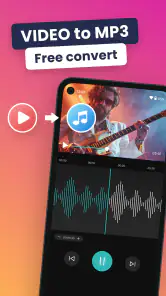
Yes. MP3 Converter - Video to MP3 is designed to turn video files into MP3 audio, which can be handy when you want to listen to a video's sound without keeping the video open. Its central purpose is straightforward: select a video, convert its audio, and use the resulting MP3 for listening.
Is MP3 Converter - Video to MP3 suitable for extracting audio from videos I already have on my device?
Yes. MP3 Converter - Video to MP3 is intended to turn video files into MP3 audio, which can be useful when you want to listen to a video's sound without keeping the video open. The app is in the Music & Audio category, and its central purpose is straightforward: select a video, convert its audio, and use the resulting MP3 for listening.
What is MP3 Converter - Video to MP3 and what does it do?
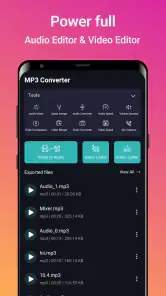
MP3 Converter - Video to MP3 is an application designed to convert video files into audio MP3 format. This tool is particularly useful for users who want to extract audio from videos, enabling them to listen to music, podcasts, or other audio content on various devices without needing the video component. The app supports various video formats and provides a user-friendly interface for seamless conversion. Its store summary highlights converting and cutting videos into MP3 music.
Is MP3 Converter - Video to MP3 free to use?
MP3 Converter - Video to MP3 is free to download, though in-app purchases are offered. Those purchases range from $0.99 to $26.99 per item, so check the purchase options in the app before choosing anything paid. The free download makes it possible to try the app, while the available purchases may suit users who want additional options.
What video formats are supported by MP3 Converter - Video to MP3?
MP3 Converter - Video to MP3 supports a wide range of video formats, ensuring compatibility with most video files users may have. Commonly supported formats include MP4, AVI, MKV, FLV, and MOV, among others. This broad compatibility allows users to easily convert their favorite videos into MP3 audio files without worrying about format restrictions. As with any conversion tool, it is sensible to try a file you plan to use before relying on it for a large batch.
Pros
- Fast conversion speed
- Supports various video formats
- Easy-to-use interface
- High-quality audio output
- Batch conversion available
Cons
- Contains ads
- Limited editing features
- Requires internet connection
- Occasional crashes reported
- No cloud storage integration

- Category
- Music & Audio
- Version
- 5.8