

Healthy Roster
- 29.00
- 3.3
- Installs
- 100.00K
- Price
- Free

Screenshots
Analysis by Reviewed
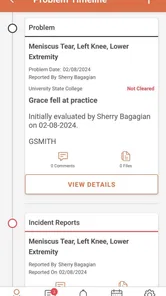
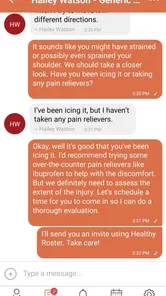
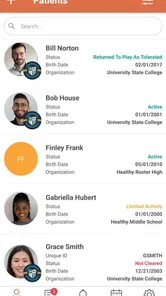
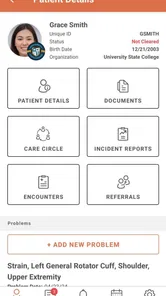
Healthy Roster is a medical app aimed at athletic trainers who need to keep documentation and communication closer to the daily rhythm of sports care. I approached it as a first-time user would: install it, look for the quickest useful starting point, and ask whether it can reduce the small delays that happen when an athlete needs attention, a record needs updating, or a message needs to reach the right person.
My overall impression is that Healthy Roster is most useful as a focused work companion for athletic training operations, rather than as a general health app for everyone. It is free, rated for Everyone, and developed by Healthy Roster, LLC. The app has been available since October 19, 2015, and its current version is 6.61.1, with support beginning at Android 7.0. Its reach is meaningful, with more than one hundred thousand installs, although its average rating sits at 3.3 from roughly ninety ratings and about thirty written reviews. That combination tells me to keep expectations practical: there is a real audience, but the experience may not feel equally polished for every user or every organization.
What to expect when you open Healthy Roster
The first thing to understand is the app’s point of view. It is built around the work of athletic trainers, so the useful question is not “Can this replace my doctor?” or “Can I use it as a personal symptom tracker?” The better question is “Can this help me organize care-related documentation and communication while I am managing athletes?” That distinction matters because it prevents a disappointing first session.
If you are an athlete or parent looking for a standalone wellness tool, this may feel too specialized. If you are an athletic trainer moving between practices, games, treatment areas, and administrative tasks, the focus makes more sense. The app’s value comes from bringing relevant work into a mobile setting, where notes and conversations can be handled nearer to the moment they happen instead of being reconstructed later from memory.
I would not treat it as a replacement for every system already used by a school, club, clinic, or team. Many organizations rely on email, paper forms, spreadsheets, messaging apps, or a larger electronic medical record. Healthy Roster makes the strongest case when those methods are creating scattered information. It can serve as a more dedicated place for athletic-training documentation and communication, while the organization’s wider procedures still determine what must be recorded elsewhere.
The free price makes trying it less intimidating, especially for an individual trainer who wants to understand the workflow before asking a whole organization to change. Still, “free” does not remove the need to think about adoption. A tool is only helpful when the people who need to contribute or read information can use it consistently. Before introducing it to a team, I would decide who is responsible for entering updates, who should receive communication, and which existing process the app is meant to simplify.
Who will get the most from it
I see the clearest fit for athletic trainers who need a mobile-first way to keep care activity organized during busy periods. It may also appeal to programs where communication between training staff and the people around an athlete has become difficult to follow. The app is especially worth considering when the current alternative is a mixture of handwritten notes, personal reminders, and long message threads.
More From Our News Desk

 Instagram
Instagram’s Power Comes From Its Place in Your Phone
A close look at how Instagram turns Meta’s reach, recommendation systems and everyday camera habits into durable platform power—and what that costs users.

 Gmail
GmailGmail in a Busy Inbox: Who Benefits Most?
From first account to crowded workday, Gmail earns its place through dependable search and flexible sorting—but its best fit depends on how much inbox maintenance you can tolerate.

 Prime Video
Switching to Prime Video: What Changes in Your Viewing Routine
Prime Video can make a compelling second home for streaming, but switching means learning a different catalog, rental layer, and route from browsing to playback.

 Universal TV Remote Control
Universal TV Remote Control Works Best as a Reliable Backup
A phone remote earns its place through quick setup and reliable habits. Here is how to get more from Universal TV Remote Control—and where its limits show.

 Weather - By Xiaomi
Weather by Xiaomi Review: Clear at a Glance, Less Clear Up Close
Xiaomi’s weather app makes everyday forecasts quick to scan, but its calm surface can leave useful details and recovery paths harder to find than they should be.

 X
XX Under Pressure: Can It Recover When Posting Goes Wrong?
A resilience-focused review of X, examining setup, mistaken posts, interruptions, weak connections, and the gaps that matter when recovery needs to be dependable.
Latest News



It is less compelling for someone who only wants a private fitness log, a medication reminder, or general medical education. It is also not the first choice for a large healthcare organization that already has a mature clinical record system and strict internal workflows. In that setting, a specialized mobile tool may add another place to check instead of removing work.
One subtle trade-off is that convenience can encourage incomplete documentation. A mobile screen makes it easier to record something promptly, but speed can also tempt a user to enter a vague note and plan to “clean it up later.” I would use the app as a prompt to document consistently, not as permission to lower the standard of the record. The best workflow is quick at the beginning and careful enough that another authorized person can understand the update afterward.
How it compares with familiar alternatives
Compared with paper, a mobile app is easier to carry and more likely to keep communication connected to the working process. Paper can still be useful for environments with poor device access or established physical forms, but it creates extra work when information needs to be shared or found later. Compared with ordinary email or texting, a dedicated medical workflow is more appropriate for separating care-related communication from personal conversations. The trade-off is that a dedicated app requires people to learn and actually use it.
Compared with a full electronic medical record, Healthy Roster appears more approachable for athletic-training situations where the priority is mobile documentation and communication rather than every possible clinical or administrative function. A larger system may provide deeper customization, reporting, and integration, but it can also take longer to configure and use. I would choose the simpler route when the immediate problem is fragmented day-to-day coordination, and the larger route when the organization needs a comprehensive record platform.
That comparison also explains the mixed rating. An app can be genuinely useful for its intended audience while still frustrating people who expect a broad consumer health experience or a fully featured institutional system. I would judge it by whether it improves a specific athletic-training workflow, not by whether it replaces every alternative at once.
Starting with the first setup
For a first-time user, I recommend beginning with a small, realistic goal rather than trying to understand the entire app in one sitting. Install it on a compatible Android device, open it, and focus on identifying the part of the workflow that matters most to you: documentation, communication, or keeping care activity easier to follow. The minimum operating-system requirement is Android 7.0, so older devices should be checked before planning a rollout.
During setup, use the identity and organizational details that match how your athletic-training work is actually arranged. A common mistake with professional apps is to rush through the opening screens using personal information or an informal label, then discover that the resulting workspace does not match the team or program’s real structure. I would pause at each step and ask whether another authorized person would recognize the context later.
It is also worth deciding in advance what your first test will be. Do not begin with an unusual injury, a complicated communication chain, or a high-pressure event. Choose a routine scenario that is easy to verify. A simple test gives you a clearer answer about whether the app fits your process and makes any setup confusion easier to isolate.
My suggested preparation is straightforward:
- Choose one ordinary athlete-care situation for the first trial.
- Agree on who will enter the information and who needs to see it.
- Use wording that another trainer can understand without asking for a private explanation.
- Keep your existing process available until the new workflow has been checked.
- Review the finished entry rather than assuming that a saved screen is automatically complete.
This approach is more reassuring than trying to migrate everything immediately. It also protects the team from a common technology mistake: changing the tool and the procedure at the same time. If something feels awkward, you want to know whether the problem is the app, the setup, or an unclear internal rule.
A realistic first-day scenario
Imagine an athletic trainer covering a practice. An athlete reports a problem, receives attention, and needs a clear update associated with the care process. In a paper-based routine, the trainer may jot down notes during a busy interval and later transfer them into a more permanent record. In a messaging-based routine, details may be split between a conversation and a separate document. With Healthy Roster, the intended benefit is to keep the documentation and communication work closer together on the mobile device.
The practical lesson is to use the app at the moment when the information is still fresh, while keeping the entry concise and understandable. I would avoid trying to write a long narrative while the situation is active. Capture the essential update first, then review it when the immediate pressure has passed. That two-stage habit is one of the most useful ways to balance speed with accuracy.
For a first test, I would complete the entry and then ask a colleague to explain what they understand from it. If they can identify the athlete, the relevant situation, and the next communication need without guessing, the workflow is doing something valuable. If they cannot, the issue may be the wording or the team’s process rather than the app itself.
Finding the first meaningful success
The first meaningful success should be small: one correctly organized update that another authorized person can follow. Do not measure the first session by how many screens you explored. Measure it by whether you finished a real task with less uncertainty than before.
I would begin with a routine case and make the record readable to someone who was not standing beside me. That means avoiding shorthand that only makes sense inside my own head. Mobile documentation is most effective when it saves future explanation, not when it merely creates a timestamped reminder for the original writer.
After saving the update, I would check the communication side of the workflow separately. Was the intended person included? Is the message clear about what has happened and what needs attention? Does the recipient know whether the update is informational or requires action? These questions are easy to overlook when the main focus is entering the clinical detail.
A useful habit is to establish a short review point after the first entry. I would look at the information as if I were returning to it later in the day. If I immediately understand the situation, the app has helped create a usable record. If I need to remember the original conversation to interpret it, I would improve the entry before relying on the process for more cases.
This is also where I would decide whether Healthy Roster is reducing work or simply relocating it. If the app lets the trainer document once and communicate clearly from the same working context, that is a practical gain. If the team still has to copy everything into another system, the benefit may be limited to convenience during the initial note-taking stage. That may still be worthwhile, but it should be acknowledged before making larger promises about efficiency.
Three workflow lessons that are easy to miss
First, the best time to use a mobile documentation tool is not always during the most intense moment of care. A quick initial update followed by a deliberate review can be safer and more useful than attempting a perfect entry while distracted. This is a workflow decision, not merely a typing preference.
Second, communication quality depends on the recipient’s context. A note written for another athletic trainer can use different shorthand from an update intended for a wider group. Before sending anything, I would imagine the least-informed authorized reader and remove wording that depends on shared memory. That small adjustment can prevent follow-up messages that erase the time saved by mobile communication.
Third, a trial should test handoff, not just entry. Many apps feel easy when one person uses them alone. The real question is whether information remains understandable when responsibility moves from one trainer or shift to another. Healthy Roster is most convincing when it supports that handoff without forcing the next person to search through unrelated conversations or reconstruct the timeline.
Common confusion and practical ways around it
The first likely confusion is expecting a general-purpose health app. Healthy Roster’s identity is professional and athletic-training focused. If you open it looking for personal exercise coaching or a broad symptom encyclopedia, you may conclude that it lacks something it was never designed to prioritize. Start from the care-documentation and communication problem instead.
Another source of friction is assuming that installing the app automatically creates a complete team workflow. It does not remove the need for local decisions about responsibility, terminology, and follow-up. I would write a short internal rule before expanding use: who records the initial update, who reviews it, and where urgent communication belongs. The app can support that rule, but the organization still has to define it.
Users may also confuse a convenient note with a sufficient record. A short entry can be appropriate, but only if it preserves the information needed for the next step. I would avoid unexplained abbreviations, emotional descriptions, and references such as “same as before” unless the related information is genuinely easy for the authorized reader to locate.
There is also a human adoption problem. Some people will prefer paper because it is familiar; others will prefer ordinary messaging because everyone already checks it. The answer is not to insist that the app is automatically better. Demonstrate one complete workflow and compare the result with the old method. If the new process does not make a handoff, follow-up, or record review noticeably clearer, the team may not be ready for a full switch.
My other caution concerns rating expectations. An average of 3.3 is neither a reason to dismiss the app nor a guarantee of a smooth experience. With a modest review base, individual experiences can reflect different devices, organizations, and expectations. I would test the exact workflow your team needs instead of relying on the number alone.
When another option is better
I would skip Healthy Roster if you need an all-purpose personal medical companion, a sophisticated hospital record system, or a tool that works without any agreement from the people around you. In those cases, a consumer health app, an established clinical platform, or a simpler shared process may be a better match.
I would also be cautious if your organization already has a reliable system and the proposed app would force duplicate entry. Duplication is one of the fastest ways to create stale records and user frustration. Healthy Roster makes more sense when it replaces a messy part of the workflow or gives mobile staff a practical front end for work that is currently delayed.
On the other hand, it deserves a fair trial when the current situation is fragmented and trainers need a dedicated place to document and communicate. The fact that it is free lowers the barrier to a controlled test, while the Everyone age rating makes it less intimidating from a general accessibility standpoint. Those points do not settle the decision, but they make experimentation reasonable.
The next step after the first successful use
Once one routine case has gone well, expand gradually. Try a second scenario that involves a different handoff or communication need, then compare how easily another authorized person can understand both entries. This reveals whether the app is helping consistently or only worked because the first test was unusually simple.
I would create a short writing convention for the team rather than a long manual. Decide how to identify the situation, how to describe the current status, and how to mark the next action in plain language. Consistency is more valuable than elaborate formatting because it lets people scan updates quickly during a busy day.
It is also smart to schedule a brief review after the first period of regular use. Ask which steps were genuinely faster, which entries were often incomplete, and where people still returned to paper or messaging. The answers should guide the next adjustment. If users keep bypassing a part of the workflow, that is useful evidence that the process needs redesign or that the app is not the right fit for that task.
Keep the app updated when practical, especially since the current release is 6.61.1, but do not assume an update alone will solve organizational friction. The strongest results will come from pairing the mobile tool with clear ownership and sensible documentation habits.
After using it as a focused athletic-training tool, I would recommend Healthy Roster to a trainer who wants to bring documentation and communication closer to the workday and is willing to test the process with a small, ordinary case first. I would not recommend it blindly to every health professional or consumer. Its usefulness depends on the setting, the team’s willingness to adopt it, and whether it prevents duplicate work.
My final view is cautiously positive. Healthy Roster has a clear purpose, a free entry point, and enough adoption to justify a practical trial. Its real strength is not that it promises to solve every medical-information problem; it is that it targets a specific gap between athletic care and mobile coordination. Start small, write for the next person, verify the handoff, and keep another trusted process available until the app proves itself in your environment. For the right athletic-training workflow, that measured approach is where the app can become genuinely useful.
Healthy Roster Frequently Asked Questions
What devices can run Healthy Roster?
Healthy Roster is a medical app for mobile devices, and its minimum operating-system requirement is version 7.0. Before downloading, check that your device meets this requirement and that you are choosing the correct app for your platform. Keeping your device’s software current can also help you use the app smoothly and maintain access to its communication and documentation tools.
Who develops Healthy Roster, and what kind of app is it?
Healthy Roster is developed by Healthy Roster, LLC and is designed for medical use, with a focus on athletic training and athlete health. Its mobile tools support documentation and communication for athletic trainers. The app is free to download and is rated for Everyone, making it suitable for a broad audience, though access to particular features can depend on the organization connected to your account.
What is Healthy Roster used for?
Healthy Roster is a digital platform designed to help manage sports medicine and athlete health information. It can be used by athletes, parents, coaches, athletic trainers, and healthcare providers to communicate about injuries, treatment updates, rehabilitation progress, and return-to-play information. Its exact features may vary depending on the organization or healthcare provider using the service, so some users may see different tools or permissions.
Who can use the Healthy Roster app?
Healthy Roster is generally intended for athletes and their families, schools, sports organizations, athletic trainers, and medical professionals. In many cases, access is provided through an invitation from a participating school, team, clinic, or healthcare organization rather than through completely independent registration. Before downloading, check whether your organization supports Healthy Roster and whether you have received the correct invitation or login details.
Is Healthy Roster a replacement for a doctor or emergency medical care?
No. Healthy Roster is a communication and health-management tool, not a substitute for professional medical advice, diagnosis, or emergency treatment. Information shared through the app should be considered part of an ongoing care process and should be reviewed by an appropriate healthcare professional. If an injury appears serious or life-threatening, contact local emergency services immediately instead of relying on the app.
Pros
- Centralizes health records
- waivers
- and injury information in one place.
- Useful communication channel between athletes
- staff
- parents
- and medical providers.
- Supports injury tracking and return-to-play documentation.
- Helps organizations organize compliance and medical paperwork digitally.
- Can reduce delays caused by scattered forms and email conversations.
Cons
- Some features may depend on an organization’s subscription or administrator setup.
- Requires users to keep contact and medical information updated.
- The interface may feel complex for occasional users or younger athletes.
- Data entry can become time-consuming for teams with many participants.
- Access to records depends on an internet connection and account permissions.











