

Health Diary by MedM
- 291.00
- 4.7
- Installs
- 100.00K
- Price
- Free

Screenshots
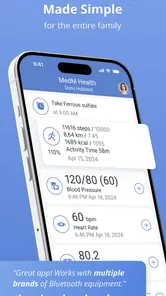
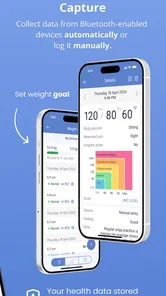
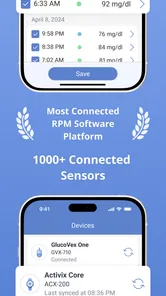
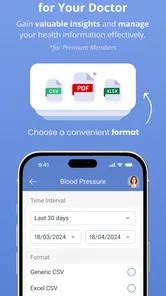

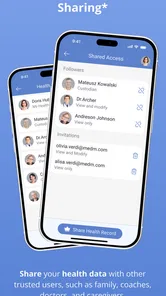
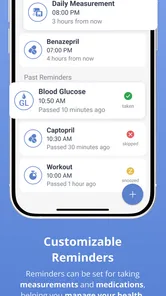
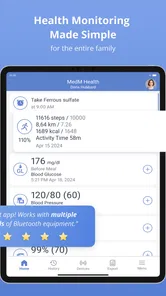
Analysis by Reviewed
I came to Health Diary expecting a simple place to jot down a few readings, but its real value is broader: it gives everyday health information a consistent home. Developed by MedM Inc, this free medical app is built around personal and family logging for blood pressure, weight, temperature, glucose, activity, and sleep. I found that combination more useful than a collection of disconnected notes because it encourages me to look at several parts of a routine together.
The important question is not whether it can replace a doctor, a glucose meter, or a blood-pressure monitor. It cannot, and it should not be treated that way. The better question is whether you need a practical diary for information you already collect. If the answer is yes, this app is worth considering. It has a 4.7 average from around 5K ratings and has passed 100K installs, which suggests that its straightforward approach works for a substantial group of users.
What I looked for before making a choice
When I compare a health log with the usual alternatives, I first ask how much effort it takes to record something at the moment it happens. A paper notebook is flexible, but it is easy to misplace and difficult to search. A general notes app is quick, yet it does not naturally separate a morning blood-pressure reading from an evening temperature or a sleep observation. A specialist app may be excellent for one measurement but less convenient when several parts of daily health need to be viewed together.
Health Diary sits between those options. It is not trying to be a complete medical service or a diagnostic tool. Its purpose is to organize recurring observations. That makes consistency more important than flashy presentation. If I only need to record one number once a month, almost any method will do. If I need a dependable history to discuss with a clinician, compare with changes in routine, or maintain for another family member, a dedicated log becomes much more sensible.
I also considered who would actually enter the information. Some people want automatic collection from connected devices, while others prefer to type readings in themselves. This app is most appealing to the second group, or to people who want a central diary even when their devices and services are not all from the same ecosystem. The trade-off is clear: manual recording gives control, but it only works when I remember to do it.
A broad health record without pretending to be a treatment plan
The range of categories is the strongest reason to choose this particular diary. Blood pressure and glucose can matter in ongoing monitoring, while weight and temperature help provide additional context. Activity and sleep add a daily-lifestyle layer that is often missing from narrowly focused medical trackers. I like that the app can hold these observations together instead of forcing me to maintain several unrelated logs.
That breadth also changes how I use the information. A single unusual reading is usually just a single unusual reading. A longer record can help me notice whether a measurement appeared alongside poor sleep, a disrupted routine, or a change in activity. I would still leave interpretation to a qualified professional, but bringing a clearer history to an appointment is more useful than relying on memory.
More From Our News Desk

 Instagram
Instagram’s Power Comes From Its Place in Your Phone
A close look at how Instagram turns Meta’s reach, recommendation systems and everyday camera habits into durable platform power—and what that costs users.

 Gmail
GmailGmail in a Busy Inbox: Who Benefits Most?
From first account to crowded workday, Gmail earns its place through dependable search and flexible sorting—but its best fit depends on how much inbox maintenance you can tolerate.

 Prime Video
Switching to Prime Video: What Changes in Your Viewing Routine
Prime Video can make a compelling second home for streaming, but switching means learning a different catalog, rental layer, and route from browsing to playback.

 Universal TV Remote Control
Universal TV Remote Control Works Best as a Reliable Backup
A phone remote earns its place through quick setup and reliable habits. Here is how to get more from Universal TV Remote Control—and where its limits show.

 Weather - By Xiaomi
Weather by Xiaomi Review: Clear at a Glance, Less Clear Up Close
Xiaomi’s weather app makes everyday forecasts quick to scan, but its calm surface can leave useful details and recovery paths harder to find than they should be.

 X
XX Under Pressure: Can It Recover When Posting Goes Wrong?
A resilience-focused review of X, examining setup, mistaken posts, interruptions, weak connections, and the gaps that matter when recovery needs to be dependable.
Latest News



One practical tip is to record the surrounding circumstances in a consistent way whenever they matter. For example, if blood pressure is being monitored, I would try to measure at roughly comparable points in the day and avoid treating readings taken under completely different conditions as if they were directly equivalent. The app can preserve the diary, but it cannot standardize the way I measure. That responsibility remains with me.
My everyday workflow with the diary
A realistic use case is a household where one person checks blood pressure regularly, another is watching weight, and a parent wants to keep track of temperature or glucose readings. Instead of leaving numbers in separate notebooks or messages, each person can have a more organized history inside the same health-focused tool. The family angle is important because a diary becomes more valuable when it helps prepare for conversations with a clinician rather than serving only as a private scratchpad.
My preferred routine would be to enter readings close to the time they are taken, rather than trying to reconstruct a week from memory. I would make the entry part of an existing habit: after a morning measurement, after weighing myself, or before putting a device away. For sleep and activity, I would review the day at a fixed time. This reduces the common problem of having a health app installed but an incomplete record.
A less obvious benefit is that the app can expose gaps in a routine. If I notice that weight is recorded often but sleep is entered only sporadically, I know that any comparison between the two is weak. That is more useful than simply seeing a chart or a list of numbers. The diary becomes a reminder to improve the quality of my observations, not just a container for them.
Where Health Diary is particularly convincing
The biggest strength is the single-diary approach. People who monitor several basic health indicators do not have to choose between a general notes app and a collection of narrow trackers. The combination of measurements and lifestyle entries gives the record more context, especially when preparing for a medical appointment or checking whether a new routine is being followed.
I also appreciate the low barrier to trying it. The app is free, carries an Everyone content rating, and supports devices running Android 7.0 or later. That makes it approachable for users who are not looking for an expensive specialist platform. The current version is 3.11.3, so someone installing it today gets a mature product rather than an early experiment.
Another strength is its usefulness for people who think in terms of trends rather than isolated events. A diary does not need to tell me what a reading means to help me see whether I have been recording regularly, whether a value changed after a routine adjustment, or whether I need to ask better questions at my next appointment. That is a modest role, but it is a realistic and responsible one.
There is also a practical advantage in keeping personal observations together when different family members have different priorities. A single-purpose blood-pressure tracker may be better for someone who wants nothing else, but it is less attractive when the same household also needs weight, temperature, glucose, activity, and sleep records. Health Diary earns its place through coverage rather than specialization.
The friction I would want new users to understand
The main limitation is that a health diary is only as reliable as the habits behind it. Manual entry can feel repetitive, particularly when several measurements are taken every day. If I stop entering information, the app cannot fill the gap with an explanation. Anyone seeking a completely automatic experience should compare it with a device-centered or platform-centered alternative before committing.
The broad scope can also feel less focused than a dedicated tracker. A person interested only in running, sleep, or glucose management may prefer an app designed around that single activity. Specialized tools often make one workflow feel deeper and more immediate. Health Diary makes a different compromise: it favors a shared record across categories, so it may not be the best fit for users who want advanced coaching or a highly specialized dashboard.
I would also avoid using it as a substitute for professional advice. The presence of health measurements can create a false sense of certainty, especially when a user sees a pattern and immediately tries to diagnose it. The sensible workflow is to use the app to preserve observations and questions, then discuss concerning or confusing results with a qualified clinician. That boundary is essential for any medical logging tool.
The free starting point is helpful, but in-app purchases range from $5.99 to $99.99 per item. That does not automatically make the app poor value, yet it does mean I would check which functions I actually need before paying. Someone who only wants basic recording may be satisfied without spending more, while a user planning a long-term or family workflow should understand the cost of any desired extras in advance.
How it compares with familiar alternatives
Compared with paper, Health Diary is easier to keep in one place and more suitable for reviewing a longer history. Paper still wins for people who want complete freedom over layout, who dislike screens, or who need a record that can be written down immediately without opening an app. I would choose paper only when simplicity and independence from a device matter more than organized digital retrieval.
Compared with a general note-taking app, this medical diary has a clearer purpose. A notes app can record anything, but that freedom often produces inconsistent labels, mixed units, and scattered entries. Health Diary is the better choice when the same types of health information recur and I want them treated as a continuing record rather than a series of improvised notes.
Compared with a single-measurement tracker, the decision depends on scope. If blood pressure is the only concern, a focused app may offer a more direct experience. If I need blood pressure alongside weight, temperature, glucose, activity, and sleep, switching among several narrow apps can create more work and make context harder to follow. In that situation, the wider diary is the more practical compromise.
Compared with an ecosystem built around automatic wearable or medical-device syncing, Health Diary is better suited to users who want to enter information themselves or who use varied equipment. An automated alternative may be preferable when reducing manual work is the top priority. The choice is not about which category is universally superior; it is about whether control and breadth matter more to me than automation.
What switching really costs
The cost of moving from a notebook or another app is not only financial. It is the effort of deciding which old records are worth preserving, learning a new routine, and avoiding a break in the timeline. I would not switch merely because the interface looks newer. I would switch if the current method makes it difficult to keep several categories together or if I repeatedly lose track of readings.
Before moving, I would define the smallest useful routine: perhaps one or two measurements that genuinely matter, plus sleep or activity only when I can record them consistently. Starting with every available category can turn a helpful diary into another chore. Once the basic habit is stable, I could add more information when it serves a clear purpose.
Another smart step is to decide how the record will be used before filling it. If the goal is a clinician visit, consistency and clear dates matter more than entering every passing sensation. If the goal is household organization, separate attention to each person matters more than creating a huge undifferentiated history. Knowing the destination prevents unnecessary data collection.
I would also keep the app in its proper role during the transition. It can help me remember and present information, but it should not encourage me to change medication, ignore symptoms, or make urgent decisions based only on a graph. For serious concerns, professional medical guidance remains the right next step.
Who should install it, and who should pass
I recommend Health Diary to adults and families who want a central place for recurring health observations and are willing to maintain the record. It is especially suitable for someone preparing for regular appointments, monitoring more than one basic indicator, or trying to connect lifestyle notes with measurements without juggling several unrelated tools.
I would be more cautious recommending it to a person who expects automatic collection, detailed coaching, or a diagnosis. Someone who rarely remembers to log information may gain little from any manual diary. Likewise, a user with one highly specialized need may be happier with a focused app made specifically for that measurement or activity.
For a first setup, I would begin with the categories that have a clear reason to exist, establish a repeatable entry time, and review the record periodically rather than obsessing over every individual value. I would also check the purchase screen carefully before unlocking anything, because the available in-app items span a wide price range. This approach keeps the app useful without turning health tracking into a full-time project.
My recommendation after using it as a decision tool
Health Diary is a sensible choice when organization across several health categories matters more than automation or specialist depth. Its free entry point, broad diary focus, and family-friendly purpose make it more capable than a basic notes page while remaining less demanding than a collection of dedicated systems. I like it most as a preparation and record-keeping tool: something that helps me arrive at a medical conversation with a clearer history.
It is not the right answer for everyone. Users who want hands-off syncing, intensive coaching, or a single deeply specialized workflow should look at alternatives in those categories. Users who need a simple, repeatable digital record for blood pressure, weight, temperature, glucose, activity, and sleep will find a much stronger reason to choose this app.
MedM Inc has made a practical medical utility rather than a dramatic all-in-one health promise. That restraint is part of its appeal. If I were recommending it to a friend, I would say: install Health Diary when you need a dependable place to collect health information you already measure, start with a small routine, and use the resulting history to support—not replace—professional care.
Health Diary by MedM Frequently Asked Questions
Is Health Diary by MedM free to download, and are there paid features?
Health Diary by MedM is free to download, with in-app purchases offered for users who want additional features. Before committing to a paid option, check what it includes and whether it suits your tracking needs. You can begin with the free app and decide whether an upgrade is worthwhile after exploring the available tools.
What health information can I keep together in the app?
Health Diary by MedM is described as a family health log for recording blood pressure, weight, temperature, glucose, activity, and sleep. Keeping these kinds of entries together can make everyday tracking more convenient and help you review your history in one place. The app is intended for logging information, so consider which records matter to you and enter them consistently.
What is Health Diary by MedM used for?
Health Diary by MedM is designed to help you record, organize, and review personal health information in one place. You can use it to track measurements such as blood pressure, blood glucose, weight, temperature, pulse, symptoms, medication notes, and other wellness data. It is especially useful for spotting trends and preparing clearer information to discuss with a healthcare professional, rather than relying on memory alone.
Can Health Diary by MedM connect to medical devices and health platforms?
The app supports health data collection from compatible Bluetooth devices and may also work with supported health platforms, depending on your phone, operating system, region, and the specific device model. Compatibility should be checked before downloading or purchasing hardware. Some integrations may require permissions, pairing steps, or a compatible MedM feature, so not every blood pressure monitor, glucose meter, or wearable will work automatically.
Is Health Diary by MedM a medical diagnosis or treatment app?
No. Health Diary by MedM is primarily a tracking and record-keeping tool, not a replacement for a doctor, diagnosis, laboratory testing, or prescribed treatment. Its charts and stored measurements can make your health history easier to understand, but they should not be used alone to change medication or make urgent medical decisions. If you notice dangerous readings or serious symptoms, contact a qualified healthcare professional promptly.
Pros
- Simple way to record symptoms
- measurements
- and daily health notes.
- Supports tracking multiple health metrics in one organized diary.
- Useful history views can help identify patterns over time.
- Can make information easier to share during medical appointments.
- Suitable for ongoing monitoring of chronic health conditions.
Cons
- Manual data entry can become time-consuming with frequent measurements.
- Some advanced features may depend on compatible MedM devices.
- Health records may require careful backup to avoid losing important data.
- The interface can feel dense for users unfamiliar with health-tracking apps.
- It should complement
- not replace
- professional medical advice.











