HappyLighting
- 1.98K
- 3.4
- Installs
- 5.00M
- Price
- Free

Screenshots
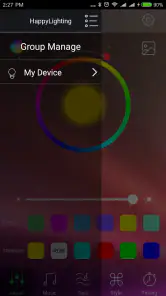
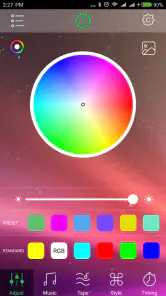
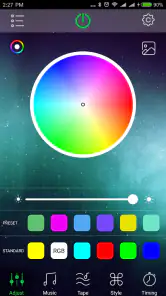
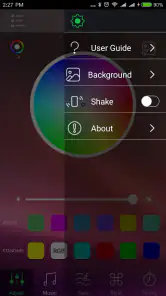
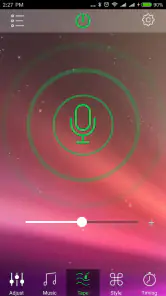
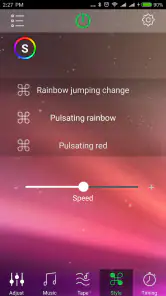
Analysis by Reviewed
I tend to judge a lighting app less by the first colorful demo than by whether I still reach for it once the novelty wears off. HappyLighting is a free personalization app from qh-tek for controlling compatible Bluetooth lamps. Its appeal is immediate: when a lamp responds to a tap, changing the feel of a room takes little effort. The more useful question is whether that simple control earns a regular place in your routine.
The first week: quick appeal, then practical tests
In the first few days, I’d try a small set of colors and brightness levels rather than constantly cycling through effects. That makes it easier to learn which settings actually suit your room: a softer look for reading or winding down, and something more vivid when friends come over. The app is for a particular kind of setup, though. It controls Bluetooth lamps, so it is not a general remote for every smart bulb or a substitute for the control app that came with another lighting system.
A realistic use is getting home, switching the lamp to a comfortable setting, and leaving it there while you make dinner or settle in. That is where a phone control can feel more useful than walking over to a lamp, especially if it is tucked behind furniture. If you are buying a lamp specifically to use with it, check that the lamp is compatible before relying on the app; the Bluetooth label alone does not mean every Bluetooth light will work.
Who gets the most from a lamp controller
I’d put this app on the shortlist for someone who already has a compatible Bluetooth lamp in a bedroom, desk area, or small living space and wants to adjust it from the phone without building a larger connected-home setup. Its value is especially clear when the lamp is awkward to reach, or when one light is enough to change the atmosphere of a room. If you are still choosing a lamp, make compatibility the first purchase check, not an afterthought: an app cannot make an unsupported light work simply because both use Bluetooth.
It is less compelling if you want every light in the home to behave as one coordinated system. A manufacturer’s own app may be the better choice for a bulb from another brand, while a broader smart-home controller makes more sense when several devices and rooms need to work together. I would also skip it if you rarely adjust lighting and are happy with a physical switch. In that case, the phone adds another step rather than removing friction.
A Burst of Color at Your Fingertips
One of the coolest things about the HappyLighting app is how easy it is to use. You can literally control your lights with just a tap on your phone. Imagine sitting on your couch and deciding you want the room to feel like a cozy autumn evening. Just a couple of taps and you’re there. The app connects seamlessly with compatible smart bulbs, and voila, you’ve got yourself a personalized light show.
Setup and Features
Setting up the app is a breeze. Once you download it, you’re just a few steps away from transforming your space. The app walks you through pairing your smart bulbs, and in no time, you’ll be playing with colors like a pro. Not only can you change colors, but you can also adjust brightness and even set timers. Want your lights to slowly dim as you drift off to sleep? Done. Need a vibrant wake-up call in the morning? Easy peasy.
More From Our News Desk

Clash of Clans Is Won Between the Battles

Android Auto Makes the Case for Quieter Car Software

MobiOffice: Transforming Mobile Productivity with Seamless Integration

EA SPORTS FC™ Mobile Soccer: Redefining Mobile Sports Gaming

How Microsoft OneDrive Became a Mobile Productivity Giant

How Google Translate Breaks Language Barriers Effortlessly
For recurring use, I’d treat a timer as a convenience to test rather than something to trust blindly from day one. Try it while you are awake, then check that the lamp behaves as expected before using it as part of a bedtime routine. This is a helpful distinction: a phone-controlled lamp can make a room easier to adjust, but it is not automatically a dependable replacement for a dedicated alarm or a whole-home lighting schedule.
A low-friction routine, not a new hobby
One useful way to test whether the app deserves a lasting spot on your phone is to give it a simple job for a week. For example, use the same comfortable setting at the desk during work and a calmer one in the evening. If you keep returning to those choices without needing to explore menus, the app is doing practical work. If every session becomes a long search for a fresh color, the control itself may be more entertaining than useful.
For a shared room, I’d settle on a default brightness and color that nobody has to renegotiate each time the lamp is switched on. That small agreement can matter more than having many possible looks: it prevents phone control from becoming a minor household chore. Keep a physical switch or the lamp’s own controls within reach as well, so a drained phone or a pairing hiccup does not leave you without a straightforward way to use the light.
Music and the occasional novelty
Another nifty feature is the music sync option. You can have your lights dance along to your favorite tunes, which is perfect for parties or just chilling with some beats. It's like having your very own disco ball, minus the 70s vibe.
I see music sync as a feature to pull out when the mood suits it, not necessarily a reason to keep opening the app every day. For a gathering, it can give a single compatible lamp a playful role without needing extra decoration. For quiet evenings, a steady color or comfortable brightness is more likely to become a habit. That difference matters if you want lasting value rather than a few entertaining demonstrations.
What to expect from Bluetooth control
Bluetooth makes sense here when your goal is direct control of a nearby lamp. It keeps the setup focused: you choose a light, use the phone to adjust it, and do not need to treat the app as the command center for every connected object at home. The trade-off is that this is not the same proposition as a networked lighting system designed around remote access or several rooms. If you often want to change a light while away, or coordinate devices across the home, I would compare other options before building your routine around this one.
That distinction also helps answer a common practical question: will it control any Bluetooth lamp? I would not assume so. The lamp needs to be compatible with the app, and checking the exact model before installation or purchase is a more reliable approach than relying on the wireless label. If the app cannot find a lamp, verify that you have the intended product and follow its pairing steps before repeatedly trying random settings; persistent uncertainty about compatibility is a reason to use the lamp maker’s recommended controller instead.
User Experience
In terms of user experience, the app is pretty intuitive. The interface is clean, and you don’t have to be a tech wizard to navigate through it. I found the layout to be user-friendly, with all the options clearly labeled. Plus, the app runs smoothly with minimal hiccups.
What really stood out to me was the app's responsiveness. There’s no noticeable lag between selecting a color on your phone and seeing it change on your lights. That’s a huge plus in my book, especially when you’re in the mood for instant ambiance adjustment.
Keeping the setup useful month to month
The strongest long-term routine is often a modest one: choose a couple of settings you genuinely use, and avoid turning every evening into a search for a new effect. If you share the room, agree on a comfortable default so the lamp does not become a small daily negotiation. A timer can help with a regular wind-down, while manual control is simpler when your schedule changes from day to day.
Bluetooth control also shapes the trade-off. It is appealing when you want a direct phone-to-lamp interaction without adopting a larger smart-home system. But if you expect to control lights from outside the room, coordinate several rooms, or use a broad ecosystem of connected devices, a more comprehensive platform may suit you better. HappyLighting is best considered a focused controller for compatible lamps, not the center of an entire smart home.
Maintenance without making lighting a project
The ongoing work should be small, but I would still keep the setup tidy. Once pairing works, note which lamp the phone is meant to control and avoid treating every connection problem as a reason to reset everything immediately. First check that the lamp is powered and available, then try the ordinary control path again. A little patience can save you from rebuilding a setup that was only temporarily unavailable.
It is also worth checking the app after an operating-system or phone change rather than assuming a routine will carry over perfectly. If a timer is part of your evening, test it again after any change that affects the phone or lamp. That is not a special burden unique to this app; it is simply sensible when a small convenience depends on two devices staying in contact. For a light you need to operate predictably every day, keep a manual fallback and avoid making the app the only way to turn it on.
Where the novelty can fade
The main fatigue point is that color changes are fun but can become needless fiddling. If you find yourself opening the app only to browse options and then returning to the same setting, simplify your routine instead of treating constant adjustment as a benefit. Bright colors can also be less comfortable for ordinary tasks than a settled, softer choice, so I would judge the lamp by how it feels during reading, meals, and quiet time—not only by how it looks during a music session.
The app is free and rated for Everyone, which makes it easy to try if you already have a compatible lamp. It has an average rating of 3.4 from around 15,000 ratings, with roughly 2,000 written reviews, and more than 5 million installs. Those figures suggest it has found a substantial audience, while the middling average is a reminder that a simple control app can still be frustrating when pairing or lamp compatibility does not match expectations. I’d check the exact lamp model first and keep the lamp’s own controls available as a fallback.
Final Thoughts
All in all, the HappyLighting app is a fantastic addition to any smart home setup. It's easy to use, packed with features, and genuinely fun to play with. Whether you’re a tech enthusiast or someone just looking to add a splash of color to your daily routine, this app is worth checking out. So go ahead, give it a whirl and let your lights do the talking.
For a lasting setup, I’d recommend it most to someone who already owns a compatible Bluetooth lamp and wants quick color, brightness, and timer control without managing a larger system. If you prefer a fixed white light, use a different brand of bulb, or want reliable whole-home routines, the usual manufacturer app or a broader smart-home controller is likely the better fit. Version 1.6.48 supports Android 4.3 and up, and the app has been available since August 30, 2018. My verdict is simple: it can earn its space when changing the room’s lighting is part of your real routine; if the novelty is the only draw, it may not stay open for long.
HappyLighting Frequently Asked Questions
Can I use HappyLighting without owning a Bluetooth lamp?
HappyLighting is a Bluetooth lamp control app, so its main purpose is to connect a phone with compatible lighting. You can explore the app, but controlling lights depends on having a Bluetooth-enabled lamp that works with it. If you are considering downloading it for a particular fixture, check the lamp’s documentation or packaging for HappyLighting compatibility before relying on the app.
How do I get started connecting a lamp to HappyLighting?
To use HappyLighting, have your Bluetooth-enabled lamp powered on and keep your phone nearby while you open the app and follow its connection prompts. Bluetooth needs to be enabled on the phone so the app can discover the lamp. The exact steps can vary with the phone and lamp, so use the lamp’s instructions if it does not appear or connect as expected.
What permissions might HappyLighting request, and why?
HappyLighting controls Bluetooth-enabled lamps, so Bluetooth access is central to connecting the app with compatible lighting. On some phones, Bluetooth scanning may also involve a location permission prompt because of how the operating system handles nearby-device discovery. Review the permission requests shown on your device and allow the access needed for Bluetooth control if you want to use the app with a lamp.
What is HappyLighting and what does it do?
HappyLighting is a versatile app designed to control LED lights via Bluetooth. It allows users to customize lighting settings, including brightness, color, and modes, directly from their smartphone. The app offers a user-friendly interface to create different lighting ambiances for various occasions, enhancing your home or party atmosphere effortlessly.
Is HappyLighting compatible with all LED lights?
HappyLighting is specifically compatible with Bluetooth-enabled LED lights. While it supports a wide range of LED brands, it's essential to check whether your specific lights are supported. Compatibility details are usually provided by the light manufacturer or can be found in the app's description to ensure seamless functionality.
Pros
- Intuitive user interface
- Extensive color options
- Syncs with music
- Customizable settings
- Compatible with various devices
Cons
- Requires internet connection
- Limited free features
- Occasional connectivity issues
- May drain battery quickly
- Ads in free version

- Category
- Personalization
- Version
- 1.6.48











