

Happy Space - AI Home Design
- 13.00
- 4.8
- Installs
- 10.00K
- Price
- Free

Screenshots
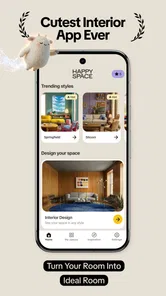
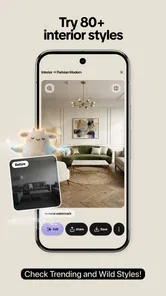
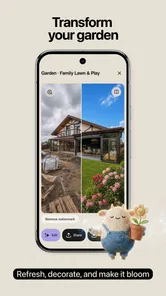
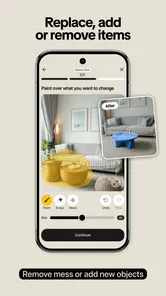
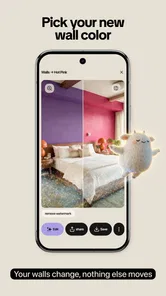
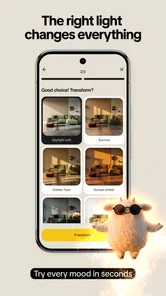
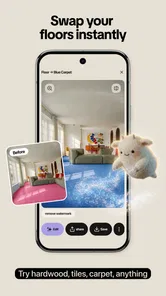
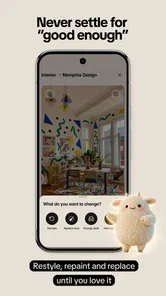
Analysis by Reviewed
Redesigning a room usually starts with a simple question: what would this space look like if I changed the mood, lighting, or style? Happy Space - AI Home Design is built around that moment of curiosity. I can upload a photo of an interior and use it as the starting point for visual restyling, rather than trying to imagine every change from an empty canvas. That makes it more approachable than many traditional design tools, especially when I want quick inspiration instead of a full architectural plan.
Developed by DigiTalya Studios, this free Art & Design app focuses on experimenting with interiors through trending styles, lighting adjustments, and related visual changes. I see it as an idea generator first and a practical planning aid second. The difference matters: an attractive result can help me choose a direction, but it should not be treated as a precise promise of how a real room, paint color, fixture, or piece of furniture will look after renovation.
The app has attracted over ten thousand installs and holds a 4.8 average from around 160 ratings, which suggests that its basic concept is connecting with people who want fast visual inspiration. It is rated for Everyone, so the presentation is accessible to a broad audience. At the same time, the free download includes optional purchases ranging from $1.99 to $34.99 per item, making it worth understanding where the free experience ends before investing time in a detailed design workflow.
What using Happy Space feels like in practice
I find this kind of photo-based design tool most useful when I decide what I want to learn before I open it. A single question—such as whether a room needs a lighter mood or warmer illumination—keeps the experiment focused and makes the resulting images easier to compare. That baseline matters because a polished restyle can be inspiring without being a reliable blueprint.
Starting with a real room instead of a blank template
The most useful part of this approach is the photo-based starting point. When I look at a blank design canvas, I have to make too many decisions at once: room proportions, furniture placement, colors, lighting, and decorative style. By working from an existing image, I can focus on one question at a time. Should this living room feel warmer? Would a cleaner modern look suit the current layout? Does brighter lighting make the room feel more open?
That workflow is particularly helpful for renters, homeowners preparing for a refresh, and anyone collecting ideas before speaking with a decorator. I can take a picture of a bedroom in daylight, try a different visual direction, and compare the mood with the original. Even when the result is not something I would copy literally, it can reveal a preference I had not been able to describe clearly.
I would take the best results as mood boards rather than measurements. An AI restyle can suggest atmosphere and broad visual character, but it may not understand the exact depth of a cabinet, the position of a window, or whether a real sofa would fit beside a door. That is not a reason to dismiss the app; it is the correct way to use it. The image answers “what feeling do I want?” more reliably than “what should I buy and where should it go?”
More From Our News Desk

 Gmail
GmailGmail in a Busy Inbox: Who Benefits Most?
From first account to crowded workday, Gmail earns its place through dependable search and flexible sorting—but its best fit depends on how much inbox maintenance you can tolerate.

 Prime Video
Switching to Prime Video: What Changes in Your Viewing Routine
Prime Video can make a compelling second home for streaming, but switching means learning a different catalog, rental layer, and route from browsing to playback.

 Universal TV Remote Control
Universal TV Remote Control Works Best as a Reliable Backup
A phone remote earns its place through quick setup and reliable habits. Here is how to get more from Universal TV Remote Control—and where its limits show.

 Weather - By Xiaomi
Weather by Xiaomi Review: Clear at a Glance, Less Clear Up Close
Xiaomi’s weather app makes everyday forecasts quick to scan, but its calm surface can leave useful details and recovery paths harder to find than they should be.

 X
XX Under Pressure: Can It Recover When Posting Goes Wrong?
A resilience-focused review of X, examining setup, mistaken posts, interruptions, weak connections, and the gaps that matter when recovery needs to be dependable.

 Clash of Clans
Clash of Clans Is Won Between the Battles
Its raids are quick; its community is a long-term project of coordination, teaching, rivalry, and shared responsibility—with all the friction that entails.
Latest News



Testing styles without committing to them
Happy Space is most enjoyable when I treat each variation as a quick experiment. Instead of trying to perfect one image immediately, I would begin with a clear original photo, test a small number of contrasting directions, and save the versions that communicate something useful. For example, a soft, warm treatment can be compared with a brighter contemporary one, not because one is automatically better, but because the contrast makes personal taste easier to recognize.
This is one of the app’s less obvious strengths: it can help turn vague design language into a visual decision. “Cozy,” “minimal,” and “bright” mean different things to different people. Seeing those ideas applied to the same room gives me something concrete to discuss with a partner, family member, decorator, or contractor.
I would avoid changing too many variables at once when making a decision. If the style, furniture appearance, wall color, and lighting all shift together, it becomes difficult to know what actually improved the room. A more disciplined sequence is to compare the overall style first, then focus on lighting, and only afterward consider whether the furniture treatment supports the direction. This produces more useful comparisons than simply choosing the most dramatic image.
A realistic everyday scenario
Imagine that I am planning to refresh a small dining area over the weekend. I take a photo when the room is tidy and the main light is on, then use the app to explore a few different moods. One version may help me realize that I prefer softer illumination and less visual clutter. Another may show that a strong, dark treatment makes the room feel narrower than expected. I can then use those observations when comparing real lamps, wall colors, table settings, or textiles in a shop.
The value here is not that the app makes the purchasing decision for me. Its value is that it can prevent an unfocused shopping trip. Rather than buying several unrelated items and hoping they work together, I can first identify the atmosphere I am aiming for. That can save money indirectly, even though the app itself offers optional purchases and should not be treated as a replacement for checking real products.
Where the visual results need caution
AI-generated interior images can be persuasive because they look finished. That polished appearance can create false confidence, particularly when I am considering expensive changes. Lighting in a generated image may flatter a space more than ordinary daylight does, while materials can appear smoother, larger, or more coordinated than their real equivalents.
I would therefore compare every appealing result with the original photograph. Look at the room’s actual floor area, natural light, storage needs, and traffic path. If a restyle makes a room look better only because it removes practical objects or changes the apparent proportions, it is inspiration rather than a plan. This check is especially important for kitchens, narrow hallways, and shared rooms where function matters as much as appearance.
Privacy and trust at the point of upload
Uploading a room photo is a more sensitive action than browsing generic design examples because the image may show personal belongings, family photographs, documents, neighboring views, or identifying details. My cautious habit would be to review the image before selecting it. I would crop out paperwork, blur faces and private photographs when needed, and avoid including anything that has no bearing on the design question.
This is not an accusation about the app or its developer. It is simply sensible behavior whenever a service processes a personal image. The important trust question for me is whether I understand what I am choosing to upload and whether I am comfortable with that choice. A clean, tightly framed room photo is usually better for design feedback anyway, because it keeps attention on the space rather than unrelated background details.
I would also check the app’s current privacy information and the permission prompts shown on my device before continuing. The visible request matters more than assumptions based on the app’s category. If the app asks for access I do not consider necessary for the task, I would pause and decide whether to deny it or use a different method. Keeping control of photo access is part of using an AI design tool responsibly.
Controls I would review before paying
Because the app is free to install but includes optional purchases, I would explore the available workflow before selecting any paid item. The practical questions are straightforward: can I complete a meaningful test without paying, is the purchase clearly labeled, and does the screen explain what the item unlocks before the confirmation step? I prefer to answer those questions while I am still casually exploring, not after I have already invested effort in a project.
On a shared device, I would be especially careful with purchase confirmation and account settings. A child-friendly age rating does not remove the need for adult oversight around optional spending. I would use the operating system’s purchase controls and review any account settings that affect billing or access. The price range is broad enough that a quick tap should never be treated as a harmless detail.
I also recommend keeping the original room photo outside the app. That gives me a reference if I later remove the application, change devices, or decide not to continue. It is a small but useful form of user control: the starting material remains mine to organize, compare, and reuse independently.
Who will get the most from it
This app suits people who think visually and want a fast way to explore interior directions. It is a good match for someone preparing a bedroom refresh, collecting ideas for a first home, comparing moods with a partner, or trying to explain a preferred style without knowing the right design vocabulary. It can also help students and hobbyists create visual references for personal projects.
I think it is especially valuable before the research phase. Once I know whether I am leaning toward a calm, bright, dramatic, or contemporary atmosphere, I can search more intelligently for real examples and products. The app reduces the blank-page problem, which is often the hardest part of decorating.
Who should choose another tool
I would not rely on Happy Space as the main tool for accurate renovation planning. If I need exact dimensions, reliable floor plans, construction documentation, precise furniture placement, or a detailed shopping list, a dedicated room planner or professional design application is a better choice. Those tools usually require more work, but they are designed for decisions where scale and technical accuracy matter.
It may also be a poor fit if I am uncomfortable uploading interior photographs or if I want complete manual control over every object. A photo-restyling workflow is convenient precisely because it automates much of the visual transformation. That convenience can feel limiting when I need to specify an exact chair, preserve every object, or make a single controlled change without affecting the rest of the scene.
Compared with browsing Pinterest-style inspiration boards or scrolling through furniture catalogues, the advantage here is personal context: the ideas begin with my room. Compared with professional 3D planning software, the advantage is speed and simplicity, while the trade-off is lower precision. Compared with a basic photo editor, the appeal is that I do not need to manually mask every wall or object to begin exploring a different atmosphere.
Practical habits that improve the results
I would take the source photo in even lighting, with the camera held level and the room reasonably tidy. A cluttered image gives the system more distractions and makes it harder for me to judge the design change. I would also take more than one angle when the room has an unusual shape, because a single attractive viewpoint can hide practical problems elsewhere.
Another useful habit is to name or organize saved images by the decision they represent rather than by vague labels such as “favorite.” “Warmer lighting,” “less clutter,” and “lighter walls” tell me why an image mattered when I review it later. This turns a collection of attractive outputs into a usable design conversation.
Finally, I would test a style against the room’s real purpose. A dramatic look may work for a reading corner but feel tiring in a bedroom. A very minimal treatment may look elegant while ignoring storage needs. The app can show me a direction, but I still need to judge whether that direction fits how I live.
Version, accessibility, and expectations
The current version is 1.10.0 and requires Android 7.0 or later. That makes the compatibility requirement relatively clear for Android users, although I would still check how the app behaves on my particular device before starting a large collection of designs. Processing visually rich images can feel different on older hardware than on a newer phone, so I would keep expectations practical rather than assuming every device will respond identically.
The Everyone rating makes the app easy to consider for a household, but the visual simplicity of the concept should not be confused with professional-grade output. Younger users may enjoy experimenting with room styles, while an adult should remain responsible for private uploads and purchases. That combination of broad accessibility and adult oversight feels appropriate for this type of creative tool.
My cautious verdict
After considering how I would actually use it, I see Happy Space as a friendly first step for interior inspiration rather than a complete design system. Its strongest idea is letting me start with a real room and quickly explore how different styles and lighting moods might change its character. That is more useful than generic inspiration when I am stuck between several directions.
The trust side depends on my own discipline. I would upload carefully selected images, review permission prompts, protect sensitive details, and inspect purchase screens before confirming anything. I would also keep expectations grounded: the app can support taste and communication, but it cannot replace measurements, product checks, or professional advice for costly work.
For someone who wants to visualize possibilities without learning a complex design program, I would recommend trying the free experience first. The decision to spend should come only after the available controls and purchase terms feel clear. If the goal is exact planning or complete manual precision, I would choose a specialized alternative instead. For quick, personal, photo-based experimentation, however, Happy Space - AI Home Design offers a sensible and approachable way to discover what kind of room I actually want.
Happy Space - AI Home Design Frequently Asked Questions
Can I use Happy Space - AI Home Design on my device?
Happy Space - AI Home Design is an app in the Art & Design category, and its current version is 1.10.0. It requires Android 7.0 or later, so check your device’s operating system before downloading. The app is free to install, though some features may involve in-app purchases. Availability and compatibility can also depend on the app store and device you use.
Who is Happy Space - AI Home Design intended for?
Happy Space - AI Home Design is aimed at people who want to explore interior-design ideas by restyling a room photo. It may suit homeowners, renters, or anyone looking for visual inspiration before discussing a decorating project. The content rating is Everyone, and the app is developed by DigiTalya Studios. Its generated concepts are useful for exploring possibilities, rather than serving as professional design or building plans.
What is Happy Space - AI Home Design?
Happy Space - AI Home Design is an interior-design app that uses artificial intelligence to help you visualize rooms in different styles. You can usually upload a photo of an existing space, select a preferred design theme, and receive a redesigned concept. It is intended for inspiration and planning rather than replacing professional architectural, construction, or structural advice.
How does the AI room design feature work?
After opening the app, you generally provide a room photo or choose an available design workflow, then select details such as the room type, preferred style, colors, or furniture mood. The AI processes the image and creates a redesigned version. Results can vary depending on lighting, image quality, room layout, and how clearly the original space is shown.
Is Happy Space - AI Home Design free to use?
The app may offer free access to selected tools, previews, or a limited number of generations, while additional designs and premium features can require a subscription or in-app purchase. Before confirming payment, check the current pricing, trial conditions, renewal terms, and cancellation instructions shown in the store listing or inside the app, as these details may change.
Pros
- Generates multiple room concepts quickly from photos
- Useful for exploring different interior design styles
- Provides visual inspiration before starting renovations
- Simple interface suitable for users without design experience
- Can help compare color schemes
- layouts
- and decor ideas
Cons
- AI results may distort furniture
- walls
- or architectural details
- Some advanced designs or features may require payment
- Uploaded room photos may raise privacy concerns
- Suggestions can look generic or differ from available products
- Results depend heavily on photo quality and lighting











