Habitica: Gamify Your Tasks
- 3.92K
- 4.7
- Installs
- 5.00M
- Price
- Free

Screenshots

Analysis by Reviewed
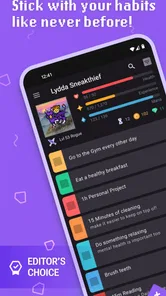
I have always found ordinary task lists easy to start and surprisingly easy to abandon. Habitica: Gamify Your Tasks takes a different route: it turns chores, routines, and personal goals into an ongoing role-playing experience. In my use, that idea is more than a colorful skin over a checklist. The app changes how I decide what deserves attention, because finishing a small real-world action gives it a visible place in my character’s progress.
My overall view is positive, with one important qualification: Habitica works best when motivation comes from playful structure rather than strict efficiency. If you enjoy seeing progress, collecting rewards, and gradually shaping a routine, it can make repetitive responsibilities feel less flat. If you want a silent, frictionless list that disappears into the background, the game layer may feel like extra work.
How Habitica turns ordinary responsibilities into a game
Habitica is a free productivity app from HabitRPG, Inc., designed for people who want to organize life through game-like feedback. The basic appeal is easy to understand. Instead of simply checking off “wash dishes,” “study,” or “go for a walk,” I place those actions inside a system where completed work contributes to a character and an ongoing sense of progress.
That framing matters because different tasks need different kinds of treatment. A one-time assignment is not the same as a behavior I want to repeat, and a large project should not be treated like a tiny daily chore. Habitica’s structure encourages me to separate those categories instead of dumping everything into one endless list. That alone makes planning more thoughtful than the usual approach of writing down every obligation in the same format.
I also appreciate that the app does not pretend motivation is identical for everyone. Some people respond to streaks, some to visible completion, and others to the feeling that their actions are building toward something. Habitica leans strongly into the last two. The role-playing presentation gives routine work a sense of consequence, while the task categories help me see whether I am dealing with a habit, a deadline, or a broader project.
The app has earned a 4.7 average from around 75 thousand ratings, and its reach is substantial, with over 5 million installs. Those figures do not guarantee that it will suit every personality, but they do reflect an idea that has connected with a large audience. The Everyone content rating also makes it approachable for a wide range of users, including families and younger users who may find a conventional planner uninteresting.
The three task types are more useful than they first appear
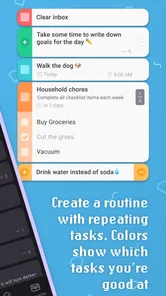
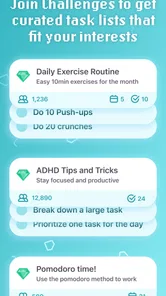
The most important practical choice is deciding where an item belongs. A habit is something I want to encourage or reduce repeatedly, such as drinking enough water or avoiding unnecessary snacking. A daily is tied to a recurring schedule, such as reviewing notes or preparing for the next morning. A to-do is a finite responsibility, such as submitting a form or repairing something at home.
More From Our News Desk

Weather by Xiaomi Review: Clear at a Glance, Less Clear Up Close

X Under Pressure: Can It Recover When Posting Goes Wrong?

Clash of Clans Is Won Between the Battles

Android Auto Makes the Case for Quieter Car Software

MobiOffice: Transforming Mobile Productivity with Seamless Integration

EA SPORTS FC™ Mobile Soccer: Redefining Mobile Sports Gaming
This distinction creates a useful planning habit of its own. When I am tempted to write “get healthier” as one giant goal, Habitica pushes me toward smaller actions that can actually be completed. I might turn that vague intention into a daily walk, a recurring meal-preparation task, and a separate to-do for buying ingredients. The result is not merely a tidier list; it is a clearer explanation of what progress looks like.
A less obvious benefit is that the app can expose badly designed goals. If I keep postponing an item, the problem may not be laziness. The task may be too broad, too unpleasant, or scheduled at the wrong time. Habitica’s repeated visibility makes that pattern difficult to ignore. I can split a large task into a first step, change its frequency, or remove it instead of carrying guilt from an unrealistic plan.
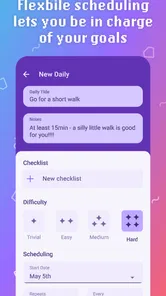
For a busy weekday, I would use it like this: create a daily for checking the next day’s calendar, add a to-do for a specific work deliverable, and use a habit for an action I want to reinforce whenever it happens. In the evening, I can see whether I completed the important actions without confusing them with long-term ambitions. That separation is one of the app’s strongest productivity ideas.
Rewards make small actions feel visible
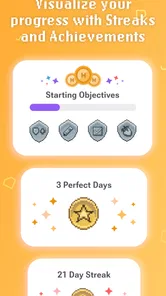
Traditional task apps often stop at a check mark. Habitica adds a sense of consequence and collection, which can be surprisingly effective for repetitive work. When I finish something dull, the app gives that action more emotional weight than a disappearing line in a list. I am not suddenly excited to fold laundry, but I am more likely to begin when the task is connected to a visible character journey.
The reward approach is especially useful for maintenance tasks that never feel finished. Cleaning, practicing an instrument, stretching, and reviewing language vocabulary all have the same problem: completing them today does not remove the need to do them again. A game-like progression gives those repeated efforts a cumulative feeling, even when the real-world task resets tomorrow.
My advice is to keep the reward relationship honest. If I add too many trivial habits, the system becomes noisy and progress loses meaning. I get better results when I reserve entries for actions that genuinely matter to my routine. A short list of meaningful behaviors is more motivating than a huge collection of tiny taps.
Another useful technique is to start with actions that are almost impossible to misunderstand. “Read for ten minutes” is easier to evaluate than “be more productive.” “Put clothes in the laundry basket” is clearer than “keep the room organized.” Habitica is at its best when the game responds to concrete behavior rather than vague self-judgment.
Planning is where the app can outperform a basic checklist
A basic checklist is often faster for capturing a sudden thought. Habitica becomes more valuable after that first capture, when I need to decide whether the item is recurring, finite, or part of a larger pattern. Its approach encourages me to build a personal operating system instead of keeping a temporary pile of reminders.
I would not use it as my only tool for every kind of work. For a complex professional project with many dependencies, detailed notes, attachments, or formal collaboration requirements, a dedicated project manager may be more suitable. Habitica is better at motivating action than documenting an entire project. I can use it as the behavioral layer: the place where I record the next action that keeps a larger project moving.
That distinction is important. If I enter “launch a website” as one to-do, the item may sit untouched because it is too large. If I enter “write the homepage outline” or “choose three layout references,” the task becomes actionable. Habitica does not magically plan the project for me, but it gives me a strong reason to translate ambition into the next physical or mental step.
Social motivation can help, but it changes the experience
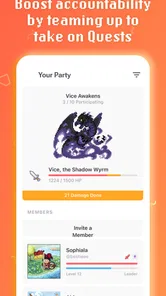
Habitica is not limited to private self-management. Its game-oriented design can make accountability more engaging when other people are involved. A shared sense of progress can be useful for study partners, friends trying to exercise regularly, or households dividing recurring responsibilities.
I would be selective about using social elements, though. Accountability is motivating only when the group has compatible expectations. If one person treats the system casually while another feels pressure to maintain perfect consistency, the shared experience can become uncomfortable. Likewise, a user who prefers complete privacy may find the community-oriented side less appealing than a personal planner.
The best arrangement is usually a small, supportive group with a clear purpose. I would avoid turning every personal goal into a public performance. Some habits are private, experimental, or likely to change. Keeping those separate can prevent the app from becoming a source of unnecessary pressure.
Where the playful approach falls short
The same game mechanics that make Habitica memorable can also create friction. To benefit from it, I must maintain the system: create sensible tasks, review outdated entries, and decide whether a missed item reflects a real problem or an unrealistic plan. A minimalist checklist asks less of me. It may be less motivating, but it is also harder to overcomplicate.
There is a real danger of optimizing for points instead of meaningful progress. If I reward myself for adding easy items, I can create the appearance of activity without doing the work that matters. The solution is not to abandon the app; it is to treat the task design as seriously as the completion itself. Habitica rewards the structure I give it, so poor structure can produce a polished version of procrastination.
Missed recurring tasks can also feel heavier than an ordinary unchecked box. For some users, that consequence may encourage a reset and a better routine. For others, it can trigger guilt and avoidance. I think people who already struggle with perfectionism should use forgiving schedules and avoid creating a large number of daily obligations at the beginning.
The role-playing layer will not appeal to everyone, either. I enjoy the sense of progression, but I can imagine a user opening the app for a quick reminder and feeling distracted by the surrounding game language. Someone who wants a professional-looking workspace, a calendar-first view, or highly detailed project documentation may prefer a conventional productivity tool.
There is also a learning curve in understanding how to translate real life into the app’s categories. The system is approachable, but it rewards experimentation. I had to adjust wording, frequency, and task size before the setup reflected my actual routine. That initial effort is worthwhile for a committed user, yet it is more demanding than downloading a plain notes app and writing a few lines.
What the current version means for practical use
The current version is 4.10.4, and the app supports devices running Android 8.0 or later. On a compatible phone, it fits naturally into quick check-ins throughout the day, but I would still avoid opening it every few minutes. Its value comes from reinforcing a routine, not from turning every moment into a status update.
The app is free to use, with optional in-app purchases ranging from $0.99 to $47.99 per item. That makes it easy to try without committing money upfront. I would begin with the free experience and only consider spending if the additional options genuinely support the way I use the system. The important question is whether the core workflow helps me act; cosmetic or optional extras should remain secondary.
Because the app is available without an entry price, it is also a reasonable experiment for students, households, and people rebuilding a routine after a difficult period. The low-risk starting point matters here. Productivity systems often fail because users invest in an elaborate setup before discovering whether the method fits them. Habitica lets me test the habit-game approach first.
Who should choose it, and who should skip it
I would recommend Habitica to people who enjoy games, visible progress, and a little ceremony around routine work. It is particularly well suited to students managing study habits, adults trying to establish healthier patterns, and anyone who repeatedly creates lists but struggles to return to them. People who respond to rewards and accountability are likely to get the most from it.
It can also help users who have many small responsibilities competing for attention. Instead of treating every task as an emergency, I can assign recurring actions their own place and build a rhythm around them. That is useful for home maintenance, personal learning, exercise, creative practice, and preparation routines.
I would be more cautious for someone who wants a completely private, distraction-free planner or who dislikes role-playing games. It is also not my first choice for teams that need extensive project records, formal workflows, or detailed scheduling. A standard task manager may be better when speed, hierarchy, and information density matter more than motivation.
People prone to perfectionism should start gently. I would create only a few dailies, make habits measurable, and review the list after a week. If an item repeatedly creates stress without helping, changing or deleting it is a sign of good planning, not failure. The app should support a routine, not become another routine I feel obliged to perform perfectly.
My final recommendation
Habitica succeeds because it addresses a problem that many productivity apps overlook: knowing what to do is not the same as wanting to do it. Its game-like feedback gives ordinary actions a little momentum, while its separation of habits, recurring responsibilities, and one-time tasks encourages better thinking about goals.
Its weaknesses are equally clear. Setup takes care, the game layer may feel distracting, and careless task design can turn motivation into point collecting. I would not recommend it as a universal replacement for calendars, notes, or project-management software. I would recommend it as a personal motivation system that sits alongside those tools when the main challenge is consistency.
After using it, my practical advice is to begin with one routine, one meaningful recurring action, and a small number of concrete to-dos. Give the system enough time to reveal what works, then remove anything that feels like administrative noise. Habitica is most effective when the game serves your real life, rather than asking your real life to serve the game.
For me, that makes it a worthwhile free productivity app and an especially good choice for people who have already tried ordinary lists without lasting success. It will not make every chore enjoyable, but it can make progress easier to notice—and sometimes that is the nudge needed to keep going.
Habitica: Gamify Your Tasks Frequently Asked Questions
Is Habitica: Gamify Your Tasks suitable for beginners?
Habitica can be approachable if you start with a few habits, daily tasks, and to-dos rather than trying to organize your whole life at once. Its role-playing elements give task completion a playful feel, but you still choose what to track and maintain your own lists. Trying a small set of tasks first can help you decide whether this style of productivity suits you.
Can Habitica help me build habits if I struggle to stay motivated?
Habitica is designed to make routines more engaging by connecting task completion with character progress and in-game rewards. You can record habits and daily responsibilities, then return to your list to track what you have done. The game layer may provide an extra nudge, but it works best when you choose realistic tasks and check in consistently; it cannot build a routine automatically for you.
Is Habitica: Gamify Your Tasks free to download?
Habitica is free to download and use for its basic productivity and role-playing features. Optional in-app purchases range from $0.99 to $47.99 per item and may offer additional customization or content, but they are not essential for everyday task management. You can begin using the core system without making a purchase and decide later whether optional extras suit your needs.
What devices can run Habitica: Gamify Your Tasks?
Habitica is available for Android and iOS, so you can use it on a compatible phone or tablet. The app requires Android 8.0 or later, and its Everyone age rating makes it suitable for a broad audience. If you plan to switch between devices, signing in to the same account helps keep your character and tasks synchronized.
What is Habitica: Gamify Your Tasks, and how does it work?
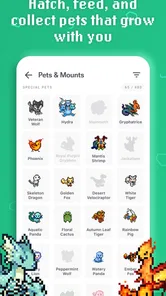
Habitica is a productivity and habit-building app that turns your daily responsibilities into a role-playing game. You create a character, add habits, daily tasks, and to-dos, then earn experience and gold for completing them. Your progress unlocks levels, equipment, pets, and other game features, making routine planning feel more interactive and rewarding.
Pros
- Turns daily tasks into motivating game challenges.
- Offers parties and social accountability with other users.
- Highly customizable avatars
- rewards
- and task categories.
- Includes recurring tasks and flexible scheduling options.
- Works well for building routines through visible progress.
Cons
- The interface can feel confusing for first-time users.
- Missing tasks may reduce character health and motivation.
- Some cosmetic content and features require in-app purchases.
- Social features depend on finding an active
- supportive party.
- Setup takes time if you want to organize many habits.











