Grok Bot
- 598.00
- 4.8
- Installs
- 1.00M
- Price
- Free

Screenshots
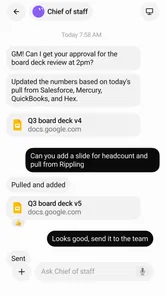
Analysis by Reviewed
I’d judge Grok Bot less by the promise of artificial intelligence and more by a practical question: can I explain a task in ordinary language and get useful work started without wrestling with a complicated setup? That framing makes this productivity app appealing, particularly for people who want help automating recurring work but don’t think of themselves as technical. It also raises an important accessibility question: an easy first instruction is only part of the experience. The app is most useful when its navigation and results are comfortable for the person using it and the situation they’re in.
Getting oriented and making instructions clear
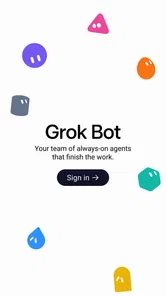
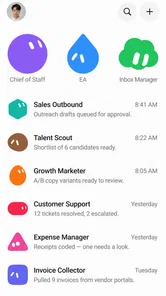
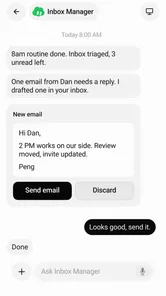
Grok Bot is a free productivity app from SpaceXAI, built around AI agents that carry out tasks from a user’s description. The basic idea is approachable: explain what you want automated instead of beginning with a dense configuration process. I like that this puts the user’s goal first. Someone who knows the result they want, but not the technical vocabulary for describing a workflow, has a natural place to begin.
The name, Grok Bot, is concise, but the more useful question is whether you can express a request precisely. I’d treat the first instruction as a working draft rather than a magic phrase. State the desired outcome, explain what should happen first, and include any important exception. For example, asking an agent to organize a recurring task is clearer if you say what counts as complete and what should be left alone. This habit can reduce ambiguity even when the app itself makes setup feel simple.
For readability, the strongest part of the concept is that the user can start with plain language rather than learning a specialist automation tool. That can lower the initial cognitive load for a person who is new to agents. But natural-language input doesn’t automatically make every later step easy to understand: users still need to judge whether an agent interpreted the request correctly and whether its work matches their intention. I would begin with a small, low-stakes task, review the result, and only then rely on the workflow for something more consequential.
The app has a 4.8 average from around 9,100 ratings, and it has passed 1 million installs. Those figures suggest that many people have tried it, but they don’t tell me whether a particular workflow will be clear or comfortable for you. I’d use them as context, not as a substitute for testing the app with a task that resembles your own day.
Why a small first task is a better test
A useful first trial is something repetitive but easy to check. Think of a task where you can compare the agent’s result with what you would have done manually. Keep the request narrow, note which parts it handles well, and revise only the unclear instruction. This makes it easier to identify whether a problem comes from wording, from the workflow itself, or from a mismatch between what you need and what the app can do.
There’s a less obvious benefit to this approach: a compact request can serve as a reusable specification. Once you have written down the desired outcome and the exceptions that matter, you have a clearer account of the task even if you later decide to use another tool. Conversely, if you need exact, repeatable control over every step, a visual automation builder or a conventional checklist may be easier to inspect than an agent interpreting a sentence.
More From Our News Desk

Weather by Xiaomi Review: Clear at a Glance, Less Clear Up Close

X Under Pressure: Can It Recover When Posting Goes Wrong?

Clash of Clans Is Won Between the Battles

Android Auto Makes the Case for Quieter Car Software

MobiOffice: Transforming Mobile Productivity with Seamless Integration

EA SPORTS FC™ Mobile Soccer: Redefining Mobile Sports Gaming
Comfort across different abilities and situations
I’d look at comfort across different abilities and situations as more than a question of whether the first request feels easy to write. In my view, the useful test is whether someone can understand the task, check the result, and correct it without unnecessary strain. That makes context just as important as interface: next, I’d consider how motor and sensory needs can change the effort involved.
Motor and sensory considerations
Starting with a written request may suit people who find long sequences of menus or repeated configuration tiring. It can also help when a user knows the task in everyday terms but would struggle to translate it into a chain of technical rules. That is a real strength of the interaction model, though it shouldn’t be mistaken for proof that every part of the app works equally well for every access need.
Typing can itself be a barrier. A person with limited hand mobility, fatigue, or difficulty entering longer text may find a detailed instruction more demanding than a short tap-based control. If that applies to you, try a concise request and build up only when needed; don’t assume that a conversational interface always means less effort. The practical test is whether the amount of editing and correction is lower than the effort required by your current method.
For sensory access, the key consideration is how comfortably you can read the prompts and evaluate the agent’s response in the environment where you use the app. I would avoid relying on any agent output that is difficult for you to review, especially if the task has consequences beyond personal organization. If visual reading is tiring, or if noise and interruptions make it hard to focus, a brief, clearly scoped task is a safer starting point than a long, multi-part request.
One useful technique is to separate instructions into outcome, boundaries, and exceptions. For instance, explain what you want done, what the agent should not change, and what should happen when information is incomplete. This isn’t a special feature claim; it’s a way to make the interaction easier to review. A shorter prompt with explicit limits is often more manageable than a long paragraph that mixes several goals.
Using it when attention and time are limited
Grok Bot may be most helpful when you can spare a moment to describe a task but don’t have time to build a workflow from scratch. Imagine finishing a busy workday and noticing that the same small administrative job keeps slipping through. You could try describing one repeatable part of it, check what the agent produces, and decide whether the result is reliable enough to keep using. That is a realistic way to assess its value without handing over an entire routine at once.
In a noisy commute or between meetings, the attraction of a direct request is obvious: you can focus on the outcome instead of navigating a complicated setup. The trade-off is that hurried instructions are often vague. I’d save consequential automation for a calm moment when you can read the response carefully. For a low-risk task, a quick trial may be fine; for anything involving important decisions or sensitive work, time pressure is a reason to slow down rather than trust the first interpretation.
The same distinction matters for people who share devices, work in public, or have limited time online. A plain-language instruction can be convenient, but you should consider what you are comfortable entering and whether you can review the result in private. I would keep the first tests free of sensitive personal details and use examples that are easy to verify. That’s a prudent workflow choice, not a claim about the app’s data practices.
Where the app can still feel demanding
The main friction is that “easy to set up” doesn’t remove the need to think carefully. An agent can only work from the request it receives, and a user may need to notice when the result misses an exception. This can make the app less suitable for people who want a completely hands-off tool, or for tasks where a subtle mistake would be hard to spot. In those cases, a simple manual process or a deterministic automation with visible steps may offer more confidence.
Another limitation is that natural language can be less predictable than fixed controls. Two people may describe the same goal differently, and a user may not know which details are important until the first attempt. If you prefer explicit settings, direct control, or a fixed sequence you can inspect at a glance, the conversational approach may feel opaque rather than liberating. I’d choose it for reducing setup friction, not for situations where the exact path matters more than the outcome.
Cost also deserves a little attention before making the app part of a routine. It is free to install, but in-app purchases range from $10 to $300 per item. That is a wide span, so I would check the purchase details in context before spending and avoid paying simply because a first experiment was interesting. Start by deciding what repeated effort the app would actually save; if you can’t name a concrete benefit, the free starting point is the sensible place to remain.
The current version is 1.13.0, and the stated minimum operating-system requirement is version 9. The age classification is Everyone, which makes the app broadly available by its content rating, but it doesn’t determine whether its interaction style will suit a particular person. Anyone deciding whether to install should check that their device meets the system requirement and then evaluate comfort directly, rather than assuming the age label answers questions about usability.
Who I’d recommend it to—and who should look elsewhere
I’d recommend trying Grok Bot if you have a recurring task you can describe simply, want to experiment with AI agents, and are willing to review their work before depending on it. It may be especially useful for people who find traditional automation tools intimidating because they begin with technical menus, rules, or visual flows. The app’s central appeal is the chance to express a goal first and refine the process after seeing how the agent handles it.
I’d be more cautious if you need accessibility controls that are essential to your use, if lengthy typing is difficult, or if you cannot comfortably inspect the result. I would also skip it for workflows where a wrong interpretation could cause significant trouble and there is no practical way to check the output. A conventional reminder, checklist, or rule-based automation can be a better choice when predictability and visible steps matter more than flexible instructions.
Compared with a standard productivity app, Grok Bot’s agent-led approach asks you to describe work rather than simply record it. That can save setup effort for flexible tasks, but a calendar or task list remains clearer when all you need is a fixed reminder. Compared with established automation builders, the conversational approach may be less intimidating, while a builder’s explicit conditions can make complex workflows easier to audit. The right choice depends on whether your bigger obstacle is configuring a process or trusting an interpretation.
My inclusive verdict
My impression is that Grok Bot has a promising entry point for people who want automation without first learning a technical system. Its natural-language premise can reduce one kind of barrier, especially for users who can explain a task more easily than they can configure it. The app is not automatically effortless, however: writing precise requests, reading the output, and catching mistakes still require attention, and those demands affect people differently.
I’d try it with a small, reversible task and judge it by the whole experience: how easy it is to describe the goal, how much correction is needed, and whether the result is comfortable to review. If those steps feel manageable, the app could become a practical addition to a productivity routine. If the interaction creates more uncertainty or effort than it removes, a simpler tool is not a failure—it is the more inclusive choice for that particular need.
Overall, I see Grok Bot as worth exploring for curious users who want to delegate carefully, not as a replacement for judgment or for every accessibility need. Its strongest case is a repeatable task with clear boundaries and an easy way to verify success. Start small, protect your attention, and keep control of decisions that matter. That gives you a fair test of whether this agent-based approach genuinely makes your day easier.
Grok Bot Frequently Asked Questions
What is Grok Bot, and what can I use it for?
Grok Bot is an AI-powered assistant designed to respond to questions and help with tasks such as brainstorming, explaining topics, drafting text, and summarizing information. Its exact features can vary depending on where you access it and which version is available. As with other AI tools, its responses may be incorrect or incomplete, so check important details against reliable sources before relying on them.
Is Grok Bot free to use?
Access and pricing can depend on the app, service, region, and account plan through which Grok Bot is offered. Some versions may provide limited features at no charge, while higher usage limits or additional capabilities may require a paid subscription. Review the current pricing, trial terms, and in-app purchase details on the official download page or inside the app before signing up.
Does Grok Bot require an account or an internet connection?
Grok Bot generally needs an internet connection to send prompts to its AI service and return responses, so many features may not work offline. Depending on the version, you may also need to sign in or link an account before chatting. Check the app’s setup instructions and permissions, and make sure you understand which account information is used before connecting an existing profile.
Can I trust Grok Bot’s answers, and is it safe to share personal information?
Treat Grok Bot’s responses as suggestions rather than verified facts: AI can misunderstand a prompt, provide outdated information, or produce confident-sounding errors. Avoid entering passwords, payment details, private documents, or other sensitive information unless you have checked the service’s privacy policy and data settings. For medical, legal, financial, or safety-related decisions, confirm advice with a qualified professional or authoritative source.
How can I make sure I download the genuine Grok Bot app?
Search for Grok Bot through the official Google Play Store or Apple App Store, and carefully check the developer name, app description, and available privacy information before installing. Avoid unofficial download files and lookalike apps that request unusual permissions or promise features that seem implausible. App availability and features may differ by country and device, so confirm compatibility on the store listing.
Pros
- Answers follow-up questions while keeping the conversation’s context.
- Can help summarize text and explain complex topics in simpler terms.
- Supports image uploads for visual questions and analysis.
- Offers real-time information from public posts on X.
- A single chat interface handles brainstorming
- writing
- and research.
Cons
- AI responses can be inaccurate
- so important claims need verification.
- Real-time results may reflect unverified or biased social media posts.
- Use of the service may require an X account or subscription.
- Uploaded prompts and images may raise privacy concerns.
- Availability of features can vary by region
- device
- and plan.











