GreenCast Connect by Syngenta
- 4.00
- 4.1
- Installs
- 10.00K
- Price
- Free

Screenshots
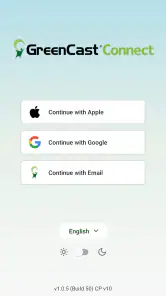
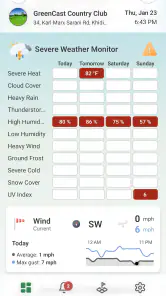
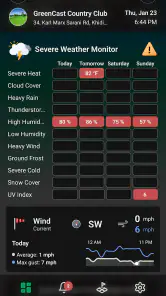
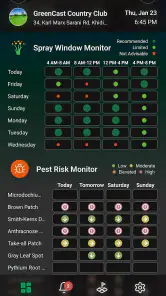
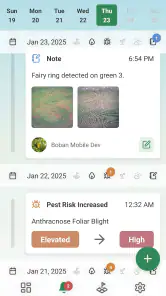
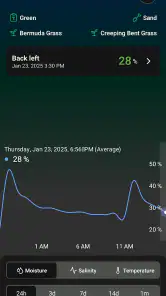
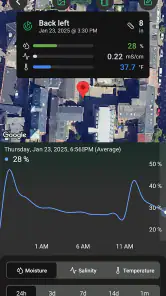
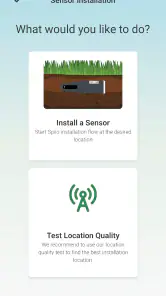
Analysis by Reviewed
GreenCast Connect is a weather-focused app from Spiio that takes a more specialized route than the ordinary forecast tools most of us keep on a phone. Its store summary points toward digital turf agronomy, while the short description presents it simply as GreenCast Connect. That combination tells me who it is really aimed at: people responsible for turf, grounds, or outdoor growing decisions who need weather information to support practical work rather than just decide whether to carry an umbrella.
I approached it as a first-time user, looking for a clear path from installation to a useful first result. The app is free, rated for Everyone, and works on devices running Android 7.0 or later. It is still a relatively young product, released in January 2025, so I would not judge it by the same expectations as a long-established general weather service. Its current version is 1.4.2, and the early audience is modest, with over ten thousand installs and an average rating of 4.1 from a few dozen ratings. That is enough to show real interest, but not enough to suggest that every unusual workflow has been tested by a huge community.
What GreenCast Connect feels like in everyday use
The biggest difference between this app and a normal weather application is the question it tries to answer. A mainstream forecast app usually helps me plan my commute, clothing, travel, or weekend. GreenCast Connect is more useful when the question is closer to, “Is this a sensible moment to make a turf-related decision?” That makes its value less obvious during a casual first glance, but more meaningful once I connect it to a real maintenance routine.
Imagine managing a sports field, a golf area, a landscaped property, or another outdoor surface where weather affects the timing of work. Before acting, I may need to think about recent conditions, the next suitable window, and whether an outdoor task is likely to be disrupted. A specialized agronomy app can be more relevant in that situation than a colorful hourly forecast designed for general audiences. I would still keep a conventional weather app nearby for broad daily planning, but I would look to this one for a turf-centered view of the decision.
That distinction is important for expectations. GreenCast Connect is not the kind of app I would install merely because I want a nicer weather widget or a quick rain alert. Its appeal depends on having a practical connection to turf care. If I do not manage outdoor surfaces or make weather-sensitive maintenance choices, the app may feel too narrow. If I do, its focused purpose is a strength rather than a limitation.
The developer is Spiio, and the product is presented under the GreenCast Connect name by Syngenta. I find that context useful because it places the app closer to professional or serious semi-professional turf work than to a general consumer weather service. That does not automatically make every screen better, but it does explain why the app’s usefulness should be judged by decision support and workflow relevance instead of visual entertainment.
The first success is not simply opening a forecast; it is turning weather information into a better-timed turf decision. Keeping that goal in mind makes the initial experience easier to understand. I am not looking for the app to replace every other weather tool on my phone. I am checking whether it helps me organize the information that matters to the outdoor work I actually do.
More From Our News Desk

Weather by Xiaomi Review: Clear at a Glance, Less Clear Up Close

X Under Pressure: Can It Recover When Posting Goes Wrong?

Clash of Clans Is Won Between the Battles

Android Auto Makes the Case for Quieter Car Software

MobiOffice: Transforming Mobile Productivity with Seamless Integration

EA SPORTS FC™ Mobile Soccer: Redefining Mobile Sports Gaming
Who is most likely to benefit
I can see the clearest benefit for grounds staff, turf managers, landscapers, facility teams, and careful home users who maintain a substantial lawn or planted outdoor area. It may also suit someone learning how weather affects turf decisions and wanting a tool built around that subject rather than a generic forecast screen.
The app is less convincing for a person who only wants tomorrow’s temperature, a radar image, or a simple rain percentage. Those tasks are handled more directly by familiar weather apps. GreenCast Connect earns its place when the user is willing to spend a little more time interpreting conditions in relation to turf work.
It is also worth considering the size of the operation. A professional responsible for several areas may need a repeatable routine and a consistent way to check conditions before scheduling work. A homeowner with one small patch of grass may find the specialized approach interesting, but may not use enough of it to justify changing habits. The free price removes the financial barrier to trying it, though time and attention are still costs.
Starting without overthinking the installation
For a first-time user, I would begin by installing GreenCast Connect on the device used during the normal outdoor routine, not necessarily the newest phone in the household. Its minimum operating-system requirement is Android 7.0, which keeps the technical entry point fairly broad. After opening it, I would resist the temptation to explore every available area immediately. The fastest route to understanding is to establish the working context first and then check one real situation.
Before tapping through the app, I would decide what I want the first session to accomplish. For example, I might want to assess whether the next maintenance visit is worth keeping on the schedule. Having that question ready prevents the common mistake of treating a specialized weather app like a news feed. The app becomes easier to evaluate when I compare its information with a decision I genuinely need to make.
As with any weather tool, the usefulness of the result depends on the relevance of the location and the quality of the surrounding context. I would therefore pay close attention to the area selected during setup and make sure it represents the turf I care about, rather than choosing a convenient but distant place. A forecast that is technically accurate for the wrong location can still lead to a poor decision.
I would also give myself a moment to understand the wording used on each screen. Turf-focused terminology may not feel as immediately familiar as the labels in a consumer weather app. That is not necessarily a flaw, but it does mean that rushing through setup can create confusion later. My advice is to read the first screen as an explanation of the app’s working model, not as a form to dismiss as quickly as possible.
Finding the first meaningful result
My recommended first session is deliberately small. Pick one maintained area, identify the next piece of work that depends on outdoor conditions, and use the app to examine the relevant weather context before making that decision. Do not begin by trying to build a complete long-term system. The first useful result should answer a narrow question such as whether a planned visit deserves a second look.
This approach also gives the app a fair test. If I simply browse without a task, I may conclude that the product is too specialized or that its information is not immediately obvious. If I compare it with a real turf-related choice, I can judge whether the presentation helps me act with more confidence. That is a more honest test than counting how quickly I can reach a forecast.
One practical habit I would adopt is checking the app at the same point in the workday whenever possible. A morning review before staff or equipment are committed can be more valuable than a random glance later. Repeating that habit helps reveal whether GreenCast Connect fits the rhythm of the operation, rather than merely looking useful during the first installation.
Another useful habit is to record the decision mentally or in an existing work log: proceed, delay, inspect again, or seek another source. This is not a claim that the app replaces professional judgment. It is a way to see whether its information changes the quality or timing of the decision. A specialized weather product should earn trust through repeated practical usefulness, not through one impressive screen.
Where first-time users may hesitate
The most likely confusion is expecting a familiar consumer forecast experience. Someone opening GreenCast Connect and looking for the same layout, icons, and quick answers found in a standard weather app may wonder why the product feels more purposeful and less casual. My solution is to stop asking whether it is the best general forecast and instead ask whether it organizes weather information in a way that supports turf work.
A second point of friction is interpreting information without a clear task. Specialized data can appear valuable while remaining difficult to apply. I would avoid making a treatment, mowing, irrigation, or scheduling decision from one isolated value or one glance. The better workflow is to consider the whole situation, compare the app’s guidance with what is happening on the ground, and use practical observation as a check.
That balance matters because weather changes, local conditions vary, and turf does not always respond exactly as a forecast suggests. A shaded area, compacted surface, drainage problem, or unusually exposed section may behave differently from the broader location. GreenCast Connect can support planning, but it should not encourage me to ignore what I can see and feel at the site.
There is also a difference between information being available and information being actionable. If a screen tells me something relevant but does not immediately translate it into a yes-or-no instruction, I need to do some interpretation myself. I consider that a realistic trade-off of a specialized tool. Users who want a fully simplified answer may prefer a conventional app, while experienced grounds users may appreciate having more context to weigh.
Three workflows that make the app more useful
My first recommended workflow is the “before the crew arrives” check. Review the relevant conditions before assigning people, equipment, or materials to an outdoor task. If the information suggests that the timing deserves caution, the team can inspect the area or reconsider the schedule before resources are committed. The non-obvious benefit is not just weather awareness; it is avoiding a rushed decision made after the workday has already started.
The second is a “same place, different day” comparison. Instead of opening the app only when a problem appears, check the same turf location across several planned workdays. This can help separate a genuinely suitable window from a convenient-looking moment that does not fit the wider pattern. It also gives a new user a more grounded feel for how the app supports planning instead of reacting.
The third is a “forecast plus observation” routine. Use GreenCast Connect to prepare a question, then verify the answer outdoors. For example, if I am considering whether conditions are suitable for a planned maintenance visit, I would use the app to identify what deserves attention and then inspect the actual surface. This two-step method is safer and more informative than treating any digital forecast as an automatic instruction.
A further tip is to keep the app’s role narrow during the first week. I would not immediately make it responsible for every weather decision. I would use it for one recurring turf task, compare the result with my existing method, and expand only if it consistently saves time or improves timing. That makes adoption less disruptive and exposes weaknesses early, before they become part of a larger routine.
How it compares with ordinary weather apps
General weather apps usually win on speed, familiarity, broad coverage, and everyday convenience. They are better choices when I need a quick forecast while traveling, checking a commute, or planning a casual outing. Their interfaces are often designed so that almost anyone can understand the main answer immediately.
GreenCast Connect has a different advantage: relevance to turf agronomy. Its value is not that it is a universal replacement for those tools, but that it approaches weather through the needs of managed outdoor surfaces. For a turf professional, that focus may reduce the effort of translating a generic forecast into a work decision. For everyone else, the same focus may feel like unnecessary complexity.
I would therefore use the two categories together rather than forcing one to replace the other. A standard weather app can provide the broad picture, while GreenCast Connect can be the more specialized checkpoint before turf-related work. That division of labor is especially sensible when a decision has practical consequences and a single glance at a general forecast is not enough.
Limitations worth accepting before relying on it
The first limitation is audience size and maturity. With a little over a few dozen ratings and four written reviews, the public feedback pool is still small. The 4.1 average is encouraging, but I would treat it as an early signal rather than a definitive verdict. A new user should spend time testing the workflow against local practice instead of assuming that a rating alone proves a perfect fit.
The second limitation is specialization itself. The app may ask more from me than a basic weather service because I need to understand how its information relates to turf decisions. That is worthwhile for the right user, but it can be frustrating for someone who wants instant simplicity. The free price makes experimentation easy, yet it does not remove the learning curve created by the subject matter.
The third limitation is that digital guidance cannot see every condition on the ground. A forecast-oriented workflow can support timing, but it cannot replace inspection of the actual turf, local knowledge, or responsible professional judgment. I would be particularly cautious about using it as the only basis for a high-impact decision. Its strongest role is as a structured input, not an unquestionable command.
I would also skip it if my main requirement is a polished consumer forecast with minimal setup and no turf-specific context. In that case, another weather app is likely to be faster and more comfortable. GreenCast Connect makes sense when its specialized purpose matches the user’s work closely enough to justify learning how to use it.
What to do after the first successful check
Once the first session has helped me review a real turf-related task, I would turn that success into a repeatable routine. Choose a consistent review point, use the same location, and note whether the app changes the decision, confirms it, or simply adds context. After several cycles, I would know much more about its practical value than I could learn from browsing the store page.
If the app fits the routine, the next step is to involve the people who make or carry out the decision. Share the reasoning behind checking it, not just the result. A grounds team is more likely to benefit when everyone understands that the app supports planning and inspection rather than replacing experience. This also helps reveal whether the information is clear enough for different users, not just the person who installed it.
If the app does not improve the workflow, I would not force it into daily use simply because it is free. Return to the ordinary weather tool that already works, or use both in a more limited way. The right tool is the one that makes a real decision clearer, not the one with the most specialized label.
Overall, I see GreenCast Connect as a focused weather app for people whose outdoor work depends on better timing and more thoughtful turf decisions. Its free access, Everyone rating, broad Android compatibility, and current version make it approachable for a trial. Its real test, however, is practical: whether the information helps a turf manager, grounds worker, landscaper, or serious property owner plan with less guesswork.
I would recommend starting with one location and one recurring task, then judging the app by the quality of the decisions it supports. That approach is concrete, low-pressure, and fair to a young specialized product. For turf-focused users, GreenCast Connect is worth trying as a planning companion; for casual weather checking, I would choose a simpler alternative.
GreenCast Connect by Syngenta Frequently Asked Questions
What devices and operating systems can run GreenCast Connect?
GreenCast Connect is a mobile app for accessing digital turf agronomy information. It requires Android 7.0 or later, so check your device’s software version before downloading. A compatible operating system is only one part of the experience: the app’s usefulness also depends on the services and account access available to you. The app is rated for Everyone.
What is GreenCast Connect by Syngenta used for?
GreenCast Connect is a digital agronomy and crop-management app from Syngenta that helps growers and agricultural professionals access field information, crop insights, weather-related data, and decision-support tools. Its purpose is to make it easier to monitor conditions, plan applications, and manage crop activities using information gathered through compatible Syngenta services and connected platforms.
Who can benefit from using GreenCast Connect?
The app is mainly intended for farmers, agronomists, crop advisers, distributors, and other agricultural professionals who need mobile access to crop-management information. Its usefulness can vary depending on the country, crops supported, and services enabled for a specific account. Before downloading, users should confirm that GreenCast Connect is available in their region and matches their farming workflow.
Does GreenCast Connect provide weather and crop-management recommendations?
GreenCast Connect may provide weather information, field-related insights, and agronomic decision support through Syngenta’s connected digital services. However, the features available can differ by location, crop, subscription, account permissions, and integration with other tools. Recommendations should be treated as support for professional decisions rather than a replacement for local expertise, product labels, or official agricultural guidance.
Do I need an account or internet connection to use GreenCast Connect?
Most of the app’s useful functions require an internet connection and may require users to sign in with a Syngenta or organization-provided account. Connectivity is generally needed to synchronize field data, retrieve updated weather or agronomic information, and access cloud-based features. Availability while offline, account registration requirements, and supported login methods may vary according to the user’s market.
Pros
- Provides localized weather data for better field planning.
- Supports crop protection decisions with timely forecasts.
- Designed for agricultural use rather than general weather viewing.
- Can help reduce unnecessary spraying during unfavorable conditions.
- Useful for coordinating farm activities around changing weather.
Cons
- Some features may depend on location and available weather stations.
- Requires reliable internet access for current forecasts and updates.
- Forecast accuracy can vary with local terrain and weather conditions.
- The agricultural terminology may feel complex for new users.
- May offer limited value to users outside supported farming regions.
- Category
- Weather
- Version
- 1.4.2











