Great Weather Alarm - Radar
- 3.00
- 3.4
- Installs
- 10.00K
- Price
- Free
Screenshots
Analysis by Reviewed
Weather information is only useful when I can take it in quickly, especially when I’m getting dressed, heading out, or trying to decide whether a change of plan is needed. Great Weather Alarm - Radar aims to make that check feel close at hand, combining forecasts, radar and alerts in a weather app from GoFish Apps. Its focus on quick access gives it a practical appeal, but ease of use depends on more than putting weather on a screen: the information also needs to be clear and workable in different situations.
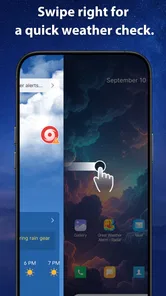
Quick checks, clear reading, and navigation
The central idea is straightforward: check the conditions without turning a small decision into a browsing session. I find that useful for questions such as whether to take a jacket, leave earlier, or rethink an outdoor errand. The app is free, and its Everyone age rating makes it approachable for a broad range of users. That does not, by itself, tell me how the interface accommodates different needs, so I would judge it by whether its information is easy to locate and interpret in ordinary use.
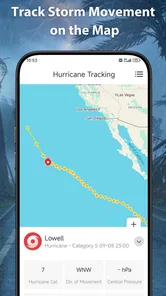
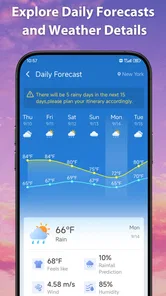
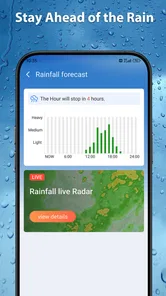
Forecasts, radar and alerts serve different purposes. A forecast helps with planning ahead; radar is more relevant when I want to judge changing precipitation nearby; an alert is valuable when conditions may call for a prompt response. Keeping those tools together can reduce the need to switch between separate weather sources. The practical benefit is strongest when I already know what I need to check and can move directly to that information.
For readability, a weather screen should make the essentials easy to distinguish: what is happening now, what may happen next, and whether an alert needs attention. I would avoid relying on a quick glance alone when the decision matters. Weather symbols and color-coded maps can be compact, but they can also be harder to interpret than plain wording for some people. If a radar view feels ambiguous, a forecast or alert is a sensible cross-check rather than a reason to guess.
The app’s current version is 1.0.1, so I would approach it as a relatively early release rather than assume that every preference or navigation detail has been refined. That matters for users who depend on predictable layouts: a familiar route to the forecast is more helpful than a crowded screen full of competing signals. My practical advice is to explore the main views at a calm moment, then settle on the path that answers your usual question with the fewest steps.
How it fits into a daily routine
Consider a morning commute with a walk to a bus stop. I would check the forecast before leaving, then look at radar if rain appears likely and I need to decide whether to take a longer sheltered route. If an alert arrives, I would treat it as a prompt to inspect the details, not as a substitute for understanding what is changing. This workflow gives each part of the app a distinct job and avoids repeatedly refreshing several screens without a clear purpose.
That same approach can help someone who finds rapid visual scanning tiring. Instead of trying to absorb every tile or map detail, identify one decision first: clothing, timing, or whether to proceed with an outdoor plan. Then open the view that best answers it. This is a general way to reduce information overload, not a special mode I can claim the app provides.
More From Our News Desk

Weather by Xiaomi Review: Clear at a Glance, Less Clear Up Close

X Under Pressure: Can It Recover When Posting Goes Wrong?

Clash of Clans Is Won Between the Battles

Android Auto Makes the Case for Quieter Car Software

MobiOffice: Transforming Mobile Productivity with Seamless Integration

EA SPORTS FC™ Mobile Soccer: Redefining Mobile Sports Gaming
Motor and sensory needs in real use
One-hand use can matter when the other hand is holding a bag, a rail, or a child’s hand. A weather app used in that moment benefits from short, forgiving interactions, but I would not assume that every control is easy to reach or operate without trying it on the device. If tapping small map controls is awkward, checking a forecast when stationary may be a more comfortable choice than using radar while walking.
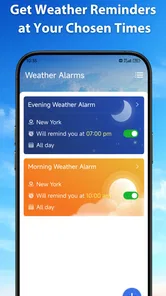
Alerts are useful partly because they can bring attention to a change without requiring constant checking. They can also be disruptive for people sensitive to sudden sounds or frequent interruptions. I recommend keeping notifications purposeful: use them for information that could change a plan, and avoid treating every weather update as urgent. The available alert behavior and controls should be reviewed in the app and device settings before relying on them for an important routine.
For people with low vision, map colors and compact icons may not convey enough on their own. I would pair visual radar with written forecast information where possible and use the device’s own display or text settings if they improve legibility. For users who are deaf or hard of hearing, visual notices may be more useful than sound, while someone who cannot comfortably watch a screen may prefer a brief alert followed by a check when it is convenient. These are practical considerations, not claims that the app has particular accessibility options.
There is also a cognitive side to weather information. Forecasts describe likelihood and changing conditions, not guarantees, and radar pictures can be easy to overread as a precise promise about a particular street. I find it best to use the app as decision support: check the trend, allow for uncertainty, and keep a backup plan when timing or safety matters. That is especially important for travel or outdoor work, where a single glance should not carry the whole decision.
When location and timing change the experience
Weather checks happen in very different contexts: at home with time to compare views, outside in bright light, or in a hurry before leaving. A quick-access approach is most useful when the screen can be read at a glance, but rushing is also when people are most likely to misread a small icon or miss a detail. I would make consequential decisions indoors or somewhere safe, then use a short check outside only to confirm whether conditions have changed.
Travel adds another trade-off. A forecast that is convenient for a routine local commute may not answer every question about a route or destination. Before a longer trip, I would check the places and time periods that matter rather than assume a local view represents the whole journey. Radar can help make sense of nearby movement, while forecast information is better suited to planning; neither should be treated as a guarantee that conditions will remain fixed.
For a household sharing weather decisions, the app can be a common reference point: one person can check the forecast, another can confirm whether an alert changes the plan. But anyone depending on that routine should know how to find the relevant information themselves. If a user cannot comfortably navigate the screen or interpret the map, a verbal explanation or a simpler information source may be the better support.
What to weigh against other weather apps
Compared with a basic weather screen built into a phone, Great Weather Alarm - Radar puts emphasis on bringing radar and alerts alongside forecasts. That combination may suit someone who wants a dedicated weather check rather than only a glance at current conditions. On the other hand, people who already get clear forecasts and dependable notices from their usual weather app may not gain enough to justify changing habits. The best comparison is not the number of views, but which one lets you answer your real question more confidently.
Dedicated radar services can be preferable for users who need detailed map interpretation, while a minimal forecast app can be easier for someone who wants little more than today’s conditions. Great Weather Alarm - Radar sits between those needs in concept: it brings multiple kinds of weather information together, yet that does not automatically make it the right choice for specialist monitoring or for a reader who finds maps distracting. I would try it alongside a familiar source before making it the sole basis for important plans.
There is a modest audience signal to consider. The app has a 3.4 average from around 20 ratings, with only a few written reviews, and it has been installed over 10,000 times. Those figures suggest some use but do not tell me whether the interface will suit a particular person. I would treat them as context, not as a substitute for checking whether the reading and navigation work for you.
Where it may still create friction
The same combination that makes a weather app useful can also make it busy. Forecast panels, radar and alerts each ask for attention, and users who want a calm, highly simplified display may prefer a more basic alternative. Likewise, people who need extensive map controls or very specific planning tools should compare those needs directly rather than assume that a general-purpose app covers them.
New users may also need to learn what each view is best for. Radar is not simply a more detailed forecast, and an alert is not the whole story about local conditions. I would spend a few minutes understanding the distinction instead of reacting to colors or notification wording alone. This small learning step can prevent a common mistake: treating one visual cue as a precise answer to a broader question.
As a newer release, version 1.0.1 may appeal to users willing to try a developing product, but I would be cautious about building an accessibility-dependent routine around any app before testing it personally. People who need consistently legible text, highly predictable controls, or a particular way of receiving alerts should verify the experience on their own device first. If a critical task depends on weather information, keep a trusted alternative available.
My inclusive verdict
I see Great Weather Alarm - Radar as a convenient option for people who want forecasts, radar and alerts close together, especially when a quick check can shape a daily decision. Its free price makes trying it straightforward, and its focus on quick access is appealing for ordinary routines. The strongest use case is practical rather than technical: check what matters, use radar when it adds context, and let alerts prompt a closer look.
For accessibility, I would describe the promise carefully. The app’s mix of information can support different situations, but the usefulness of that mix depends on a person’s vision, hearing, dexterity, attention and comfort with maps. I would test it in the actual context where it will be used—at home, outdoors, or during a commute—and keep the device steady when a reading affects safety. If the screen feels crowded or its controls are tiring, a simpler weather source is a reasonable choice.
Overall, I would recommend giving it a try if you want a single place to check a forecast and consult radar or alerts without overcomplicating a routine. I would skip it if you need specialist weather analysis, strongly prefer a minimal screen, or require accessibility behavior you have not personally confirmed. Its value is not that it removes uncertainty from weather; it is that, when the views are easy for you to use, it can make the next everyday decision easier to make.
Great Weather Alarm - Radar Frequently Asked Questions
What is Great Weather Alarm - Radar used for?
Great Weather Alarm - Radar is designed to combine weather information with alerts that can help you plan around changing conditions. Depending on the features available in your version and region, you may be able to check forecasts, view radar imagery, and receive notifications about weather events. Treat forecasts as guidance rather than a guarantee, and consult official local alerts when conditions could affect your safety.
Does Great Weather Alarm - Radar provide severe weather alerts?
The app’s name suggests an emphasis on weather notifications, but the alerts you receive can depend on your location, device settings, app version, and the data sources available in your area. Before relying on it, review its notification and location permissions and check which alert types it supports. For urgent hazards, keep official government or emergency-service warnings enabled as a backup.
Does the app need location access to work?
Location access can help a weather app show conditions and forecasts for where you are, and it may be needed for location-specific notifications. You can usually choose whether to provide precise or approximate location, or enter a place manually if that option is offered. Check the permission prompt and privacy information before deciding; limiting access may affect some location-based features.
Is Great Weather Alarm - Radar free, and does it include ads or in-app purchases?
Pricing, advertising, and optional purchases can vary by platform, country, and app version. Check the app’s current store listing for whether it is free to download, whether it offers subscriptions or paid features, and what in-app purchases are available. Also review the listing’s notes about ads or recurring charges so you understand the costs before installing or starting a trial.
Can I rely on Great Weather Alarm - Radar without an internet connection?
Weather radar and forecasts generally depend on recently updated data, which typically requires an internet connection. Some information may remain visible temporarily if the app has cached it, but it can become outdated and should not be treated as a live report. For the most useful radar and current alerts, connect to the internet and confirm that the app has permission to send notifications.
Pros
- Combines weather forecasts with alarms
- so plans and wake-up times are easy to check together.
- Radar maps offer a visual way to follow approaching rain and storms.
- Weather-based alarm options can help you prepare for changing conditions.
- Useful for checking forecasts before travel
- outdoor activities
- or the start of the day.
- A focused mix of weather tools and alarm features may reduce the need for separate apps.
Cons
- Radar data and forecast accuracy can vary by location and weather provider.
- Some weather or alarm features may require extra setup before they work as expected.
- Frequent weather updates may use mobile data and affect battery life.
- Notifications and alarm permissions must be enabled for key features to work reliably.
- The combined interface may feel less straightforward than a dedicated weather or alarm app.












