Granola - AI Meeting Notes
- 34.00
- 4.9
- Installs
- 100.00K
- Price
- Free

Screenshots

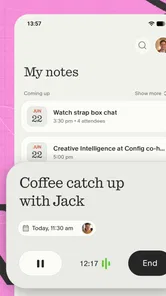
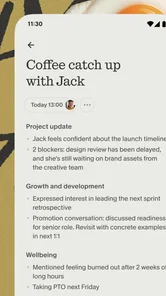

Analysis by Reviewed
Back-to-back meetings create a surprisingly specific problem: the conversation ends, the next call begins, and the useful details from the previous discussion are still floating around in your head. I have tried solving that with hurried typing, scattered documents, and the occasional voice memo, but each method adds its own work. Granola - AI Meeting Notes is built around removing that repeated chore. It is a productivity app from Granola Inc that turns the meeting-notes process into something I can approach with less preparation and less cleanup afterward.
What makes the idea appealing is not simply the presence of AI. The real value is the attempt to keep my attention on the discussion while still giving me a usable record afterward. That distinction matters. A note-taking tool can be impressive in a demonstration and still be annoying in a busy workday if it requires too much setup, produces vague summaries, or leaves me with another document to organize. My view of Granola is therefore based on a practical question: does it reduce the time and mental friction surrounding meetings?
As a free app in the productivity category, it is easy to try without making the decision feel expensive. Its Everyone content rating also makes it broadly approachable, although the usefulness is clearly strongest for people who regularly attend work, study, planning, or project meetings. The app has a 4.9 average from around 1.4 thousand ratings and has passed 100 thousand installs, which suggests that the focused concept is resonating with a meaningful group of users.
How Granola fits into a real meeting day
I find it helpful to judge Granola by the handoff between one conversation and the next, not by how polished a note looks on its own. A quick post-meeting check can turn the captured discussion into decisions and follow-ups, while a separate shared document remains a better place for confirmed team commitments. That distinction also brings trust into focus: before using any meeting assistant, I would make sure everyone is comfortable with the chosen approach.
The first useful setup is deliberately small
I would not begin by treating Granola as a complete replacement for every note-taking habit. The better approach is to use it for the meetings where missing one decision creates extra work later: project check-ins, client conversations, interviews, planning sessions, and recurring team calls. Starting with those situations makes the benefit easier to judge because the cost of poor notes is visible.
The first setup should also include a personal note structure. Before a meeting, I find it useful to decide what I actually need afterward: decisions, owners, deadlines, open questions, or a short explanation of the problem being discussed. That small preparation changes how I read the resulting notes. Instead of expecting an AI tool to understand every possible priority, I have a clear standard for what a successful record should contain.
Granola works best when I treat its output as a draft for action rather than an unquestionable transcript. I still scan the result for names, commitments, and wording that could change the meaning of a decision. This is not a criticism unique to this app; it is the sensible working method for any automated meeting assistant. The time saving comes from avoiding a blank page, not from abandoning judgment.
More From Our News Desk

Weather by Xiaomi Review: Clear at a Glance, Less Clear Up Close

X Under Pressure: Can It Recover When Posting Goes Wrong?

Clash of Clans Is Won Between the Battles

Android Auto Makes the Case for Quieter Car Software

MobiOffice: Transforming Mobile Productivity with Seamless Integration

EA SPORTS FC™ Mobile Soccer: Redefining Mobile Sports Gaming
The current version is identified as prod-260827.1, and the app supports Android from version 8.0 onward. That gives it a reasonably wide device range for Android users. I would still check that an older phone feels responsive during a meeting, because productivity tools are most frustrating when they work technically but make the device feel busy at the exact moment I need it for communication.
A practical workflow before, during, and after a call
My preferred workflow is simple. Before the meeting, I create or prepare the note around the purpose of the conversation. During the call, I avoid trying to capture every sentence manually. Instead, I write only the details that need emphasis, such as a correction, a personal reminder, or a commitment that I want to verify later. Afterward, I review the generated material while the context is still fresh.
That last step is where many people will either gain value or lose it. If I leave the notes untouched for several days, even a good summary becomes less useful because I no longer remember which points were tentative. A quick review immediately after the meeting lets me correct the important parts and turn the note into a reliable working document. Granola reduces the starting effort, but it does not remove the need for a short finishing step.
One non-obvious advantage of this workflow is that it separates attention during the conversation from organization after the conversation. Manual notes force me to perform both jobs at once. With Granola, I can listen for tone, uncertainty, and disagreement instead of spending the entire call trying to create polished sentences. That is especially helpful when the meeting contains technical explanations or several people speaking quickly.
Where it helps in an ordinary workday
Imagine a project coordinator moving from a morning planning call to a customer discussion and then to an internal review. In the first meeting, the important outcome may be who owns each task. In the second, it may be a customer concern that needs careful wording. In the third, it may be a decision that depends on information from both earlier conversations. A conventional notebook can hold all three, but the coordinator must remember how to structure each record while also participating.
Granola is most useful in that chain because it gives each conversation a separate starting point for review. I can return to the meeting with a clearer memory of what was said, compare the stated decision with my own quick notes, and extract the next action without reconstructing the entire call. The benefit is cumulative: a few minutes saved after one meeting may feel minor, but avoiding repeated re-reading and rewriting across a full day is much more meaningful.
For one-to-one meetings, I would use it to preserve commitments and follow-up topics rather than attempting to document every personal detail. For brainstorming, I would look for the ideas that were accepted, rejected, or left unresolved. For interviews, I would be particularly careful with names and exact claims, using the output as an organized reference that still deserves verification. The tool’s value changes with the meeting type, so the review standard should change too.
Students and volunteers can also find a practical use for it when discussions lead to shared responsibilities. A study group can leave with a clearer record of what needs researching, while a community project can keep decisions from disappearing into a group chat. Still, people should agree on a comfortable note-taking approach before relying on an automated system in a sensitive conversation. Trust among participants matters more than convenience.
Friction it removes, and friction it leaves behind
The biggest friction Granola addresses is the blank-page problem. After a long call, I often know that the meeting mattered but cannot immediately decide how to summarize it. Starting with organized material is easier than creating a structure from memory. That makes the app more valuable than a basic notes field when the conversation includes several threads and the outcome is not obvious at first.
It also reduces the temptation to write everything down. Excessive notes can become a second meeting that I conduct alone afterward. By shifting more of the initial capture into an automated process, I can reserve manual typing for details that genuinely need my interpretation. This is one of the strongest reasons to consider it over a standard notes app.
However, automation does not eliminate review friction. A summary can sound confident while still requiring a human check. I would pay special attention to negations, conditional statements, similar names, changing deadlines, and comments made as possibilities rather than decisions. Those are precisely the details that can create trouble when a neat-looking note is accepted too quickly.
Another trade-off is that a focused meeting tool may feel unnecessary for short, informal conversations. If a call lasts only a few minutes and ends with one obvious task, opening a dedicated note can take more effort than writing that task directly. I would not use Granola automatically for every interaction. Its strongest case is a meeting with enough complexity that remembering the structure afterward is harder than remembering the general topic.
There is also a human limitation that no note assistant can solve: unclear meetings produce unclear records. If participants avoid naming an owner, change direction repeatedly, or leave decisions implied, the resulting notes may accurately reflect the confusion without resolving it. I find that useful in one sense because it exposes the lack of clarity, but it should not be mistaken for project management. Granola can help reveal follow-up work; it cannot make a team agree.
How it compares with familiar alternatives
A regular notes app is still better when I want complete control over wording, formatting, and what is saved. It is also the safer choice for a private reflection, a quick shopping list, or a meeting where automated assistance would be inappropriate. Manual notes take more effort, but they make me actively process the discussion, which can improve memory and understanding.
A traditional voice recorder, where available and appropriate, may preserve more of the original conversation, but it can leave me with a long file that is difficult to search or turn into actions. Granola’s appeal is the move toward usable notes rather than merely keeping audio. The trade-off is that I should review the generated interpretation instead of assuming it captures every nuance.
Calendar descriptions and shared documents remain better for distributing finalized information. They are designed for collaboration and visible ownership, whereas Granola is most useful earlier in the process, when the meeting has just ended and the raw material still needs shaping. My preferred combination is to use Granola for the first pass, then move only the confirmed decisions and tasks into the team’s established workspace.
That distinction prevents a common mistake: expecting one app to become the official source of truth for an entire team without changing any habits. I see Granola as a bridge between conversation and dependable documentation. It earns its place when it shortens that bridge, not when it tries to replace every other productivity system.
Who should try it first
I would recommend starting with people who have several meetings close together and regularly lose time writing follow-ups. Managers, coordinators, consultants, recruiters, students in discussion-heavy courses, and small teams can all benefit if their work depends on remembering what was agreed. The app is especially attractive for someone who understands the value of notes but dislikes the act of producing them in real time.
It is less suitable for someone who rarely attends meetings, prefers handwritten notes, or needs a strictly manual record for every conversation. I would also be cautious about using it as the sole record for legal, medical, financial, or otherwise sensitive discussions without first considering the expectations of everyone involved. Convenience should not override confidentiality, consent, or a team’s established rules.
The free price makes experimentation straightforward, and the Everyone rating removes an obvious age barrier for general use. Even so, “free” does not mean “effort-free.” The real test is whether the app fits the user’s existing routine. If opening it, reviewing its output, and transferring actions takes longer than the old method, the central promise is not being achieved.
My final judgment after using the concept in practice
Granola - AI Meeting Notes succeeds because it targets a recurring, expensive annoyance rather than trying to become a broad all-purpose organizer. Its best contribution is not flashy automation; it is giving me a better starting point after a demanding conversation. When I use it for meetings with several decisions or follow-ups, it helps preserve context, reduces manual typing, and makes the next step easier to see.
I would not treat every generated note as final, and I would not open the app for every tiny conversation. The strongest results come from choosing the right meetings, deciding what matters before they begin, and spending a short moment checking the important details afterward. That workflow keeps the time savings while protecting against misplaced confidence in automated wording.
For anyone whose calendar repeatedly turns into a blur of calls, this is a useful productivity app to test. The combination of a free entry point, broad Android compatibility, and a focused purpose lowers the risk of trying it. My recommendation is positive, with one condition: use it as an intelligent first draft and an attention aid, not as a substitute for judgment. If your main meeting problem is the time spent turning conversations into actionable notes, Granola is worth adding to your routine.
Granola Inc has kept the product’s identity clear, and that focus is its main strength. It does not need to replace a shared workspace, a calendar, or a personal notebook to be valuable. It only needs to make the transition from “we discussed this” to “here is what we are doing next” less tiring and more dependable. In my experience, that is a small change with a noticeable effect across a crowded meeting day.
Granola - AI Meeting Notes Frequently Asked Questions
What does Granola cost, and is it free to download?
Granola is a free productivity app, so you can download it without an upfront purchase. The app’s pricing and any available features or limits can change over time, so check the current details in the app before relying on a particular capability. If you are choosing a meeting-notes tool for regular work, consider whether its available features suit the way you plan to use it.
Can I use Granola on my device?
Granola is an app, and its minimum operating system requirement is version 8.0. Before downloading, check your device’s operating system version and confirm that the app is available for your device through its app store. Keeping your operating system and app updated can also help you access the current experience. Granola is intended for people who want help managing notes around meetings.
What is Granola - AI Meeting Notes, and how does it work?
Granola is an AI-powered meeting-notes application designed to help you capture, organize, and summarize conversations. It can work alongside your meeting workflow by combining recorded or transcribed conversation details with notes you type yourself. After a meeting, the app turns that information into structured summaries, key points, decisions, and follow-up tasks, reducing the time normally spent writing notes manually.
Does Granola record or transcribe meetings automatically?
Granola’s meeting workflow is built around capturing conversation information and using AI to create useful notes, but the exact recording and transcription behavior can depend on the platform, meeting setup, permissions, and current app version. Before using it, check which audio sources it supports and whether participants must be notified. Always follow local recording laws, workplace policies, and the privacy rules of the meeting service you are using.
Is Granola - AI Meeting Notes free to use?
Granola is free to download and use, making it an option to try without an upfront purchase. What is available may depend on the current app experience, so review the in-app details before making it part of a regular workflow. If you are evaluating it for ongoing meeting notes, make sure the available features suit your needs before depending on them for important meetings.
Pros
- Creates concise meeting summaries automatically.
- Highlights action items and key decisions.
- Works with popular video conferencing platforms.
- Searches past meetings quickly and efficiently.
- Reduces the need for manual note-taking during calls.
Cons
- AI summaries may occasionally miss context or speaker intent.
- Best results depend on clear audio and distinct speakers.
- Some advanced features may require a paid subscription.
- Meeting transcripts can raise privacy and compliance concerns.
- Processing lengthy meetings may take some time to complete.











