GPS Map Driving Directions
- 2.00
- 4.2
- Installs
- 5.00M
- Price
- Free
Screenshots
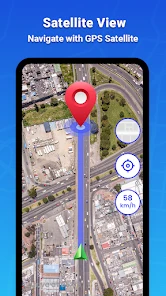
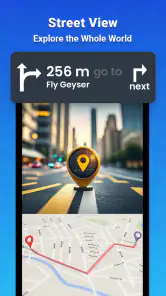
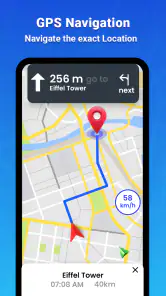
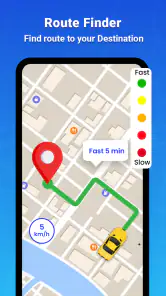
Analysis by Reviewed
I judge a navigation app less by how many features it advertises than by whether it helps me make a calm, sensible decision when the road gets complicated. GPS Map Driving Directions aims to do that with turn-by-turn guidance, traffic information and map-based route planning. Its appeal is straightforward: it brings several familiar driving tools together, without asking a casual traveler to learn a complicated system first.
A practical choice for everyday trips
For a familiar commute, the useful test is not simply whether an app can draw a route; it is whether it can help when a road is slow or a turn arrives quickly. Live traffic information and spoken directions are valuable in those moments, especially when I would rather keep my attention on driving than keep checking a screen. I would still review a proposed route before setting off, since the quickest-looking option may not be the most comfortable one for a driver unfamiliar with the area.
A realistic use is leaving for an appointment across town during a busy part of the day. I can check the route before starting, listen for the next turn, and use traffic updates as a reason to reconsider the plan if congestion appears. That is more useful than repeatedly stopping to consult a paper map, but it does not remove the need to watch road signs or make safe decisions myself.
Where its approach has limits
Compared with the usual alternatives, such as a dedicated navigation device or another mapping app, this one is most appealing if I want a phone-based route guide with traffic and driving directions in one place. A familiar map service may suit someone who already depends on its saved places and established routines; a dedicated device may be preferable to a driver who does not want a phone to handle navigation. I would not switch solely for a feature list: the better choice is the one whose map presentation and spoken instructions feel clear to you on your own routes.
There is also a practical trade-off with phone navigation: following a route depends on having the device ready and being able to see or hear its guidance comfortably. Before a longer drive, I would set the destination while parked, check the route, and arrange the phone so it does not obstruct the view. If a suggested detour feels confusing or unsafe, I would ignore it and follow the road conditions instead. Navigation should support attention, not compete with it.
Getting Started with GPS Map Driving Directions
When I first downloaded GPS Map Driving Directions, I was immediately impressed with its user-friendly interface. It's like having a seasoned navigator in your pocket, ready to guide you through the twists and turns of any journey. Setting it up was a breeze—just input your destination, and you're off!
Key Features that Stand Out
One of the features I absolutely adore about this app is its real-time traffic updates. Imagine cruising down the highway and suddenly being informed about a traffic jam ahead. With this app, you get instant rerouting options to save time and avoid stress. It's like having a little traffic guru whispering in your ear!
You May Like

Clash of Clans Is Won Between the Battles

Android Auto Makes the Case for Quieter Car Software

MobiOffice: Transforming Mobile Productivity with Seamless Integration

EA SPORTS FC™ Mobile Soccer: Redefining Mobile Sports Gaming

How Microsoft OneDrive Became a Mobile Productivity Giant

How Google Translate Breaks Language Barriers Effortlessly
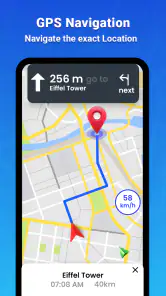
Another highlight is the voice-guided navigation. The app speaks to you in a clear, concise manner, allowing you to keep your eyes on the road and hands on the wheel. This is especially helpful in busy city streets where visual distractions are aplenty.
Personal Experience on the Road
On a recent road trip, I decided to put GPS Map Driving Directions to the test. The app didn't disappoint. Whether I was navigating through the bustling streets of downtown or the serene countryside, the app provided accurate directions every step of the way. The ability to download maps for offline use was a game-changer, particularly in areas with spotty internet connection.
The app's search functionality is top-notch too. Whether you're looking for the nearest gas station, restaurant, or a cozy little café, it gets you there with ease. I was able to discover hidden gems I would have otherwise missed.
Who should keep it in their travel toolkit?
This is a sensible option for drivers who want a direct route, spoken guidance and a way to look for useful stops along the journey without juggling separate tools. It can also work as a backup when traveling somewhere unfamiliar: checking a route before departure and keeping directions available can make a detour feel less stressful. If you rely heavily on a different mapping service’s saved locations or prefer a dedicated in-car navigation unit, switching may add little to your routine.
For an unfamiliar trip, I would search for a fuel stop or place to eat before reaching the busiest stretch, rather than trying to browse while driving. That small habit makes the app’s search more useful and keeps the task manageable. Offline maps can help where connectivity is unreliable, but I would download the area before leaving coverage and avoid assuming that offline use will provide every connected feature. A map stored in advance is best treated as a fallback, not a reason to skip planning.
Choosing a route without over-trusting it
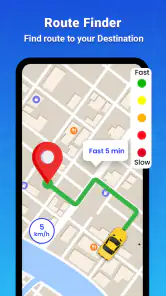
Traffic guidance is most useful as a prompt to assess the situation, not as an automatic instruction to take every detour. A suggested alternate road may look attractive on a screen but involve unfamiliar turns, narrow streets or a more demanding drive. I would compare the proposed change with the road I already know, and accept it only if it seems sensible and legal in the moment. That judgment matters most when travelling with passengers, carrying luggage or driving somewhere where stopping to reorient would be awkward.
There is a small planning advantage in entering a destination in full before departure and checking that the route ends at the place you actually mean. This is especially worthwhile for a large venue, a neighbourhood with similar street names, or a stop near a busy road. I would also look over the first few turns while parked. That makes the opening part of the trip less dependent on reacting to a prompt at exactly the wrong time.
What offline use can and cannot solve
Offline maps are valuable when mobile coverage drops, but I would treat them as preparation for a known area rather than a blanket substitute for a connected route. Downloading before leaving a reliable connection is the practical step; doing it at the roadside after reception disappears defeats the point. If I expect to rely on an offline map, I would check that the relevant area is ready before setting out and keep road signs in view as a second source of guidance.
That distinction also helps set expectations around traffic. A stored map can still provide a visual reference when data access is poor, while live updates depend on being connected. For a short drive through a dead zone, that may be enough. For a long route where congestion information is central to the plan, I would not assume that an offline map will keep delivering the same connected assistance throughout the journey.
How it fits beside familiar alternatives
Compared with the mapping app a driver already uses every day, the main question is not which one has the longer feature list; it is which one makes the next decision easiest to understand. Saved destinations and established habits can be hard to replace, so I would keep a familiar service if its route presentation already works well. This app makes more sense to try when someone wants a separate, straightforward driving option and is willing to judge it on actual trips rather than on a quick glance at its menus.
A dedicated dashboard navigator has a different appeal: it keeps navigation separate from the phone and may suit drivers who prefer that arrangement. A phone app is more convenient for someone who already carries a phone and wants a route guide for both routine errands and occasional travel. Neither approach removes the need for a safe mount, audible instructions that suit the driver, and a sensible plan for the journey. The better fit depends on how you drive, not on the idea that one kind of device is always superior.
Cost, audience and my verdict
GPS Map Driving Directions is a free travel and local app from Smart Tools & Utilities. It has a 4.2 average from around 3,700 ratings, and more than 5 million installs. The app is rated for Everyone, while optional in-app purchases range from $1.99 to $13.99 per item. It was released on July 9, 2022, and its current version is 1.2.8, with Android 7.0 or newer required. I’d consider those details alongside your own needs: the free entry point makes it easy to try, but check any purchase prompt before paying and decide whether the available route tools fit your habits.
For a first trial, I would use it on a familiar journey with a straightforward destination rather than making an important appointment or a complicated trip the test. Notice whether the spoken prompts arrive in time for your usual driving pace, whether the map is easy to interpret at a glance, and whether a reroute feels helpful instead of distracting. A short trial like that answers the practical question that ratings cannot: does its guidance work for you, in your car, on roads you understand?
The strongest audience is someone who wants a free-to-start navigation option for ordinary drives, occasional unfamiliar routes and finding useful stops. It is less suited to a driver who expects every saved place and routine from another service to carry over, wants navigation kept off their phone, or prefers not to depend on a screen while driving. Optional purchases are another reason to decide what you actually need before spending; I would first establish whether the basic experience covers my regular journeys.
My overall view is that this app is best for someone who wants uncomplicated phone navigation for errands, commutes and occasional road trips, and who values traffic updates and voice guidance. It is less compelling for a traveler who needs a particular ecosystem of saved places or prefers a device built solely for the dashboard. I would try it on a familiar drive first, learn how its directions sound and look, and then decide whether I trust it for a longer journey. That gives you a fair test without making an unfamiliar route your first experiment.
Wrapping Up
In a nutshell, GPS Map Driving Directions is a must-have for anyone who spends time on the road. It's user-friendly, reliable, and packed with features that make traveling a cinch. So, if you're ready to leave those cumbersome paper maps behind and embrace the digital age of navigation, give this app a whirl. Trust me, your future road trips will thank you!
GPS Map Driving Directions Frequently Asked Questions
Is GPS Map Driving Directions suitable for everyday travel?
GPS Map Driving Directions is a Travel & Local app for people looking for GPS navigation, maps, traffic updates, and driving routes in one place. Its store summary highlights 3D maps and live traffic updates, while its Everyone age rating makes it suitable for a broad audience. The app is free to download, with optional in-app purchases.
What features does GPS Map Driving Directions offer?
GPS Map Driving Directions provides accurate real-time navigation, including turn-by-turn voice guidance and estimated arrival times. It offers offline maps for areas with poor internet connectivity, live traffic updates to avoid congestion, and points of interest like gas stations and restaurants. The app also includes various map views, such as satellite and terrain, for better navigation.
Is GPS Map Driving Directions free to use?
Yes, GPS Map Driving Directions is free to download and use, offering a wide range of features at no cost. However, there might be some in-app purchases or ads that could enhance your experience. Premium features, if available, may include ad removal, advanced map options, and exclusive traffic data. In-app purchases are offered at different prices, so check the purchase details before choosing one.
How accurate are the maps and navigation in GPS Map Driving Directions?
The app uses up-to-date map data and real-time GPS technology to ensure high accuracy in navigation. While it provides reliable directions in most areas, users should be aware that occasional discrepancies can occur due to construction, road closures, or rapidly changing traffic conditions. Always double-check your route if you're heading to a new location.
Can I use GPS Map Driving Directions offline?
Yes, one of the standout features of GPS Map Driving Directions is its offline map capability. Users can download maps for specific regions and use navigation without an internet connection. This feature is particularly useful in rural areas or when traveling abroad where data roaming can be expensive.
Pros
- User-friendly interface for easy navigation
- Real-time traffic updates to avoid delays
- Voice-guided turn-by-turn directions
- Offline maps available for no data usage
- Multiple route options for convenience
Cons
- Consumes significant battery power quickly
- Ads can be intrusive during navigation
- Occasional inaccuracies in route predictions
- Requires constant updates for new maps
- Limited features in free version
- Category
- Travel & Local
- Version
- 1.2.8