

Gorilla Skins for Monkey Arena
- 23.00
- 3.9
- Installs
- 1.00M
- Price
- Free

Screenshots
Analysis by Reviewed
I approached Gorilla Skins for Monkey Arena as a first-time user wondering whether a dedicated personalization app would make choosing a look easier than browsing in the game itself. Its focus is on creating outfits and textures for Monkey Mobile Arena, so the appeal is specific: it is for players who enjoy shaping how their gorilla looks, not for someone seeking a general wallpaper or avatar editor. My main advice is to treat it as a creative companion and check each step against what the game can actually use.
Who will get the most from it
I’d point this app toward someone who already plays Monkey Arena and likes making a character feel distinct. It has a clearer purpose than a general drawing app when the goal is specifically to explore gorilla outfits and textures, and that focus can make a short customization session feel more direct. It is less compelling if you rarely play the game, prefer to leave your character’s appearance alone, or want one editor for assets across several titles.
It also helps to decide what “success” means before you start. For one player, it may be finding a look that friends can recognize quickly; for another, it may simply be trying a style they would not normally choose. Those are different goals, and the first may favor strong visual contrast while the second leaves more room for experimentation. I’d use that simple distinction to narrow browsing rather than treating every option as a must-try.
What to expect from a focused skin app
This is a free personalization app from Dumitru Boico, with optional in-app purchases ranging from $1.99 to $49.99 per item. Its Everyone age rating makes it suitable for a broad audience, though younger users should still involve a parent before making purchases. The app has a 4.1 average from around 960 ratings and more than a million installs, which suggests that plenty of players have tried it, but those figures don’t guarantee that every design will suit your taste or workflow.
Compared with broad avatar editors, the advantage here is its Monkey Arena focus: you can spend your attention on looks and textures intended for that setting rather than adapting a generic design tool. The trade-off is the same specialization. If you want to edit portraits for several games, make general-purpose graphics, or customize something other than your gorilla, a flexible art or avatar app is likely a better fit.
First Impressions: A Jungle of Options
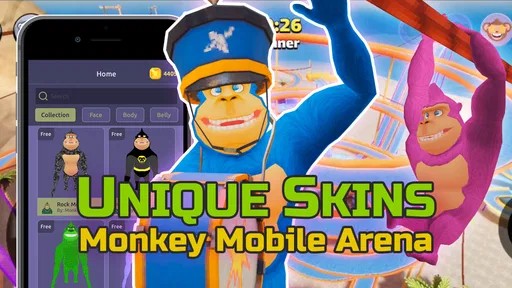
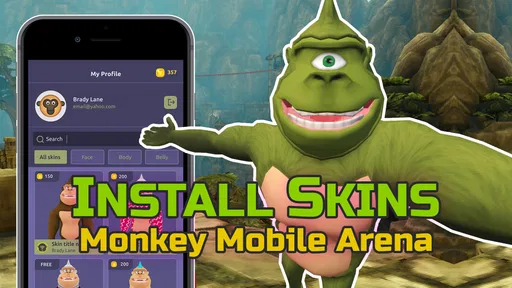
When I first opened Gorilla Skins for Monkey Arena, I was honestly surprised by the sheer variety of skins available. It’s like walking into a candy store, but instead of sweets, you get to dress up your primate warrior in all sorts of wild and wacky outfits. From classic battle armor to more whimsical designs like a banana suit, there’s something here for every player’s taste. The app’s interface is clean and user-friendly, making it easy to navigate through the plethora of options without feeling overwhelmed.
A first-session approach that stays manageable
For a first session, I’d avoid trying to design a whole collection at once. Pick a single idea—perhaps a color theme you already use, or a look that will be easy to recognize—and explore the available outfit and texture choices around it. This makes it simpler to judge whether the result feels coherent and helps you notice which parts of the process you enjoy. If you’re installing it between game sessions, a small, specific goal is also less likely to turn a quick experiment into aimless browsing.
More From Our News Desk

 Gmail
GmailGmail in a Busy Inbox: Who Benefits Most?
From first account to crowded workday, Gmail earns its place through dependable search and flexible sorting—but its best fit depends on how much inbox maintenance you can tolerate.

 Prime Video
Switching to Prime Video: What Changes in Your Viewing Routine
Prime Video can make a compelling second home for streaming, but switching means learning a different catalog, rental layer, and route from browsing to playback.

 Universal TV Remote Control
Universal TV Remote Control Works Best as a Reliable Backup
A phone remote earns its place through quick setup and reliable habits. Here is how to get more from Universal TV Remote Control—and where its limits show.

 Weather - By Xiaomi
Weather by Xiaomi Review: Clear at a Glance, Less Clear Up Close
Xiaomi’s weather app makes everyday forecasts quick to scan, but its calm surface can leave useful details and recovery paths harder to find than they should be.

 X
XX Under Pressure: Can It Recover When Posting Goes Wrong?
A resilience-focused review of X, examining setup, mistaken posts, interruptions, weak connections, and the gaps that matter when recovery needs to be dependable.

 Clash of Clans
Clash of Clans Is Won Between the Battles
Its raids are quick; its community is a long-term project of coordination, teaching, rivalry, and shared responsibility—with all the friction that entails.
Latest News



A useful check before settling on a design is to ask whether you want a look that stands out at a glance or one that feels more personal up close. Those aims can pull in different directions: bold combinations may be memorable, while subtler choices can better match your own style. Keeping that distinction in mind gives your browsing a purpose instead of making every option seem equally tempting.
One detail I’d pay attention to is whether an outfit and a texture feel like parts of the same idea. It can be tempting to choose each element separately because it looks appealing on its own, but the combination may end up visually busy. I’d start with the part I care about most, then choose the other element to support it. That gives me a clearer way to compare alternatives and makes the final choice feel intentional rather than accidental.
Making a design choice you can actually use
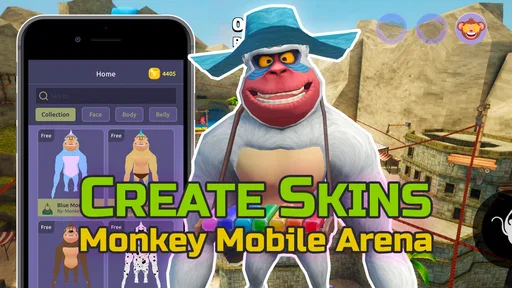
One of the standout features of this app is the level of customization it offers. Whether you’re a casual player or a competitive gamer, you’ll find the ability to tweak and personalize your monkey’s appearance to be incredibly satisfying. Each skin comes with its own set of attributes, which can add a strategic layer to your gameplay. Plus, the skins are regularly updated, which means there’s always a fresh look to try out in the arena.
For a practical everyday use, imagine opening the app before joining friends for a match and choosing a new look that makes your character easier for your group to spot. That is a more useful test than picking a design only because it looks striking in a preview: ask whether it remains recognizable in the setting where you plan to use it. I’d also keep a note of the design choices I like before moving on, so I can compare a new idea with my current favorite rather than rebuilding my decision from memory.
A small but helpful habit is to compare one change at a time. If you switch several visual elements together, it becomes harder to tell which part improved the look and which part made it less readable. I’d settle on a basic direction first, then experiment with a single adjustment before moving on. This is especially useful if you want to recreate a favorite later, because you’ll have a clearer sense of what made the combination work.
One point worth keeping in mind is the difference between a visual customization and a gameplay advantage. If your main reason for installing is to gain an edge in matches, don’t choose a skin on that assumption alone. Try the look for its appearance first, and judge any effect in the actual game rather than relying on a description or expectation. Players who only want cosmetic variety are likely to find the clearest value here; players seeking dependable competitive benefits may be better served by focusing on the game’s own mechanics.
Cosmetics, claims, and realistic expectations
While the primary function of these skins is cosmetic, I found that they added a surprising amount of depth to the gameplay. It’s not just about looking good; some skins offer minor boosts or abilities that can make a difference in tight matches. This added layer of strategy keeps the game feeling fresh and engaging, making each match feel like a unique experience.
There is a practical distinction between making a design and getting it into a game session: don’t assume that choosing an appearance in a separate app automatically means it has been applied in Monkey Arena. Follow the available instructions carefully, then check the result in the game before spending time on more elaborate variations. That simple confirmation step helps you tell whether the design workflow suits you, and it avoids confusing a saved or selected idea with a finished in-game change.
If the first design does not appear as expected, I would pause before repeating the whole process or paying for anything. Recheck the steps shown in the app, make sure I am looking for the result in the right place in the game, and try a simple option again. The key is to establish that the basic handoff works before investing effort in a complicated look. That first confirmation is more useful than building several designs without knowing whether the route from the app to the game fits your setup.
If you’re unsure whether this is the right kind of app, ask yourself what you want to do after choosing a design. Someone happy to experiment with gorilla looks and textures has a clear reason to explore it. Someone who expects a complete character editor, a broad library of unrelated assets, or an automatic improvement to match performance may find the narrow focus frustrating. That expectation check is especially useful before considering any optional purchase.
Where the workflow may feel less smooth
The app also integrates seamlessly with the main game, so you won’t experience any hiccups when switching between the two. This is a huge plus for those who, like me, can’t stand it when a fun session is interrupted by technical issues.
Even when a workflow is easy to understand, the separate-app setup asks for a little more attention than changing a look entirely inside a game. You have to keep track of what you selected and then confirm that the outcome is visible where you play. I’d avoid doing this while rushing into a match: a few calm minutes make it easier to spot whether the result is right and reduce the chance of mistaking a preview for an applied change.
That extra check is also why I would not treat this as an all-purpose creative tool. A general art app is better when you want control over a wider range of images, while the game’s own customization options are the simpler choice if they already offer the looks you want. This app makes most sense in the middle ground: you want to explore Monkey Arena-specific appearance ideas, and you are comfortable verifying the result in the game.
Deciding whether to keep exploring
All in all, Gorilla Skins for Monkey Arena is a delightful addition to any fan’s gaming library. It offers a blend of creativity and strategy that is both entertaining and rewarding. Whether you’re looking to stand out in the arena or just want to have a little fun with your gameplay, this app has got you covered. With its continuous updates and a community that’s as vibrant as the skins themselves, you’ll find yourself coming back to see what new surprises await.
Before settling into a longer design session, I’d use the first successful result as a checkpoint: make one choice, see how it looks in context, and decide whether you want to explore further. That approach is also a sensible way to think about the optional purchases. The app is free to try, but paid items span a wide range, so I’d only spend after confirming that the particular option is worth it to me—not simply because I’ve already invested time browsing.
When deciding whether a paid item makes sense, I’d ask whether it adds something I genuinely want that I cannot get from the free exploration I have already done. The listed purchase range is broad, so I would take the time to check the individual price and what it applies to before confirming. That is a better approach than assuming all extras cost about the same or buying just to see whether the app becomes more useful afterward.
It runs on Android versions starting with 8.0, and the current version is 3.6. If you’re using an older device or are unsure whether it meets that requirement, check compatibility before planning around it. For a newcomer, the most reassuring path is straightforward: install it, explore one outfit or texture idea, verify the result in Monkey Arena, and then decide whether the focused customization is enjoyable enough to keep using.
So, if you’re ready to take your monkey battles to the next level, give Gorilla Skins for Monkey Arena a try. It’s not just about changing the way your character looks; it’s about enhancing your entire gaming experience. Trust me, once you start decking out your gorilla, you won’t want to stop!
My practical recommendation is to approach it as a try-before-you-commit creative extra. If you get a look you like, can confirm it in the game, and enjoy the process of exploring more, it has earned a place in your routine. If you mainly want a guaranteed competitive benefit or a broad editor for unrelated projects, I’d skip it and use a tool that better matches that goal. For the right player, the simplest win is a distinctive look that feels like yours—and knowing exactly how you got it there.
Gorilla Skins for Monkey Arena Frequently Asked Questions
What should I know about the app before downloading it?
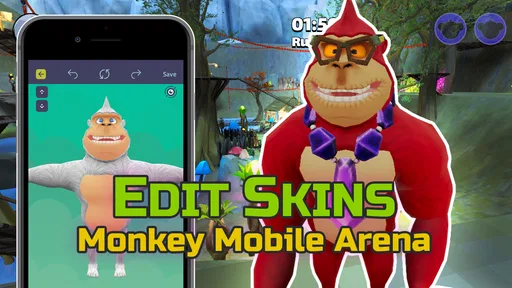
Gorilla Skins for Monkey Arena is a personalization app by Dumitru Boico. Its focus is on skins and mods for Monkey Mobile Arena, with tools for creating tag outfits and textures. It is aimed at players who want to customize the look of their game experience, rather than being a game in its own right.
What is Gorilla Skins for Monkey Arena?
Gorilla Skins for Monkey Arena is an app designed to enhance your gaming experience in the popular game, Monkey Arena. This app provides a variety of unique skins for your gorilla character, allowing you to customize your appearance and stand out in the game. With regularly updated skins, players can keep their gorilla characters fresh and exciting.
Is Gorilla Skins for Monkey Arena free to use?
Yes, Gorilla Skins for Monkey Arena is free to download and use. However, while the app offers a selection of free skins, there may be premium skins available for purchase within the app. These premium skins offer additional customization options and can be purchased through in-app transactions. The listed in-app purchase range is $1.99 to $49.99 per item, so review purchase details before confirming a transaction.
How can I apply skins from Gorilla Skins for Monkey Arena?
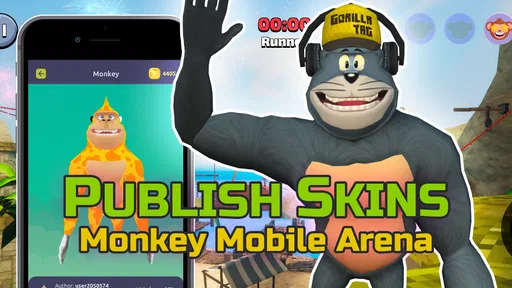
Applying skins is straightforward. Once you have the app installed, browse through the available skins and select the one you want to use. Follow the easy instructions to apply the skin to your gorilla character in Monkey Arena. The process is user-friendly and doesn't require any technical expertise.
Is Gorilla Skins for Monkey Arena safe to download?
Gorilla Skins for Monkey Arena is safe to download from reputable app stores such as Google Play and the Apple App Store. It is important to ensure that you are downloading the app from these official platforms to avoid any security risks or downloading counterfeit versions that may harm your device.
Pros
- Vast selection of unique skins.
- Easy to navigate interface.
- Regular updates with new skins.
- Compatible with all game versions.
- High-quality skin designs.
Cons
- Some skins require in-app purchases.
- Occasional loading delays.
- Limited customization options.
- Ads can be intrusive at times.
- Not all skins are high resolution.













