GolfLogix Golf GPS + 3D Putts
- 3.56K
- 2.2
- Installs
- 1.00M
- Price
- Free

Screenshots
Analysis by Reviewed
I found GolfLogix Golf GPS + 3D Putts most useful when I treated it as a round companion rather than a complete replacement for course knowledge. It is a free sports app from GolfLogix Golf GPS, aimed at golfers who want digital distance guidance, scoring tools, visual course information, and putting help in one place. The idea is appealing: instead of switching between a rangefinder, scorecard, and separate training tool, I can keep several parts of my round on the phone.
That convenience comes with an important condition. A golf GPS app lives or dies by the phone’s connection, location access, battery, screen visibility, and the quality of the course information available at the moment I need it. GolfLogix can make a familiar course easier to manage, but it does not remove the need to prepare before teeing off. My overall impression is positive for casual and improving golfers, although the low average rating of 2.2 from around 12 thousand ratings shows that the experience has not been equally smooth for everyone.
What the app feels like during an actual round
The most natural use is simple. I arrive at a course, open the app, select the course, and use the GPS view to orient myself before choosing a club. The appeal is not just seeing a number; it is having that number in context. A golfer who tends to rush shots can pause, look at the hole layout, consider the landing area, and then decide whether the aggressive option is really worthwhile.
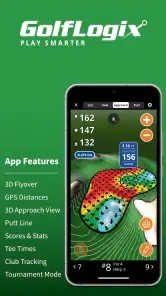
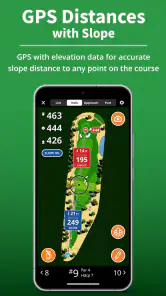
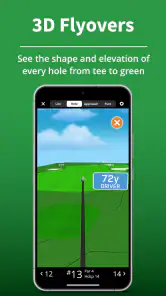
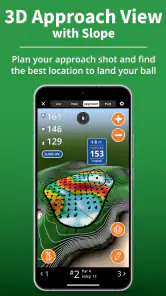
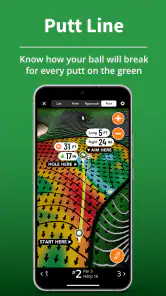
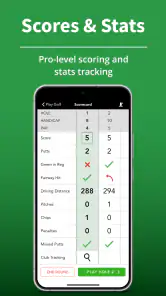
The app’s feature set combines GPS guidance with plays-like distance, three-dimensional flyovers, scoring, and putting-related tools. Those elements serve different kinds of golfers. GPS distance is practical during almost every hole. Flyovers are more valuable when I am unfamiliar with a course or cannot see the landing area. Scoring is useful if I want the phone to replace a paper card. The putting view is most interesting for players who struggle to read breaks rather than simply missing their intended line.
I would not use every feature on every hole. That is one of the first practical lessons. Constantly exploring menus or replaying visual previews can slow down a group, especially when other players are ready to hit. I get more value by checking the hole layout early, choosing a target, and then returning to the simplest distance screen. The richer tools work best before a decision, not as entertainment between every shot.
On a familiar course, the app becomes less about discovering the hole and more about building consistency. I can compare my intended target with the result recorded in scoring, notice where my strategy repeatedly breaks down, and make a more informed plan for the next round. That makes the scoring function more useful than a basic total counter, provided I actually enter information carefully instead of tapping through it in a hurry.
Connectivity changes the best time to use it
The network-dependent part of the experience deserves more attention than the short store description suggests. A golf course is not always a comfortable place for phone connectivity. Trees, hills, crowded areas, weak signals, and a busy mobile network can all make an app feel slower or less dependable. Even when the GPS location itself is available, the app may still need connectivity for parts of the course experience, so I would prepare before leaving the clubhouse or starting the first hole.
More From Our News Desk

Clash of Clans Is Won Between the Battles

Android Auto Makes the Case for Quieter Car Software

MobiOffice: Transforming Mobile Productivity with Seamless Integration

EA SPORTS FC™ Mobile Soccer: Redefining Mobile Sports Gaming

How Microsoft OneDrive Became a Mobile Productivity Giant

How Google Translate Breaks Language Barriers Effortlessly
My preferred routine is to open the app while I still have reliable service, find the course, and inspect the first few screens before play begins. I also keep the phone charged and avoid assuming that a feature will behave exactly the same way after the signal becomes weak. This is not a criticism of one particular screen; it is a sensible habit for any golf application that combines location, maps, visual content, and account-based functions.
A useful distinction is between GPS positioning and internet access. Seeing where I am on a course and loading all the information needed for that course are not necessarily the same task. GolfLogix should therefore be tested at the course before I depend on it for a serious round. If the first hole loads correctly and the interface responds normally, I have more confidence. If it hesitates before play starts, I would keep a physical or alternative backup rather than discovering the problem beside the tee.
This matters especially for golfers who play in unfamiliar places. A local player may know the routing and hazards well enough to continue if the app becomes inconvenient. A visitor may be relying on the visual layout to understand blind shots, doglegs, or target areas. For that player, connectivity is not a minor comfort issue; it can determine whether the app is a helpful guide or merely an extra distraction.
Using it on the move without slowing the group
Golf is a mobile situation in a very literal sense. I am walking or riding, carrying clubs, dealing with sun glare, and trying not to hold up other players. The best workflow is therefore one-handed and deliberate: check the hole while approaching the ball, decide what information matters, lock in the plan, and put the phone away before addressing the shot.
The 3D flyover is particularly useful before I reach a blind decision. It can help me understand the shape of a hole when a flat view is not enough. I would use it while waiting for the group ahead, not while standing over the ball. That timing turns a potentially slow feature into a planning aid. It can also help a newer golfer understand why a conservative target may be smarter than aiming directly at the flag.
Plays-like distance is another feature that needs judgment rather than blind trust. A number that adjusts for conditions can be more useful than a simple yardage, but I still have to combine it with my lie, strike quality, wind, elevation feel, and personal club distances. The app can support the decision; it cannot know whether I am about to hit from a clean fairway lie or a difficult patch of rough. I would never let a precise-looking display override basic course awareness.
Screen readability is a practical concern. Bright daylight, gloves, wet fingers, and a phone mounted in a cart can make small controls less pleasant to use. I found that the app is easier to live with when I decide in advance which screens I need. If I am constantly zooming, switching views, or searching for scoring controls, the phone becomes a source of friction. GolfLogix rewards a little familiarity before the round.
For walking golfers, the main benefit is reducing the need to carry a separate distance device or paper notes. For cart golfers, the larger screen can make course views easier to interpret, but the phone still needs to be positioned safely and checked without distracting from driving. In either case, the app works best as a quick reference, not as something I stare at continuously.
What happens when the experience goes wrong
Every GPS app has moments when the user has to recover: the wrong course is selected, the screen takes too long to respond, the location appears unhelpful, or scoring is entered incorrectly. My advice is to build a recovery routine instead of hoping nothing will fail. Before the round, confirm the course name and opening hole. During play, keep the scorecard or another distance method available. After a disruption, return to the simplest view first rather than reopening every advanced feature at once.
If a visual flyover does not load when I need it, I would not hold up the group waiting for it. I can use the basic hole information, ask a playing partner, or rely on course signage and local knowledge. This is an important trade-off: the app adds information, but it should not become the only source of information. A golfer who has no tolerance for interruptions may prefer a dedicated rangefinder or a simple printed guide for the core distance task.
Scoring deserves its own recovery habit. Entering a score immediately after each hole is usually safer than trying to remember several holes later, but I still review the total before leaving the course. A rushed tap can be more annoying than a missed fairway because it affects the record of the entire round. If I use the app for improvement, accurate entry matters more than having a sophisticated-looking history.
The putting tools can also create a false sense of certainty if I use them without checking the actual green. A digital suggestion may help me think about direction and pace, but footprints, grain, moisture, slope, and the condition of the green still matter. If the display conflicts with what I can see, I would treat that conflict as a reason to reassess rather than automatically blaming my stroke.
Another sensible recovery step is to close anything unnecessary before continuing. A flyover, scoring screen, and GPS view all compete for attention, and a phone under strain is not the ideal instrument for a hurried golfer. I prefer to simplify the session: use the hole view for planning, enter the score, and save deeper analysis for a pause or after the round.
Using the app without wasting data or battery
Because the experience can involve location, maps, visual content, and repeated screen use, I would approach it with the same care I use for any travel app. I start with a charged phone, reduce unrelated background activity, and avoid streaming or browsing other content during the round. The goal is not to make the app feel complicated; it is to preserve enough battery and connectivity for the parts that actually help me play.
I also avoid repeatedly reopening the same course information. If I already understand the hole, there is little value in refreshing a flyover several times. A short pre-round check is more data-conscious than exploring every visual option while moving between shots. This is one of the less obvious advantages of learning the interface: familiarity reduces both delays and unnecessary phone use.
The free price makes trying the app easy, but the presence of in-app purchases ranging from $0.99 to $59.99 per item means I would examine the purchase screen carefully before committing to anything. I would first establish whether the free experience fits my normal rounds, then decide whether an optional feature solves a specific problem I actually have. Paying for more information is not automatically worthwhile if my real need is simply a reliable basic yardage.
That pricing range also changes who should approach the app cautiously. A dedicated golfer who plays often may appreciate investing in advanced guidance. Someone who plays only a few times a year may get better value from a simpler free tool, a course scorecard, or borrowing a rangefinder. I would not buy an add-on merely because it makes the app look more complete. The right question is whether it improves a recurring weakness in my own game.
Privacy-minded users should make their own comfort decision about location-based golf tools and review the app’s current device prompts before use. I would grant only the access needed for the functions I intend to use, and I would avoid treating any app as a reason to keep unnecessary services active all day. That approach is especially sensible when the phone is also needed for calls, navigation, or an emergency during a long round.
Who gets the most from GolfLogix
I think the strongest audience is the recreational golfer who wants more structure without buying several separate devices. A beginner can use the hole views to understand course strategy, an intermediate player can use plays-like distance to make more thoughtful club choices, and a regular player can use scoring to spot patterns over time. The combination is more compelling than any one feature by itself.
It is also a good fit for golfers who play different courses and dislike arriving without a plan. Looking at the layout before the round can reduce uncertainty, particularly on holes where the landing area is hidden from the tee. The app becomes a preparation tool, not just a number displayed after I reach the ball.
I would be more hesitant to recommend it to a tournament-focused player who demands a very fast, minimal interface and already owns a trusted rangefinder. That golfer may find the extra screens unnecessary. I would also hesitate for anyone who refuses to carry a backup method or who plays in places where mobile connectivity is routinely unreliable. In those situations, a dedicated device or printed course guide can be the safer primary solution.
Golfers who mainly want a social scorecard may find the GPS and 3D material more than they need. Conversely, players specifically searching for detailed swing analysis should not expect the app’s golf-course guidance to replace a launch monitor or coaching session. Its strength is on-course decision support, not every kind of golf improvement.
How it compares with the usual alternatives
Compared with a paper scorecard, GolfLogix offers much more context: digital distances, visual planning, and a record that can be easier to review later. Paper still wins for speed, simplicity, and independence from a phone. I would choose the app when I want help making decisions, and paper when I want zero setup and no screen between me and the group.
Compared with a dedicated laser rangefinder, the app provides broader course awareness rather than one focused measurement. A rangefinder can feel faster for a golfer who already knows the hole and wants the flag distance immediately. GolfLogix is more useful when I need to understand the hole shape, consider a landing area, or keep scoring in the same place. These are different tools, and serious golfers may reasonably prefer having one as the backup for the other.
Compared with a basic GPS distance app, the 3D and putting-oriented elements give GolfLogix a wider ambition. That can be an advantage if I actually use those views. It can also make the experience feel busier than necessary. The app is at its best when I select the feature that matches the decision in front of me instead of treating every available tool as mandatory.
GolfLogix has been available since May 19, 2010, and its current version is 10.0.7. It supports Android 6.0 and later, which makes it accessible to many older devices, although a golfer should still consider how well an aging phone handles bright outdoor use, location updates, and extended screen time. The app has passed one million installs, so it is not an obscure experiment, but popularity alone does not remove the need to test it on the device and course I actually use.
My final view after weighing the trade-offs
I see GolfLogix Golf GPS + 3D Putts as a practical all-rounder for golfers who want course guidance, visual planning, putting assistance, and scoring together. I like the way it can turn an unfamiliar hole into a more understandable decision, and I especially value the option to prepare before reaching the ball. The app encourages me to think about targets and strategy rather than simply chasing the flag.
Its biggest weakness is not one missing feature; it is the dependence on a smooth mobile experience at exactly the time when I may have weak service, limited battery, glare, or a group waiting behind me. The solution is preparation: load the course early, learn the simplest screen, charge the phone, and keep a backup method. Those habits make the app substantially less frustrating.
The free download lowers the barrier to trying it, while optional purchases from $0.99 to $59.99 per item mean I would explore carefully and pay only for a clear personal benefit. It is rated for Everyone, so the presentation is broadly accessible, but the real question is whether its connected, feature-rich approach matches the way I play.
My recommendation is conditional but clear: try it if you want more than a basic scorecard and enjoy using your phone to plan a round. Skip it as your only golf aid if you need absolute simplicity, dependable independence from connectivity, or the fastest possible flag measurement. For my casual and improvement-focused rounds, it earns a place in the bag—as long as I remember that good preparation and sound course judgment still matter more than any number on the screen.
GolfLogix Golf GPS + 3D Putts Frequently Asked Questions
What devices can run GolfLogix Golf GPS + 3D Putts?
GolfLogix Golf GPS + 3D Putts is a sports app for Android and iOS, and its Android minimum requirement is version 6.0. Check that your device meets the platform requirements before downloading. Since the app uses GPS and displays course maps and visual features, it is also sensible to make sure your phone is charged and comfortable to use during a round.
Who develops GolfLogix Golf GPS + 3D Putts, and is it suitable for all ages?
The app is developed by GolfLogix Golf GPS and is intended for a general audience, with an Everyone content rating. Its focus is golf GPS, course guidance, scoring, and related tools, so it is aimed at people interested in playing or following the sport. The age rating describes its content; it does not mean every feature will suit every golfer’s experience level or playing style.
What is GolfLogix Golf GPS + 3D Putts used for?
GolfLogix Golf GPS + 3D Putts is designed to help golfers plan and improve their rounds. It provides GPS distances to important points on the course, including greens, hazards, and layup areas, while its 3D putting features help visualize breaks and slopes. The app is useful for both casual players and golfers who want more detailed course strategy and performance information.
Does GolfLogix Golf GPS + 3D Putts work on every golf course?
The app includes a large database of golf courses, but coverage and available features can vary depending on the course and region. Before relying on it during a round, it is a good idea to search for your course in the app and confirm that the layout is available. Some advanced mapping, green-reading, or course-planning tools may also require an active subscription.
Is GolfLogix Golf GPS + 3D Putts free to download?
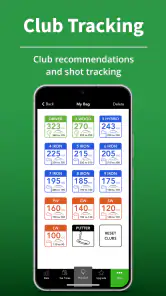
GolfLogix Golf GPS + 3D Putts is free to download, but not every feature is necessarily included in the free experience. Premium tools, detailed green maps, 3D putting information, club tracking, or other advanced functions may be offered through in-app purchases or a subscription. In-app purchase options range from $0.99 to $59.99 per item, so review the available choices before purchasing.
Pros
- Accurate GPS distances for fairways
- hazards
- and greens
- 3D putting views help visualize breaks and slopes
- Large course database supports many golf destinations
- Score tracking makes it easy to monitor rounds over time
- Works as a useful digital companion for practice sessions
Cons
- Many advanced features require a paid subscription
- GPS use can drain your phone battery during a full round
- Some course maps may need updates or user corrections
- The interface can feel crowded for first-time users
- Requires location access for accurate on-course measurements

- Category
- Sports
- Version
- 10.0.7