Golf Genius
- 253.00
- 4.7
- Installs
- 500.00K
- Price
- Free

Screenshots
Analysis by Reviewed
I’d approach Golf Genius less as a general golf companion and more as a tool whose value depends on the kind of round you play. If your golf life includes organized events, shared scores, and coordinating with other players, it has a clearer purpose than a simple score notebook. If you mostly head out alone and want personal practice notes, a basic scorecard or a dedicated stats tracker may be a better fit.
What free access means in practice
Golf Genius is a free sports app from Golf Genius Software, Inc., and its age rating is Everyone. That makes it easy to try without a purchase decision, but I wouldn’t treat “free” as proof that every function or event workflow is available to every user in every situation. The practical value is in whether the round or tournament you’re joining uses it; an organizer’s setup can shape what participants see and do.
That distinction matters before you build your routine around it. If a club, group, or event already relies on Golf Genius, joining through the app can bring useful shared information together. If nobody you play with uses it, the app may feel like extra setup rather than a replacement for the paper card or messaging thread your group already understands.
Where the shared workflow earns its place
The strongest case for the app is a round where several people need to stay in sync. Imagine arriving for a weekend group event and discovering that the tee order has changed: an organizer can communicate the update, while players can follow the event rather than trying to reconstruct details from scattered messages. During play, shared scoring can also reduce the familiar end-of-round debate over whose card has the latest total.
A useful habit is to check the event details before leaving home, then confirm that you are looking at the right round once you arrive. That small check helps separate an app problem from an event-selection mistake, especially when a group has more than one activity scheduled. For organizers, entering and checking the plan before players gather is more sensible than trying to sort everything out beside the first tee.
How it differs from a scorecard or a tracker
Compared with a paper card, Golf Genius is more useful when scores and event information need to be visible to a group, but paper remains quicker for someone who simply wants to jot down a number and keep moving. Compared with a personal performance tracker, its appeal is more social and organizational: it is not automatically the best choice for someone focused on detailed individual practice records. I’d choose the tool that matches the round, rather than expecting one app to replace every golf habit.
There is also a people-dependency trade-off. Shared features make more sense when the organizer and players are all working within the same event setup. If your playing partners prefer a different routine, the app’s coordination benefits can shrink, even if you personally like having digital information at hand. I’d agree on how the group will record scores before teeing off instead of assuming everyone will switch on the day.
More From Our News Desk

Clash of Clans Is Won Between the Battles

Android Auto Makes the Case for Quieter Car Software

MobiOffice: Transforming Mobile Productivity with Seamless Integration

EA SPORTS FC™ Mobile Soccer: Redefining Mobile Sports Gaming

How Microsoft OneDrive Became a Mobile Productivity Giant

How Google Translate Breaks Language Barriers Effortlessly
Getting more from an event without adding confusion
One useful way to judge the app is to separate the preparation stage from the on-course stage. Before play, confirm that the event you intend to join is the right one and review the information your group is using. Once the round begins, keep scorekeeping consistent: if players are entering scores in a shared workflow, agree who is responsible for checking entries rather than letting everyone assume someone else has done it. That simple division can make a shared tool feel helpful instead of creating a second record that nobody trusts.
For a player who is not organizing, it is reasonable to ask the organizer what they expect participants to do before the day starts. Do they want everyone to follow the event in the app, or is it mainly being used by the person running the round? Knowing that beforehand prevents the awkward first-tee pause of several people trying to work out their roles at once. If the answer is unclear, a quick message to the organizer is more useful than exploring menus while the group is waiting.
What shared scoring can and cannot settle
Digital scoring can make it easier for a group to keep a common record, but it does not remove the need for players to check what they enter. I would treat the app as a convenient shared reference, not as an authority that settles disagreements about a score or the rules of a format. When a number looks wrong, resolve it with the other players while the details are fresh, then make sure the event record reflects the group’s decision.
This matters most in a busy event, when small misunderstandings can spread from one group to another. A shared screen is useful because it gives people a common place to look; it is not a substitute for the organizer explaining how the event is being run. For a casual round with no organizer and no agreed scoring routine, the added coordination may not be worth it. A paper card can be the more practical choice when the group wants to keep things simple.
Hey there fellow app enthusiasts! Today, I’m diving into the world of golfing with an app that’s making waves on the green: Golf Genius. If you’re a golf aficionado looking to streamline your game management, then this app might just be your new best friend. Let’s tee off and explore what this app has to offer.
All About the Game-Changing Features
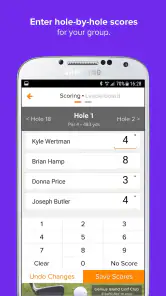
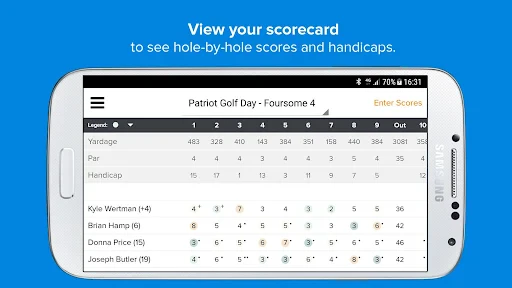
First off, let me tell you, Golf Genius is packed with features that cater to both the casual golfer and the tournament organizer. Picture this: you’re on the course, the sun is shining, and you want to track your progress in real-time. This app does just that and more. With its intuitive interface, you can effortlessly manage live scoring, and it even lets you keep tabs on your buddies’ scores too. It’s like having a personal caddie right in your pocket!
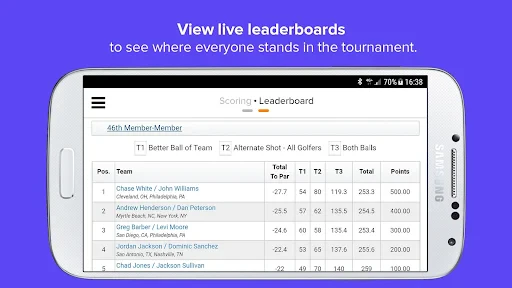
One of the standout features is the tournament management system. Whether you're organizing a friendly match with your pals or a full-blown championship, the app’s got you covered. It handles registrations, tee times, leaderboard updates, and even sends notifications for any changes. It’s a lifesaver, especially if you’re juggling multiple tasks on the day of the event.
Organizing responsibilities before play
If you are responsible for the event, I’d use the app as one part of a clear plan rather than expecting the software to do the organizing for you. Decide who will handle registration and tee-time information, who will answer players’ questions, and how changes will be communicated. The app can bring event details and updates into one place, but the people running the day still need to make decisions and keep that information current.
A practical workflow is to prepare the event information early enough that participants can check it before arriving, then leave time to verify that the details make sense from a player’s point of view. A player may know the event name but still need to identify the correct round or understand what action is expected. Reviewing the participant experience helps catch confusion before it becomes a queue of questions at the course.
User Experience and Interface
Now, let’s talk about the user experience. Navigating through Golf Genius is as smooth as a perfect putt. The design is sleek and modern, making it super easy to find what you need without getting lost in a sea of menus. Plus, the app supports a variety of devices, so whether you’re on an Android or iOS, you’re guaranteed a seamless experience.
One thing I really appreciate is how the app caters to all skill levels. Whether you’re a seasoned pro or a newbie just learning the ropes, Golf Genius adapts to your needs. The tutorials and support options are incredibly helpful, ensuring you’re never left in the rough when trying to figure out a feature.
Choosing between a phone and a paper backup
Even when a group prefers shared digital scoring, I would not make a phone the only plan for keeping the round understandable. Agree on a straightforward backup approach, such as noting a disputed score or important change on a card until it can be checked. This is not an argument against the app; it is a sensible way to avoid turning a technical hiccup or a missed update into a disagreement about the round.
That approach is especially useful for mixed groups, where some players may be comfortable with the event workflow and others may be trying it for the first time. A quick explanation of the group’s routine is often enough: where to find the event, who is entering scores, and when to flag a correction. The app works best as part of a shared habit, not as an assumption that every player already knows what to do.
Final Thoughts
In conclusion, Golf Genius is a hole-in-one for anyone serious about improving their golfing experience. The app’s robust features and user-friendly interface make it a must-have for golfers of all levels. Whether you’re managing a tournament or simply tracking your personal stats, this app offers a comprehensive solution that makes your golfing life easier and more enjoyable.
So, if you’re ready to take your game to the next level, give Golf Genius a shot. It’s like having a golf course in your pocket, ready to assist you whenever you need it. Happy golfing!
A quick fit check before you commit
Its audience is broad, but not every golfer will get equal value from it. I’d recommend trying Golf Genius if you regularly join organized rounds, help run club events, or enjoy following friends’ progress as play unfolds. I’d skip it as a primary tool if you want a quiet, solo score log with detailed personal analysis; a purpose-built tracking app is likely a closer match. The app has a 4.7 average from around 3.3K ratings, with over 500K installs, which suggests plenty of golfers have tried it, but those figures can’t tell you whether your own group will use its event tools.
One practical limitation is that the usefulness of a live event view depends on the information being set up and maintained. If details are incomplete or your group changes plans informally, a phone screen can’t replace a quick conversation with the organizer. I’d use the app as the shared reference, not as a reason to stop confirming important changes with the people running the round.
What to expect from the app itself
The current version is 15.3.0, and the app requires iOS 11 or later. Its release goes back to Oct 23, 2012, so it has been around long enough to become a familiar option in golf-event workflows. I’d still check compatibility on the device you plan to use, and I’d open the relevant event before play rather than waiting until you’re on the course and in a hurry.
If you’re wondering whether it can work for a casual foursome, the deciding factor is less how formal the round feels and more whether someone has organized the event in Golf Genius. For a friendly match, that can make shared scoring convenient; for a spontaneous walk-on round, a paper card or the scoring option already familiar to your group may be simpler. Likewise, it can help an organizer coordinate a busy day, but it won’t make last-minute decisions for them: people still need to agree on the format and communicate clearly.
My recommendation for the right kind of golfer
My advice is to treat Golf Genius as a free way to join a golf group’s digital routine, not as an automatic upgrade for every round. Start by asking whether your club or playing partners use it, then try it on one event where shared scores or coordination would save effort. If that experience feels clearer than juggling cards and messages, keep it in your kit; if it adds another step without helping your group, there’s no reason to force the change.
Golf Genius Frequently Asked Questions
Is Golf Genius free to download, and what should I know about its cost?
Golf Genius is free to download and is a sports app for golfers and golf events. The app itself can be installed without a purchase, while its use may depend on the way an organizer or golf facility runs an event. Before downloading, consider whether you are joining an event that uses Golf Genius or looking for tools to organize one, since the app is designed around those golfing activities.
Which devices and operating systems can run Golf Genius?
Golf Genius is available for Android and iOS devices, so golfers can use it on a compatible phone or tablet. On Apple devices, it requires iOS 11 or later. Checking your device’s operating system before installing is a sensible first step, especially if you use an older phone or tablet. The app is developed by Golf Genius Software, Inc. and is intended for a broad audience.
What is Golf Genius and how does it enhance my golfing experience?
Golf Genius is a comprehensive golf tournament management software designed to enhance the experience of both golfers and golf administrators. It offers a range of features including real-time scoring, live leaderboards, and seamless communication tools. With Golf Genius, users can easily organize tournaments, manage pairings, and track performance, making it a must-have tool for both casual golfers and professionals looking to improve their game.
Is Golf Genius compatible with both Android and iOS devices?
Yes, Golf Genius is compatible with both Android and iOS platforms, allowing users to access its features on a wide range of devices. Whether you're on a smartphone or tablet, the app is designed to be user-friendly and responsive, ensuring that you can manage and participate in golf events effortlessly from anywhere.
Does Golf Genius require a subscription, and what are the available pricing plans?
Golf Genius operates on a subscription model, offering various pricing plans to suit different needs. The plans may vary based on the features and scale of the tournaments you wish to manage. Users are encouraged to visit the Golf Genius website or contact their customer support to get detailed information on pricing and choose a plan that best suits their requirements.
Pros
- Comprehensive tournament management tool
- User-friendly interface
- Real-time scoring and leaderboards
- Supports multiple formats and events
- Cloud-based solution for easy access
Cons
- Can be expensive for small clubs
- Steep learning curve for new users
- Limited offline capabilities
- Requires stable internet connection
- Some features need improvement
- Category
- Sports
- Version
- 15.3.0





