GitHub
- 2.30K
- 4.6
- Installs
- 10.00M
- Price
- Free

Screenshots


Analysis by Reviewed
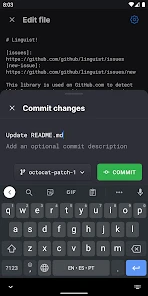
I find the most useful way to think about GitHub on a phone is as a place to keep work moving when I’m away from my computer, not as a replacement for a full coding setup. Its strongest mobile role is handling repository notifications and helping me review, comment on, and merge changes. That focus makes it valuable in short bursts: I can check what needs attention, understand the discussion, and take a suitable next step without opening a laptop.
Notifications are the starting point, not the whole job
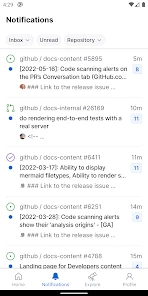
The most practical mobile capability is not simply seeing that something happened; it is being able to decide what deserves attention and respond in the same work context. When a repository notification points to a review or discussion, I can follow the thread instead of switching between a notification, a chat app, and a browser tab. That keeps the reason for the alert close to the action I take.
This is particularly helpful for distributed teams, where a request may arrive while someone else is working and waiting on a decision. The app can help me acknowledge a question, clarify what I need to inspect, or handle a straightforward review. It does not make every request urgent, though. I still need to distinguish “I saw this” from “I have reviewed this carefully,” especially when a merge would affect other people’s work.
Where the mobile workflow helps
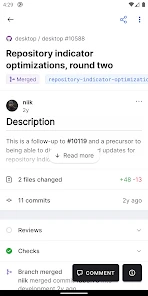
For a team that already uses GitHub, the app can turn a notification into a manageable task instead of another item I postpone. I might see a request for review while commuting, open the relevant conversation, leave a focused comment, or approve and merge a change if I have enough context. The key advantage is continuity: the discussion stays attached to the work, rather than getting lost in a separate chat thread.
I would still treat a phone review as a judgement call, not a shortcut around careful engineering. A small, familiar change with a clear explanation may be easy to assess on a screen. A complicated change that depends on broad context is better saved for a larger display, where I can compare files and follow the wider project more comfortably. Mobile review works best when the decision is clear and the consequences are understood.
A practical routine for staying on top of work
One useful habit is to triage notifications in two passes. First, I separate items that need an immediate response from updates I can leave for later. Then I open only the conversations where I can contribute meaningfully from the phone. This avoids turning every notification into a rushed approval and keeps the app useful even when I have only a few minutes.
For example, if a teammate asks a narrow question about a change, I can read the thread and add context while the details are fresh. If the request instead calls for a deep code review, I can leave it for my desktop session rather than pretending a quick glance is enough. That distinction is a small workflow choice, but it helps protect review quality.
You May Like

Clash of Clans Is Won Between the Battles

Android Auto Makes the Case for Quieter Car Software

MobiOffice: Transforming Mobile Productivity with Seamless Integration

EA SPORTS FC™ Mobile Soccer: Redefining Mobile Sports Gaming

How Microsoft OneDrive Became a Mobile Productivity Giant

How Google Translate Breaks Language Barriers Effortlessly
Make a mobile review useful without rushing it
I get more out of a phone review when I begin with the question the change is meant to answer. Before commenting, I read the conversation and look for the author’s explanation, the concern raised by the reviewer, and any replies that have already changed the picture. This prevents me from repeating feedback that someone else has resolved and makes a short comment more useful to the person waiting for it.
A good mobile contribution can be a question rather than a verdict. If a detail is unclear, I can ask for the missing context and leave the final assessment until I can examine the work properly. That is a better use of a small screen than making an approval just to clear a notification. For teams, it also sets a healthy expectation: a quick response can keep communication moving without pretending that every response is a completed review.
I also find it useful to separate urgency from importance. A notification may be recent without requiring an immediate decision, while an older discussion may be blocking someone. Checking the thread before acting helps me judge whether a brief reply will unblock the work or merely add noise. This is one of the app’s quiet strengths: it puts the decision close to the repository conversation, but the quality of that decision still depends on how carefully I read.
Getting Started with GitHub
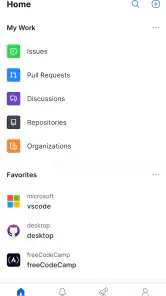
First things first, setting up on GitHub is a breeze. You download the app, create your account, and boom, you're in. The interface is sleek and intuitive, making it easy to navigate even if you're not a tech wizard. Trust me, once you start exploring, you'll feel like a kid in a candy store.
Features That Make It Stand Out
One of the standout features of GitHub is its collaborative environment. You can work with developers from all over the world on open-source projects. It's like social media but for coding. You get to see what others are working on, contribute to projects, and learn from the best in the business.
Another killer feature is the version control system. Gone are the days of worrying about losing your code or not being able to revert changes. With GitHub, every change is tracked, and you can roll back to previous versions without breaking a sweat. It's like having a time machine for your code.
And let's not forget about the community. The discussions and forums are treasure troves of information. Stuck on something? Post a question, and you'll get insights from experienced developers. It's a supportive space where learning and growth are encouraged.
A day when the phone is enough—and when it isn’t
Imagine I have a few minutes between meetings and a teammate has asked whether a small change addresses a specific concern. I can open the relevant discussion, read the explanation and responses, and add a targeted comment while the question is still timely. If the change is familiar and the evidence is clear, I may be able to finish the review there. If understanding it requires a broader comparison or careful inspection across files, I can leave a note and return to it at my desk.
That distinction is what makes this a companion rather than a pocket workstation. I would not plan a coding session around the app or expect it to replace the larger screen and full development environment I use for substantial work. Its value is in removing small delays around collaboration: acknowledging a request, answering a focused question, or completing a decision that genuinely fits a mobile screen.
For someone new to repository-based teamwork, the app can also make the social side of a project easier to follow. Reading an exchange attached to a change shows how a technical decision is discussed in context. Still, it is not a substitute for learning the underlying workflow. If terms such as review, merge, or repository are unfamiliar, the app may expose you to them without teaching every concept from scratch.
Why Developers Love It
Developers love GitHub for its seamless integration with other tools. Whether you're using it for personal projects or professional endeavors, the app syncs effortlessly with platforms like Slack, Trello, and more. This connectivity keeps your workflow smooth and efficient.
Plus, the app is constantly evolving. The updates and new features are rolled out regularly, ensuring that it remains at the cutting edge of technology. It's like having a tool that grows with you and adapts to your changing needs.
What to expect from the phone-sized view
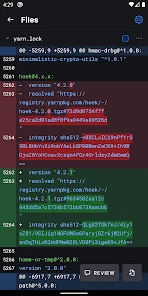
The main trade-off I notice is space. A conversation is easy to read in a short stretch, but reviewing a large or intricate change is naturally less comfortable when I cannot see as much at once. That matters when I need to compare details, keep several pieces of context in mind, or decide whether a change has wider consequences. In those situations, a desktop browser is the more sensible choice, not because mobile access is useless, but because the task calls for a broader view.
There is also a judgement cost to handling notifications wherever I happen to be. A quick glance can tempt me to respond before I have time to understand the whole discussion. I try to use mobile access for triage and clearly bounded decisions, and reserve high-impact or uncertain reviews for a focused session. This keeps convenience from becoming a reason to lower my standards.
Compared with a coding editor on a phone, GitHub serves a different purpose: it helps me stay involved in collaboration rather than build and test a substantial change. Compared with email or general team chat, repository discussions keep comments attached to the work being discussed. And compared with opening a desktop browser, the app makes quick follow-ups more accessible while giving up room for detailed inspection. The better alternative depends on the task, not on which tool is universally best.
Features That Make It Stand Out
One of the standout features of GitHub is its collaborative environment. You can work with developers from all over the world on open-source projects. It's like social media but for coding. You get to see what others are working on, contribute to projects, and learn from the best in the business.
Another killer feature is the version control system. Gone are the days of worrying about losing your code or not being able to revert changes. With GitHub, every change is tracked, and you can roll back to previous versions without breaking a sweat. It's like having a time machine for your code.
And let's not forget about the community. The discussions and forums are treasure troves of information. Stuck on something? Post a question, and you'll get insights from experienced developers. It's a supportive space where learning and growth are encouraged.
Choosing the right tool for the task
Compared with email or a general team-chat app, GitHub keeps review comments beside the change they discuss, which makes later context easier to recover. Compared with working in a desktop browser, the mobile app trades screen space and detailed inspection for quick access when you are away from your desk. I would use it for keeping a review moving, not for every part of a coding session.
That makes it especially useful for developers who already collaborate through GitHub and want to handle lightweight follow-ups on the go. It is less compelling if you rarely review repository activity, prefer to do all project work locally, or need a phone to serve as your main coding environment. In those cases, a desktop workflow or the team’s usual communication tool may suit you better.
Who it suits, and what to expect
GitHub is a free productivity app from GitHub, with optional in-app purchases listed from $9.99 to $38.99 per item. It is rated Teen, and the current version is 1.237.1, with Android support starting at version 8.0. Its 4.6 average comes from around 119,000 ratings, and it has passed 10 million installs. Those figures suggest a well-established choice, though popularity does not make every mobile workflow a good fit.
If you are deciding whether it belongs on your phone, ask whether you regularly need to read repository discussions or respond to review requests away from your computer. If yes, it can make those small gaps in the day more productive. If your priority is writing and testing substantial code on a handset, I would look for a tool designed around that job instead. The app’s value is clearest when it complements, rather than tries to replace, your main development setup.
Who gains most from keeping it close
I would recommend it most to people who already have a steady GitHub workflow and sometimes need to respond between desktop sessions: maintainers keeping conversations moving, developers reviewing focused changes, and contributors who want to follow project discussion without waiting until they are back at a computer. It is also a reasonable fit for someone who wants to read along with an open-source project and occasionally join its discussions.
I would skip it as a priority download if repository activity is rare in your day, if your team handles decisions entirely elsewhere, or if your main goal is to write code on a phone. Those users may get more from their usual communication channel or a mobile coding tool. The app is most convincing when it solves a specific interruption: a review request or question that can be answered responsibly in a short window.
It is free to get started, while the listed in-app purchases range from $9.99 to $38.99 per item. I would not treat that as a reason to expect a paid purchase to be necessary for the basic mobile role described here. The practical question is whether reading and responding to GitHub work away from a computer would save you enough friction to justify keeping another work app within reach.
Final Thoughts
In a nutshell, GitHub is not just an app; it's a gateway to a global community of developers. Whether you're looking to hone your skills, collaborate on exciting projects, or just keep track of your coding adventures, GitHub has got your back. So, if you haven't already, give it a whirl. You might just find yourself wondering how you ever managed without it.
My more grounded recommendation is to use it as a focused companion for repository conversations, not as a promise that every piece of development work can happen comfortably on a handset. When I can resolve a clear question or move a suitable review forward, it earns its place. When the work needs more screen space or deeper inspection, saving it for a computer is the smarter choice. That balance is what makes the app useful rather than merely convenient.
GitHub Frequently Asked Questions
Is the GitHub mobile app free to download, and are there optional purchases?
Yes. The GitHub app is free to download, so you can install it without paying an upfront price. Optional in-app purchases are also listed, ranging from $9.99 to $38.99 per item. The app is designed for mobile access to GitHub workflows, including notifications, reviews, comments, and merges, so consider whether those features fit the way you want to use GitHub on your phone.
Who develops GitHub, and what is the app’s age rating?
GitHub is developed by GitHub and is rated Teen. It is a productivity app focused on engaging with software projects and their conversations, including reviewing changes and commenting. Before installing, check that the age rating is appropriate for the person who will use it and that the app’s project-focused purpose matches what you are looking for.
What should I know about GitHub’s popularity before downloading it?
GitHub has an average rating of 4.6 from around 119,000 ratings, with about 2,300 written reviews and over 10 million installs. Those figures suggest that many people use the app, but they do not guarantee that it will suit every workflow or device. Its main mobile focus is handling notifications and participating in project activity while away from a computer.
Can I use GitHub on my phone to manage projects while away from my computer?
Yes. GitHub’s mobile app is designed to let you handle selected project tasks from your phone, including triaging notifications, reviewing changes, commenting, and merging. It can be useful when you need to keep up with a project away from your computer, though it is best understood as a mobile companion to GitHub rather than a replacement for every desktop development task.
What devices and operating systems can run the GitHub app?
GitHub is a productivity app for mobile devices, and the Android version requires Android 8.0 or later. Before downloading, check that your device meets this minimum requirement and that you are choosing the version intended for your operating system. The app is free to download, while optional in-app purchases are listed from $9.99 to $38.99 per item.
Pros
- Excellent collaboration features
- Robust version control system
- Wide range of integrations
- Large open-source community
- Intuitive user interface
Cons
- Steep learning curve for beginners
- Limited mobile app features
- Dependence on internet connection
- Complexity for small projects
- Potential privacy concerns

- Category
- Productivity
- Version
- 1.237.1











