GIF Maker, GIF Editor Pro
- 526.00
- 4.7
- Installs
- 50.00K
- Price
- $2.99
Screenshots
Analysis by Reviewed
I rarely judge a creative app by the first GIF it helps me make. The more telling question is whether I still reach for it after the novelty wears off. GIF Maker, GIF Editor Pro is a photography app for turning pictures and video into GIFs, and its appeal is easy to understand: it puts a familiar, shareable format within reach without asking me to learn a full desktop editor. I see it as a handy specialist tool, rather than an app that needs to become part of everyone’s daily routine.
The first week: quick ideas, quick results
In the first few days, I’d use it for small, personal projects: a pet doing something unexpectedly funny, a short reaction from a family video, or a sequence of photos that works better as a loop than as separate images. The app’s core idea is straightforward, and that makes it approachable when I want to make something quickly rather than spend an evening learning a complicated editing workflow.
A practical tip is to decide what the GIF needs to communicate before editing. A short, focused moment usually makes a clearer loop than a long clip with several actions competing for attention. I’d trim around the gesture or reaction I want people to notice, then check the result at the size it will be shared. Text and stickers can add context, but too many decorations can make a small animated image harder to read.
Month-to-month value: a useful tool, not a daily habit
The lasting value depends on how often GIFs fit into your conversations or creative work. If you regularly make reactions for group chats, quick visual jokes for social posts, or simple animated instructions, having a dedicated editor can save a few steps. If you only make one GIF every few months, the app may feel more like a convenient option to keep around than something you open regularly.
That distinction matters when considering the $2.99 price. I’d be more comfortable paying for a tool I know I’ll use repeatedly than buying it just because making a first GIF sounds entertaining. Its 4.7 average from around 3.9K ratings suggests many users are pleased, while the 50K-plus installs give a sense of its reach; neither figure can tell me whether it suits my own workflow, so I’d base that decision on how often I actually share animated clips.
What shapes the everyday experience
Sharing, quality, and the small trade-offs
For a realistic everyday use, imagine a friend sending a short clip of a dog leaping for a toy. I’d isolate the few seconds that carry the joke, keep the loop readable, and share the finished GIF in a chat. Before sending, I’d pay attention to the balance between visual clarity and file size: a very detailed or lengthy animation can be less convenient to pass around, while cutting too aggressively can remove the moment that makes it funny.
That is where a dedicated GIF maker has an advantage over a general photo editor: the goal is an animation you can pass along, rather than a polished still image. A phone’s built-in editing tools may be enough for cropping or touching up a photo, and a social platform’s own tools may be quicker if I only want to post a basic clip there. I’d choose this app when I want more control over making a GIF itself; I wouldn’t expect it to replace a broad video editor for a project that needs detailed timelines, elaborate transitions, or extensive sound work.
More From Our News Desk

Clash of Clans Is Won Between the Battles

Android Auto Makes the Case for Quieter Car Software

MobiOffice: Transforming Mobile Productivity with Seamless Integration

EA SPORTS FC™ Mobile Soccer: Redefining Mobile Sports Gaming

How Microsoft OneDrive Became a Mobile Productivity Giant

How Google Translate Breaks Language Barriers Effortlessly
Who should keep it—and who can skip it
I can see this being a good fit for people who often turn personal videos and photos into lightweight reactions, or who want a simple way to add motion to casual posts. It is less compelling for someone who rarely shares GIFs, prefers ready-made animations, or needs a more extensive video-production setup. The useful question is not whether GIFs are fun once, but whether making your own saves enough effort or adds enough personality to justify opening a separate app.
There is also a small maintenance burden to consider. Any creative app earns its place more easily when I can remember what I made and find source clips without rummaging through an overflowing camera roll. I’d keep a few promising clips in a clearly named album before starting a batch of GIFs, and review the finished exports before sharing so that near-duplicates or test versions do not pile up. That simple habit makes a one-off experiment easier to repeat later.
Where fatigue can set in
Making a GIF is satisfying, but repeated edits can start to feel samey if every result is just a trimmed clip with a caption. I’d treat text and stickers as tools for clarity or a punchline, not default decoration, and vary the source material rather than trying to make every video work as an animation. Some moments are better left as a video or still photo; forcing them into a loop can make them less natural.
GIFs also have practical limits: they are not the right format when smooth, detailed footage or sound is central to the experience. The app’s compression controls can help me weigh quality against convenience, but that remains a choice rather than a magic fix. For a quick reaction, a smaller file may be worth the trade-off; for fine detail, I’d keep the original video available and share that instead.
Choosing source material with care
The source clip often matters more than the amount of editing. I’d favor footage with one clear subject and a simple background, since busy scenes can become harder to follow once reduced to a compact animation. For a set of still photos, I’d pick frames with consistent lighting and framing; abrupt changes can make a sequence feel jumpy, even when the images are individually good. This is a useful way to avoid spending time decorating material that was never likely to loop smoothly.
If I’m making a GIF to explain a small action—where to tap on a screen, for example—I’d keep the motion deliberate and the text brief. A reaction GIF can rely on a face or gesture, but an instructional one needs to remain legible when viewed quickly. I’d check that any added wording stays visible long enough to read and doesn’t cover the detail the viewer needs. This kind of use is where a personal editor can be more useful than searching through generic reaction libraries.
What I would check before sharing
One practical question is whether the finished file will behave as expected in the place I plan to send it. Sharing options can make distribution convenient, but apps and messaging services may handle animated images differently. I’d preview the export and, for anything important, test it in the intended conversation or post before relying on it. If the result appears too large, too busy, or awkwardly cropped, I’d revisit the source and framing rather than assume another effect will fix it.
I’d also keep the original photo or video until I’m happy with the exported version. That gives me room to make a shorter loop, try a different crop, or retain a regular video when the animation loses too much detail. Treating the GIF as a shareable copy rather than the only version of a moment is a simple safeguard, especially when a clip has personal value beyond its joke.
Getting Started with GIF Fun
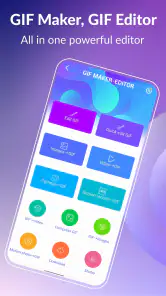
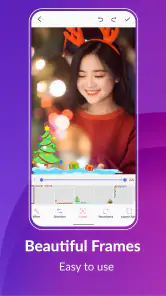
First things first, let's talk about the user interface. GIF Maker, GIF Editor Pro greets you with a clean and intuitive design. It's like the app is saying, "Hey, let's make some awesome GIFs together!" Navigating through the options is a breeze, even if you're not the most tech-savvy person out there. I was pleasantly surprised by how the app guides you through each step, ensuring you never feel lost in the process.
Features That Make You Go Wow!
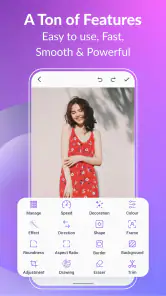
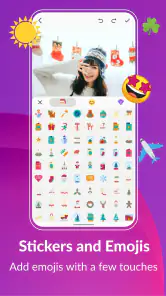
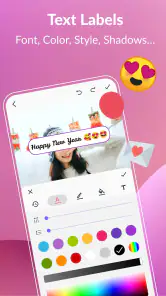
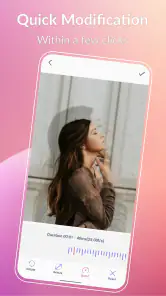
One of the standout features of this app is its versatility. You can create GIFs from images, videos, or even live photos. Yes, you heard that right! I had a blast turning my random video clips into hilarious GIFs. The editing tools are robust yet straightforward. You can trim, adjust speed, and even add text or stickers to your creations. It's like having a mini graphic design studio right in your pocket!
Another thing I love is the app's compression feature. You know how sometimes GIFs can slow down your phone or take ages to send? Not with this one. The compression tool ensures your GIFs are high quality but still lightweight enough for quick sharing. Plus, you can choose the resolution and frame rate, giving you full control over the final product.
Making the controls work for the result
Those output choices are most useful when I treat them as compromises rather than settings to maximize. For a small reaction in a chat, I’d prioritize an easy-to-view file and accept that tiny details may soften. For an image with fine movement or text, I’d preserve more clarity and accept a heavier result if needed. I would not assume that the highest resolution automatically makes the best GIF: if the animation is mainly viewed on a phone, readable framing and a clean loop can matter more than retaining every pixel.
Speed adjustments can change the character of a moment, so I’d make them sparingly. A slight change can emphasize a quick gesture, while an extreme effect may turn an ordinary action into a novelty that gets old fast. I’d compare the adjusted version with the original pace before exporting, especially for instructional content where viewers need to understand what happened rather than simply notice that it looks unusual.
Sharing is Caring
Once you've created your masterpiece, sharing it is as easy as pie. The app offers direct sharing options to popular platforms like Instagram, WhatsApp, and Facebook. I found this super convenient because, let's be real, what's the point of making a cool GIF if you can't show it off to your friends?
Oh, and did I mention the app supports multiple languages? Whether you're chatting with a friend in English or sending a funny GIF to someone in French, this app has got you covered. It's these little details that truly enhance the user experience.
When another tool is the better choice
Compared with the usual alternatives, this app sits between a phone’s basic media tools and a full video editor. Built-in photo editing is better for quick still-image adjustments, while social apps can be the shortest route when I only need a simple post made for that one platform. A specialist GIF editor makes more sense when I want to shape the animation itself and reuse the result in different conversations. For longer edits, sound-led clips, or carefully layered video projects, I’d move to a dedicated video editor instead of trying to make a looping format do every job.
That comparison also helps answer whether the purchase is worthwhile: the app’s $2.99 price is easier to justify if I regularly make custom reactions or animated explainers, not if I mainly browse and send GIFs made by other people. With an average of 4.7 across around 3.9K ratings and over 50K installs, it has attracted a substantial audience for a focused tool, but those figures are not a substitute for matching it to my own habits. It is rated for Everyone, which makes its general audience broad, though a simple editor still needs a clear purpose to earn repeat use.
The Verdict
In a nutshell, GIF Maker, GIF Editor Pro is a must-have for anyone who loves to express themselves through GIFs. It's user-friendly, feature-rich, and just plain fun to use. Whether you're a newbie or a seasoned pro, this app will have you creating and sharing GIFs like a boss in no time.
If you're looking to add a new dimension to your social media game or just want to have some fun with your friends, give this app a shot. Trust me, you won't regret it!
Who makes it and whether it earns a place
GIF Maker, GIF Editor Pro is made by GIF Maker & GIF Editor & Video Maker. It is rated for Everyone and has been available since March 10, 2018. I’d describe its strongest recurring use as turning a specific moment into a personal reaction, rather than producing polished content for a demanding creative project.
For me, the best way to decide is to try a few different source types: a short video, a small set of photos, and, if relevant to your camera roll, a Live Photo. That reveals whether its creation and editing flow matches the material you actually have. I’d also make one version intended for a chat and another with a little more visual detail, then compare which one is easier to understand and share.
My long-term verdict is that this is a focused convenience app, not an essential camera-roll companion. When I have a moment worth looping, the ability to trim, adjust speed, add a little context, and manage the output’s quality can make the result more personal than a ready-made reaction. When I don’t have that recurring need, built-in phone tools or a platform’s own editor may be enough. I’d keep it for a regular GIF-making habit, but skip it if the idea of making GIFs is more appealing than the occasions on which I’ll actually use them.
GIF Maker, GIF Editor Pro Frequently Asked Questions
Can GIF Maker, GIF Editor Pro create GIFs without a watermark?
Yes. GIF Maker, GIF Editor Pro is described as a way to make high-quality GIFs from images and videos without watermarks. That makes it useful if you want to share a finished animation without a branding mark covering part of the image. You can use its creation and editing tools to prepare a GIF before sharing it.
Who develops GIF Maker, GIF Editor Pro, and what is its age rating?
GIF Maker, GIF Editor Pro is developed by GIF Maker & GIF Editor & Video Maker and is rated Everyone. It is a photography app focused on creating and editing GIFs, so its main purpose is working with images, video clips, and animated output. The age rating can help families decide whether the app is appropriate for the person who will use it.
What features does GIF Maker, GIF Editor Pro offer?
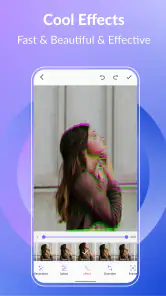
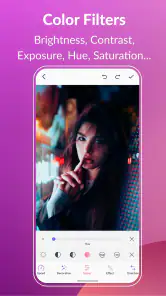
GIF Maker, GIF Editor Pro provides a comprehensive suite of tools for creating and editing GIFs. Users can convert images and videos into GIFs, edit existing GIFs by adding text, emojis, and filters, and optimize GIFs for size and quality. The app also supports frame by frame editing, ensuring precise control over the final product.
Is GIF Maker, GIF Editor Pro user-friendly for beginners?
Yes, GIF Maker, GIF Editor Pro is designed to be user-friendly, even for beginners. The app features an intuitive interface with easy-to-use tools and step-by-step guides that help users create GIFs without hassle. Whether you are a novice or an experienced user, the app offers a seamless experience.
Does GIF Maker, GIF Editor Pro support various file formats?
Absolutely, GIF Maker, GIF Editor Pro supports a wide range of file formats for both input and output. Users can import videos and images in formats like MP4, JPEG, and PNG, and export their creations as high-quality GIFs. This versatility ensures compatibility with different media files, making it a flexible tool for all your GIF-making needs.
Pros
- Easy-to-use interface for beginners
- Supports multiple image formats
- Fast processing speed
- High-quality output GIFs
- Variety of editing tools available
Cons
- Limited advanced editing features
- Occasional app crashes
- Ads in free version
- Requires in-app purchases for full functionality
- Large file sizes for high-quality GIFs
- Category
- Photography
- Version
- Varies with device












