GHIN
- 2.65K
- 3.8
- Installs
- 500.00K
- Price
- Free

Screenshots
Analysis by Reviewed
When I use a golf app, I want it to help with the practical parts of a round without making me stare at my phone between shots. GHIN is aimed at golfers who want to record scores and keep an eye on their handicap, with extra tools for looking back at how they played. It’s most useful when those records matter to your regular golf routine, rather than when you’re simply looking for a general-purpose course guide.
Readable enough for quick checks, best explored off the course
The app’s scorekeeping approach is straightforward: enter a score hole by hole, then review the round later. That separation matters. I’d treat the phone as a brief score-entry tool during play and save detailed stat review for after the round, when there’s time to focus. It’s a more sensible rhythm than trying to interpret performance data while your group is waiting.
As the official app from the Golf Handicap and Information Network, GHIN is centered on handicap-related use rather than trying to be an all-purpose golf companion. That focus may make its purpose clear to golfers who already use the network, but newcomers should expect to learn how score posting and handicap tracking fit their own golf routine. If you mainly want course navigation or a broad range of unrelated golf utilities, a dedicated alternative may suit you better.
For a first visit, I’d explore away from the course and identify the path from a completed round to its record and handicap information. That small bit of preparation can prevent a rushed search when other players are ready to move on. If your main aim is simply to remember how you played, a basic notes app or paper card asks less of you; GHIN becomes more worthwhile when keeping a consistent handicap record is part of the point.
Different abilities call for different ways to use it
Entering information on a phone can be convenient, but it still involves looking at a screen and making repeated selections. I wouldn’t assume that every golfer will find this equally comfortable. If small touch targets, screen glare, or precise tapping are difficult for you, try entering a sample round or exploring the app before relying on it during play. A paper card or help from a playing partner can remain a useful backup.
There’s also a sensory trade-off in golf: bright light, weather, gloves, and the pace of a group can make phone interaction less comfortable than it is at home. I’d keep score entry brief, put the phone away between checks, and avoid making a detailed stats session part of the round itself. That approach helps the app support play without turning it into another demand for attention.
If you find repeated phone interaction tiring, decide in advance who will keep the score and when the digital entry will happen. A playing partner can record the round on paper while you concentrate on play, then you can enter it together afterward. This is not just a workaround for motor or vision needs: it can also suit anyone who wants to stay present with the group instead of switching attention to a screen after every hole.
More From Our News Desk

Clash of Clans Is Won Between the Battles

Android Auto Makes the Case for Quieter Car Software

MobiOffice: Transforming Mobile Productivity with Seamless Integration

EA SPORTS FC™ Mobile Soccer: Redefining Mobile Sports Gaming

How Microsoft OneDrive Became a Mobile Productivity Giant

How Google Translate Breaks Language Barriers Effortlessly
Where it fits—and where it may not
A regular golfer who wants to post scores and follow a Handicap Index is the clearest fit. A casual player who rarely records rounds may get less from it, while someone primarily seeking GPS guidance, extensive course discovery, or a single place for every golf tool may prefer an app built around those priorities. I’d also check that the current version works on your device before installing: GHIN is free to download, is rated for Everyone, and its listed minimum operating system is Android 5.0.
The app has a 3.8 average from around 7,800 ratings, with over 500,000 installs. Those figures suggest it has found a substantial audience, but they don’t tell me whether its workflow will suit your game. The current version is 5.4.6, and in-app purchases are listed at $49.99 per item, so I’d check any purchase details in the app before committing to one. The right question is whether its score and handicap tools match the way you already play.
That distinction matters if you’re comparing it with a golf GPS app or a general score tracker. Those alternatives may be more convenient for finding course information or keeping a simple tally, while GHIN’s appeal is its handicap-centered routine. I would not install it expecting every golf task to live in one place. Instead, decide whether you need an official handicap record often enough to justify another app in your kit.
Unpacking the GHIN Experience
So, what exactly does GHIN offer? It's more than just a digital scorecard. This app is a golfer’s dream come true, designed to help you improve your game by providing detailed insights into your performance. From tracking scores to providing handicap calculations, it's got a lot packed under its hood.
Scorekeeping Made Simple
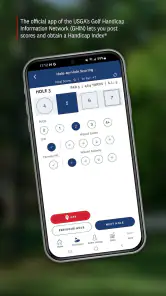
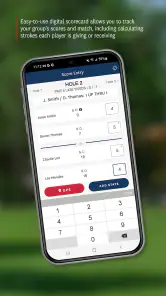
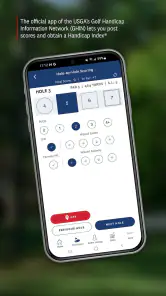
First off, let's talk about the scorekeeping feature. It's pretty intuitive. You can easily enter your score after each hole, and the app keeps a running tally. No more fumbling with paper scorecards that can blow away with the wind! Plus, it automatically syncs with your profile, so you can review your games later and analyze where you might improve.
A useful habit is to confirm each hole’s entry before moving on, especially if you’re entering scores while walking or chatting with your group. A single missed or mistyped hole can make a later comparison frustrating. If you prefer not to handle your phone during play, write scores on a card first and enter them afterward; that adds a step, but keeps your attention on the round and gives you a backup record.
For a Saturday game, I’d choose the workflow before teeing off rather than improvising once the group is moving. If the pace is relaxed and phone use feels comfortable, enter scores hole by hole and check them as you go. If the course is busy, the weather is awkward, or you’re playing with people who prefer uninterrupted conversation, keep the card and do the app entry afterward. Either way, a quick check against the card before posting is a sensible safeguard.
Handicap Index at Your Fingertips
One of the standout features of GHIN is its ability to calculate your Handicap Index. Remember those days of manually calculating your handicap? This app does all the heavy lifting for you. It updates your handicap after you post a new score, helping you to track your progress over time. It's like having a personal coach who knows where you stand in your game.
That makes GHIN especially practical for golfers who play with different people and want a consistent reference point when discussing a round. I’d still separate the convenience of seeing a number from the work of improving: the index gives context to your scoring, but it doesn’t explain why a particular round went well or poorly. Pairing it with a quick personal note about conditions or a troublesome hole can make your own review more useful than relying on the number alone.
For someone new to handicap tracking, the most useful question is not just “What is my number?” but “What do I need this number for?” If you play in settings where a Handicap Index helps put different golfers’ rounds in context, maintaining a regular score history is valuable. If you play only now and then with the same small group and don’t use an index, a handwritten record may cover your needs with less setup.
Detailed Stats and Insights
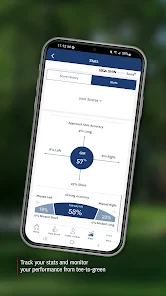
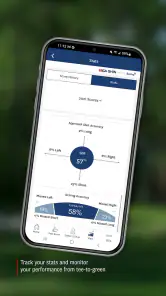
Another cool feature is the in-depth stats the app provides. You can dive into your game data with metrics on fairways hit, greens in regulation, and putts per round. It's a great tool for anyone serious about improving their game. You get a clear picture of which areas need work and where you're excelling. I found the stats to be a real eye-opener for my game.
For a more useful read, look for patterns across several rounds instead of reacting to one unusually good or bad day. If greens in regulation are repeatedly low, that points toward a different practice focus than a round where putting stands out as the weak link. Stats are most helpful when they lead to one manageable goal for your next session, not an attempt to overhaul every part of your game at once.
One practical trade-off is that detailed stats ask for more attention than a basic score entry. I’d use them selectively: after a few rounds, pick one area you can act on, then see whether it changes in later records. Trying to track every detail during a round can make the phone feel like a chore, and a statistic without a clear practice response is not automatically useful. The app is strongest when the information helps you ask a better question about your game.
Community and Connectivity
GHIN also has a social aspect. You can connect with fellow golfers, share your scores, and even challenge friends to beat your record. It's a fun way to stay engaged with the golfing community and maybe even brag a little about your latest hole-in-one.
That social element is a bonus, not a reason everyone needs the app. If you prefer to keep your golf records private or don’t enjoy comparing results, you can focus on the personal score and handicap workflow instead. Before sharing anything, take a moment to understand the choices presented in the app so your use of its community features matches your comfort level.
For a golfer who enjoys friendly competition, sharing can give a round a second life after everyone leaves the course. For someone who would rather keep results between themselves and their playing partners, the social tools are easy to regard as optional rather than central to the app’s value. I’d choose based on the way you actually enjoy golf, not because a community feature is available.
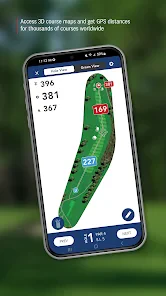
One of the things I appreciate is how GHIN integrates with other golf apps and devices. If you're already using a GPS watch or another golf app, GHIN plays nicely with them, making it a versatile addition to your digital golf toolkit.
I’d think of that connection as a way to complement tools you already rely on, rather than a guarantee that every device or app will work in exactly the same way. If you use a watch for on-course information, keep that as your quick-glance option and use GHIN for the score and handicap record. That division can reduce phone handling and avoid expecting one app to replace every part of your setup.
A practical routine for real rounds
Imagine finishing a Saturday round with friends: you’ve kept a paper card as you played, then use GHIN afterward to enter the scores, review the round, and check your handicap record. On a less hurried day, you might enter scores as you go and confirm them before leaving each hole. Both workflows are reasonable; the better choice depends on how comfortable you are using a phone outdoors and whether your group’s pace leaves room for it.
GHIN is a sports app released on January 18, 2012, and it remains focused on golfers who want scorekeeping, handicap tracking, and a way to examine their play. It is free to download, though the listed in-app purchase price is $49.99 per item; that does not mean every golfer needs to buy anything, so I’d inspect the purchase description before paying. If you only play occasionally, a paper card may be enough. If you regularly post scores and care about your index, GHIN is a more purpose-built choice than a generic score tracker.
For a group with different comfort levels around phones, I’d agree on a simple division of tasks before the round: one person keeps the paper card, and the golfer who wants the digital record enters or checks the scores later. That avoids turning one person’s preference into an expectation for everyone. It also leaves room to use the handicap and stats tools after play without making them part of every conversation on the course.
The app is developed by the Golf Handicap and Information Network, and its purpose will make the most sense to golfers already interested in that network’s handicap workflow. Its long-running presence in the sports category is reflected in its release history, but age alone does not guarantee that a particular interface or routine will feel right for you. I’d judge it by a low-stakes trial: explore the screens at home, try a sample workflow, and make sure the score-entry style is comfortable before depending on it for a round.
In conclusion, if you're a golf enthusiast looking for a comprehensive tool to help you track and improve your game, GHIN might just be the app you need. It simplifies the scorekeeping process, offers detailed insights into your performance, and connects you with other golfers. So, next time you hit the course, you might want to have this handy app in your pocket. Happy golfing!
GHIN Frequently Asked Questions
Is GHIN the official app for the Golf Handicap and Information Network?
Yes. GHIN is the official app of the Golf Handicap and Information Network, aimed at golfers who want to access handicap-related tools and golf information from a mobile device. It is a sports app developed by Golf Handicap and Information Network. If you already use GHIN through your golf association, the app offers a convenient way to manage relevant golf activity on your phone.
What should I check before downloading GHIN?
Check that your device meets the app’s minimum operating-system requirement and that you have an active membership with an affiliated golf association if you plan to use membership-based features. GHIN is free to download, but some functions may depend on your membership. The app is rated for Everyone, and it is available for Android and iOS devices.
What is the GHIN app used for?
The GHIN app is designed for golf enthusiasts who want to manage their handicaps conveniently. It allows users to post scores, view stats, and track performance over time. The app also helps golfers find courses, calculate course handicaps, and connect with other golfers, making it a comprehensive tool for improving their game.
Is the GHIN app free to use?
The GHIN app is free to download, but using it requires active membership with an affiliated golf association. Some features might be limited to those with specific memberships, so it's essential to check with your golf club or association for exact details. This ensures you can access all the app's functionalities efficiently. In-app purchases are also offered, with items priced at $49.99 each.
Can I track multiple golfers' scores on the GHIN app?
Yes, the GHIN app allows users to track and manage scores for multiple golfers. This feature is particularly useful for families or groups playing together, as it lets everyone keep a record of their individual performances. You simply need to add each golfer's profile to your account for easy access and management.
Pros
- User-friendly interface for easy navigation.
- Comprehensive stats to track performance.
- Seamless integration with tournaments.
- Regular updates with new features.
- Available on both Android and iOS.
Cons
- Requires paid subscription for full access.
- Occasional sync issues with external devices.
- Limited offline functionality.
- Some features can be overwhelming for beginners.
- Performance issues on older devices.
- Category
- Sports
- Version
- 5.4.6





