

Gexa Energy
- 435.00
- 3.1
- Installs
- 100.00K
- Price
- Free

Screenshots
Analysis by Reviewed
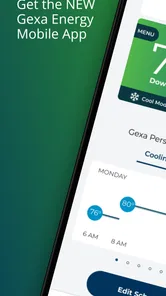
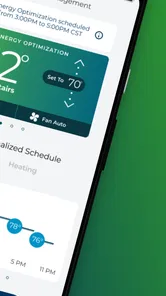
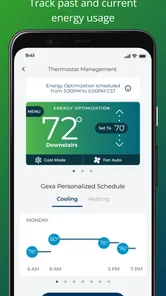
Managing household energy is one of those tasks I tend to postpone until a bill arrives or a hot afternoon makes me wonder how hard the air conditioner is working. Gexa Energy is designed to bring that responsibility onto a phone, with a focus on managing and optimizing home energy usage. After spending time with it, I see it as a practical companion for Gexa customers rather than a universal smart-home control center.
The app sits in the House & Home category and is developed by Gexa Energy LP. It is free to install, rated for Everyone, and has reached over one hundred thousand installs. Those details make it easy to try without committing money, but the real question is whether it gives you enough useful control and visibility to justify becoming part of your regular household routine.
How Gexa Energy fits into everyday energy management
The most important thing to understand is that this is an energy-service app, not a general-purpose home automation platform. I would not approach it expecting the broad device compatibility or deep automation rules found in dedicated smart-home products. Its purpose is narrower and more relevant to people who want to keep an eye on their home energy relationship through a mobile screen.
That narrower focus can be a strength. Instead of jumping between a utility website, a paper bill, and separate thermostat or appliance apps, a Gexa customer has a single place intended for energy-related tasks. The value is less about flashy technology and more about reducing the effort needed to check what is happening with the home.
In practical terms, I found the app most useful when treated as a small habit rather than an emergency tool. A quick check during the week can help you notice how your household is behaving before a billing surprise becomes the first warning. That makes it better suited to people who want ongoing awareness than to someone looking for a one-time answer.
What the free access means
There is no purchase price attached to the app itself. That is important because it lowers the barrier to testing it: you can install it, explore the available account experience, and decide whether it fits your routine without paying for the download. The free access should be understood as access to the app, not as a promise that energy service, electricity usage, or any related household cost is free.
I appreciate that distinction because energy apps can easily create confusion between the software and the underlying utility relationship. Gexa Energy helps you manage that relationship digitally, but it does not remove the cost of using electricity. If your main goal is to reduce your bill, the app can support better decisions, while the actual savings depend on your home, habits, plan, weather, and equipment.
More From Our News Desk

 Instagram
Instagram’s Power Comes From Its Place in Your Phone
A close look at how Instagram turns Meta’s reach, recommendation systems and everyday camera habits into durable platform power—and what that costs users.

 Gmail
GmailGmail in a Busy Inbox: Who Benefits Most?
From first account to crowded workday, Gmail earns its place through dependable search and flexible sorting—but its best fit depends on how much inbox maintenance you can tolerate.

 Prime Video
Switching to Prime Video: What Changes in Your Viewing Routine
Prime Video can make a compelling second home for streaming, but switching means learning a different catalog, rental layer, and route from browsing to playback.

 Universal TV Remote Control
Universal TV Remote Control Works Best as a Reliable Backup
A phone remote earns its place through quick setup and reliable habits. Here is how to get more from Universal TV Remote Control—and where its limits show.

 Weather - By Xiaomi
Weather by Xiaomi Review: Clear at a Glance, Less Clear Up Close
Xiaomi’s weather app makes everyday forecasts quick to scan, but its calm surface can leave useful details and recovery paths harder to find than they should be.

 X
XX Under Pressure: Can It Recover When Posting Goes Wrong?
A resilience-focused review of X, examining setup, mistaken posts, interruptions, weak connections, and the gaps that matter when recovery needs to be dependable.
Latest News



For a free utility companion, the value is therefore practical rather than financial in itself. You are paying with attention: opening the app, interpreting what you see, and changing habits when the information suggests it. If you never review your energy activity, even a well-designed tool will have little effect.
Where the app can deliver real value
The clearest benefit is centralization. Energy management often becomes messy when information is scattered across emails, browser pages, and separate household devices. A dedicated Gexa experience gives the energy side of the home a recognizable place on your phone, which can make routine checking feel less like administrative work.
I also see value in using it as a conversation tool inside a household. For example, imagine a family noticing that cooling has been working harder than usual during a warm week. Rather than blaming one appliance or one person, they can use the app as a starting point for a broader discussion: Are doors being left open, is the thermostat being adjusted repeatedly, or is the home simply experiencing more extreme weather? The app does not solve every cause, but it can encourage a more informed response.
A less obvious use is timing your attention. You do not need to stare at energy information every day. A better workflow is to check after a meaningful change, such as returning from travel, starting a new work-from-home schedule, or using heating or cooling more heavily. Comparing your routine before and after that change can be more useful than casually checking without a question in mind.
Another worthwhile habit is to use the app before making a household purchase. If you are considering a new appliance or changing how you heat and cool a room, first establish what your home is already doing. That baseline helps you judge whether a later change appears to help. It will not replace a professional energy audit, but it can stop you from relying entirely on guesswork.
Useful workflows for different households
For a single occupant, the app can be a simple accountability tool. I would check it after a week with an unusual schedule, such as working from home more often or leaving the property empty. The goal is not to obsess over every fluctuation, but to connect changes in routine with changes in energy behavior.
For a family, the strongest approach is to agree on a small number of checks rather than asking everyone to monitor constantly. One person can review the account while the household discusses practical adjustments. This avoids turning the app into a source of arguments over individual actions, especially because energy use is influenced by weather and equipment as well as behavior.
For someone moving into a new home, it can help establish a digital starting point for managing the Gexa relationship. I would still keep important account information available elsewhere and avoid treating the phone as the only place where essential records exist. That is a sensible precaution for any utility app, particularly when access to an account matters during a billing or service issue.
Renters may find the app useful, but with a clear limitation: they may not control insulation, windows, heating systems, or major appliances. In that situation, the app is better for identifying patterns and adjusting controllable habits than for promising dramatic improvements. Homeowners have more opportunities to act on what they learn, but they also face more complicated decisions and should not confuse app insights with technical diagnosis.
Tradeoffs I noticed while using it
The app’s focused purpose is also its main limitation. If you want one dashboard for lighting, cameras, plugs, thermostats, solar equipment, and energy billing, this is unlikely to replace a broader smart-home system. It is more sensible to view it as the Gexa-facing part of your setup and keep specialized device apps when you need detailed hardware controls.
There is also a difference between visibility and control. Seeing energy information can improve awareness, but it does not automatically change the behavior of an air conditioner, water heater, or appliance. Users looking for remote switching, advanced schedules, or equipment-level diagnostics should check their expectations carefully. The app’s energy-management role should not be mistaken for complete automation.
The average rating is 3.1 from around three thousand ratings, with more than four hundred written reviews. I would treat that as a reason to keep expectations measured, not as a final verdict. Utility apps are often judged during stressful moments, such as bill questions or account problems, so ratings can reflect both everyday usefulness and frustration with service-related situations. Still, the score suggests that the experience may not feel equally smooth for everyone.
Another tradeoff is that energy information needs context. A higher reading does not automatically mean the app or the household has done something wrong. Weather, occupancy, seasonal changes, equipment condition, and billing periods can all affect what you see. My advice is to look for patterns and meaningful changes rather than reacting to one isolated result.
Version 3.0.14 indicates that the app is an established product rather than a brand-new experiment. It supports devices running Android 5.0 or later, which gives it broad compatibility with older Android phones. That is convenient for people who keep a handset for several years, although compatibility alone does not guarantee that every older device will feel equally fast or comfortable.
How it compares with the usual alternatives
The most obvious alternative is using a browser and managing the energy relationship through a conventional utility website. A website can be perfectly adequate for occasional account administration, especially if you prefer a larger screen or need to review information carefully. The app has the advantage of being more immediately available during a quick household check, while the website may feel better for longer sessions.
A second alternative is a smart thermostat or home-energy monitor. Those tools can offer more detailed equipment data or more direct control, depending on the product and installation. They may be the better choice if your priority is adjusting temperature automatically or understanding individual circuits. Gexa Energy makes more sense when you want the utility-facing experience first and do not need a separate hardware system to do the work.
There are also general budgeting and spreadsheet approaches. These can be surprisingly effective for people who enjoy tracking bills manually, but they require more effort and depend on consistent data entry. The app is preferable when you want energy management to be connected to your Gexa account rather than maintained as a personal record. The spreadsheet wins only if you need custom calculations or comparisons that the app does not provide.
In my view, the best setup for some households is not choosing one alternative exclusively. Use Gexa Energy for the account-centered energy view, a thermostat for direct temperature control, and a simple household note for unusual events such as guests, travel, or extreme weather. That division of labor is more realistic than expecting one free app to explain every aspect of home consumption.
Who should use it and who should skip it
I would recommend trying it if you are a Gexa customer who wants a more convenient way to stay engaged with home energy. It is especially suitable for people who prefer checking a phone rather than logging into a browser, households trying to build better energy habits, and anyone who wants to connect everyday changes with their energy use.
It is also a reasonable fit for people who want to start with free access before buying extra hardware. You can begin with awareness and decide later whether a thermostat, monitor, or other tool is necessary. That sequence avoids spending money on equipment before you know what problem you are trying to solve.
I would skip it, or at least avoid relying on it as your main solution, if you are not a Gexa customer, if you need detailed appliance-by-appliance measurement, or if your priority is advanced smart-home automation. A dedicated energy monitor or a compatible thermostat may deliver more useful information for those needs. Likewise, if you only review energy matters once or twice a year, the app may not change your habits enough to justify a place on your home screen.
People who are uncomfortable interpreting changing energy patterns should also use it with restraint. The app can support questions and decisions, but it should not encourage panic over normal variation. When a result seems surprising, check the timing, weather, occupancy, and recent changes in the home before drawing a conclusion.
My final view on its value
After weighing the free installation, focused purpose, and practical limitations, I see Gexa Energy as a sensible utility companion rather than a complete energy-optimization system. Its strongest quality is convenience: it gives Gexa customers a mobile route into the energy side of the home and can make regular awareness easier.
The app is most valuable when you use it with a question in mind. Check after changing your schedule, during a period of heavier heating or cooling, or before deciding whether a new household habit is helping. That approach turns a passive account tool into a small but useful decision aid.
My recommendation is to try it if you already use Gexa and want free access to a more phone-friendly energy-management experience. Keep your expectations realistic, and pair it with specialized tools if you need direct device control or detailed diagnostics. For the right household, the real value is not a promise of automatic savings but a clearer routine for noticing and responding to energy use.
With an Everyone age rating, broad Android compatibility, and a current version of 3.0.14, it is approachable for a wide range of users. The modest average rating means I would not call it flawless, but I also would not dismiss it without trying it in your own household context. If your goal is simple, account-centered energy awareness, Gexa Energy is worth testing; if you want a full smart-home command center, choose a more specialized alternative instead.
Gexa Energy Frequently Asked Questions
Is the Gexa Energy app free, and which devices can run it?
Gexa Energy is a free app for managing and optimizing home energy usage. It is suitable for a general audience and requires Android 5.0 or later. Before downloading, check that your device meets that minimum requirement and has enough space for installation. The app is developed by Gexa Energy LP, and its current version is 3.0.14.
Who develops the Gexa Energy app, and how popular is it?
The app is developed by Gexa Energy LP and is listed in the House & Home category. It has an average rating of 3.1 from around 3,000 ratings, with 435 written reviews and over 100,000 installs. These figures offer a broad sense of its reach and user feedback, though your experience may depend on your account, device, and the features you need.
What is Gexa Energy, and what can I do with its mobile app?
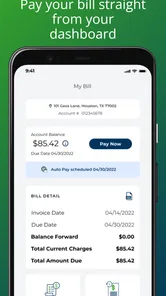
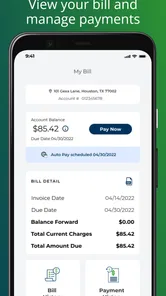
Gexa Energy is an electricity provider that offers energy plans to eligible customers in selected U.S. markets, particularly in Texas. Its mobile app is designed to help customers manage their electricity account from a phone or tablet. Depending on the account and region, you can review your balance, check usage, make payments, manage billing preferences, view plan information, and contact customer support without needing to use the website.
Can I use the Gexa Energy app if I am not already a customer?
The app is primarily intended for existing Gexa Energy customers who have an active electricity account and valid login credentials. If you are considering switching providers, you may need to visit the official Gexa Energy website to review available plans, service areas, pricing details, and enrollment requirements first. Availability can depend on your address, local regulations, and whether Gexa currently serves your location.
How can I pay my electricity bill through the Gexa Energy app?
After signing in, customers can generally view their current amount due and choose an available payment method, such as a bank account or eligible debit or credit card. The exact options may vary by account type and location. Before confirming a payment, carefully review the amount, processing date, and any applicable convenience fees. Keep the confirmation details in case you need to verify the transaction later.
Pros
- Simple tools to monitor electricity usage and estimate monthly costs.
- Convenient mobile bill payments with saved payment options.
- Usage alerts can help identify unusually high energy consumption.
- Easy access to account details
- service information
- and support.
- Useful for managing multiple Gexa Energy accounts in one place.
Cons
- Some features may require an active Gexa Energy customer account.
- Usage data may not update instantly
- depending on meter reporting.
- App performance can vary after updates or on older devices.
- Plan details and pricing may be difficult to compare in the app.
- Customer support response times may vary during billing or outage issues.







