GameChanger
- 8.70K
- 4.5
- Installs
- 1.00M
- Price
- Free

Screenshots


Analysis by Reviewed
During the first week with GameChanger, the appeal is easy to understand: this youth-sports app can bring scores, player stats, live updates and team communication together instead of scattering them across paper notes and message threads. I notice the difference most on a busy game day, when a parent wants to follow along and a coach needs the scorekeeper to keep pace with the action. The app is free to download, though some purchases are available inside it, so I’d treat it as a practical tool to try rather than assume every option costs nothing.
What earns a place in the game-day routine
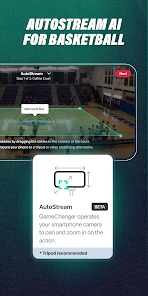
The biggest early win is having a shared view of what is happening. If I’m delayed getting to the field, live updates can help me follow the game without relying on a stream of separate texts. Free live video streaming is part of its appeal, but a score feed and video serve different needs: a quick update is easier to check while moving around, while a stream is better when I can settle in and watch. That distinction matters for families juggling travel, work and multiple games.
For a volunteer keeping score, I’d suggest learning the scoring flow before the first close game. Entering plays while also watching the field demands attention, and a phone screen is not as forgiving as a paper sheet you can glance over. A useful routine is to have one person focus on scoring and another handle messages or filming from the stands. That division keeps the record more consistent and prevents a well-meaning parent from missing the action while trying to do everything at once.
A realistic Saturday with the app
Picture a parent leaving work late while a child’s game is already underway. Instead of asking several relatives for the score, they can check the team’s updates on the way and decide whether to head straight to the field or watch from elsewhere. Once there, they can put the phone away and enjoy the rest in person. This is where the app feels genuinely useful to me: it can bridge a missed start, not replace the pleasure of being present.
For a coach, the same shared record can help after the final play. Rather than trying to reconstruct events from memory, the coach can look back at recorded stats and use them to guide a conversation about what to work on. I’d keep that review focused: stats are a useful prompt for questions, not a complete account of effort, teamwork or development. Used that way, the record supports coaching without turning every game into a judgment of a young player.
Keeping Score and Stats Like a Pro
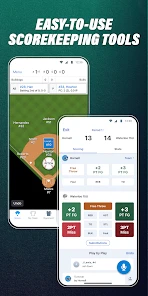
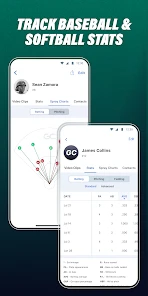
The first thing that struck me about GameChanger is how it simplifies the scoring process. Gone are the days of scribbling scores on paper or trying to keep track of stats in your head. With this app, you can easily enter scores, update plays, and even track player stats in real-time. It’s like having a personal assistant who knows the ins and outs of the game, right there on your phone!
I was particularly impressed by the detailed analytics the app provides. You can monitor individual player performance and team stats, which is a game-changer (pun intended) for coaches who want to improve their team's performance. Whether you're looking to strategize for the next big game or just want to see how your favorite player is doing, this app has got you covered.
More From Our News Desk

Clash of Clans Is Won Between the Battles

Android Auto Makes the Case for Quieter Car Software

MobiOffice: Transforming Mobile Productivity with Seamless Integration

EA SPORTS FC™ Mobile Soccer: Redefining Mobile Sports Gaming

How Microsoft OneDrive Became a Mobile Productivity Giant

How Google Translate Breaks Language Barriers Effortlessly
Using stats without letting them run the conversation
The practical value of player and team statistics grows when someone returns to them with a question in mind. A coach might compare performances across games to spot an area worth addressing in practice; a family member could use the record to follow a player’s progress when they cannot attend. I wouldn’t treat a single stat as a verdict on a player. Youth sports involve context that numbers don’t capture, so the healthiest use is to support discussion rather than rank children from the stands.
A small workflow choice makes a difference here: decide before the season which information your team actually wants to maintain. If the volunteer tries to capture every detail without a clear purpose, scoring can become a chore and the record may be abandoned. Starting with the essentials your coach and families will revisit makes it more likely that the information stays useful. The app’s depth is an advantage only when the team has a reason to use it.
Real-Time Updates and Communication
One of the standout features is the real-time updates. I can’t tell you how many times I’ve been at a game and missed a crucial play because I was distracted. With GameChanger, you get live updates directly on your phone. It’s like having a personal commentator who never misses a beat.
Communication is a breeze too. The app allows you to send messages to team members and parents, which is perfect for last-minute schedule changes or sharing game highlights. It’s seamless, efficient, and cuts down on the endless email chains we’ve all grown to dread.
When team communication helps—and when it doesn’t
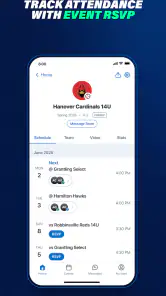
Putting messages beside team activity can make a practical difference when a schedule changes or families need to catch up on a game. It also gives a team a common place to look, which is helpful when not everyone follows the same text thread. But moving communication into another app is not automatically simpler: families still need to know where updates are posted, and a message only helps if people check the right place.
Before switching over, I’d tell parents what the team plans to use the app for and what can stay in an existing chat. That avoids duplicate announcements and the familiar confusion of one person checking one channel while another checks somewhere else. If the team only sends a rare reminder, a basic group message may be easier. GameChanger makes more sense when communication is part of a regular rhythm of games, scoring and follow-up.
User-Friendly Interface
Now, I’m no tech wizard, but I found the interface to be incredibly user-friendly. The layout is intuitive, making it easy for anyone to navigate, even if you’re not the most tech-savvy person out there. Setting up your team, managing schedules, and entering stats is straightforward and hassle-free. It's clear the developers put a lot of thought into the user experience.
Who is most likely to keep using it?
I see the strongest fit for a youth team that plays regularly, has someone willing to keep the record, and includes family members who value following games they cannot attend. Coaches who revisit team stats can get more from it than a spectator who only wants an occasional score. Players and families may also appreciate having a shared record to look back on, provided the adults keep the focus on participation and improvement rather than constant comparison.
I’d be more cautious if the team is informal, has no reliable volunteer, or rarely needs more than a reminder about where to meet. The app’s usefulness depends on a group adopting it, not just one person downloading it. A casual spectator who is already happy with in-person games and occasional messages may find that the extra updates create another habit without solving a real problem.
When the season becomes a habit
The month-to-month value depends on whether your team uses the app consistently. If coaches keep scores and families check updates, player histories and team stats can become more useful as a season unfolds; a single game gives only a snapshot. For a coach, reviewing patterns between games can inform practice priorities, while a parent may simply appreciate being able to catch up after missing a weekend. If nobody on the team maintains the information, though, the app has little to offer beyond another place to check.
Compared with a paper scorebook, the app is easier to share and can make stats accessible to people who aren’t at the field. Compared with a general chat group, it keeps game information closer to the team’s scoring and updates. Those alternatives can still be better in some situations: paper is dependable when phones are inconvenient, and a basic group chat may be enough for a team that only needs occasional reminders. I’d use GameChanger when ongoing scores, stats and family updates matter together, not just because every team has a phone.
Keeping it useful without adding chores
There is a small but real maintenance burden: someone has to enter plays, keep team details and schedules current, and make sure messages reach the right people. Before relying on it, I’d agree on who handles scoring and who sends schedule changes. That simple division is more valuable than expecting one volunteer to update everything during a game. I’d also check the current in-app purchase choices before committing to a paid feature; the app itself is free, while optional items range from $7.99 to $99.99 each.
GameChanger is a sports app from GameChanger Media, and its 4.5 average comes from around 27,000 ratings, alongside more than a million installs. It is rated for Everyone, and version 2025.23.0.1 requires Android 9 or later. Those details make it easy to judge whether the app fits your device and household, but they don’t remove the practical question: will your team keep it updated? The answer depends less on the interface than on having a willing scorekeeper and families who actually want the extra detail.
Make the routine manageable
One useful way to prevent the app from becoming a volunteer’s second job is to agree on responsibilities before the opening game. Decide who enters plays, who checks that schedules are current, and where families should look for changes. If the designated scorekeeper is absent, the team should know whether someone else can take over or whether a simpler record will do for that day. A clear fallback is better than expecting the same person to keep every feature active under pressure.
It also helps to separate game-time tasks from after-game browsing. During play, the scorekeeper can concentrate on the record while spectators watch; afterward, families can look through stats, highlights or messages at their own pace. This division makes the app less intrusive and gives its different tools a purpose. I’d especially recommend it for teams where relatives follow from different places, but not for groups that would have to persuade everyone to adopt yet another channel.
Where fatigue can set in
Real-time updates are useful, but they can also encourage people to check their phones instead of watching the game. Messages, stats and highlights are most valuable when they solve a real coordination or follow-up need; they become noise if every small update draws attention away from the field. I’d mute or ignore nonessential conversation during play and use the app to catch up afterward. For someone who only wants to watch in person, a paper schedule and a quick chat may feel calmer.
There is also a learning curve hidden inside the promise of easy scoring. A new volunteer may need practice before entering plays confidently, and a crowded sideline is not the ideal place to figure out an unfamiliar workflow. I’d try a low-pressure game or review the controls beforehand, then keep a simple backup note if accuracy is important. That isn’t a reason to avoid the app; it is a reminder that digital scoring still depends on a person paying attention.
What to consider before paying or switching
The free download makes it reasonable to explore the basic routine before a team commits to paid options. Still, “free to start” is not the same as “every tool is free,” so I’d check which in-app purchase, if any, matches what the team wants before anyone spends money. If your main need is simply to share a meeting time, a paid option is unlikely to make the app a better fit than an existing group chat. If the team expects to use the broader record and video experience, first make sure the people responsible will keep it active.
For a household deciding whether to install it, the key question is not whether it has plenty to explore; it is whether the child’s team actually uses it. Ask the coach or team organizer where scores and schedule changes will appear, and whether there is a designated person entering plays. That short check can prevent a parent from downloading the app only to discover that the team’s real routine happens elsewhere. On Android, the stated minimum is Android 9, so I’d also check the device before planning to rely on it at a game.
Wrapping It Up
So, what’s the final verdict on GameChanger? Honestly, it’s a fantastic app for anyone involved in sports, whether you're a coach, a parent, or a player. It takes the hassle out of managing teams and provides valuable insights into performance. Plus, it keeps everyone connected with real-time updates and easy communication. If you're looking to up your game management skills, this app is definitely worth a shot.
Overall, GameChanger is more than just an app; it’s a must-have tool for sports lovers. Whether you’re on the field or cheering from the sidelines, it enhances the way you experience the game. Give it a try, and I promise you won’t be disappointed!
My long-term take
After the novelty fades, I think it earns lasting space when it replaces several recurring tasks: keeping a score record, checking team updates and sharing information with families. The developer, GameChanger Media, has built an app that can make those routines feel connected, and I’d recommend it most to organized youth teams with a committed scorekeeper and relatives who want to follow from elsewhere. It is less compelling for casual spectators, teams that rarely track stats, or anyone who would rather avoid phone-centered coordination. I’d start with the free experience, agree on a light-touch routine, and keep using it only if the shared record genuinely saves effort over the season.
GameChanger Frequently Asked Questions
Can I use GameChanger just to watch a game, or do I need to create a team?
You can use GameChanger as a follower rather than as a coach or team manager. The app is designed for people who want to keep up with youth sports, including families and fans who may not be at the game. Following a team lets you view available scores, stats, streams, highlights, and updates without taking on scorekeeping or team-management duties.
What can I expect to find on a team’s page before or during a game?
GameChanger brings team-related sports information together, including game updates, scores, stats, and available live video and highlights. What appears depends on the team’s activity and the information being shared through the app. For a supporter, that can make it easier to follow along from elsewhere; coaches and team participants can use the app’s tools to help keep those updates organized.
Who is GameChanger designed for, and can I follow a team without being part of it?
GameChanger is aimed at people who want to keep up with youth sports, including coaches, players, families, and fans. You can use it to follow games and view updates without being the person keeping score or managing the team. That makes it useful for relatives and supporters who cannot be at the field or court but still want to stay connected to the action.
What is GameChanger and how does it work?
GameChanger is a comprehensive app designed for sports enthusiasts, teams, and fans. It offers features like live scorekeeping, game streaming, and team management tools. Users can track live games, view stats, and connect with team members and fans. Its intuitive interface makes it easy for coaches and parents to keep up with the game, whether they're on-site or remote. It is a sports app from GameChanger Media, presented as a free youth sports app with live video streaming, stats, and highlights.
Is GameChanger free to use, or does it require a subscription?
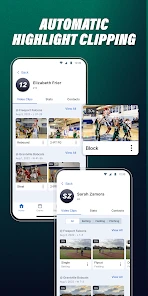
GameChanger is free to download, and its core appeal includes live video streaming, stats, and highlights. The app also offers optional in-app purchases, with prices ranging from $7.99 to $99.99 per item. What you can access may depend on the feature or purchase you choose, so check the available options in the app before paying. You can start with the free experience and decide whether an optional purchase suits your needs.
Pros
- Easy-to-use interface with intuitive navigation.
- Real-time game updates and alerts.
- Comprehensive stats tracking for teams.
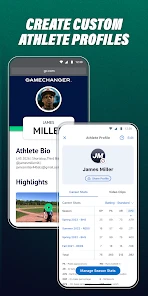
- Customizable team and player profiles.
- Free access to basic features.
Cons
- Some advanced features require a subscription.
- Occasional syncing issues reported.
- Limited offline functionality.
- Ads in the free version.
- User interface can be overwhelming for new users.
- Category
- Sports
- Version
- 2025.23.0.1