

Gallerie Wallpapers
- 86.00
- 4.2
- Installs
- 1.00M
- Price
- Free

Screenshots
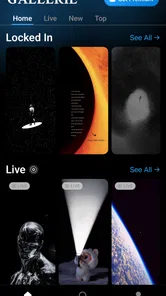

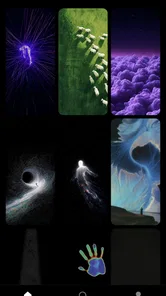

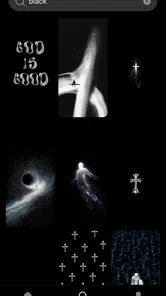
Analysis by Reviewed
I judge a wallpaper app less by how dramatic its screenshots look than by what happens after I open it: can I find an image I actually want to live with, and does browsing feel worth the effort? Gallerie Wallpapers is built around a focused promise: keep the collection selective rather than make me sift through a huge pile of questionable images. That makes its appeal easy to understand, though it also means the experience depends on whether its chosen taste matches mine.
A smaller-feeling search for a better background
Wallpaper apps often compete through volume: endless categories, trending galleries, and more images than I can realistically inspect. Gallerie Wallpapers takes a different angle. Its central idea is curation—presenting wallpapers as a considered collection, with the aim of reducing the time spent skipping past weak options. In a personalization app, that can be more useful than another sprawling catalog.
The distinction matters most when I have a specific mood in mind but no particular image to search for. A broad library can turn that moment into a chore: scroll, reject, scroll again. A filtered selection gives each candidate a better chance of earning attention. The practical value is less browsing fatigue, not a promise that every image will suit every screen or personal style.
That focus also sets expectations. Gallerie Wallpapers is not the right pick if I want a powerful editing studio, a complicated home-screen redesign, or fine-grained control over every visual detail. I would approach it as a place to discover a background, not as a complete customization toolkit. Knowing that boundary makes the app easier to assess on its own terms.
What curation changes when I browse
Curated selection changes the way I make a choice. Instead of treating every image as one item in an enormous feed, I can look at each candidate for the qualities that matter on a real device: whether the main subject has room to breathe, whether the colors feel comfortable, and whether the image seems likely to compete with the icons I use every day. That is a more useful test than choosing a wallpaper solely because it looks striking in a preview.
There is a tradeoff, of course. Filtering out weaker material can make a collection feel more consistent, but it also narrows the range of what appears. If I want an unusual niche aesthetic, a very specific subject, or an image that matches an exact color palette, a vast searchable library may give me more chances to find it. Curation saves effort only when the available selection is close enough to my taste.
I also like the idea of choosing for the screen I actually use, rather than the idealized screen shown in a promotional image. A detailed wallpaper may look impressive in isolation but become visually busy once app icons sit on top of it. With any collection, including this one, I would favor open space and balanced contrast for a home screen, then reserve more intricate art for a lock screen where fewer elements need to remain legible.
More From Our News Desk

 Instagram
Instagram’s Power Comes From Its Place in Your Phone
A close look at how Instagram turns Meta’s reach, recommendation systems and everyday camera habits into durable platform power—and what that costs users.

 Gmail
GmailGmail in a Busy Inbox: Who Benefits Most?
From first account to crowded workday, Gmail earns its place through dependable search and flexible sorting—but its best fit depends on how much inbox maintenance you can tolerate.

 Prime Video
Switching to Prime Video: What Changes in Your Viewing Routine
Prime Video can make a compelling second home for streaming, but switching means learning a different catalog, rental layer, and route from browsing to playback.

 Universal TV Remote Control
Universal TV Remote Control Works Best as a Reliable Backup
A phone remote earns its place through quick setup and reliable habits. Here is how to get more from Universal TV Remote Control—and where its limits show.

 Weather - By Xiaomi
Weather by Xiaomi Review: Clear at a Glance, Less Clear Up Close
Xiaomi’s weather app makes everyday forecasts quick to scan, but its calm surface can leave useful details and recovery paths harder to find than they should be.

 X
XX Under Pressure: Can It Recover When Posting Goes Wrong?
A resilience-focused review of X, examining setup, mistaken posts, interruptions, weak connections, and the gaps that matter when recovery needs to be dependable.
Latest News



How I would use it in an ordinary routine
A realistic use case is changing my background when I am tired of seeing the same screen but do not want to spend a lunch break comparing hundreds of near-identical images. I would browse with a simple purpose—perhaps finding something calmer for workdays—rather than opening the app expecting it to solve every personalization decision. A focused session is more likely to end with a choice I still enjoy the next morning.
Before settling on an image, I would check how its bright and dark areas line up with the parts of the screen I look at most. If a subject lands where icons or text normally appear, the image may feel cluttered after application even when it looked clean in the gallery. This is a small but useful habit: judge a wallpaper as a background, not just as artwork.
I would also avoid changing the wallpaper impulsively every time I see an attractive option. A curated gallery can make discovery feel easy, but a quick save-or-choose decision may still lead to a background that clashes with my usual icon layout. Taking a moment to imagine the image behind the apps I open most often is a better filter than choosing by novelty alone.
For a shared or family device, I would treat selection as a personal preference rather than assume one collection will satisfy everyone. One person may want a quiet landscape, while another prefers saturated artwork or a recognizable subject. A curated app can make it faster to browse together, but the limited-selection tradeoff is more noticeable when several people have different tastes.
Where it sits beside other wallpaper options
Compared with a huge wallpaper directory, Gallerie Wallpapers favors a more selective browsing experience over sheer breadth. That can be a welcome change for someone who usually opens a gallery, scrolls for too long, and leaves without choosing anything. On the other hand, people who enjoy digging through obscure styles or using detailed search filters may be better served by a larger catalog designed around discovery by category or keyword.
It is also different from a full phone-customization app. Those tools may combine backgrounds with icon packs, widgets, themes, or layout controls. Gallerie Wallpapers is best considered when the background itself is the decision I want to make. If I am trying to change the entire look of a device in one coordinated process, I would look for a broader personalization suite instead of expecting this app to provide those extra layers.
That separation is useful because it keeps the choice honest. A wallpaper library does not need to become a theme editor to be worthwhile; it needs to help me find an image I am happy to see repeatedly. The more specific my requirements become—matching a widget color, finding a rare subject, or coordinating several interface elements—the more likely I am to need a different tool alongside it.
Who will appreciate the focused approach
Gallerie Wallpapers is a sensible option for someone who changes backgrounds occasionally, values a cleaner browsing experience, and does not want to sort through a mountain of low-quality choices. It may also suit people who enjoy visual discovery but prefer a collection that feels selected rather than completely open-ended. The app is free to start, while in-app purchases range from $0.99 to $12.99 per item, so I would check the cost of anything I choose to buy before committing.
The app comes from Sibelius Studios LLC and sits in the personalization category. Its Teen age rating is worth keeping in mind for households choosing apps for younger users. Gallerie Wallpapers has a 4.2 average from around 24,000 ratings and more than 1 million installs, which suggests it has reached a substantial audience; those figures are useful context, but they cannot tell me whether its visual taste will match my own.
It was released on October 18, 2025, and version 2.0.5 is the current version. The minimum operating-system requirement is version 8.0. Those details make it easier to judge basic fit before I try it, especially if I am installing on an older device or deciding whether to recommend it to someone else.
The tradeoffs I would keep in mind
The main limitation follows directly from the app’s strength: a selective collection cannot offer the same breadth as a sprawling image repository. If I browse with a very exact idea in mind, I may not find the right match quickly—or at all. I would skip it when my priority is exhaustive search, highly specific subject matter, or extensive tools for adjusting the image itself.
There is also a personal element to judging “high quality.” An image can be technically polished and still feel wrong for my screen, taste, or daily routine. A curated selection reduces one kind of friction, but it does not remove the need to consider composition, contrast, and how long I will want to look at the result. I would rather take a little time to choose carefully than assume that a polished preview automatically makes a good everyday background.
Likewise, a free starting point does not mean every option is necessarily included without charge. Because the app offers in-app purchases, I would distinguish between browsing and buying rather than assume that a favorite image or item carries no cost. That is not a reason to avoid the app; it is simply a practical step before making a purchase.
My verdict on the everyday value
I would recommend Gallerie Wallpapers to a friend who wants a more deliberate way to pick a background and finds oversized wallpaper collections tiring. Its defining advantage is the curated approach: it aims to put attention on the candidates rather than make volume the whole experience. For an everyday screen, that can make the small task of refreshing a phone feel less like searching a warehouse.
I would point someone toward a different option if they need deep editing, a complete theme system, or a very broad catalog with precise search. But if the goal is simply to browse a selected range and choose a background that feels considered, this app has a clear reason to exist. My advice is to use it with a screen-first eye: look beyond the preview, think about icons and contrast, and choose an image you will still find comfortable after the novelty wears off.
Gallerie Wallpapers Frequently Asked Questions
What is Gallerie Wallpapers, and what can I use it for?
Gallerie Wallpapers is a wallpaper app intended to help you browse images and choose one for your phone’s home or lock screen. The available collection, categories, and browsing tools can vary by app version, so check the screenshots and description on the store listing before installing. Also review the app’s permissions and privacy information to understand what data or device access it requests.
How do I set a wallpaper with Gallerie Wallpapers?
Typically, you open an image in the app, select its wallpaper or apply option, and then choose whether to use it on the home screen, lock screen, or both. The exact steps depend on your Android or iOS version and the controls offered by the app. If an image does not fit as expected, your device’s crop or positioning controls may help adjust it.
Does Gallerie Wallpapers work offline?
Offline access depends on whether the wallpaper images are stored on your device or need to be loaded from an online collection. Images you have already downloaded may remain available without a connection, while browsing or downloading new wallpapers may require internet access. Check the app’s current listing and test the relevant features on your device, since offline behavior can differ between versions.
Is Gallerie Wallpapers free, and does it include ads or in-app purchases?
The price and monetization details can change, so consult the official Google Play or Apple App Store listing before downloading. Some wallpaper apps are free to install but may display advertising, offer paid extras, or provide optional purchases. Review the store’s pricing section and any purchase prompts carefully, particularly if you share your device or payment account with someone else.
Is Gallerie Wallpapers safe to download, and what should I check first?
Download the app only from a trusted official store, and check the developer name, recent reviews, update history, and privacy disclosures. A wallpaper app may need permission to save images, but requests for unrelated access deserve closer attention. No app can be guaranteed safe from a brief description alone, so read the permissions shown on your device and avoid providing information that is not needed.
Pros
- Quick access to a variety of wallpapers for personalizing your device.
- Wallpaper previews make it easier to choose an image before applying it.
- A simple layout helps users browse without a steep learning curve.
- Useful for refreshing your home or lock screen with minimal effort.
- Offers a visual way to find wallpapers that suit different tastes.
Cons
- Image selection and variety may be limited compared with larger wallpaper apps.
- Some wallpapers may not fit every screen size without cropping.
- Image quality can vary from one wallpaper to another.
- Browsing may feel less convenient if categories or filters are limited.
- Availability of new wallpapers may depend on how often the app is updated.











