

Galileo: Medical Care
- 775.00
- 4.8
- Installs
- 100.00K
- Price
- Free

Screenshots
Analysis by Reviewed
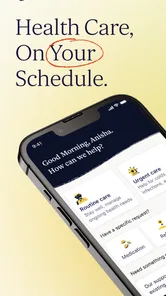
When I think about medical apps, I usually ask one practical question first: will this help me make a better decision when I am uncomfortable, worried, or short on time? Galileo: Medical Care is built around that everyday problem. Developed by Galileo Health, this free medical app offers access to care around the clock, and my impression is that its real value depends less on browsing screens and more on how smoothly it connects you with the right kind of help when you need it.
I would not treat it as a replacement for emergency services, a hospital, or a long-term relationship with a personal physician. I see it instead as a convenient first stop for situations that are important enough to ask about but not obviously severe enough to justify rushing to an emergency department. That distinction matters, especially because the usefulness of any connected care app changes with your signal, your location, the urgency of the problem, and the kind of answer you need.
How Galileo feels when care depends on a connection
The app sits in the medical category, but it does not feel like a digital medicine cabinet or a simple symptom encyclopedia. Its purpose is more interactive: you use it to seek medical attention rather than merely read general health information. That makes the quality of the connection part of the experience. A strong mobile signal can make the process feel reassuringly direct; a weak connection can turn a simple request into a frustrating wait at exactly the wrong moment.
In a normal home setting, I would open Galileo when I wanted professional guidance without first spending time searching the web and trying to judge which result applied to me. That is a meaningful difference from a search engine. Search can give you possibilities, but it also tends to amplify alarming explanations and leaves you responsible for sorting medical advice from speculation. Galileo is more useful when my goal is to explain what is happening to a clinician and receive guidance tailored to that conversation.
The network dependency is not a minor technical detail. Any service that connects a patient with care needs a dependable path for messages, forms, or other interactions. If I were using it from a basement, a crowded transit station, or a rural area with inconsistent reception, I would prepare for delays rather than assume the experience would be identical to using it on a stable home connection. I would also avoid waiting until a symptom becomes urgent before opening the app for the first time.
A sensible habit is to install and explore it while feeling well. That lets me understand where to begin, check whether my device runs it properly, and avoid learning the interface while anxious. It also gives me a chance to decide whether this kind of remote care fits my needs. Convenience is most valuable when the setup happens before the stressful moment.
What a connected consultation is good at
I think Galileo is best suited to questions that benefit from context. A minor but persistent symptom, a concern about whether something needs attention, or a request for medical direction can be easier to explain through a care service than through a list of search results. The app can serve as a bridge between “I am not sure what this is” and “I know what kind of next step to take.”
More From Our News Desk

 Instagram
Instagram’s Power Comes From Its Place in Your Phone
A close look at how Instagram turns Meta’s reach, recommendation systems and everyday camera habits into durable platform power—and what that costs users.

 Gmail
GmailGmail in a Busy Inbox: Who Benefits Most?
From first account to crowded workday, Gmail earns its place through dependable search and flexible sorting—but its best fit depends on how much inbox maintenance you can tolerate.

 Prime Video
Switching to Prime Video: What Changes in Your Viewing Routine
Prime Video can make a compelling second home for streaming, but switching means learning a different catalog, rental layer, and route from browsing to playback.

 Universal TV Remote Control
Universal TV Remote Control Works Best as a Reliable Backup
A phone remote earns its place through quick setup and reliable habits. Here is how to get more from Universal TV Remote Control—and where its limits show.

 Weather - By Xiaomi
Weather by Xiaomi Review: Clear at a Glance, Less Clear Up Close
Xiaomi’s weather app makes everyday forecasts quick to scan, but its calm surface can leave useful details and recovery paths harder to find than they should be.

 X
XX Under Pressure: Can It Recover When Posting Goes Wrong?
A resilience-focused review of X, examining setup, mistaken posts, interruptions, weak connections, and the gaps that matter when recovery needs to be dependable.
Latest News



That does not mean every case belongs there. Severe breathing trouble, signs of a stroke, major bleeding, loss of consciousness, or another immediate danger calls for emergency help, not a phone-based consultation. I would also be cautious about relying on a remote interaction when a physical examination, testing, imaging, or hands-on treatment is central to the decision. Galileo may help frame the question, but it cannot make distance disappear.
This is where the app compares favorably with the usual alternatives and also shows its limits. A traditional clinic offers physical access and continuity, but often requires travel, scheduling, and a wait. A nurse line may be useful for quick direction, yet can feel narrower when I want a broader medical discussion. A search engine is instant, but it provides no personal clinical judgment. Galileo occupies the middle ground: more personal than self-research and more accessible than an in-person appointment, while still depending on the limits of remote care.
Using it away from home
Mobile care becomes especially interesting when I am traveling, working irregular hours, or caring for someone else. In those situations, the problem is not always that a clinic is unavailable; it may simply be difficult to pause everything, travel across town, or find a provider who can see me quickly. A phone-based service can reduce that logistical burden.
For example, imagine I develop a persistent sore throat after arriving in another city. I am not in obvious danger, but I do not know whether to wait, look for a walk-in clinic, or seek advice immediately. With Galileo already installed, I could use a stable hotel connection to describe the symptoms and ask what kind of care makes sense. That does not guarantee that remote care is sufficient, but it can turn an uncertain evening into a clearer plan.
The same scenario also exposes an important trade-off. If my connection drops while I am explaining the problem, I may need to repeat details or wait before the interaction continues. I would therefore keep the description concise and organized: when the symptom started, whether it is worsening, what I have already tried, and which warning signs are present. This is not just good writing; it reduces the chance that a poor connection or rushed exchange hides the most important information.
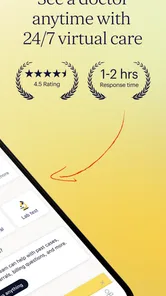
For parents, travelers, and people with demanding schedules, the around-the-clock positioning is attractive because medical concerns rarely arrive at a convenient appointment time. Still, I would not interpret “24/7 medical care” as a promise that every type of treatment is available instantly or that every problem can be solved remotely. The practical benefit is access to a care pathway at unusual hours, not a substitute for every service a physical facility provides.
When the connection fails
My biggest concern with a connected medical app is not whether the interface looks polished. It is what happens when the technology becomes unreliable during a sensitive conversation. A stalled upload, a lost signal, or an interrupted session can create more than annoyance: it can make me wonder whether the clinician received the full story and whether I need to start again.
I would handle that risk by preparing a short personal summary before beginning. I might note the main symptom, its start time, changes since it began, current medicines, allergies, relevant conditions, and the question I need answered. I would not assume the app can recover every detail automatically. Keeping the information ready lets me reconnect without depending entirely on memory, especially if I am tired or worried.
There is also a difference between a technical failure and a medical delay. If the screen takes time to respond, I should not interpret that as reassurance that the condition is harmless. Conversely, I should not panic solely because the connection is slow. I would use the seriousness of the symptoms, not the speed of the app, to decide whether to seek another form of care.
This is one area where a conventional clinic may be better. If I already know that I need an examination, a procedure, or an urgent test, driving to an appropriate facility is more dependable than trying to force the problem into a remote workflow. Galileo is strongest when communication and clinical direction are the main needs. It is weaker when the next step necessarily involves equipment or physical contact.
Making mobile medical use more dependable
I would use the app on a stable connection whenever possible and avoid starting an important consultation while moving between networks. A quiet place also matters. Medical conversations can involve details that are difficult to explain in a noisy café, on public transport, or while multitasking. Better connectivity helps, but so does giving the interaction enough attention.
Another useful habit is to keep the phone charged before beginning. That sounds obvious, yet a low battery can turn a manageable medical question into a rushed exchange. If I am traveling, I would identify a nearby in-person option as a backup rather than assuming the app will cover every possibility. The backup is not a criticism of Galileo; it is sensible planning for any service that operates through a phone.
I would also avoid sending a vague opening message such as “I feel strange.” A clear description gives the care team a better starting point and reduces unnecessary back-and-forth. Mentioning what changed, what worries me, and what I want to know makes the connected format more efficient. This is a non-obvious strength of the app’s model: the user can improve the quality of the encounter by preparing well, instead of treating the app as a button that magically produces a diagnosis.
Privacy-minded use on a phone
Medical information deserves more care than an ordinary shopping or entertainment conversation. I would use Galileo in a private setting when possible, especially if I need to discuss sensitive symptoms. On a shared device, I would be careful about who can see the screen, notifications, or conversation history. Even without changing any settings, choosing the right environment is part of using a medical service responsibly.
I would also think before typing unnecessary personal details. A clinician needs relevant context, but adding unrelated information can make the important facts harder to find. My approach would be to provide accurate information that affects the medical question and to avoid treating the conversation like a general diary. That keeps the interaction focused and makes it easier to review what I actually told the care team.
Connectivity creates another privacy consideration: I would avoid using an unsecured public network for a sensitive consultation when a trusted mobile connection or private network is available. I am not saying that every public network is unsafe, but a medical conversation deserves deliberate handling. The app may be convenient in a public place, yet convenience should not force me to discuss private health details where other people can overhear.
For families, I would be especially careful about whose symptoms are being described and whether the information is complete. Helping another person through a phone can introduce mistakes: medication names may be misremembered, timelines may be unclear, and the patient may not be present for follow-up questions. Galileo can support the conversation, but the quality of the information still depends on the person using it.
Who will get the most from Galileo?
I would recommend this app to someone who wants a convenient medical starting point and is comfortable communicating through a phone. It makes particular sense for people who struggle to fit routine questions into office hours, travelers who want a care option already available on their device, and anyone who prefers professional guidance over self-diagnosing through web searches.
The fact that it is free removes an obvious barrier to trying it, and its Everyone age rating makes it approachable for a broad audience. Galileo Health has also built a recognizable user base: the app has passed one hundred thousand installs, carries an average rating of 4.8 from around five thousand ratings, and has several hundred written reviews. Those figures suggest that many users find the experience worthwhile, although a rating cannot tell me whether the service fits my specific medical needs.
I would skip it as my primary option if I need immediate emergency intervention, a physical examination, complex ongoing treatment, or a provider who already knows my full history in person. I would also hesitate if my internet access is regularly unreliable or if I strongly prefer face-to-face communication. In those cases, a local clinic, established physician, or emergency service is the more appropriate choice.
What the app’s maturity means in practice
Galileo was released on September 24, 2019, so it is not a brand-new experiment. The current version is 2026.08.04, and it supports devices running Android 9 or later. For me, that combination suggests an app that has had time to become established while still requiring users with older phones to check compatibility before depending on it.
The version detail is particularly relevant for people who keep an older device as a backup phone. If that phone runs an earlier operating system, I would not wait until a medical need appears to discover that it cannot run the current app. Testing the app in advance is a small step, but it is exactly the kind of preparation that makes mobile care more reliable.
The developer name also matters when deciding where this service fits in my health routine. Galileo Health is focused on medical care rather than general wellness tracking, so I would not expect it to replace a fitness app, a medication organizer, or a hospital portal. Its role is narrower and more useful: connecting a person with medical guidance when a digital route is appropriate.
My connectivity verdict
After weighing the convenience against the dependence on a working connection, I see Galileo as a practical first-line option for non-emergency medical questions. Its strongest moment is when I need informed direction outside the rhythm of a traditional appointment and can communicate clearly from a reasonably stable location. Its weakest moment is when the condition is urgent, the network is unreliable, or the answer depends on examination and testing.
I like that the app’s value is easy to understand without pretending that remote care can do everything. I would install it before I needed it, prepare a concise health summary, use it privately, and keep an in-person backup for situations that require hands-on attention. Those habits make the service more useful than simply opening it in a panic and hoping technology will solve the whole problem.
My final recommendation is therefore measured but positive. Galileo is a strong convenience tool for connected medical guidance, not an all-purpose substitute for healthcare. If that distinction matches what you need, the free price and mobile access make it worth trying. If your situation demands immediate physical care or dependable treatment beyond a remote conversation, I would choose the appropriate local medical service instead.
Galileo: Medical Care Frequently Asked Questions
What should I check before downloading Galileo: Medical Care?
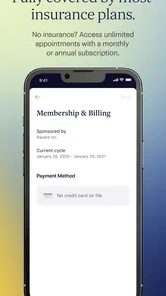
Galileo: Medical Care is a medical app from Galileo Health, with a store summary focused on 24/7 medical care. Before installing it, consider whether you want digital access to healthcare and whether the service is available to you through your location, employer, health plan, insurer, or membership. The app is free to download, and its age rating is Everyone.
What devices can run Galileo: Medical Care?
The app is available for Android and iOS users whose devices meet its operating-system requirements. Check your device’s software version and the app’s compatibility details in the relevant app store before downloading, particularly if you use an older phone or tablet. Keeping your operating system and the app updated can also help you use its current features smoothly.
What is Galileo: Medical Care, and who is it designed for?
Galileo: Medical Care is a digital healthcare service that connects users with medical professionals through a mobile app. It is designed for people who want convenient access to medical guidance, consultations, care plans, and health-related support without always needing to visit a clinic in person. Availability and eligible services may depend on your location and membership or insurance plan.
Can I speak with a doctor through the Galileo app?
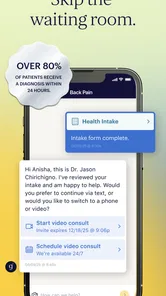
The app is intended to provide access to healthcare professionals through digital communication, which may include messaging, virtual visits, or other consultation options depending on your plan. After describing your symptoms or health concern, you may be guided to the appropriate type of care. Galileo should not be used as a replacement for emergency services when symptoms are severe or life-threatening.
What types of medical conditions or services can Galileo help with?
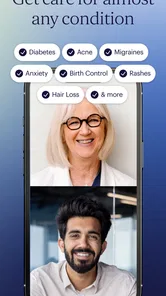
Galileo may support a range of everyday healthcare needs, such as common illnesses, medication questions, preventive care, chronic-condition support, and general medical advice. The exact services vary by membership, employer, insurer, and region. Some cases may require an in-person examination, laboratory testing, specialist care, or referral to another healthcare provider.
Pros
- Easy access to medical consultations from a smartphone.
- Lets users manage appointments without calling the clinic.
- Digital access to medical records and treatment information.
- Useful reminders can help users keep track of appointments.
- May reduce waiting time for routine healthcare requests.
Cons
- Availability of doctors and services may vary by location.
- Some consultations may still require an in-person visit.
- Requires a reliable internet connection for video appointments.
- Not suitable for urgent or emergency medical situations.
- Certain features may depend on support from participating providers.











