

Futuristic 3D Tech Wallpaper
- 158.00
- 4.6
- Installs
- 1.00M
- Price
- Free
Screenshots
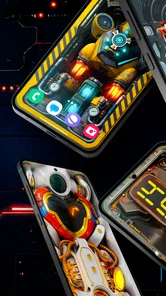
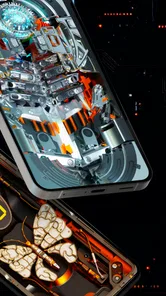
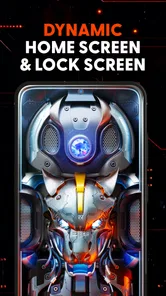
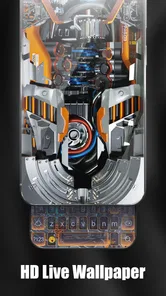
Analysis by Reviewed
I find Futuristic 3D Tech Wallpaper most appealing when I want my phone to feel less like a plain utility and more like a personal object. Its focus is clear: dramatic, technology-inspired visuals rather than a broad library of unrelated styles. That makes it easy to understand who might enjoy it, but it also means the look will not suit everyone. If you prefer calm photography, minimal colors, or a background that disappears behind your icons, a conventional wallpaper collection may be a better fit.
Making a busy screen easier to read
A striking wallpaper can change how usable a home screen feels. Neon edges and detailed mechanical imagery look lively, but they can compete with app labels and widgets, especially when icons sit over bright or intricate areas. I’d try a few designs against the actual layout of your phone rather than judging them only in a preview. A wallpaper that looks impressive on its own may be less comfortable once notifications, shortcuts, and text are layered on top.
This is where the app’s narrow visual identity is both a strength and a trade-off. If you like sci-fi styling, the themed selection gives your screen a more deliberate personality than a random image search. If you depend on a very plain background to spot icons quickly, the usual static-photo or solid-color alternatives give you more control over visual quiet. I would choose based on what helps me find things at a glance, not just on which preview looks most dramatic.
Movement, touch, and sensory comfort
For anyone sensitive to motion or intense contrast, a dynamic 3D effect deserves a little real-world testing before becoming a permanent background. I’d start with one design, use the phone normally for a while, and notice whether the movement or glow feels distracting during reading or in a dim room. A still image may be the more comfortable choice if visual motion causes fatigue, or if you want the screen to stay understated in shared spaces.
The app is part of the personalization category, so the practical value is in shaping the phone’s appearance rather than helping with a task. That distinction matters for motor access, too: the wallpaper itself does not change the size or placement of your controls. If you already rely on larger text, simplified layouts, or carefully arranged shortcuts, check that the selected image leaves those elements easy to see and reach. I would treat the background as a finishing touch, not a replacement for the phone’s built-in access settings.
Choosing it for the right moments
For an everyday example, imagine checking a notification while walking between appointments. A high-contrast, detailed background may make small text harder to pick out in bright conditions, while a quieter design can keep the important information prominent. I’d preview the wallpaper in the places I use my phone most—at home, outdoors, and under evening lighting—and switch to a simpler option if the visuals get in the way.
This app is a stronger match for someone who enjoys a futuristic theme and likes refreshing their screen for personal expression. It may be less suitable for people who want nature imagery, broad art styles, or a purely functional background. It is free, rated for Everyone, and made by Live Wallpapers by Wave Studio. Its average rating is 4.6 from around 35,000 ratings, and it has been installed over a million times. Those figures suggest it has found an audience, though they cannot tell you whether its particular visual style will work for your eyes or daily habits.
More From Our News Desk

 Gmail
GmailGmail in a Busy Inbox: Who Benefits Most?
From first account to crowded workday, Gmail earns its place through dependable search and flexible sorting—but its best fit depends on how much inbox maintenance you can tolerate.

 Prime Video
Switching to Prime Video: What Changes in Your Viewing Routine
Prime Video can make a compelling second home for streaming, but switching means learning a different catalog, rental layer, and route from browsing to playback.

 Universal TV Remote Control
Universal TV Remote Control Works Best as a Reliable Backup
A phone remote earns its place through quick setup and reliable habits. Here is how to get more from Universal TV Remote Control—and where its limits show.

 Weather - By Xiaomi
Weather by Xiaomi Review: Clear at a Glance, Less Clear Up Close
Xiaomi’s weather app makes everyday forecasts quick to scan, but its calm surface can leave useful details and recovery paths harder to find than they should be.

 X
XX Under Pressure: Can It Recover When Posting Goes Wrong?
A resilience-focused review of X, examining setup, mistaken posts, interruptions, weak connections, and the gaps that matter when recovery needs to be dependable.

 Clash of Clans
Clash of Clans Is Won Between the Battles
Its raids are quick; its community is a long-term project of coordination, teaching, rivalry, and shared responsibility—with all the friction that entails.
Latest News



The Future is Here
When I first stumbled upon the Futuristic 3D Tech Wallpaper, I was admittedly skeptical. I mean, how different can a wallpaper app really be, right? But boy, was I in for a surprise! This app is all about taking your device into the future with stunning 3D wallpapers that look like they’ve come straight out of a sci-fi movie. And yes, they are as cool as they sound.
Immersive Visuals
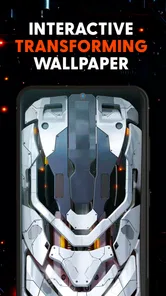
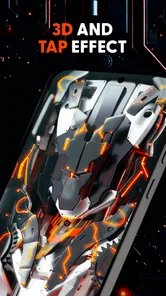
The first thing that caught my eye was the sheer quality of the wallpapers. The 3D effects are incredibly dynamic and, frankly, mesmerizing. It's like having a tiny piece of a futuristic world right in your pocket. Whether you're into neon lights, cyberpunk vibes, or sleek, tech-inspired designs, there's something here for everyone. And let’s be real, who doesn’t love a good neon glow?
Easy Navigation and User-Friendly
I’ve tried my fair share of wallpaper apps, and one thing that often bugs me is clunky navigation. Thankfully, this app keeps it simple. The interface is clean, intuitive, and not cluttered with ads that make you want to throw your phone across the room. Finding a wallpaper that speaks to your inner tech-geek is just a swipe away, and setting it as your background is a breeze.
Battery and Performance
Now, if you’re worried about these stunning visuals draining your battery, let me put your mind at ease. The app is designed to be light on resources, so you get all the beauty without sacrificing battery life. I’ve been using it for a few weeks now and haven’t noticed any significant battery drain, which is a win in my book.
Personalization at Its Best
One of the standout features of this app is the level of personalization it offers. You can adjust the effects to suit your mood or style, giving you a unique experience every time you unlock your phone. It’s like having a personal touch of future tech right at your fingertips.
Small choices that improve the fit
I’d approach setup as a short comparison rather than settling on the first eye-catching design. Try a couple of different visual moods, then check whether the clock, notification previews, and frequently used icons remain easy to pick out. This is a useful way to judge the wallpaper in context, since a lock screen and a busy home screen can make the same image feel quite different.
One practical trade-off is that a more animated, high-energy look can feel exciting during a quick glance but tiring if it is always in view. If you spend long stretches reading on your phone, choose the version that keeps the center of the screen visually calm, or use a simpler background for that routine. I’d also avoid changing several things at once: keeping your icon arrangement steady makes it easier to tell whether the wallpaper itself is helping or distracting.
Who should try it—and who may prefer another style
If your phone is an extension of your personal style and you enjoy mechanical, neon, or sci-fi imagery, this is a focused option rather than a general-purpose wallpaper browser. It can also be a fun choice when you want a coordinated look for a new device or simply want to make an otherwise familiar screen feel fresh. By contrast, people who prioritize maximum legibility, understated design, or a wide range of photographic subjects will probably be happier with plain backgrounds or a less specialized wallpaper app.
It is free, and the app had reached version 5.28.8 when I reviewed it; it runs on Android 5.0 and later. It was released on February 12, 2024, and has around 158 written reviews. These details help set expectations about availability, but I’d still make the final call by testing a wallpaper on your own display and with your usual text and accessibility settings enabled.
A considered everyday verdict
My main advice is to treat the 3D look as a personal design choice, not an automatic upgrade to usability. A detailed background may be exactly what makes your phone feel distinctive, while a quieter alternative may serve better when you need to read quickly, conserve visual attention, or use the device in bright surroundings. That flexibility in how you choose and place a wallpaper is more useful than chasing the most dramatic effect.
Overall, I’d recommend it to friends who specifically want a futuristic mechanical aesthetic and are happy to spend a moment checking how it works with their screen layout. The app’s presentation is appealing, but the strongest choice is the one that remains comfortable across your ordinary routine. If vivid technology-inspired art is your thing, it is worth exploring; if clarity and calm matter more, there is no shame in choosing a simpler background instead.
Futuristic 3D Tech Wallpaper Frequently Asked Questions
Is Futuristic 3D Tech Wallpaper suitable for someone who only wants a simple background?
It may suit you if you enjoy futuristic, high-tech visuals, but the app’s focus is specifically on 3D tech wallpapers and mechanical themes. If you prefer plain colors, nature photography, or minimal patterns, that style may not match your taste. The app is in the personalization category, so its main purpose is to let you change the look of your phone.
What kind of visual style can I expect from Futuristic 3D Tech Wallpaper?
The app centers on futuristic 3D wallpapers and high-tech mechanical themes. Expect designs with a technology-inspired look rather than a general collection spanning every wallpaper style. Its short description captures the main idea: Futuristic 3D Tech Wallpaper. If you are drawn to a bold, modern appearance for your phone, this focus may be appealing; take time to browse the designs before choosing one.
Can I preview a wallpaper before setting it on my phone?
Previewing a design before applying it is a useful way to decide whether its futuristic look suits your screen. Futuristic 3D Tech Wallpaper is a personalization app focused on high-tech mechanical themes, so take a moment to view a design and check how it appears with your icons and lock screen before making it your wallpaper. The app is free to download.
What features does the Futuristic 3D Tech Wallpaper app offer?
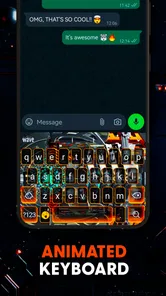
The Futuristic 3D Tech Wallpaper app offers a variety of high-resolution, animated wallpapers that can transform your device into a visually stunning piece of technology. The app includes features such as customizable animations, interactive touch effects, and a vast library of futuristic designs that cater to tech enthusiasts. Users can easily switch between wallpapers and set schedules for automatic changes.
Is the Futuristic 3D Tech Wallpaper app compatible with all devices?
While the Futuristic 3D Tech Wallpaper app is designed to work on most Android and iOS devices, compatibility may vary depending on the device's hardware and operating system version. The Android version requires Android 5.0 or later, so check your system version before downloading. The app performs optimally on devices with higher processing power and newer OS versions.
Pros
- Stunning 3D visuals enhance device aesthetics.
- Wide variety of wallpapers to suit all tastes.
- Easy to navigate and user-friendly interface.
- Regular updates with fresh and trendy designs.
- Low battery consumption despite 3D effects.
Cons
- Advertisements can disrupt user experience.
- Limited free options; many are paid.
- May slow down older devices slightly.
- Requires internet for downloading new wallpapers.
- Some designs may not fit all screen sizes perfectly.












