

3D Aquarium Live Wallpaper
- 1.18K
- 4.6
- Installs
- 1.00M
- Price
- Free

Screenshots
Analysis by Reviewed
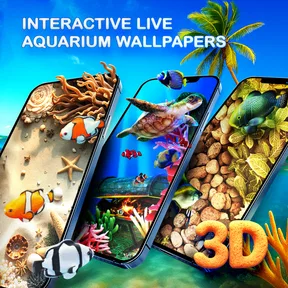
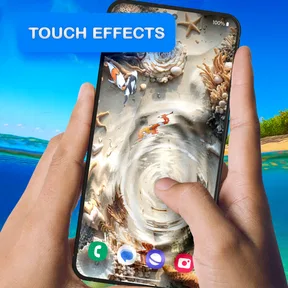
I’m drawn to phone customizations that change the mood of a screen without asking me to reorganize my whole device, and Aquarium 3D Live Wallpaper 4K has a clear appeal on those terms. Its moving underwater scenes make an ordinary glance at the home screen feel more distinctive. I’d recommend it to someone who genuinely enjoys aquarium imagery, while keeping in mind that animation is a personal preference rather than an automatic upgrade over a still wallpaper.
That distinction matters because a live background is part of the phone’s everyday interface, not a separate viewing experience. You see it between tasks, behind icons, and whenever you return to the home screen. The app works best when that brief visual change is something you welcome; if your priority is a restrained screen that stays out of the way, a static background will probably suit you better.
Immersive Underwater Experience
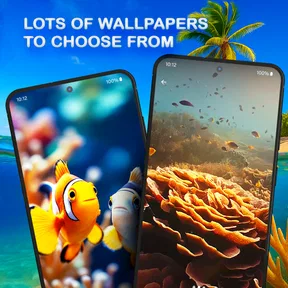
The first thing that caught my attention about Aquarium 3D Live Wallpaper 4K was its stunning graphics. The clarity and detail of the live wallpaper make it feel as though you're peeking into a real aquarium. The 4K resolution ensures that every fish scale and coral texture is visible, offering an ultra-realistic experience. It's hard not to get lost watching the fish swim gracefully across your screen.
In everyday use, a live background has a different job from a still image: it adds movement when I glance at the screen, but it should not compete with icons or make the phone harder to read. I’d preview the wallpaper with my usual home-screen layout before settling on it. A busy arrangement of widgets and app shortcuts may obscure some of the scene, while a simpler layout lets the underwater visuals breathe.
A practical way to enjoy it is to treat the wallpaper as a small visual pause rather than something to watch constantly. For example, after setting the phone down between errands, I can unlock it and take in the fish for a moment before moving on. That works better for me than expecting the app to deliver a full aquarium simulation or hours of entertainment.
Customization Galore
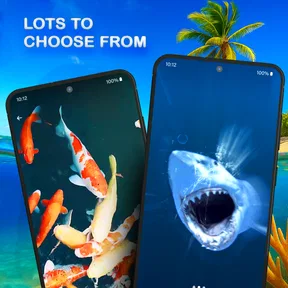
One of the app's standout features is its customization options. You can choose from various fish species and backgrounds, tailoring your aquarium to your personal taste. Want a serene, deep-sea vibe? Or maybe a colorful reef? It's all possible with just a few taps. The app's intuitive interface makes it easy to navigate these options, even if you're not tech-savvy.
My advice is to make one change at a time and check how it looks on the actual home screen, not just in a selection view. A striking background can look lovely on its own yet clash with brightly colored icons. Choosing a scene that leaves enough visual breathing room can make the phone feel more cohesive without giving up the aquarium effect.
More From Our News Desk

 Gmail
GmailGmail in a Busy Inbox: Who Benefits Most?
From first account to crowded workday, Gmail earns its place through dependable search and flexible sorting—but its best fit depends on how much inbox maintenance you can tolerate.

 Prime Video
Switching to Prime Video: What Changes in Your Viewing Routine
Prime Video can make a compelling second home for streaming, but switching means learning a different catalog, rental layer, and route from browsing to playback.

 Universal TV Remote Control
Universal TV Remote Control Works Best as a Reliable Backup
A phone remote earns its place through quick setup and reliable habits. Here is how to get more from Universal TV Remote Control—and where its limits show.

 Weather - By Xiaomi
Weather by Xiaomi Review: Clear at a Glance, Less Clear Up Close
Xiaomi’s weather app makes everyday forecasts quick to scan, but its calm surface can leave useful details and recovery paths harder to find than they should be.

 X
XX Under Pressure: Can It Recover When Posting Goes Wrong?
A resilience-focused review of X, examining setup, mistaken posts, interruptions, weak connections, and the gaps that matter when recovery needs to be dependable.

 Clash of Clans
Clash of Clans Is Won Between the Battles
Its raids are quick; its community is a long-term project of coordination, teaching, rivalry, and shared responsibility—with all the friction that entails.
Latest News



This is also where the app differs from the usual alternatives in personalization. A static ocean photo is simpler and avoids motion, but it cannot provide the same sense of life when the screen wakes. A general live wallpaper may offer motion without the specific aquarium mood. I’d pick this one if fish and underwater scenery are the point; if I only want a clean, low-distraction background, a still image is probably the better fit.
The app is from Live Wallpapers by Wave Studio and is free, with an Everyone content rating. Its average rating is 4.6 from around 49,000 ratings, and it has over a million installs. Those figures suggest that many people enjoy this kind of visual customization, though popularity alone cannot tell you whether animated wallpaper suits your own habits.
On Android, it supports devices running version 5.0 or later, and the current version is 5.28.8. If you’re deciding whether to try it, the useful question is less about the version number and more about whether your phone’s screen layout gives the aquarium room to show. I’d also check the result after applying it, since icon contrast and personal preference matter more than a preview.
Putting the Aquarium to Work on a Busy Home Screen
A useful way to judge the customization is to begin with the screen you actually use, rather than building an idealized layout just for the wallpaper. If your first page is packed with folders, widgets, and shortcuts, try placing the aquarium on a less crowded page or removing only the items you no longer use. That gives the scene room without forcing a complete redesign of your phone.
I’d also think about when the background is most visible. If you spend much of the day inside messaging apps or reading, you may only catch glimpses of the home screen. In that case, the wallpaper’s value comes from those short returns between tasks, not from constant viewing. Someone who keeps the home screen open while choosing what to do next may notice the movement more, and should be more careful about whether it feels calming or distracting.
For a realistic routine, imagine checking your phone while waiting for a bus: you glance at a notification, return to the home screen, and see the aquarium before putting the device away. That small moment can make the screen feel more personal without changing how you use your apps. But if you tend to unlock the phone repeatedly and find any movement pulls your attention away from what you intended to do, the same effect can become an annoyance. The best test is not whether the scene looks impressive once, but whether it remains welcome through ordinary, brief encounters.
It may also help to consider how you use widgets. Large widgets can cover the most interesting part of a background, and the wallpaper cannot make a crowded layout feel uncluttered by itself. I would keep the widgets that genuinely help, then position them so they do not hide the whole scene. If that compromise leaves too little visible, I would choose a different background rather than sacrificing useful information just to show more animation.
Battery and Practical Trade-offs
Now, you might be wondering about battery usage. Live wallpapers have a reputation for being power-hungry, but Aquarium 3D Live Wallpaper 4K is surprisingly efficient. The app includes settings to minimize battery drain by adjusting the frame rate and resolution. This means you can enjoy the stunning visuals without worrying about your phone dying halfway through the day.
Even so, I wouldn’t assume that any animated background will have exactly the same impact on every phone or routine. If you are careful about battery life, try the wallpaper during an ordinary day and compare how the phone feels with your normal setup. The useful trade-off is straightforward: prioritize the moving scene when you enjoy seeing it often, or choose a static background if you would rather keep the display as simple as possible.
One small workflow that makes sense is to settle the visual choices first, then leave the settings alone for a while and judge the wallpaper in regular use. Constantly revisiting customization can make the feature feel like a project; choosing a scene that works with your icons turns it into a background you can simply enjoy. If the animation becomes distracting, that is a good sign to switch to a quieter alternative rather than forcing yourself to like it.
For someone especially attentive to battery, the sensible approach is to treat the app’s adjustment options as a starting point, not a guarantee that every setup will behave identically. Use the phone as you normally do for a while and decide whether the visual payoff feels worthwhile. If battery conservation is more important than a moving background, a static aquarium image gives you the subject without the animation. That is a straightforward alternative, and it avoids turning a small decorative choice into something you have to monitor constantly.
Another practical consideration is how the wallpaper looks in different lighting and with your display brightness set as usual. A scene that looks crisp in a preview may feel too dark or too visually active in your everyday environment. I’d make the final decision after using the phone in the places where I normally check it, rather than repeatedly tweaking it in a single setting. This is less about finding a universally perfect scene and more about finding one that stays comfortable on your own screen.
Who Will Get the Most from It
For anyone who appreciates a touch of nature and tranquility in their digital life, this app is a must-have. It's perfect for those moments when you need a quick escape from the hustle and bustle. Plus, it's a great conversation starter—friends and family will be amazed at the lifelike quality of your wallpaper.
I’d especially recommend it to people who like aquatic scenery, enjoy personalizing their home screen, and are happy to trade a little visual simplicity for movement. It is less suited to someone who prefers a plain interface, relies on a very dense home screen, or finds animated backgrounds distracting. In those cases, a carefully chosen still image is a more sensible choice, not a lesser one.
The best everyday test is to apply it during a normal stretch of phone use: check messages, open a few apps, and return to the home screen as you usually would. If the aquarium still feels pleasant in those brief glances and your icons remain easy to spot, it is doing its job. If you mostly see clutter or find yourself wanting a quieter display, the novelty may not outweigh the extra motion.
The app belongs to the personalization category, and that is the right way to think about its purpose: it changes the feel of a device rather than solving a practical problem. I would not choose it for someone looking for fish facts, care advice, or a hands-on aquarium experience. Its strongest fit is a person who already likes underwater visuals and wants that interest reflected in a frequently seen part of their phone.
The free price makes trying the look relatively straightforward, but I would still make the decision based on the experience rather than assuming free means no trade-offs. The central choice is whether a moving aquarium improves your home screen enough to justify having animation there. If you like decorative customization but prefer a quieter device, a single fish or reef photograph may give you the theme you want with less visual activity.
For families, the Everyone content rating is reassuring in the basic sense that the app is intended for a broad audience, though I’d still treat it as a decorative phone customization rather than an activity designed to occupy a child. Its appeal is visual and personal: choosing a scene, applying it, and seeing how it changes the phone’s look. That makes it easy to understand, but not a substitute for an interactive game or educational resource.
A Small, Specific Escape Rather Than a Full Aquarium
In conclusion, Aquarium 3D Live Wallpaper 4K is more than just a pretty addition to your phone; it's an immersive experience that brings the calming presence of the ocean right to your fingertips. Whether you're a marine enthusiast or just someone looking for a unique wallpaper, this app is worth checking out.
My final view is positive, with one important qualification: it succeeds when the aquarium is something you want to notice in passing, not when you expect it to become a major feature of your phone. Its moving aquatic look gives the home screen a distinctive character, and the customization makes it easier to make that look your own. The trade-off is that motion can compete with icons or simply feel unnecessary after the initial novelty.
I’d try it if you enjoy fish and reef imagery, have a home screen where some of the scene can remain visible, and like the idea of a little visual change between tasks. I’d skip it if your top priorities are a completely still display, maximum visual simplicity, or a background that disappears behind your apps. For that audience, a static image is not a compromise so much as the better tool.
Ultimately, this is a personal choice with a clear use case: making an Android home screen feel more like your own through animated aquarium scenery. Give the scene a fair trial alongside your real icons and daily routine, then keep it only if it continues to feel pleasant. That is the standard I’d use, and by it this app is a worthwhile option for the right kind of wallpaper fan.
3D Aquarium Live Wallpaper Frequently Asked Questions
Is Aquarium 3D Live Wallpaper suitable for everyday phone use?
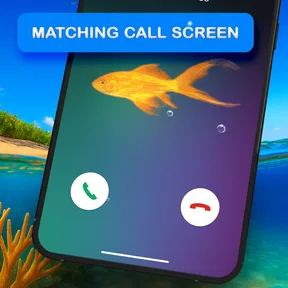
It is a personalization app for people who want an animated aquarium as part of their phone’s look. The moving fish and underwater scene can make a screen feel more distinctive than a static background. Since a live wallpaper is visible during ordinary phone use, consider whether you enjoy animation on your screen before installing it.
Can I use the aquarium theme on my keyboard as well as my wallpaper?
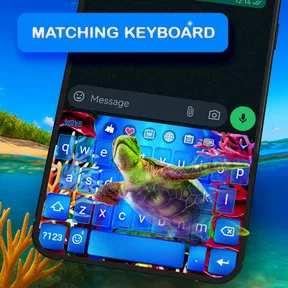
The app’s description mentions both a 3D aquarium wallpaper and a live aquarium keyboard, so it may suit people who want an aquatic look across more than one part of their phone. The wallpaper is the central feature, while the keyboard offers another way to carry the theme into everyday use. Check the available options in the app to see which elements you want to apply.
Who makes Aquarium 3D Live Wallpaper, and is it appropriate for all ages?
Aquarium 3D Live Wallpaper is developed by Live Wallpapers by Wave Studio. It has an Everyone content rating, making it suitable for a general audience. The app focuses on personalization through aquarium visuals, rather than a game or a social platform, so its main appeal is changing the appearance of your phone with an animated underwater theme.
What should I know about the app before downloading it?
Aquarium 3D Live Wallpaper is developed by Live Wallpapers by Wave Studio and is free to download. It has an Everyone content rating, and its current version is 5.28.8. The app is designed around a 3D aquarium wallpaper, with a live aquarium keyboard also mentioned in its description, so it may appeal to users who want a coordinated aquatic look.
What is Aquarium 3D Live Wallpaper 4K?
Aquarium 3D Live Wallpaper 4K is a dynamic and interactive live wallpaper app for Android and iOS devices that transforms your screen into a vibrant, realistic aquarium. Featuring stunning 4K visuals and lifelike fish animations, it offers a serene underwater experience, providing both aesthetic pleasure and relaxation to users.
Pros
- Stunning 3D graphics enhance visual appeal.
- Highly customizable settings for personalization.
- Minimal battery consumption despite high quality.
- Features realistic underwater sounds for ambiance.
- Regular updates with new fish species and features.
Cons
- Limited free version features.
- May lag on older devices.
- Ads can be intrusive at times.
- Requires internet for initial setup.
- Not interactive
- purely decorative.












