FUT 25 Card Creator
- 573.00
- 4.7
- Installs
- 1.00M
- Price
- Free

Screenshots

Analysis by Reviewed
I’d put this app in the “make something for fun” corner of football apps, rather than treating it as a team-management game or a source of match information. FUT 25 Card Creator is aimed at fans who enjoy imagining players, ratings and club identities on a card they can personalize. Before downloading, I’d ask one simple question: do you want to create and share a visual idea, or are you looking for live football features? For the first, this is a focused fit; for the second, another kind of sports app will serve you better.
A quick test before you commit
I’d decide whether this is right for me by thinking of one card I genuinely want to make, rather than downloading it just because I like football. It might be a fictional signing, a card for a friend, or a playful version of a favorite player. If I can picture the name, image and general mood, the app has a clear job to do. If I can’t think of anything beyond “I want more football content,” a news, scores or game app is probably a better match.
That distinction also helps set expectations. A card creator is less about discovering information than expressing an idea. I wouldn’t open it expecting it to tell me which player is in form or to turn my phone into a full football game. I’d use it when I already have a concept and want to give that concept a visual form. The creative input is part of the appeal, but it also means the experience depends on how much you enjoy making choices.
Getting Started with FUT 25 Card Creator
First things first, downloading the FUT 25 Card Creator was a breeze. Available on both Android and iOS platforms, it took just a few taps to get it on my device. Upon launching, I was welcomed by a user-friendly interface, which made navigation pretty straightforward. The app doesn’t bombard you with complicated tutorials; instead, it invites you to jump right into the fun of creating your card.
Designing Your Dream Card
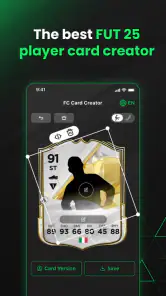
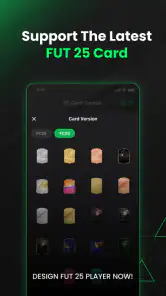
The heart of the app is, of course, the card creation feature. You start by selecting a card template from a variety of options, ranging from classic designs to more modern and flashy ones. I appreciated the diversity, as it allowed me to tailor the cards to my personal taste. Once you pick a template, the real fun begins. You can customize the card with player names, stats, club logos, and even upload your own pictures. This personalization aspect is where the app truly shines, giving me the freedom to craft something unique.
A useful way to get more from that freedom is to decide on the card’s purpose before filling in its details. For a joke card about a friend, exaggerated stats and a familiar photo can make the result feel personal; for a dream signing, keeping the name, club and visual choices consistent makes it easier for other fans to understand the idea at a glance. I’d also settle on the image first, since the picture is the part most likely to shape the overall look. That small bit of planning can save you from repeatedly reworking the card just to make its elements feel like they belong together.
Making a design feel intentional
One practical workflow is to treat the card as a tiny poster rather than a form to fill in. I’d start with the central idea, choose a photo that supports it, and only then settle on the club and stats. If the image is busy, simpler choices elsewhere can keep the result legible; if the picture is plain, the other details can carry more of the personality. This is a useful trade-off when a card is meant to be seen quickly in a chat, where people may only glance at it before replying.
More From Our News Desk

Clash of Clans Is Won Between the Battles

Android Auto Makes the Case for Quieter Car Software

MobiOffice: Transforming Mobile Productivity with Seamless Integration

EA SPORTS FC™ Mobile Soccer: Redefining Mobile Sports Gaming

How Microsoft OneDrive Became a Mobile Productivity Giant

How Google Translate Breaks Language Barriers Effortlessly
For a set of cards, I’d make one complete example first and use it as a visual reference for the next. Keeping the same general tone—whether it’s a sincere fantasy team or a run of jokes about friends—helps the cards feel connected without forcing every detail to match. I would avoid designing several cards in one sitting before deciding on that tone, because small differences in style can make a set feel less deliberate. This approach is especially handy for a group-chat challenge or a birthday surprise where the cards are meant to belong together.
User Experience
One thing I loved about the FUT 25 Card Creator is its intuitive design. The app is responsive, and I didn’t experience any lag or crashes during my time with it. The developers clearly put a lot of thought into ensuring a smooth user experience. Plus, the added feature of sharing your creations directly on social media is a nice touch, making it easy to show off your creativity to friends or fellow football fans.
The sharing angle makes this especially handy for a casual, everyday use: I can imagine making a card during a match-day conversation, then sending it to a group chat as a playful response to a friend’s bold prediction. It works best when the goal is a quick visual joke or a fan-made concept, not when you need a precise record of player performance. If you plan to post a card publicly, I’d make the design readable on a phone screen and avoid cramming in so many custom details that the main idea gets lost.
Where it fits among football apps
Compared with the usual alternatives, this is a creative tool rather than a companion for following scores, managing a squad or browsing football news. That distinction matters: those apps answer practical questions about real matches and players, while this one gives you room to invent a card around your own idea. I’d choose it for fan art, a friendly challenge or a personalized gift-style image. I’d skip it if my priority were current player data, tactical planning or a deeper game loop, because card design alone cannot replace those experiences.
It also sits in a different place from general-purpose image editors. An editor may offer more control over a whole composition, but it asks you to build the football-card structure yourself. This app’s specific appeal is having card creation as the point of the experience, rather than starting with a blank canvas. If I wanted a one-off design with lots of unrelated visual elements, I’d lean toward a broader graphics tool; if I wanted the recognizable structure of a player card, I’d start here and see whether its choices were enough for my idea.
There is also a small trade-off in how you approach a personal project. A simple card is quick to make and easy to share, while a more elaborate one takes more thought about the photo, the stats and the club details. I’d keep a rough note of the choices I want to use before starting if I’m making several related cards; that helps them feel like a set instead of a handful of disconnected designs. And if a result is mainly for private amusement, there’s no need to chase a polished, official-looking finish—the fun is often in the personal reference only your friends will recognize.
Limits that matter in everyday use
The same creative freedom that makes the app enjoyable can create a little friction. You need to bring the concept yourself, and a card that looks convincing depends on your choices rather than on the app supplying a ready-made story. I’d also be careful about treating custom stats as factual claims: they work well as part of a fantasy or joke, but they are not a substitute for current player information. If accuracy is the point of the post, I’d check the facts elsewhere and use the card only as the presentation layer.
Another consideration is how much time you want to spend polishing. The quickest route is to choose a template and make a few clear edits; a more personal result may take several rounds of adjusting the picture and details. That’s not a flaw for someone who likes making things, but it can feel like unnecessary effort if you only wanted a finished image immediately. I’d start with a deliberately simple design and add details only when they improve the idea, rather than assuming more customization automatically makes a better card.
Who Will Get the Most from It?
The strongest audience is football fans who enjoy visual customization and don’t mind making their own creative brief. It can suit younger fans and adults alike, and its Everyone age rating reflects that broad audience. Someone who only wants to check a score, follow a club or play a full football game should look elsewhere; this is a narrower, more playful use of a phone. If you’re deciding whether to keep it, make one card based on a real idea you’d actually share. If that process is enjoyable, the app has found its purpose for you.
I can also see it working for fans who enjoy friendly debates but don’t want to turn them into serious arguments. A made-up card can make a prediction, a dream transfer or a running joke easier to share than a long message. For a parent and child, it could be a small creative activity built around a favorite player, with the child choosing the picture and the adult helping shape the details. It is less suitable for someone who wants a structured lesson, a competition with rules, or an automatically generated result; its value comes from making your own choices.
One question worth asking before sharing is whether the image is for a private joke or a wider audience. Friends who know the context may enjoy a deliberately exaggerated card, while other viewers could mistake it for an official or factual graphic if the presentation looks too serious. I’d add a clear caption when the idea is fictional, especially when sharing beyond a familiar group. That small step preserves the humor and avoids asking the design to explain more than it can.
Is It Worth Your Time?
In a nutshell, if you’re a football fan who loves a bit of creativity, the FUT 25 Card Creator is definitely worth your time. It’s not just about creating cards; it’s about engaging with your passion for the sport in a new and exciting way. The app is free to download, with some in-app purchases available, but even without spending a dime, there’s plenty to explore and enjoy. So go ahead, give it a try, and let your inner football manager shine!
Silver FANG’s app sits in the sports category, and its appeal is reflected in a 4.7 average from around 109,000 ratings, alongside over a million installs. It launched on January 2, 2024, and version 2.8.1 is the current release. I’d treat those figures as a sign that the card-creator idea has found an audience, not as a promise that every fan will want to use it regularly. Since it’s free, the sensible approach is to try a single card before deciding whether it deserves a place on your phone.
On Android, it requires version 8.0 or later, which is useful to check before planning to make a card on an older device. The practical question is less about technical ambition and more about whether the screen and image you have to hand make editing comfortable. If you’re creating something to share, I’d preview it at phone size before sending it; small labels and busy images can read differently when viewed in a chat than when you’re building the design.
One practical question is what the title’s “FUT 25” focus means for someone arriving later: I’d judge it by whether the available card styles suit the concept I want to make, rather than assuming it will behave like an official football game or stay aligned with every real-world roster change. The app is for designing fan-made images, so the value is in your own choices. For a first attempt, I’d make one familiar player card, check that the photo and details look balanced, then decide whether the experience is enjoyable enough to make a second.
For anyone wondering whether it is useful beyond the first novelty, I’d look at how often I have a reason to create a card. A fan who regularly chats about transfers, favorite players or made-up squads may find recurring moments for it. Someone who rarely shares football images may enjoy one session and then leave it unused. That is a fair outcome for a focused creative app, and it’s why I’d judge it by the enjoyment of making a specific design rather than by how long it keeps me occupied.
My recommendation is straightforward: give it a try if you like football and want a low-pressure way to turn an idea into a shareable card. I’d pass if I needed reliable match information, a deep squad-building system or an app I could use without supplying any creative input. For the right person, that narrow focus is a benefit rather than a flaw: it keeps the experience centered on designing something personal. Just go in expecting a fan-made creative outlet, and you’ll have a much clearer sense of whether it suits you.
FUT 25 Card Creator Frequently Asked Questions
Is FUT 25 Card Creator suitable for younger football fans?
FUT 25 Card Creator has an Everyone age rating, so it is presented as suitable for a broad audience, including younger users. Its focus is creating football-themed player cards rather than playing matches. As with any creative app, parents may still want to check how a child uses sharing features and what content they choose to add to their designs.
Who develops the app, and which version is available?
FUT 25 Card Creator is developed by Silver FANG, and its current version is 2.8.1. Knowing the developer and version can be useful before downloading, especially if you are checking that you have the intended app and a compatible release. The app is a football-card creation tool, designed around making customized player-card designs.
What devices can run FUT 25 Card Creator?
FUT 25 Card Creator is available for Android devices running Android 8.0 or later. Before downloading, check your device’s operating system version to make sure it meets that requirement. The app is a sports-themed card creator for football fans, so it is intended for making and enjoying custom player-card designs rather than playing football matches.
What is FUT 25 Card Creator?
FUT 25 Card Creator is a mobile application that allows users to create custom football (soccer) cards similar to those found in the popular FIFA Ultimate Team (FUT) game mode. Users can personalize these cards with various attributes, including player names, stats, and images, making it a fun tool for football enthusiasts who enjoy crafting unique cards for their favorite players.
Is FUT 25 Card Creator free to use?
Yes, FUT 25 Card Creator is free to download and use. However, it may contain in-app purchases or ads that can enhance the user experience by providing additional features or removing ads. Users should review the app store details to understand what optional purchases are available and how they might benefit from them.
Pros
- User-friendly interface
- Customizable card designs
- Wide range of card templates
- Real-time card previews
- Easy sharing options
Cons
- Limited free features
- Occasional ads
- Requires internet connection
- No offline mode
- Limited export formats
- Category
- Sports
- Version
- 2.8.1





