

Frigidaire
- 816.00
- 4.3
- Installs
- 100.00K
- Price
- Free

Screenshots
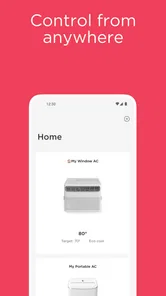
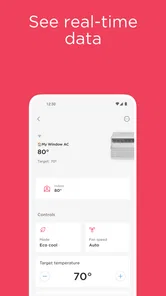
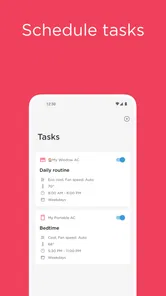
Analysis by Reviewed
I found Frigidaire most useful when I stopped thinking of it as another appliance remote and started treating it as a shared household tool. The Android app is designed for connected Frigidaire appliances, and that distinction matters: its value depends less on the phone itself than on whether the appliances in your home can actually work with it. When they do, it can make ordinary coordination easier, especially in a home where several people need to know what is happening without standing in front of the appliance.
My experience with this kind of setup is that convenience comes from removing small interruptions. Someone can check on a connected appliance while in another room, another person can take over a task, and the household does not have to rely on one person remembering every detail. That sounds modest, but it is exactly where a home-control app earns its place. Frigidaire is free, aimed at Everyone, and comes from AB Electrolux, so it is clearly positioned as a practical companion rather than a specialist tool for technical users.
How Frigidaire fits into a shared home
The most convincing use case is a household with a connected Frigidaire appliance and more than one person involved in daily chores. Imagine one person preparing dinner, another handling laundry or cleaning, and a third person arriving home later. Instead of repeatedly asking whether an appliance has finished or whether someone has already dealt with it, the app can become a common point of reference for the connected equipment.
I would not describe this as a replacement for normal appliance controls. The physical buttons and the appliance itself remain important, particularly when someone is already standing nearby. The app is more valuable at the edges of a task: checking from another room, keeping track of an appliance while doing something else, or coordinating who is responsible for the next step.
That shared-use angle also reveals an important trade-off. A household app is only helpful when everyone understands who is using it and what the app is meant to do. If one person assumes that installing it automatically gives the whole household access, confusion follows. If everyone treats it as a coordinated tool linked to the home’s connected Frigidaire equipment, the experience is much more straightforward.
In practical terms, I would recommend agreeing on a simple routine before inviting several people into the setup. Decide who will perform the initial connection, who needs access afterward, and whether the app is being used mainly for monitoring, day-to-day control, or both. That small conversation prevents a common problem with shared technology: several people making separate assumptions about the same device.
What the first setup feels like
The first step is not choosing a clever automation scheme. It is confirming that the appliance is compatible and ready to be connected. This is where expectations should stay realistic. Frigidaire is not a universal controller for every brand or every older appliance in a home. Its usefulness begins with supported connected Frigidaire equipment, so checking the appliance and its connection process before planning a household workflow is sensible.
More From Our News Desk

 Instagram
Instagram’s Power Comes From Its Place in Your Phone
A close look at how Instagram turns Meta’s reach, recommendation systems and everyday camera habits into durable platform power—and what that costs users.

 Gmail
GmailGmail in a Busy Inbox: Who Benefits Most?
From first account to crowded workday, Gmail earns its place through dependable search and flexible sorting—but its best fit depends on how much inbox maintenance you can tolerate.

 Prime Video
Switching to Prime Video: What Changes in Your Viewing Routine
Prime Video can make a compelling second home for streaming, but switching means learning a different catalog, rental layer, and route from browsing to playback.

 Universal TV Remote Control
Universal TV Remote Control Works Best as a Reliable Backup
A phone remote earns its place through quick setup and reliable habits. Here is how to get more from Universal TV Remote Control—and where its limits show.

 Weather - By Xiaomi
Weather by Xiaomi Review: Clear at a Glance, Less Clear Up Close
Xiaomi’s weather app makes everyday forecasts quick to scan, but its calm surface can leave useful details and recovery paths harder to find than they should be.

 X
XX Under Pressure: Can It Recover When Posting Goes Wrong?
A resilience-focused review of X, examining setup, mistaken posts, interruptions, weak connections, and the gaps that matter when recovery needs to be dependable.
Latest News



I would handle setup with the appliance nearby and enough time to finish the process without rushing. Shared-device arrangements are especially vulnerable to half-completed setup. If one person starts the connection and another later tries to take over without knowing what has already been done, the household may end up repeating steps or wondering which account is actually associated with the appliance.
The app is available as a free House & Home app, and its current version is 4.29. It requires Android 11 or later, which is worth checking before making an older spare phone the household’s permanent control device. A free app can still be inconvenient if the only available phone cannot install or run it.
My practical setup rule is simple: establish one clear primary account boundary first, then add household use around it. I would avoid treating every phone as an independent starting point. The person who owns or manages the appliance connection should understand the arrangement before other household members depend on it.
Account boundaries matter more than people expect
Frigidaire sits close to the physical home, which makes account ownership more important than it might be in a casual entertainment app. The person who sets it up may become the person everyone else turns to when something needs changing. That can be convenient, but it can also create an unnecessary bottleneck if nobody else knows how the household connection is organized.
For a couple or shared home, I would discuss access before installing the app on multiple phones. Decide whether one person will be the main manager, whether another person needs regular access, and how you will handle a change in living arrangements. This is not about inventing controls the app may not have; it is about making sure the people using the appliance understand the account arrangement.
A separate phone profile or a guest-style arrangement should not be assumed to provide a separate layer of appliance authority. The app should be treated as a connected access point, not as a family-management system. If a household needs detailed roles, approval steps, or child-specific restrictions, that requirement may be beyond what this app is intended to provide.
This is also why I would be cautious about installing it on a device that many unrelated people use. A shared tablet on a kitchen counter can be convenient, but it changes the privacy and control conversation. Anyone who can use that device may be able to interact with the app according to the access arrangement already in place. The right choice depends on trust within the home, not merely on whether the tablet is available.
Coordinating chores without creating more work
The best household workflow is usually the least complicated one. I would use Frigidaire to support a task that already exists, not create a new ritual of checking the app constantly. For example, one person can begin a household job, another can check the connected appliance when they are ready to continue, and the first person does not need to remain physically nearby just to keep everyone informed.
A useful habit is to pair app use with a clear verbal handoff. If I start something that another person will finish, I would tell them what I did and what I expect them to check. The app can provide the connected-appliance view, but it should not become the only communication channel in a busy home. A short handoff avoids the assumption that everyone has seen the same screen or understands the same status.
This approach is particularly helpful when household schedules do not match. One person may leave early, another may return late, and a third may only handle chores on certain days. The app can reduce unnecessary interruptions, but it does not remove the need for a shared routine. In my view, the strongest benefit is not remote control by itself; it is the ability to make responsibility easier to pass from one person to another.
There is a subtle limitation here. If the household has no agreed process, a connected appliance can actually produce more questions: Who changed the setting? Did someone already check it? Was the app showing the latest state? Those are coordination problems rather than app problems, but they affect the experience. I would keep the workflow simple and use the app as supporting information rather than as a substitute for household communication.
What younger household members should understand
The Everyone age rating makes Frigidaire suitable in a broad age context, but that should not be confused with giving every child unrestricted responsibility for connected appliances. An age label describes the app’s general audience; it does not decide whether a particular child is ready to control equipment in a real home.
For younger users, I would explain which appliance actions are acceptable and which should be left to an adult. The app may make access feel as easy as tapping a phone, while the physical consequences still belong to the household. A child who can use a smartphone comfortably may not yet understand when a setting should remain unchanged or why a task must be checked in person.
This is where trust and supervision matter. I would begin by letting a child observe the app or help with a routine task, then expand responsibility only when the household is comfortable. I would not assume that the app itself provides child-specific permissions, approval prompts, or a separate supervised mode. If those are essential requirements, a general appliance companion may not be the right tool for that family’s expectations.
Older teenagers and adult housemates are a different case. They may need practical access because they are genuinely sharing chores, but they should still know whose account is connected and what to do if the appliance or app behaves differently from what they expect. Clear boundaries are more useful than pretending that a shared login arrangement is automatically simple.
Where the app is stronger than ordinary alternatives
The usual alternative is to use the appliance directly and rely on memory, messages, or a quick phone call. That approach remains perfectly reasonable for a small home where everyone follows the same schedule. It costs nothing extra, requires no account discussion, and avoids depending on a connected appliance.
Frigidaire becomes more appealing when distance and timing create friction. A connected appliance can be part of a more convenient routine, especially when the person responsible for the next step is not in the same room. Compared with a generic smart-home hub, a manufacturer-specific app is also easier to understand conceptually: it is built around Frigidaire equipment rather than asking the user to combine unrelated brands and services.
That focus is also its main limitation. A generic smart-home platform may be a better fit for someone who wants one place to manage appliances from several manufacturers. Frigidaire makes more sense when the home already relies on compatible Frigidaire equipment and the priority is a direct, brand-specific experience rather than broad cross-brand control.
I would also choose ordinary hands-on operation over the app when the appliance is close, the task is occasional, or the household dislikes connected accounts. There is no benefit in adding a digital layer to a simple action that takes seconds at the appliance. The app earns its keep when it reduces repeated checking or makes shared responsibility clearer.
Everyday friction I would plan around
The first source of friction is dependence on the connected setup. The app cannot make an incompatible appliance connected, and a phone app is not a substitute for the appliance’s own controls. I would keep the normal operating method familiar to everyone in the home, especially for guests or household members who do not use the app regularly.
The second is shared understanding. A person may install the app expecting it to behave like an independent controller, while the household actually needs one coordinated account arrangement. That mismatch can make the product feel unreliable even when the real issue is unclear ownership. Writing down the basic setup details for the household can save time later.
The third is device age. Android 11 is the minimum operating system, so an older phone kept for kitchen or utility-room use may not qualify. This is an easy detail to overlook when the main household phones are newer. I would check the spare device before planning to mount it somewhere as a permanent control screen.
There is also a human limitation: notifications or remote information do not remove the need for judgment. If something looks unusual, the right response may be to inspect the appliance directly rather than repeatedly refreshing the app. I prefer using connected information as a prompt for action, not as proof that every physical detail is fine.
Who should install it and who should skip it
I think Frigidaire is a good match for someone who owns or regularly uses compatible connected Frigidaire appliances and wants a simpler way to coordinate household tasks. It is particularly suitable for couples, housemates, or families who share chores but do not always share the same schedule. The free price also makes it easy to try without committing to another subscription.
I would be more cautious if your appliances are from several brands and you want one combined control center. In that situation, a broader smart-home option may fit better, provided it supports the equipment you own. I would also skip this app if you do not want connected accounts in your home or if everyone is already satisfied with direct appliance controls and normal communication.
It is not the right answer for a household looking primarily for detailed parental controls, complex permission management, or a universal automation platform. Those needs call for a different kind of product. Frigidaire is more focused: it is a companion for connected Frigidaire appliances, not a complete digital operating system for the entire home.
How established it feels in practice
The app has a 4.3 average from around 5.6 thousand ratings, with more than 800 written reviews, and it has passed 100 thousand installs. Those figures suggest that it has a meaningful user base rather than being an obscure experiment, although popularity alone does not guarantee that it will suit a particular appliance or household.
It was released on March 27, 2023, and the current version is 4.29. I see that continuing version history as a reason to approach it as an actively maintained companion rather than a one-time setup utility. Still, I would judge the app primarily by the compatibility and workflow of the appliances in my own home. A well-maintained app cannot compensate for a household arrangement that is unclear or a device that is not supported.
My household verdict
After looking at Frigidaire as a shared-home tool, I would recommend it when the connected appliance is central to a recurring household routine. Its strongest contribution is coordination: fewer unnecessary trips to check an appliance, easier handoffs between people, and a more consistent view of what is happening from a phone.
I would set it up deliberately, keep account responsibility clear, and explain the boundaries to everyone who may use it. I would not present it to children as unrestricted appliance access, and I would not expect it to replace a universal smart-home system. Those limits are important, but they do not cancel the app’s practical value.
My final recommendation is to install Frigidaire when your home already has compatible connected Frigidaire equipment and shared chores are the real problem to solve. For a single user who always operates the appliance in person, the improvement may feel small. For a household that regularly passes tasks between people, the app can turn a scattered routine into a clearer one, provided everyone understands where access begins, who manages it, and when a physical check is still the sensible choice.
Frigidaire Frequently Asked Questions
Is the Frigidaire app free, and which devices can install it?
The Frigidaire app is free to download and is intended for Android and iOS phones. It is a House & Home app from AB Electrolux for managing connected Frigidaire appliances. Check that your phone meets the minimum operating-system requirement before installing. The app is rated for Everyone, so its content rating is suitable for a broad audience.
Can I use the Frigidaire app on my phone?
Yes, the app is designed for use from a mobile phone, letting you manage compatible connected Frigidaire appliances at home. It is available for Android and iOS, but your device must meet the platform’s minimum operating-system requirement. After installing, you can follow the app’s setup steps to connect supported appliances; the controls and information available depend on the appliance and its connected features.
What is the Frigidaire app used for?
The Frigidaire app is designed to help you manage compatible Frigidaire smart appliances from your Android or iOS device. After connecting supported appliances to Wi-Fi, you can check certain settings, receive notifications, monitor appliance status, and use available remote controls. The exact features depend on the appliance model, firmware, region, and whether the product supports Frigidaire’s connected-home services.
Which Frigidaire appliances are compatible with the app?
Compatibility is not universal across every Frigidaire product. The app generally works with selected connected refrigerators, air conditioners, dehumidifiers, ranges, and other smart appliances, depending on the model and market. Before downloading, check the product documentation or Frigidaire’s official compatibility information. You may also need the appliance model number, a compatible wireless network, and the latest version of the app.
How do I connect a Frigidaire appliance to the app?
To connect an appliance, install the Frigidaire app, create or sign in to your account, and follow the in-app setup instructions. Your phone normally needs to be connected to a compatible Wi-Fi network while pairing. You may have to enable Bluetooth, location access, or local network permissions during setup. Keep the appliance nearby, powered on, and ready for Wi-Fi configuration before starting.
Pros
- Simple controls make everyday appliance management easy.
- Useful alerts can help track appliance activity remotely.
- Clean interface is easy to navigate for most users.
- Supports convenient monitoring without being near the appliance.
- Helpful for coordinating household chores and routines.
Cons
- Requires compatible Frigidaire appliances for full functionality.
- Some features may depend on a stable Wi-Fi connection.
- Remote controls can respond slowly at times.
- Initial setup may take several steps and permissions.
- App usefulness is limited if you own appliances from other brands.







