Friday: AI E-mail Assistant
- 326.00
- 4.4
- Installs
- 1.00M
- Price
- Free
Screenshots

Analysis by Reviewed
I’d decide whether to try Friday by looking at the kind of writing that slows me down. If I need a nudge to begin a routine reply, or want help shaping several kinds of text in one place, an AI assistant can be useful. If I mainly need a dependable inbox for reading, filing, and searching messages, I’d start with the email app I already use and ask whether Friday adds a step I actually want.
Choose it for drafting, not blind inbox control
The distinction I’d keep in mind is that writing assistance and email management are related, but not the same job. A prompt-based tool can help turn a rough intention into a readable draft. It does not remove my responsibility to decide whether the message is accurate, appropriately timed, and right for the recipient. I’d consider Friday most promising when the blank page is the obstacle, rather than when the inbox itself needs a complete overhaul.
That makes the app easier to evaluate: test it on a message you already know how to write, and see whether it gets you to a usable version faster. If you spend as long correcting tone or checking details as you would have spent composing the email, it may not be a worthwhile addition to your routine. The goal is not to use AI for every message; it is to find the narrow tasks where a first draft genuinely helps.
A low-risk way to try it in a busy day
Picture a typical workday: you have a short gap between meetings, a few ordinary replies to send, and one follow-up you keep putting off. I’d use a straightforward request for the acknowledgement, then give the follow-up its own prompt with the context, desired tone, and a clear next step. Keeping those requests separate makes it easier to spot when the assistant has mixed up the purpose or added a promise you never intended to make.
For messages that depend on exact facts, I’d draft from notes rather than asking the assistant to supply missing details. I would check names, dates, amounts, and commitments before sending, even when the prose looks polished. This is a particularly useful habit if I’m writing quickly on a phone: fluent text can be easy to skim past, while a small factual error can matter more than an awkward sentence.
I’d also keep a personal “do not delegate” line. A sensitive apology, a delicate disagreement, or a message that requires a nuanced professional judgement may be better written from scratch, with AI used only to check clarity if that feels appropriate. For confidential topics, I would avoid entering identifying details unless I had reviewed the app’s current privacy information and was comfortable with it.
Another practical question is how much editing I’m willing to do. A useful draft is raw material, not a finished decision. If the result routinely sounds unlike me, I’d add concrete instructions—such as “plain language, no enthusiastic opening, one short paragraph”—and see whether that reduces revisions. If it still needs extensive rewriting, that is a sign to reserve the tool for other kinds of tasks.
More From Our News Desk

Weather by Xiaomi Review: Clear at a Glance, Less Clear Up Close

X Under Pressure: Can It Recover When Posting Goes Wrong?

Clash of Clans Is Won Between the Battles

Android Auto Makes the Case for Quieter Car Software

MobiOffice: Transforming Mobile Productivity with Seamless Integration

EA SPORTS FC™ Mobile Soccer: Redefining Mobile Sports Gaming
I recently stumbled upon an app that's been a real game-changer for my email management woes. Say hello to Friday: AI E-mail Assistant. Now, if you're anything like me, drowning in a sea of unread messages and struggling to stay organized, this app might just be your new best friend.
Before you hand over a task to AI
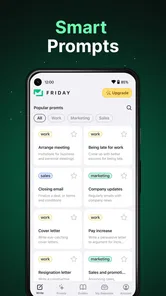
I’d judge an AI writing assistant less by how polished its first draft sounds and more by how easily I can steer it. A useful prompt includes the audience, the purpose, and the tone: “write a brief, friendly reply confirming I’ll send the file tomorrow” gives the assistant more to work with than “reply to this.” I also reread the result for names, dates, promises, and anything that could commit me to something I did not mean to say.
That habit matters especially when an email is sensitive or consequential. I would use an AI draft to get past a blank screen, not as permission to send without checking. For private or confidential correspondence, I’d also think carefully before entering details into any AI tool and review its current privacy information before relying on it.
Transforming Chaos into Order
We all know the dread of opening our inbox only to be met with a barrage of emails that need sorting, responding, or deleting. This is where Friday: AI E-mail Assistant shines. It's like having a personal assistant that works tirelessly to declutter your digital life. The app uses AI to sort through your emails, prioritizing them based on importance and urgency. Imagine having your emails neatly organized without lifting a finger – pure bliss!
Friday is a free productivity app from Players Link, with a 4.5 average from around 38,000 ratings and over 1 million installs. Those numbers suggest it has attracted a sizable audience, but they don’t tell me whether its approach will fit your inbox. The more practical question is whether you want AI help with several kinds of writing, not just email: the app is also presented for essays, stories, and chatbot conversations.
Seamless Integration and Smart Features
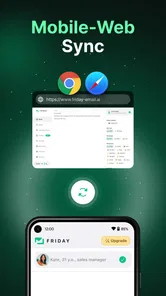
One of the standout features of this app is how seamlessly it integrates with both Android and iOS platforms. Whether you're team Android or an iOS aficionado, Friday has got you covered. It supports a wide range of email providers, ensuring that no matter where your emails are hosted, they can be managed effortlessly. Plus, its smart features are nothing short of impressive. The app learns from your behavior, adapting to your preferences over time. It's like it reads your mind, prioritizing emails just the way you would.
For a practical trial, I’d start with a low-stakes message rather than moving every routine reply to AI at once. Ask for a short response, then compare the draft with your own usual wording. If it sounds too formal, too cheerful, or simply unlike you, add that preference to your next prompt instead of repeatedly editing the same phrases after generation. This small test helps you decide whether the tool saves effort or merely shifts the work from writing to proofreading.
Efficiency at Its Best
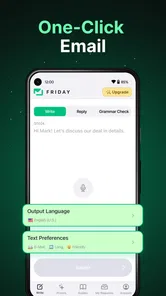
Time is precious, and Friday understands that. The app comes packed with tools to help you respond faster and more effectively. It offers smart replies, email templates, and even scheduling features so you can manage your correspondence without breaking a sweat. The AI assistant suggests contextually appropriate responses, making your life a tad bit easier.
A realistic use is clearing a cluster of ordinary messages between other tasks: ask for a polite acknowledgement, shape a quick follow-up, or get a first draft for an email you have been postponing. I’d give each request one clear job instead of asking for a perfect, all-purpose message. For example, first request a concise draft, then ask for a warmer tone if needed. That keeps the result easier to inspect and avoids accepting confident wording that misses the point.
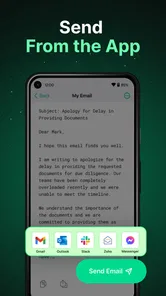
Scheduling can also help separate writing from sending: draft a message when you have a moment, then use the scheduling option when the timing suits. I would still check the recipient and intended send time before relying on it, especially for a time-sensitive reply. The convenience is most useful for routine correspondence; it is less valuable when a message needs careful negotiation, detailed technical accuracy, or a voice that depends on personal context.
What's more, it also offers a comprehensive analysis of your email habits, providing insights into your communication patterns. This is not just an email app; it's a productivity tool that aims to optimize the way you manage your digital correspondence.
A Personal Touch
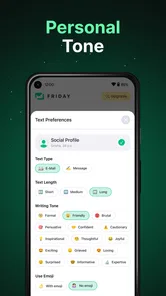
Despite being powered by AI, the app doesn't feel robotic. It's designed to add a personal touch to your emails, ensuring they don't lose that human element. Whether it's suggesting friendly sign-offs or helping you craft a more personalized response, Friday ensures your emails are always on point.
The broader writing angle is a useful distinction when comparing it with a standard email client. A conventional inbox is often the better choice if your main need is reliable message organization and you already like writing replies yourself. A dedicated writing tool may suit someone who wants more control over a long essay or story. Friday makes more sense when you want one place to prompt different kinds of text, but I would not assume that its email assistance replaces every feature or workflow in a full-purpose mail service.
Where the alternatives make more sense
If your main frustration is finding old messages, keeping folders or labels tidy, or coordinating a shared inbox, I’d compare Friday with the features of your existing mail service before changing habits. A conventional email client is built around managing correspondence; an AI writing assistant is most compelling when composing is the bottleneck. The two needs can overlap, but solving one does not automatically solve the other.
For long-form work, a writing-focused tool may be the better fit if you need to build a sustained argument, revise a story over several passes, or carefully manage a document. Friday’s range of writing purposes is appealing for variety, but I would test it on a short, low-stakes piece before making it part of a larger project. Different tasks call for different levels of control, and a fast first draft is not always the same as a reliable finished text.
Someone who writes mostly personal messages and enjoys doing so may not gain much from another app. Likewise, if your workplace has strict rules about where business information can be entered, follow those rules rather than experimenting with AI on real correspondence. The sensible alternative in those cases is to stay with your approved tools and write the message yourself.
There is a trade-off in switching, too. If you already have a settled routine in your mail app, adding another writing step can feel like friction rather than relief. Try it first on messages you can easily review, and keep your existing inbox habits until you know which prompts consistently help. That way, you can judge the quality of the drafts without making the whole day’s correspondence depend on a new workflow.
What to check before making it a habit
One question I’d answer early is whether the free starting point is enough for my actual use. Friday has in-app purchases, with items ranging from $4.99 to $99.99, so I’d inspect the purchase details in the app before paying and decide what I need from it first. I would not treat a paid option as worthwhile just because I use the assistant occasionally; I’d want to see that it removes a recurring annoyance.
Compatibility is another simple check. The app is rated for Everyone and its Android requirements begin at version 7.0, while the current release is 1.1.21. It was released on February 22, 2023, and has 308 written reviews. I’d treat its rating and reach as useful context, not a guarantee that every generated message will need little editing.
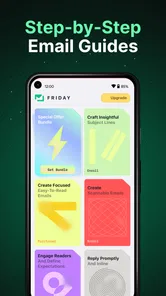
Before relying on it for a routine, I’d test a few different prompts: one brief reply, one message that needs a particular tone, and one piece of non-email writing. That gives a better sense of whether its broad scope is useful to me than repeatedly trying the same request. I’d also keep a note of which instructions lead to drafts I can actually use; a small prompt library can make repeated tasks quicker without surrendering judgement over the final wording.
Overall, Friday: AI E-mail Assistant is a breath of fresh air for anyone overwhelmed by their inbox. Its intuitive design and smart features make email management a breeze. So, if you're ready to take control of your inbox and boost your productivity, give Friday a whirl. You might just find that it's the email assistant you never knew you needed.
My recommendation is to try it if you regularly need help getting a first draft onto the screen, especially when email is only one of several writing jobs you want assistance with. It may be a poor fit if you expect completely hands-off inbox management, need every message to sound unmistakably like you without review, or prefer to keep sensitive writing out of AI tools. Start small, compare its drafts with your own, and keep it only if the time saved outweighs the checking and editing.
Friday: AI E-mail Assistant Frequently Asked Questions
Does Friday: AI E-mail Assistant have a good user rating?
Friday: AI E-mail Assistant has an average rating of 4.5 from around 38,000 ratings, with around 300 written reviews. That offers a useful snapshot of how people respond to the app, though individual experiences can differ depending on which writing tools they use and what they expect from an AI assistant. It has passed one million installs.
Who develops Friday: AI E-mail Assistant, and when was it released?
Friday: AI E-mail Assistant is developed by Players Link and was released in February 2023. Knowing the developer and release period can help you identify the app when browsing similar AI writing tools. Its current version is 1.1.21, so check that your device can run the version available to you before downloading.
Is Friday: AI E-mail Assistant suitable for younger users?
The app is rated Everyone, so its content is considered suitable for a broad audience. Friday: AI E-mail Assistant offers AI writing tools for email, essays, stories, and chatbot conversations, which may be useful for different kinds of users. As with any writing assistant, parents and users should consider whether AI-generated content is appropriate for their particular needs.
Is Friday: AI E-mail Assistant free to download, and are there optional purchases?
Friday: AI E-mail Assistant is free to download, so you can try the app without paying upfront. It also offers in-app purchases, with items ranging from around five dollars to around one hundred dollars. Check the purchase details in the app before choosing an option, and consider whether its paid features suit your needs.
What devices can run Friday: AI E-mail Assistant?
Friday: AI E-mail Assistant is a productivity app for Android, and it requires Android 7.0 or later. Before downloading, check your device’s Android version and available storage. The app is rated for Everyone, making its content suitable for a broad audience, though individual users should still decide whether its AI writing tools fit their needs.
Pros
- Efficiently organizes email threads.
- Quickly drafts email responses.
- Seamless integration with email clients.
- User-friendly interface for easy navigation.
- Enhances productivity with smart suggestions.
Cons
- Requires internet connection to function.
- Limited customization options.
- Occasional AI misinterpretations.
- Subscription needed for premium features.
- May not support all email providers.











