Freedom: App & Website Blocker
- 818.00
- 4.5
- Installs
- 1.00M
- Price
- Free

Screenshots
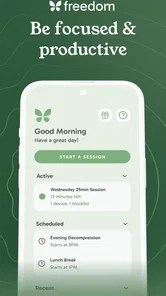
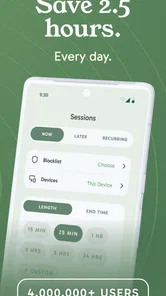

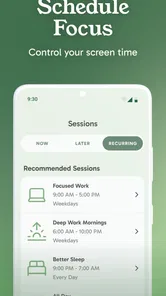
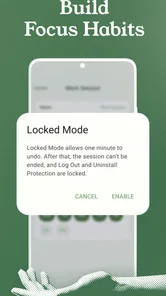

Analysis by Reviewed
I approached Freedom: App & Website Blocker as a practical productivity tool rather than a dramatic “digital detox” solution. Its purpose is straightforward: help me put distance between myself and distracting apps or websites so that a planned task has a better chance of getting done. That makes it especially relevant when the problem is not a lack of motivation, but the ease of opening the same distracting service whenever work becomes slightly uncomfortable.
Freedom is a free productivity app from Eighty Percent Solutions Corporation, available for users who want to manage screen time on a phone or tablet. It is rated for Everyone, so its basic idea is accessible to a broad audience. The app has reached over a million installs and holds a 4.5 average from around eight thousand ratings, which suggests that its approach is useful to many people, although the experience still depends heavily on how honestly and carefully I configure it.
What Freedom feels like in everyday use
The important thing to understand before installing it is that Freedom is not mainly a task manager, note-taking app, or calendar replacement. It does not tell me what to work on. Instead, it helps remove selected temptations while I work, study, read, sleep, or spend time with other people. That narrower purpose is also its strength: I can keep my existing planning system and use Freedom as the barrier between intention and impulse.
A realistic example is an afternoon when I need to write a report. I already know the assignment and have the necessary files open, but I keep checking social feeds and entertainment sites whenever I reach a difficult paragraph. I can create a session that blocks those particular distractions, then return to the report without relying on repeated self-control. The meaningful success is not simply starting a session; it is finishing a defined piece of work before the usual interruptions take over.
I found that the app works best when I treat blocking as a commitment made in advance. If I wait until I am already distracted, I am more likely to choose an overly broad or poorly planned setup. A short, specific session for one task is often more useful than an ambitious attempt to control every aspect of my phone for an entire day.
The app’s store positioning focuses on blocking apps and websites, improving productivity, and controlling screen time. In practice, those goals overlap but are not identical. Blocking can create a quiet environment, yet it cannot decide whether I use that quiet well. If I replace social media with aimless browsing elsewhere, the tool has done its part but my workflow has not improved. That distinction is worth keeping in mind from the beginning.
Starting without making the setup harder than it needs to be
After installation, I would begin with one clearly defined distraction rather than trying to build a perfect system immediately. Think about the behavior that most often breaks concentration: checking a particular app, visiting a familiar website, or opening entertainment during study time. Choosing a small target makes the first session easier to judge and reduces the chance that useful services become inconveniently unavailable.
More From Our News Desk

Weather by Xiaomi Review: Clear at a Glance, Less Clear Up Close

X Under Pressure: Can It Recover When Posting Goes Wrong?

Clash of Clans Is Won Between the Battles

Android Auto Makes the Case for Quieter Car Software

MobiOffice: Transforming Mobile Productivity with Seamless Integration

EA SPORTS FC™ Mobile Soccer: Redefining Mobile Sports Gaming
The current version is 7.14.1, and the app supports devices running Android 7.1 or later. That makes it suitable for many older Android devices as well as newer ones, though practical behavior can still vary with the device and operating system. I would check the app’s requested access during setup carefully and read each permission or system prompt instead of tapping through automatically. A blocking tool needs enough system access to do its job, so understanding what I am enabling is part of making a comfortable decision.
Freedom is listed as free, but it also includes in-app purchases ranging from $12.99 to $199.99 per item. I would therefore explore the basic experience before assuming that every planning option is included without charge. The price range is broad enough that anyone considering an upgrade should inspect the exact offer shown in the app and decide whether the additional commitment matches their routine.
My preferred first setup would be a single work period with a short list of known distractions. I would avoid blocking communication tools if I might need an urgent message, and I would not include a website that is genuinely required for research. This is one of the less obvious parts of using a blocker: the quality of the list matters more than the size of the list. A careless setup can create frustration and teach me to distrust the app.
It is also useful to decide what “success” means before starting. For a student, it might be completing a reading section. For a remote worker, it could be drafting a document without checking unrelated sites. For someone trying to sleep, success might simply mean leaving the phone alone for a planned period. A concrete result gives the session a purpose and makes it easier to adjust later.
The first session should prove one useful point
For a first meaningful test, I would choose a task that takes long enough for distraction to appear but is not so large that failure feels inevitable. I might set aside time to answer a batch of important emails, outline an article, or study a specific chapter. Then I would block only the apps and websites that repeatedly pull me away from that task.
Once the session begins, I would put the phone in its normal working position and start the task immediately. The goal is to notice the moment when the automatic habit would usually happen. If I reach for a social app and find that it is unavailable, that pause is valuable. It gives me enough time to return to the document or book instead of following the impulse without thinking.
The first win is not a perfectly distraction-free day; it is one completed task that would normally have been interrupted. That is a more realistic way to judge Freedom. If I finish the planned work and feel less scattered, the app has earned a place in my routine. If I simply become annoyed because I blocked something essential, I should revise the session rather than conclude that all blocking is ineffective.
One practical tip is to prepare the work area before activating the block. Open the document, gather the references, fill a glass of water, and decide what the first small action will be. This prevents me from using the setup period as another form of procrastination. The blocker can remove certain exits, but it cannot remove every excuse.
Another useful habit is to write down the next action before the session starts. “Work on project” is vague and easy to abandon. “Draft the opening paragraph” or “review the first two pages” gives me somewhere specific to go when the blocked app is no longer available. This makes Freedom part of a workflow instead of a standalone act of restriction.
Where new users often become confused
The first common confusion is expecting a blocker to behave like a universal lock on the entire device. Freedom is more selective and works according to the apps and websites included in the session. If a distraction was not chosen, I should not be surprised to find that it remains available. That is not necessarily a failure; it may simply mean that my list needs to reflect the way I actually browse.
The opposite problem is blocking too much. If I include tools needed for two-factor authentication, navigation, work communication, research, or family contact, the session can feel like an obstacle rather than support. I prefer to make a “minimum effective block”: the smallest collection of distractions that changes my behavior. After a successful session, I can add another item only if I notice a specific recurring escape route.
Website behavior can also feel less predictable than app behavior because people reach the same service through different paths. A user may open a site directly, through a search result, or inside another app’s built-in browser. I would test the sites that matter to me before relying on Freedom for an important deadline. A short trial reveals whether the setup matches my actual habits.
There is another subtle issue: blocking a service does not automatically block the emotional reason I wanted it. If I am tired, uncertain, or avoiding a difficult decision, I may look for a different distraction. That is why I find the app more effective when paired with a simple fallback activity, such as a printed outline, a timer from another device, or a short list of easy next steps.
Users should also distinguish between a session that prevents casual checking and a system designed for strict accountability. Freedom can make an unwanted action less convenient, but the exact level of resistance depends on the device, the selected targets, and the way the session is configured. Anyone who needs an extremely rigid environment should test the app under their real conditions instead of assuming that the strongest possible restriction will suit every device.
Building a routine instead of collecting blocked lists
Once the first session works, I would create separate patterns for different parts of the day rather than one enormous list. A study setup may need to block entertainment and social browsing, while a writing setup may need to leave research sites available. An evening setup could focus on the services that keep me awake. Separating these situations makes each session more precise and lowers the risk of blocking something useful at the wrong time.
The trade-off is convenience. A detailed system takes more thought at the beginning, while a broad block is quicker to create. I prefer the detailed approach when the same task happens regularly because it reduces decisions later. For occasional work, a small manual session may be enough. Freedom is most valuable when its configuration mirrors a real pattern in my life rather than an idealized schedule I rarely follow.
A non-obvious benefit is that reviewing failed sessions can reveal the shape of a distraction habit. If I repeatedly leave the planned task to visit a service that was not on my list, that is useful information. I can either add it to the next session or decide that it is a legitimate resource and redesign the task around it. The app becomes a way to observe my behavior, not just suppress it.
I would also avoid changing the setup every few minutes. Constantly editing a session can become another form of avoidance, especially when the work is difficult. A better approach is to note the problem, finish or stop the current attempt, and make a considered adjustment before the next session. That small delay helps separate a genuine need from a convenient excuse.
For people who share devices or need to remain reachable, a selective approach is especially important. Blocking entertainment while leaving essential communication available may be more sustainable than attempting total isolation. For parents, the Everyone age rating makes the app broadly approachable, but the right configuration still depends on the individual child, device, and household expectations. I would use it as one part of a conversation about screen habits, not as a substitute for supervision.
How it compares with ordinary alternatives
Android’s built-in digital wellbeing controls can already show usage patterns and offer basic limits, so they may be enough for someone who only wants a quick reminder or a simple daily boundary. Freedom is more appealing when I want a dedicated productivity layer centered on planned blocking rather than general device statistics. The advantage is focus; the disadvantage is adding another app and another setup to maintain.
Browser extensions are useful for people who work almost entirely at a computer and only need to manage websites in one browser. They become less convenient when distractions move between a phone, tablet, and computer. Freedom makes more sense for someone whose habit is spread across several app and website destinations, provided the selected device support and behavior fit that person’s setup.
Manual self-control costs nothing and has no compatibility questions, but it also leaves every tempting shortcut immediately available. I would not claim that Freedom replaces discipline. Instead, it changes the environment so that discipline is needed less often. That is a meaningful difference during repetitive work, though it cannot solve poor planning, exhaustion, or a task that has never been broken into manageable steps.
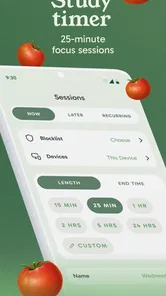
Dedicated focus timers may be better for users who mainly need a visible work-and-rest rhythm. Freedom is the better match when the central problem is access to specific distractions. Someone who wants detailed task planning, habit journaling, or deep analytics may prefer a broader productivity suite and use a blocker alongside it. I see this app as a focused instrument, not an all-in-one personal operating system.
Who should use it, and who should look elsewhere
I would recommend Freedom to students, writers, remote workers, and anyone who notices a predictable pattern of opening distracting services during important tasks. It is also useful for people who want a deliberate transition into reading, exercise, family time, or sleep without relying on a sudden burst of willpower. The free entry point makes it reasonable to test before deciding whether the workflow deserves further investment.
I would be more cautious if my work depends on constantly changing websites or urgent communication. A blocker can become counterproductive when I need to react quickly to legitimate requests. I would also skip it if I dislike configuring lists and sessions, because the app’s results depend on that preparation. Someone seeking a complete replacement for a planner, timer, habit tracker, or screen-time dashboard will probably find the experience too narrow.
The in-app purchase range also deserves attention. A person who only needs occasional blocking may not want to commit to a higher-priced option, while someone who relies on structured sessions may consider the upgrade worthwhile. I would make that decision after a real trial, not from the promise of becoming productive simply by installing the app.
My recommendation after using the approach
Freedom: App & Website Blocker is at its best when I use it with a modest promise: protect one important period, complete one clearly defined task, and learn from what happens. Its strongest quality is the way it interrupts automatic checking before that habit turns into a long detour. Its main weakness is equally clear: a badly chosen block can interfere with useful work, while a weak block can leave an easy escape route.
The developer, Eighty Percent Solutions Corporation, has positioned this as a practical productivity app rather than a replacement for every other tool in my routine. That feels accurate. I would install it for a specific problem, begin with a narrow session, test the sites and apps I genuinely need, and expand only after the first success. That path is reassuring because it does not require me to redesign my entire life around the app.
With a 4.5 average and more than a million installs, it has clearly found an audience, but those figures should not replace a personal trial. My recommendation is strongest for people who already know which digital habits are costing them time. If you can name the distraction, define the task, and accept a few minutes of setup, Freedom can provide a useful layer of friction. If you need detailed planning or total device control, another category of tool may serve you better.
For a first-time user, I would start today with one short work session, one realistic goal, and only the distractions that repeatedly derail it. Finishing that goal will tell you far more than creating an impressive list of blocked services. In my experience, that is where the app becomes genuinely helpful: not when it promises perfect focus, but when it gives an ordinary task enough protected space to finally get done.
Freedom: App & Website Blocker Frequently Asked Questions
Who is Freedom: App & Website Blocker best suited for?
Freedom may suit students, remote workers, and anyone who finds it difficult to stay away from distracting apps or websites. Its focus is on helping people create boundaries around digital habits, rather than replacing a task manager or other work tools. If you want a way to reduce interruptions during focused activities, its blocking approach may be worth considering.
What is Freedom: App & Website Blocker used for?
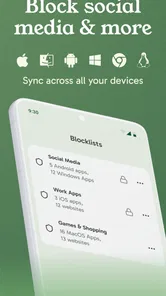
Freedom is a productivity and digital-wellbeing app designed to reduce distractions by blocking selected websites and applications on your devices. After creating a blocklist, you can start a session for a chosen period and prevent access to services such as social media, streaming platforms, news sites, or games while you work, study, read, or sleep.
Which devices and platforms does Freedom support?
Freedom is built for people who use multiple devices, and it can generally be used across supported Android, iOS, Windows, macOS, and Chrome environments. Availability and blocking behavior may differ by platform, so it is worth checking the current store listing and official compatibility information before downloading. A single account can help synchronize sessions where supported.
Can Freedom block both apps and websites?
Yes, Freedom can block websites and, on supported devices, distracting applications as well. You can usually create customized blocklists instead of applying one universal restriction to everything. This makes it possible to block social networks during working hours while leaving essential tools, communication apps, or reference websites available when you still need them.
Can I stop a Freedom session once it has started?
Freedom includes session controls intended to make blocking harder to bypass, but the exact options depend on the device and session settings. Some sessions may be ended or adjusted, while locked sessions are designed to remain active until the scheduled time finishes. Because operating-system permissions and app limitations vary, users should review the available lock features before relying on it for strict control.
Pros
- Blocks distracting apps and websites across multiple devices.
- Custom schedules make it easy to protect work
- study
- or sleep time.
- Lock Mode adds extra resistance against changing an active block.
- Usage insights help identify recurring distraction patterns.
- Clean interface makes creating blocklists quick and straightforward.
Cons
- Some advanced features require a paid subscription.
- Certain blocking functions may vary between Android and iOS.
- Determined users may find ways around restrictions on some devices.
- Setup can take time if you need detailed rules for many apps.
- Strict blocks may interrupt useful websites or apps unexpectedly.











