FPE OC Maker: FPE Stickers
- 71.00
- 3.7
- Installs
- 1.00M
- Price
- Free
Screenshots
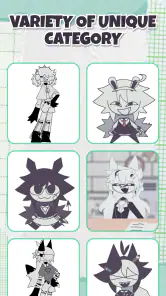
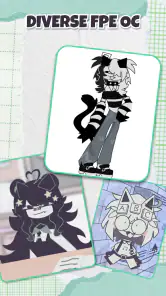
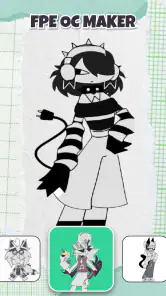
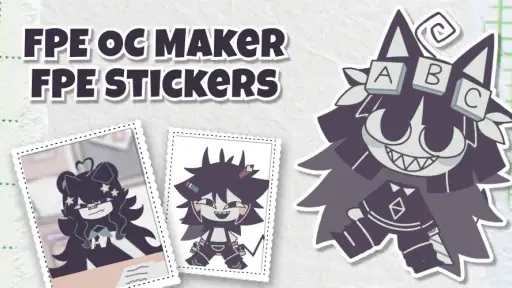
Analysis by Reviewed
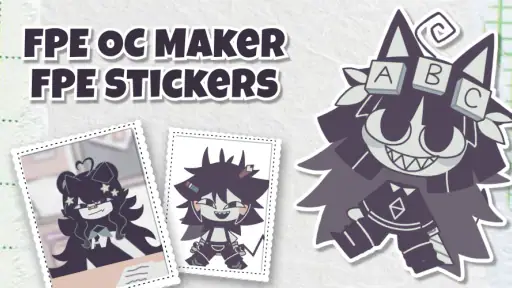
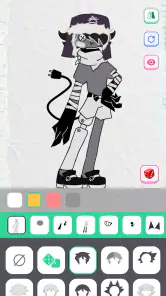
I approached FPE OC Maker: FPE Stickers as a quick creative tool rather than a full illustration studio. It is an art and design app from Revivoskin that focuses on making FPE-style original characters and stickers with a paper-like cartoon look. That narrow purpose is also its appeal: instead of opening a complicated drawing program and starting with a blank canvas, I can work toward a recognizable character idea much more directly.
The app is free, suitable for Everyone, and available for devices running Android 7.0 or later. Its current version is 1.1.9, and the app has passed one million installs, so it is clearly reaching people who want this particular kind of character creator. The average rating sits at 3.7 from around 1.3 thousand ratings, with roughly 71 written reviews. To me, that combination suggests a useful but not universally polished experience: plenty of people find the concept worthwhile, while the rating also encourages realistic expectations.
How the creative workflow feels in everyday use
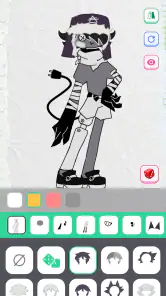
The first thing I noticed is that the app makes more sense when I treat it as a character-planning desk than as a replacement for a professional drawing application. I can begin with the broad identity of a character, make visual choices, and gradually turn a loose idea into something shareable. That is especially handy when I want to sketch out an original character for a story, a profile image, a chat sticker, or a small collection of matching designs.
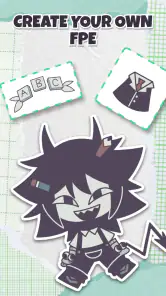
A practical example would be creating a character for a group chat. I might start with a simple personality in mind—quiet, mischievous, dramatic, or cheerful—and use the creator to build a visual version without spending an hour drawing every line manually. Once the main character feels right, I can think about how the same design would work as a sticker: a clear pose, an expressive face, and a silhouette that remains readable when viewed small. That change in mindset is important because a good sticker is not merely a detailed character reduced in size.
The strongest part of the experience is the reduction of creative friction. I do not need to know advanced anatomy, layers, brush settings, or color theory before I can make something recognizable. The paper-style cartoon direction gives the results a consistent visual identity, which is useful when I want several characters to look as though they belong to the same set.
That consistency is also a trade-off. If I want a completely personal art style, unusual proportions, highly detailed clothing, or precise control over every mark, a conventional drawing app will usually be the better choice. FPE OC Maker is more effective when I accept its visual language and build within it. The app helps me make a certain kind of result; it is not designed to be an unrestricted canvas.
Speed expectations when starting a new character
For this type of app, perceived speed is less about raw processing and more about how quickly I can move from an idea to a usable result. A focused character creator should feel faster than a general illustration app because it removes many decisions that would otherwise slow me down. I can concentrate on the character itself instead of setting up a document, selecting a brush, and constructing every feature from scratch.
More From Our News Desk

Clash of Clans Is Won Between the Battles

Android Auto Makes the Case for Quieter Car Software

MobiOffice: Transforming Mobile Productivity with Seamless Integration

EA SPORTS FC™ Mobile Soccer: Redefining Mobile Sports Gaming

How Microsoft OneDrive Became a Mobile Productivity Giant

How Google Translate Breaks Language Barriers Effortlessly
That makes the app a good fit for short creative sessions. If I have a few minutes while waiting for an appointment or want to test a character concept before committing to a larger drawing, the paper-style approach feels more approachable than a blank illustration page. I would not choose it for a long, detailed art session where the pleasure comes from drawing each element manually.
My advice is to decide on the character’s role before opening the creator. Think about whether the design is meant to be cute, funny, mysterious, or expressive, and choose visual elements with that purpose in mind. This avoids repeatedly changing unrelated details. It also helps to preview the character at a smaller size during the process, because a design that looks balanced up close may lose its expression when used as a sticker.
Another useful workflow is to make a basic version first and refine it only after the overall silhouette works. Beginners often spend too much time on small decorative choices before checking whether the character is readable. With this app, the broad outline and facial expression matter more than tiny details, particularly if the final use is a sticker or profile image.
What happens during heavier creative sessions
The app’s simple purpose should make it less demanding than a full digital art suite, but a longer session can still become more involved than the store summary suggests. Creating one character is different from building a coordinated group, experimenting with several expressions, or preparing multiple sticker ideas. The more variations I make, the more important it becomes to keep a clear naming and saving routine outside the creative process.
For a larger project, I would work in batches. First I would settle on the main character design, then create related expressions or poses, and only afterward decide which versions are actually worth keeping. This prevents a common problem with character makers: generating many slightly different results without a clear visual system. A small set of purposeful stickers is usually more useful than a large set of near-duplicates.
Heavy use also exposes the limits of a focused creator. If I want to combine several characters into a complex scene, add a custom background, retouch edges precisely, or prepare professional print artwork, I would move the result into a more capable art tool. FPE OC Maker works well as the first stage of that process, but I would not make it the only stage for demanding projects.
Before a long session, I would keep the device reasonably clear of unnecessary background activity and avoid switching constantly between several demanding apps. I am not claiming a specific memory requirement or measured performance result; the sensible point is simply that any creative workflow becomes easier when the device is not already overloaded. Short, focused sessions are likely to feel more comfortable than treating the app as a full-day production environment.
Reliability, interruptions, and recovering your work
Reliability matters more in a creator than it may seem. Losing a casual experiment is annoying, but losing a carefully developed character or a whole sticker set is much worse. I therefore recommend treating each finished design as something to preserve promptly rather than assuming an unfinished project will always be available exactly as I left it.
A cautious workflow is to complete one meaningful stage at a time, save or export whenever the app offers that option, and avoid closing it immediately after making a major change. If I am experimenting with a character, I would first secure a satisfactory base version before trying more radical variations. That way, an unwanted change or an interrupted session does not force me to rebuild the whole idea.
Recovery is also easier when I keep the creative process organized. I would use descriptive names for saved outputs if the app supports naming, and I would keep the strongest version separate from experiments. For sticker work, I would also inspect the final image before sharing it: check the expression, the edges, and whether the design still communicates clearly at a small size. These habits are useful because the app’s convenience may encourage quick, repeated experimentation.
I would be especially careful before uninstalling the app, clearing its storage, or moving to a new device. Creative applications do not all handle local work in the same way, so I would preserve any important finished images externally before making those changes. This is not a criticism unique to Revivoskin; it is a basic precaution whenever an app contains personal creative work.
Device constraints and who will enjoy it most
Because the minimum requirement is Android 7.0, the app is accessible to people using older Android devices as well as newer phones and tablets. That broad compatibility is helpful for casual creators who do not want to replace a working device just to try a character maker. Still, the operating-system requirement alone does not guarantee the same experience on every phone. Screen size, available storage, memory, and the general condition of the device can affect comfort during longer sessions.
On a smaller screen, detailed character choices may feel cramped, especially if I am trying to judge subtle differences in facial expression or clothing. A larger display can make the creative process easier to inspect, but it is not essential for simple designs. The app’s focused visual approach means I can still use it casually on a phone, which is one reason it suits spontaneous ideas better than a desktop-oriented art program.
I would recommend it to younger creators, fans of paper-like cartoon aesthetics, and anyone who wants to make an original character without learning a complete illustration toolkit. It can also be useful for writers and role-players who need a visual reference for a character, or for someone who wants a themed set of personal stickers rather than generic images.
I would skip it if my main goal is professional illustration, frame-by-frame animation, detailed photo editing, or exact control over exported artwork. I would also look elsewhere if I dislike template-driven creation or want every visual element to be drawn from nothing. In those cases, a dedicated drawing app offers more freedom, while a conventional sticker editor may be better for adding text, photos, and custom graphics.
How it compares with ordinary alternatives
Compared with starting in a blank drawing app, FPE OC Maker is more welcoming. A general art app gives me a larger toolbox, but that flexibility can become a burden when I only want a character concept. I spend less time configuring the workspace here and more time making decisions about the character’s appearance and mood.
Compared with a standard avatar maker, the app’s appeal is its specific paper-style cartoon direction and its connection to FPE-style character creation. A typical avatar tool may be better for a polished social profile portrait or a realistic-looking person, while this app is more suitable when I want a playful, illustrated identity. The choice depends on whether style consistency matters more than broad customization.
Compared with a sticker-design app, this creator appears better suited to developing the character itself. A sticker editor may offer stronger tools for typography, image arrangement, or combining several assets, but it may not provide the same focused starting point for an original cartoon character. I would use FPE OC Maker to establish the character and another tool only when the final sticker needs extra layout work.
The free price makes that comparison easier because I can try the focused workflow without first committing to a purchase. At the same time, free access does not automatically make it the best option for everyone. The real value depends on whether I want this particular style and simplified process. If I do, it can save time; if I do not, the narrower design approach may feel restrictive very quickly.
Small decisions that improve the final result
One of my most useful tips is to design for the final viewing size from the beginning. Stickers are often seen quickly and at a small scale, so a strong outline, a clear face, and one dominant visual idea usually matter more than adding many competing details. I would test the character as a thumbnail before deciding that it is finished.
I would also build a visual rule for a group of characters. Repeating one element—such as a shared mood, a similar proportion, or a consistent color direction—can make separate creations feel connected. The app’s paper-style look already provides a common foundation, so I would use that consistency rather than fighting it with overly complicated designs.
A third tip is to separate experimentation from final production. Make unusual versions freely, but keep a clean base character that can be reused as the starting point for expressions or sticker ideas. This is more efficient than changing the only copy repeatedly. It also makes it easier to compare options honestly, because each variation begins from the same foundation.
Finally, I would judge the result by its intended use instead of by how much work went into it. A simple character can be successful if it communicates personality immediately. A more elaborate design can fail if the face becomes unreadable or the silhouette becomes visually crowded. That is where the app’s limitations can become an advantage: they encourage me to focus on the recognizable parts of the character.
My performance verdict
After considering the app as a practical creative tool, I see it as a lightweight entry point for FPE-style original characters and stickers, not as a complete art workstation. Its focused workflow should appeal to people who value quick visual experimentation, while its consistent paper-like appearance gives a set of creations a shared identity. The broad Android compatibility and free price make trying it straightforward.
The rating of 3.7 is a useful reminder to keep expectations balanced. I would approach it for its specific purpose rather than expecting professional-grade control, unlimited artistic freedom, or a replacement for every other design tool. During ordinary short sessions, that focused purpose is likely to matter more than advanced production features. During heavier projects, I would protect finished work carefully and be ready to use another app for polishing or final composition.
My recommendation is simple: if you want to turn character ideas into playful, sticker-ready designs without facing a blank canvas, Revivoskin’s creator is worth exploring. If you need precision, complex scenes, or a fully custom drawing workflow, choose a dedicated illustration app instead. For the right user, the best reason to install it is not maximum power but minimum creative hesitation.
FPE OC Maker: FPE Stickers Frequently Asked Questions
What should I know about the app before downloading it?
FPE OC Maker: FPE Stickers is an Art & Design app from Revivoskin for creating FPE-style characters and stickers with a simple paper-style cartoon creator. It is free, has an Everyone content rating, and requires Android 7.0 or later. The app is currently at version 1.1.9, so check that your device meets the system requirement before installing.
What is FPE OC Maker: FPE Stickers used for?
FPE OC Maker: FPE Stickers is a character-creation and sticker-making app designed for users who enjoy building original characters and expressing them in a recognizable FPE-inspired style. You can usually combine visual elements such as hairstyles, faces, clothing, accessories, colors, and poses, then turn your creations into images or stickers for personal use and sharing.
Is FPE OC Maker: FPE Stickers free to download and use?
The app is free to download. The exact experience can depend on the platform version and the developer’s current monetization choices. Some content, tools, advertisements, or optional upgrades may be restricted. Before installing, check the Google Play Store or App Store listing for in-app purchases, subscription information, supported devices, and any regional limitations.
Can I create my own original characters without drawing skills?
Yes. The app is aimed at users who want to design characters through selectable and customizable elements rather than drawing everything from scratch. Its layered approach can make character creation accessible to beginners, including people who are unfamiliar with digital art. However, the amount of customization may vary, so users seeking advanced illustration tools should not expect a full professional drawing application.
Can the stickers or characters be saved and shared on social media?
Created characters and stickers can generally be exported or saved as images, depending on the features enabled in the installed version. Once saved to your device, they may be shared through messaging apps, social networks, or other compatible services. You should review the app’s storage and photo permissions, and avoid sharing personal information or using copyrighted material in ways that violate platform rules.
Pros
- Simple tools make creating custom FPE-style stickers quick and accessible.
- Sticker designs can be personalized with different characters
- poses
- and expressions.
- Useful for fans who want to make original content inspired by the FPE universe.
- Lightweight editing experience works well for short
- casual creative sessions.
- Finished creations can be saved for later sharing or personal use.
Cons
- Customization options may feel limited for users wanting advanced editing controls.
- Some sticker elements may require patience to position and combine neatly.
- The app’s niche theme may not appeal to users unfamiliar with FPE content.
- Export or sharing options may depend on the device and installed social apps.
- Ads or optional purchases could interrupt the creation process for some users.
- Category
- Art & Design
- Version
- 1.1.9