Dreamcore & Weirdcore Maker
- 62.00
- 3.0
- Installs
- 1.00M
- Price
- Free
Screenshots
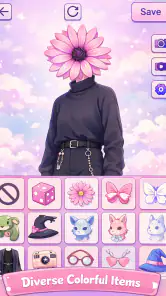
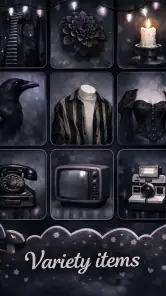
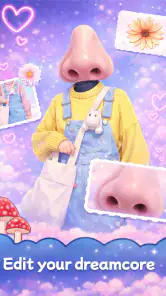
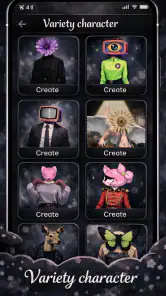
Analysis by Reviewed
I opened Dreamcore & Weirdcore Maker expecting a quick way to turn a simple idea into a strange, dreamy character, and that is exactly the kind of experience it aims to provide. This free Art & Design app from Revivoskin focuses on fantasy avatars rather than general illustration, so the starting point is refreshingly clear: you want a profile image, mood-board character, social post, or surreal visual without building everything from a blank canvas.
My first impression was that the app works best when I treat it as a visual playground, not as a full drawing studio. The appeal is in combining an unusual atmosphere with a character concept and then deciding whether the result feels charming, unsettling, nostalgic, or deliberately odd. That narrow purpose gives it personality, although it also means people looking for detailed painting tools or professional graphic design controls may quickly reach its limits.
The app is listed for Everyone and is free to use. It runs on Android 7.0 or later, and the current version is 1.0.9. Revivoskin has already attracted over one million installs, while its average rating sits at 3.0 from around one thousand ratings and 62 written reviews. I would read that combination as a sign of broad curiosity rather than universal satisfaction: plenty of people are willing to try the concept, but the experience may not suit every workflow.
From a vague mood to a finished avatar
Starting with the right kind of idea
The easiest way to get value from this app is to begin with a specific feeling instead of a technical brief. “Make a good avatar” is too open-ended and can lead to random choices. “A lonely character in a soft, dreamlike world” or “a cheerful figure with an unsettling visual twist” gives me a much better direction. The app’s dreamcore and weirdcore focus is strongest when I already know the emotional contrast I want.
For example, I can imagine using it before changing a social profile picture. I might want something recognizable as a character but less ordinary than a standard selfie or polished cartoon portrait. Rather than searching through unrelated avatar makers, I can begin with the atmosphere I want, experiment with fantasy details, and stop once the image communicates that mood at a glance.
This is also useful for a small creative handoff. A writer could create a rough visual for a character, then send it to an artist as a reference for tone rather than as a finished design. A short-form video creator could use the result as a thumbnail starting point. Someone making a digital scrapbook could produce a visual that matches a page about dreams, memory, isolation, or surreal humor. In each case, the output is most useful as a concept or identity piece, not as a replacement for a carefully illustrated commission.
Building the first version without overthinking it
My practical advice is to make the first avatar quickly. Choose a broad visual direction, adjust the character until the silhouette and mood feel right, and resist the urge to perfect every detail immediately. Dreamlike art often becomes less effective when every element is made equally loud. A single strange feature can carry more personality than a screen full of unrelated decorations.
More From Our News Desk

Clash of Clans Is Won Between the Battles

Android Auto Makes the Case for Quieter Car Software

MobiOffice: Transforming Mobile Productivity with Seamless Integration

EA SPORTS FC™ Mobile Soccer: Redefining Mobile Sports Gaming

How Microsoft OneDrive Became a Mobile Productivity Giant

How Google Translate Breaks Language Barriers Effortlessly
I would also create a deliberately plain first attempt. That gives me a reference point for judging later changes. If the character becomes more interesting after a few adjustments, I know which decisions helped. If it starts to look crowded, I can return mentally to the simpler version instead of adding even more elements to solve the problem.
The most useful non-obvious workflow here is to separate identity from atmosphere. First decide what makes the avatar recognizable: its face, shape, expression, or central visual idea. Then decide how the dreamcore or weirdcore feeling should surround that identity. If I reverse that order, the mood can overpower the character and leave me with an image that looks unusual but does not feel personal.
Using variation as a design tool
Because this is a free-form creative app rather than a formal design package, I would not expect the first result to be the final one. The better approach is to make several related versions with one meaningful change between them. One version might be softer, another stranger, and a third more minimal. Looking at those alternatives side by side makes it easier to identify the direction that actually fits the intended use.
This matters when the avatar will be handed to someone else. A friend choosing a profile image may react more clearly to three distinct options than to a long explanation of one complicated design. Likewise, if I am preparing a visual for a post, I can compare which version remains readable when viewed small. A highly detailed image may look impressive while editing but lose its character once reduced to an icon.
I find that constraint especially important for avatars. The final image may appear inside a small circle or beside compact text, so the focal point needs to survive shrinking. I would keep the most important feature near the center and avoid relying on tiny details to communicate the entire concept. This is a design decision I have to make myself; the app can help produce the image, but it cannot replace that judgement.
The handoff from creation to everyday use
Once I have a version I like, the next question is what happens outside the editor. For a profile image, I would check the crop before committing it. A face or central symbol placed too close to an edge can disappear in a circular frame. For a post, I would consider whether the background competes with the caption. For a mood board, I might prefer a more unusual composition because the image will be viewed at a larger size and alongside other references.
This is where the app’s focused identity helps and hurts. It can give me a distinctive starting point much faster than opening a general illustration program, choosing a canvas, finding brushes, and constructing a character from scratch. On the other hand, if the finished image needs typography, exact dimensions, layered edits, brand colors, or a carefully controlled layout, I would move it into another design tool afterward.
That two-stage workflow is the sensible one: use this app to generate the character and atmosphere, then use a separate editor for presentation. Trying to force one small avatar maker to handle the entire publishing process is likely to create frustration. I see its role as the imaginative first handoff, not the final production department.
A realistic everyday scenario
Imagine I want to refresh a messaging profile before joining a new online group. I do not want to use a real photograph, but I also do not want a generic cartoon face. I open the app with a simple brief: friendly at first glance, slightly uncanny on closer inspection. I make a basic character, try a calmer version and a stranger version, then choose the one whose main feature remains visible when reduced.
Before using it, I would view the image at the size it will actually appear. If the expression disappears or the unusual detail becomes visual noise, I would revise the avatar rather than blaming the platform’s crop. I could then send the selected image to a friend for a quick reaction. That handoff is valuable because another person can often tell whether the intended mood is readable without needing the backstory.
If the friend says it looks more sad than mysterious, I have a useful revision target. I can soften the surrounding choices while keeping the central identity intact. This is a better creative loop than endlessly changing everything at once. The app supplies the experimentation; the real improvement comes from giving each revision a clear purpose.
Where it fits beside familiar alternatives
Compared with a standard avatar generator, this app has a more specific visual personality. A conventional tool may be better when I want a clean professional portrait, a realistic headshot, or a familiar collection of polished character styles. Dreamcore & Weirdcore Maker makes more sense when ordinary avatar design feels too predictable and I want the image itself to suggest a world or emotional state.
Compared with a general drawing app, it is more approachable for a quick concept. I do not need to begin by selecting a brush, setting up layers, or learning a large interface before seeing something recognizable. That convenience is valuable for casual creators and for anyone who has an idea but not strong drawing skills. The trade-off is control: a full illustration app will usually offer more precise editing, more dependable revisions, and better support for a final piece that must meet exact requirements.
Compared with a photo editor, the app is better suited to creating an invented identity than transforming an existing photograph. If my goal is to remove a background, correct lighting, add text, or prepare a polished social graphic, I would choose the photo editor. If my goal is to make a character that feels like it came from a dream, this app is the more natural first stop.
The important distinction is not simply “easy versus advanced.” It is “specialized imagination versus broad control.” I would recommend the specialized option when the unusual aesthetic is the main point. I would skip it when the aesthetic is secondary to precision, branding, retouching, or professional export work.
Small decisions that improve the outcome
One useful habit is to name each version by its intended mood rather than by its order. Labels such as “quiet,” “nostalgic,” or “unsettling” help me evaluate whether the image is doing its job. “Version three” tells me nothing about why I made it. This becomes especially helpful when I return to the project later and need to remember which direction felt promising.
Another is to test the avatar in context before deciding. I would place it mentally beside the username, imagine it against a light and dark interface, and check whether the central idea remains clear. A design that looks balanced on its own may feel too busy beside text. This context check is a genuine advantage of a quick iteration workflow because I can make alternatives without treating every attempt as precious.
I would also avoid confusing visual strangeness with originality. Adding more bizarre elements can make an image less memorable if there is no clear relationship between them. The strongest result usually has an understandable base with one or two unexpected turns. That balance lets the avatar remain approachable while still reflecting the app’s distinctive dreamcore and weirdcore direction.
Where the flow breaks down
The biggest limitation is the gap between inspiration and precision. If I have a detailed character sheet in mind, I may not be able to reproduce every proportion, expression, or symbolic detail exactly as imagined. That is normal for a focused creative maker, but it matters if the avatar must match an established design across multiple images.
The average rating of 3.0 also encourages a measured approach. I would not install it expecting a flawless, endlessly flexible studio. The app is more convincing as a quick experiment than as the only creative tool on my phone. A person who wants a predictable professional result may find the specialized style restrictive, while someone who enjoys trial and error may see the same limitation as part of the fun.
There is also a practical risk of stopping at the first image that looks merely unusual. Weirdcore-inspired visuals can become repetitive when every choice aims for maximum oddness. I would take a short break, compare the result with the original mood, and ask whether the avatar communicates anything beyond “strange.” If it does not, the problem is probably the concept rather than the amount of decoration.
People who need detailed painting, advanced composition, exact brand consistency, or a carefully prepared marketing asset should choose a broader design application instead. I would also steer away from this app if the intended audience expects a conventional professional appearance. Its strength is expressive individuality, and that is not automatically appropriate for every profile, project, or workplace.
Who should try it
I think this app is a good match for casual creators, fans of surreal visual styles, and anyone who wants a fantasy avatar without drawing from an empty canvas. It is particularly useful when the desired result is mood-led: a character that feels dreamy, eerie, nostalgic, or playfully offbeat. The free price makes experimentation easy, and the Everyone rating makes it suitable for a broad audience.
It is also a practical starting point for collaborative ideas. I can make a rough character for a friend, pass a visual concept to an illustrator, or prepare a reference for a personal project. The result does not need to be perfect to be useful; it needs to communicate a direction clearly enough for the next person or tool to build on it.
I would be more cautious if I were choosing an app for serious illustration practice or client work. The focused concept may help me get started, but it does not remove the need for a separate tool when accuracy, repeatability, or final layout matters. In that situation, I would use this app only during brainstorming, then move the idea into software designed for controlled editing.
My final workflow recommendation
For the best experience, I would begin with one emotional goal, make a simple first avatar, and create a few alternatives by changing only one major decision at a time. Then I would inspect the image at its real display size, ask another person what mood they notice first, and revise only the part that conflicts with my intention. Finally, I would hand the image to a separate editor if it needs text, cropping, layout, or other finishing work.
That process keeps the app in the role where it performs best: turning a vague fantasy into a visible character quickly. It does not promise the complete control of a professional illustration suite, and I would not treat it as one. But for a free Art & Design app built around dreamcore and weirdcore avatars, it offers a distinctive route away from generic profile pictures.
My recommendation is therefore conditional but positive. If you want a conventional, polished avatar, choose a conventional avatar tool. If you want something that feels personal, surreal, and a little difficult to explain, Dreamcore & Weirdcore Maker is worth trying. Just approach it as the first step in a creative workflow, not the last word in image editing. Used that way, its focused style becomes an advantage rather than a restriction.
Dreamcore & Weirdcore Maker Frequently Asked Questions
What devices and operating systems can run Dreamcore & Weirdcore Maker?
Dreamcore & Weirdcore Maker is an Android app in the Art & Design category, developed by Revivoskin. Its minimum Android requirement is version 7.0, so check your device’s software version before downloading. The app is free and rated for Everyone, making it accessible to a broad audience interested in creating imaginative, dreamlike artwork.
What is Dreamcore & Weirdcore Maker used for?
Dreamcore & Weirdcore Maker is a creative editing app for producing surreal, unsettling, and nostalgic dreamcore- or weirdcore-inspired images. It typically lets you combine backgrounds, overlays, text, filters, stickers, and visual effects to create atmospheric scenes. It is useful for social media posts, mood boards, wallpapers, profile pictures, and experimental digital artwork rather than conventional photo editing.
Is Dreamcore & Weirdcore Maker suitable for beginners?
Yes, the app is generally approachable for beginners because its creative tools are designed around selecting an image, applying effects, and layering visual elements. You do not need professional design experience to start making edits. However, creating a convincing weirdcore or dreamcore composition may take some experimentation, especially when adjusting transparency, color tones, text placement, blur, distortion, and the balance between eerie and visually appealing elements.
Does Dreamcore & Weirdcore Maker work offline?
Basic editing may be possible without a constant internet connection, particularly when the required assets and tools are already included in the app. Nevertheless, some functions can depend on internet access, including advertisements, downloading additional content, saving projects through online services, or sharing creations directly to social platforms. It is best to check the app’s current permissions and test its main editing features offline before relying on it while traveling.
Are there in-app purchases or advertisements in Dreamcore & Weirdcore Maker?
Dreamcore & Weirdcore Maker is free to download. The availability of advertisements, premium effects, locked templates, or optional purchases can vary according to the app version and the platform where it is downloaded. Many creative editing apps provide free tools while reserving certain assets or removing ads through paid options. Before installing, review the store listing and purchase information carefully, especially if the app will be used by children or on a device with a restricted budget.
Pros
- Easy-to-use tools for creating surreal Dreamcore and Weirdcore visuals.
- Includes atmospheric filters
- glitch effects
- and eerie overlays.
- Useful for making distinctive profile pictures and social media posts.
- Creative editing style suits fans of nostalgic and unsettling aesthetics.
- Works well for quick edits without requiring advanced design skills.
Cons
- Some effects may feel repetitive after extended use.
- Advanced customization options are limited compared with professional editors.
- Certain assets or features may require in-app purchases.
- Results can lose quality when exporting or enlarging images.
- The unusual visual style may not appeal to users seeking conventional edits.
- Category
- Art & Design
- Version
- 1.0.9