FLY PDF
- 38.00
- 3.2
- Installs
- 5.00M
- Price
- Free
Screenshots
Analysis by Reviewed
I’d decide whether FLY PDF belongs on your phone by starting with the documents you actually handle. If your regular routine involves opening PDFs, making quick notes, and sending them on, a dedicated mobile tool can be more convenient than moving between a file viewer, a separate editor, and email. If you only read the occasional document, your phone’s built-in viewer may already be enough.
That distinction matters because PDF apps often promise to do everything, while many people just need a dependable way to get through a form, handout, or work document. In my view, the useful question is not whether an app has a long feature list, but whether it makes your common tasks easier without adding another complicated filing system to maintain.
Who gets the most out of a phone-based PDF tool
I’d consider this kind of app most useful for students reviewing course material, people who travel with work documents, and anyone who receives PDFs by email and needs to mark them up before replying. A realistic example: you get an agenda on the way to a meeting, open it on your phone, highlight two points to raise, and send the marked copy to a colleague. That is a much better fit for a mobile PDF workflow than trying to make detailed page layouts on a small screen.
For longer reading, I’d use annotations selectively. A highlight or short note can help you remember why a passage matters, but extensive editing is usually easier on a tablet or computer, where the page is larger and precise selection is less fiddly. The practical tip is to make the phone the place for quick review and follow-up, not necessarily the only place you ever work on a document.
Choosing it over a basic viewer or a desktop editor
FLY PDF is a free productivity app from Shenzhen Yayi E-commerce Co., Ltd. It has an average rating of 3.2 from around 1,100 ratings, and has passed 5 million installs. Those figures suggest plenty of people have tried it, but the rating is a reason to approach it with measured expectations rather than assume it will suit every workflow. It is rated for Everyone, and version 3.9 requires Android 7.0 or newer.
Compared with a basic PDF viewer, a tool that also supports editing or organizing can save a trip between apps when you need to make a quick change. Compared with a full desktop editor, a phone app is naturally better suited to short tasks than careful, complex document production. I would choose based on the work: quick access and markup favor mobile, while intricate revisions or substantial page-by-page work favor a larger screen and a more specialized editor.
Where convenience has limits
Before relying on any mobile editor for an important file, I’d test the exact kind of change I need on a copy. PDF text can be arranged in ways that make small-screen editing awkward, and a document that looks fine while reading may take more care when changing its contents. I’d also reopen the saved copy and check the pages before sending it. That simple check helps catch an unintended change before it becomes someone else’s problem.
More From Our News Desk

Clash of Clans Is Won Between the Battles

Android Auto Makes the Case for Quieter Car Software

MobiOffice: Transforming Mobile Productivity with Seamless Integration

EA SPORTS FC™ Mobile Soccer: Redefining Mobile Sports Gaming

How Microsoft OneDrive Became a Mobile Productivity Giant

How Google Translate Breaks Language Barriers Effortlessly
There is a similar trade-off with file organization. Sorting documents can be helpful when your phone holds work, study, and personal PDFs, but categories only pay off if you use them consistently. A lightweight habit works better than trying to build a perfect archive: keep a clear filename, place the file where you can find it later, and avoid making multiple ambiguous copies after each edit.
What to consider before switching
If you already annotate PDFs in another app, switching is worthwhile only if the new routine feels simpler. Try a low-stakes document first, then check whether your notes remain clear when you reopen or share it. For a one-off form, switching tools may be more effort than it saves; for repeated reading and quick markups, keeping one familiar app on hand can reduce the small interruptions that add up over a week.
I would skip a phone-first PDF tool if your main need is precise, professional document editing, or if you rarely work with PDFs at all. In those cases, a desktop editor or the viewer already built into your device may be the more sensible choice. And if your documents are sensitive, review the app’s current privacy and file-handling details before putting them into any third-party service; convenience should not outweigh your own requirements.
The app’s short description is simply “FLY PDF,” while its store summary positions it as a practical PDF tool. I find that modest framing more useful than expecting a mobile app to replace every document workflow. If you install it, start with a file you can safely experiment on, check how your usual tasks feel, and keep it only if it genuinely saves you time.
How I’d test it in an ordinary workday
I would begin with a document I already know how to handle elsewhere, rather than moving my whole archive at once. For example, if a school sends a permission form or a colleague sends a short agenda, I’d open that single file, make only the changes I need, save it, and then reopen the saved version. This small trial answers the practical question that matters most: does the app fit the route from receiving a PDF to returning a useful copy?
There is a useful distinction between adding a note and changing the document itself. When I need to remember a question or point out a paragraph, an annotation is usually less disruptive than altering original text. I’d use that approach for a draft that someone else may review, then make sure the annotation is visible after sharing. For a form that requires typed answers, I’d check the final copy carefully, since editing existing text and adding a separate note are not the same task.
If you handle documents while commuting or between appointments, I’d also prepare the workflow before the moment you need it. Keep the source file under a recognizable name and avoid editing the only copy of something important. That is not glamorous advice, but it prevents confusion about which version contains your notes. A phone is excellent for quick access; it is less forgiving when several near-identical files are mixed together.
Small-screen habits that make PDF work easier
On a phone, I find it helps to decide what a useful result looks like before opening the file. If the goal is to identify three passages, mark those passages and stop; if the goal is to send back a completed form, check the fields and the full page before sharing. Without a clear endpoint, it is easy to spend time adjusting a document in ways that do not improve the message you need to convey.
Long PDFs also reward a little restraint. Rather than annotating every paragraph, I’d mark only the sections I expect to revisit and add brief notes that make sense outside the moment. A vague mark may be obvious today but unhelpful next week. This is a practical way to keep a mobile review readable, especially when the document is being passed to another person who needs to understand why a passage was marked.
For files that will be printed or used as formal records, I would not treat a quick phone check as a substitute for a final review on a larger screen. A small display can make page layout and text placement harder to judge. The most sensible division of labor is to use mobile for triage, lightweight annotation, and sharing, then move to a tablet or computer if the document needs exact formatting or a careful page-by-page inspection.
Choosing between a viewer, a mobile tool, and a specialist editor
The built-in viewer is often the right answer when you mainly open a PDF and read it. It keeps the routine simple and avoids adopting another app just for occasional use. A mobile PDF tool becomes more compelling when reading is only one part of the task and you repeatedly need to mark, arrange, or pass documents along. A desktop editor makes more sense when exact placement, extensive revisions, or dependable control over a finished document matters more than being able to work anywhere.
That comparison is about the shape of the work, not a promise that one category is universally better. I would not expect a phone-first workflow to feel as comfortable for a long contract as a large screen, and I would not open a full desktop program just to highlight one item on a meeting agenda. The best option is the one that handles your recurring task with the fewest steps while still giving you confidence in the file you send.
Before settling on FLY PDF, I’d also ask whether you need to collaborate on a document or simply share a finished copy. Those are different expectations. If your work depends on several people editing the same file together, test that process with a non-sensitive document before making it part of a routine. If you only need to send a marked copy to one person, a straightforward export-and-share workflow may be enough.
Who should keep looking
I would be cautious about choosing any PDF app solely because it sounds like an all-in-one solution. People who handle confidential business, legal, medical, or personal documents should first decide what file handling and privacy practices they require, then check that those needs are met. A convenient editing screen cannot compensate for a mismatch with your organization’s rules or your own comfort level.
Likewise, if you only encounter a PDF every few weeks, there may be little benefit in learning another interface or changing where your files live. A built-in viewer is a perfectly reasonable choice for occasional reading. At the other end of the scale, users who produce polished documents or make extensive revisions are better served by a specialist editor on a larger display. FLY PDF is most persuasive in the middle: frequent, practical tasks that are too involved for simple viewing but do not call for a full desktop workflow.
Its 3.2 average from around 1,100 ratings reinforces my preference for a personal trial instead of a blanket recommendation. That score is neither a reason to dismiss the app automatically nor a guarantee that it will match your device and habits. I’d judge it by one ordinary task and one slightly more demanding task, then keep it only if both feel clear and the saved files behave as expected.
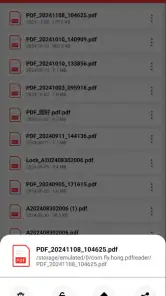
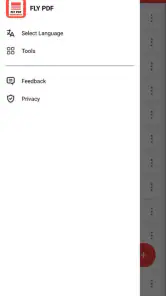
The first thing you’ll notice when you fire up the app is its sleek and intuitive interface. No more fumbling around trying to find the right tool. Everything is laid out clearly, making it super easy to navigate. Whether you need to edit, annotate, or share a document, it’s all just a tap away. I found that the app integrates smoothly with other platforms, which means you can quickly pull in documents from your email or cloud storage with minimal fuss.
Edit and Annotate with Ease
Now, editing PDFs can often feel like trying to write on a piece of glass with a dry-erase marker, but FLY PDF simplifies this process brilliantly. The app offers a range of tools to highlight, underline, or even add sticky notes to your documents. It’s a breeze to insert text and images too. So, whether you’re jotting down notes for a meeting or marking up a draft, this app has you covered.
Efficient Document Management
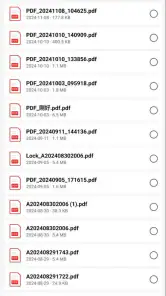
Managing your documents can sometimes be as daunting as organizing your sock drawer, but FLY PDF makes it effortless. You can easily sort and categorize your files, making it simple to find what you need when you need it. The search function is particularly robust, allowing you to locate documents quickly using keywords. Plus, the app’s ability to compress files without losing quality is a lifesaver when you’re running low on storage space.
Share and Collaborate Effortlessly
In today’s digital age, sharing documents is as common as sharing memes. FLY PDF understands this, providing an array of sharing options. You can send your PDFs via email, or share them directly through various apps. What’s even cooler is the collaboration feature. You can invite others to view and edit your documents, making teamwork a breeze. It’s like having a virtual office space where everyone can contribute in real-time.
To wrap things up, if you’re on the hunt for a reliable, feature-packed PDF tool, look no further than FLY PDF. It’s more than just another app; it’s a comprehensive solution to all your PDF woes. From editing and annotating to sharing and managing, this app does it all with finesse. So why not give it a shot? I promise, once you’ve tried it, you’ll wonder how you ever managed without it.
FLY PDF Frequently Asked Questions
What should I know about FLY PDF before downloading it?
FLY PDF is a productivity app for working with PDF files, with a simple store description: “FLY PDF.” It is free to download and is rated for Everyone. Its current version is 3.9, and it requires Android 7.0 or later. The app has an average rating of 3.2 from around 1,100 ratings, giving prospective users a quick sense of its reception.
Who makes FLY PDF, and is it widely used?
FLY PDF is developed by Shenzhen Yayi E-commerce Co., Ltd. It has more than 5 million installs, so it has reached a substantial number of users looking for a convenient and practical PDF tool. The app was released on October 30, 2024, and has 38 written reviews. Those details may help you judge its background and adoption before deciding whether it suits your document needs.
What features does FLY PDF offer for PDF management?
FLY PDF provides a comprehensive suite of tools for managing PDF documents. Users can easily edit, annotate, and highlight text within their PDFs. It also allows for the merging and splitting of documents, converting PDFs to other formats, and vice versa. The app supports password protection for sensitive documents, ensuring your data remains secure. Additionally, FLY PDF integrates with cloud storage solutions, enabling seamless access to your files across multiple devices.
Is FLY PDF free to use, or does it require a subscription?
FLY PDF is available as a free app with basic features accessible to all users. However, for advanced functionalities such as batch processing, OCR (Optical Character Recognition), and cloud integration, users may need to purchase a subscription. The subscription model offers a monthly or annual payment plan, providing full access to premium features and regular updates from the developers.
On which platforms is FLY PDF available?
FLY PDF is available for both Android and iOS platforms, making it accessible to a wide range of smartphone and tablet users. The app is designed to optimize performance on various devices, ensuring a smooth user experience regardless of the operating system. Users can download the app from the Google Play Store for Android devices and the Apple App Store for iOS devices.
Pros
- User-friendly interface for easy navigation
- Supports multiple file formats
- High-speed PDF processing
- Secure and reliable data management
- Cross-platform compatibility
Cons
- Limited free version features
- Occasional crashes on older devices
- In-app purchases can be costly
- Requires stable internet for cloud features
- Limited customer support options
- Category
- Productivity
- Version
- 3.9











