

FlixBus: Book Bus Tickets
- 6.58K
- 4.7
- Installs
- 50.00M
- Price
- Free

Screenshots

Analysis by Reviewed
When I’m arranging a trip with other people, the hard part is often not finding a departure but agreeing on the details: which stop works, when everyone can leave, and how the journey fits the rest of the day. FlixBus: Book Bus Tickets gives me a straightforward way to compare bus journeys across the US, so I can discuss the options before anyone commits. It is a free travel app from Flix SE, with a 4.7 average from around 843,000 ratings and over 10 million installs. That reach suggests many travelers know it, but its usefulness still comes down to whether the route and timing suit your plans.
Planning together on a shared phone
For a household coordinating a visit or a weekend away, one person can search routes while another checks the destination and timing. I would treat the phone as a planning aid, not a shared account by default: keep the booking details and payment choices with the person responsible for the trip, and let other travelers review the itinerary before purchase. That simple boundary helps avoid confusion about who is traveling, which date was chosen, and who needs the ticket at boarding.
For example, imagine arranging a Saturday trip to see relatives. You can compare the available journeys, discuss whether an earlier departure is worth the trade-off, then make the final booking once everyone agrees. Before paying, I recommend reading the selected journey details aloud or checking them together. It is a small step, but it catches the sort of city, date, or time mistake that is easy to make when several people are talking at once.
Useful boundaries for booking and coordination
The app is most helpful when the traveler and the person arranging the trip stay in contact. If one adult books for another person, agree in advance who will keep the booking information and share the necessary travel details directly. I would not assume that installing the app on a family phone automatically gives each person a separate profile or private booking space; use only the account and payment arrangements that suit your household.
There is also a useful distinction between comparing a route and choosing it. A bus can look attractive on price, yet the departure point, arrival time, and onward journey may matter more than the ticket itself. I check how the trip fits the full day, including the ride to the station and the plan after arrival. For a tight connection or a time-sensitive appointment, I would compare other transport options rather than choosing a bus fare in isolation.
When the bus option fits—and when it doesn’t
I find bus travel most appealing when my plans have some flexibility and the route starts and ends near places I actually need to reach. A direct journey can spare me the hassle of changing between modes, while a lower fare can leave more room in a weekend budget. But a bus ticket is only one part of the cost and effort: getting to the stop, waiting there, and traveling onward at the other end all count. I compare those pieces before deciding that a route is genuinely convenient.
That is also how I weigh FlixBus against the usual alternatives. Rail may be a better fit when it offers a more useful station or schedule, while driving can make more sense when several people are traveling together and need flexibility at the destination. Local transit or a rideshare may solve only the first or last part of the journey, but that can be preferable to building a long bus trip around an awkward stop. I use the app to assess the bus option, not to assume it beats every other mode.
More From Our News Desk

 Gmail
GmailGmail in a Busy Inbox: Who Benefits Most?
From first account to crowded workday, Gmail earns its place through dependable search and flexible sorting—but its best fit depends on how much inbox maintenance you can tolerate.

 Prime Video
Switching to Prime Video: What Changes in Your Viewing Routine
Prime Video can make a compelling second home for streaming, but switching means learning a different catalog, rental layer, and route from browsing to playback.

 Universal TV Remote Control
Universal TV Remote Control Works Best as a Reliable Backup
A phone remote earns its place through quick setup and reliable habits. Here is how to get more from Universal TV Remote Control—and where its limits show.

 Weather - By Xiaomi
Weather by Xiaomi Review: Clear at a Glance, Less Clear Up Close
Xiaomi’s weather app makes everyday forecasts quick to scan, but its calm surface can leave useful details and recovery paths harder to find than they should be.

 X
XX Under Pressure: Can It Recover When Posting Goes Wrong?
A resilience-focused review of X, examining setup, mistaken posts, interruptions, weak connections, and the gaps that matter when recovery needs to be dependable.

 Clash of Clans
Clash of Clans Is Won Between the Battles
Its raids are quick; its community is a long-term project of coordination, teaching, rivalry, and shared responsibility—with all the friction that entails.
Latest News



A small planning routine that prevents avoidable mistakes
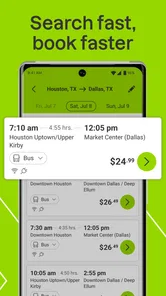
When I search, I settle the origin and destination first, then compare dates and departures with the group’s actual availability. I read the arrival time alongside the departure time rather than focusing on the fare at the top of a result. Then I check what happens after arrival: is someone collecting us, is there a local connection, or do we need to allow time to reach a different part of town? This sequence makes the decision more grounded than picking the cheapest-looking option and solving the rest later.
If two people are sharing the planning, I find it useful to have one person operate the phone and the other independently verify the destination and travel date before checkout. That division is especially helpful when similar place names or several possible stops could cause confusion. Once booked, the responsible person can share the relevant itinerary details with the travelers through whatever communication method the household already uses. It keeps the booking task clear without turning a shared phone into a shared account by assumption.
Getting Started with FlixBus
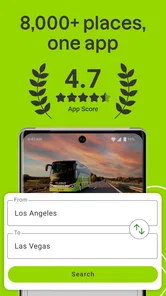
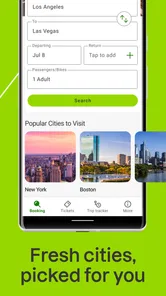
First things first, downloading the FlixBus app was a breeze. Available on both Android and iOS, the app's interface is sleek and user-friendly, making it super easy to navigate. As soon as you open the app, you're greeted with a simple search bar where you can enter your departure and arrival cities, along with your travel dates. With a tap of a button, you're presented with a list of available routes, complete with prices and travel times. It's incredibly convenient to have all this information in one place.
Booking Your Trip
Booking a ticket through the app is as easy as pie. Once you've found your desired route, you simply select it, and the app guides you through the booking process. You can even choose your preferred seat, which, for someone like me who always wants a window seat, is a fantastic feature. The app also allows for multiple payment options, including credit card and PayPal, ensuring a hassle-free checkout process.
Seat choice is particularly handy when you are traveling with someone and want to sit together, though I would make that decision before reaching checkout rather than treating it as an afterthought. If you are booking for another person, check the passenger and journey details carefully before finishing. I also compare the total travel time with the fare: a cheaper option is not automatically the better one if its timing makes the day awkward.
Features That Stand Out
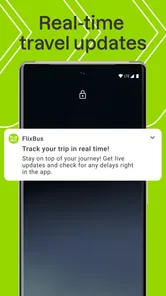
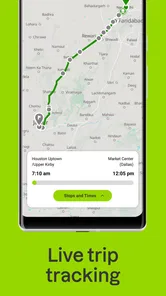
One of the standout features of the app is its real-time bus tracking. This feature lets you see exactly where your bus is, so you can plan your arrival at the station accordingly. No more waiting around in the cold wondering if your bus is running late! Another great feature is the in-app customer support. Whether you have a question about your booking or need to make changes, help is just a tap away.
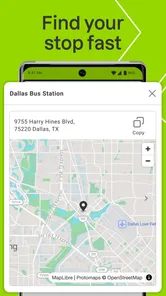
Tracking is most useful as a last-mile planning tool, not a reason to leave at the last possible moment. I would still allow time to reach the stop and identify the right boarding point, especially if I am meeting someone there. If a plan changes, having support available in the app is reassuring, but I would check the booking conditions and available options before relying on a change being possible.
On the Road
Once you're on the bus, the journey is smooth sailing. The buses are equipped with free Wi-Fi, so you can stay connected throughout your trip. There's also plenty of legroom, which is a blessing for those long-haul journeys. Plus, the app even provides entertainment options, so you'll never be bored on your ride.
I would still prepare for a stretch without a dependable connection by saving the details I need before leaving and bringing something to read or watch offline. That is sensible for any bus journey, and it matters even more if several people are coordinating arrival plans. Wi-Fi and entertainment can make the ride easier, but neither replaces having the destination and pickup plan clear in advance.
Who will get the most from it
I see this as a strong fit for flexible travelers who are comfortable spending more time in transit in exchange for a bus option, and for households where one person can handle the booking while keeping everyone informed. It is less suitable when arrival time is critical, when the nearest stop is inconvenient, or when a traveler needs a level of assistance or certainty that the app and bus journey cannot guarantee. In those cases, compare rail, driving, or other local transport choices before deciding.
For younger travelers, the app’s Everyone age rating describes its general content classification, not whether a particular trip is appropriate without adult planning. I would make sure the traveler knows the route, boarding point, and who to contact if arrangements change. The app itself should not be treated as a substitute for household supervision or a coordinated travel plan.
Practical questions I consider before booking
Can I use it to plan without immediately buying a ticket? I use the search results to compare possible journeys first, then make a decision only after checking the schedule against the wider plan. That is useful for family discussions, but I keep a clear distinction between researching an option and having a confirmed booking. If someone else is handling payment, I share the exact journey details for them to review rather than assuming they have seen the same screen.
What should I do if someone in the group is delayed on the way to the stop? I would not rely on bus tracking to solve a missed departure. I check the journey details, keep the group in contact, and leave enough time to reach the boarding point. Tracking can help me judge where a bus is, but it does not remove the need to plan for the travelers’ own journey to the stop.
Is this a good choice for a child or teenager traveling without an adult? I would decide based on the traveler, route, and household arrangements, not on the app’s age classification alone. Before booking, I would make sure the young person can identify the correct stop, understands the itinerary, and knows whom to contact if plans change. For a traveler who needs close supervision or a handoff that has not been carefully arranged, I would choose a different plan.
And is a bus always the budget-friendly choice in practice? Not necessarily. I compare the fare with the cost and effort of reaching the departure point and continuing from the arrival stop, as well as the value of time spent traveling. If those parts make the trip cumbersome, a different mode may be worth considering even if its initial price looks higher.
FlixBus has been available since February 3, 2014, and its current version is 9.70.0 for Android 6.0 and later. Those details matter most when checking whether an older phone can run it; the app is also available on iOS. For me, the deciding factor is not the version number but whether the route, timing, and boarding location work for the actual trip.
All in all, the booking experience feels straightforward from searching through to choosing a journey. Whether you're a frequent traveler or just planning a weekend getaway, this app can be useful when a bus route fits your schedule and destination. I would not call it essential for every trip: the right choice depends on the whole journey, not just the fare or a convenient-looking departure. When the route works, having the search and booking process in one place makes planning easier.
My household verdict
I would use it as a practical place to search and book when a bus route suits the schedule, and as a shared planning reference when several people need to agree on the details. I would not make it the household’s only travel option: compare the whole journey, keep booking responsibility clear, and choose another mode when reliability or a precise arrival matters more than a lower-cost bus trip. On those terms, it earns a place on my phone without pretending every journey is right for it.
FlixBus: Book Bus Tickets Frequently Asked Questions
Is FlixBus free to download, and what devices can run it?
FlixBus is free to download, so you can install the app and explore its travel-booking features without paying for the app itself. It is available for Android devices running Android 6.0 or later. The app is categorized as Travel & Local, and its content rating is Everyone, making it suitable for a broad audience.
Can I search for a route without creating a booking?
Yes. You can explore journeys in the app before deciding whether to buy a ticket. Enter a destination and travel dates to see available bus options and compare prices, then leave the booking unfinished if you are still weighing up your plans. This can help you check whether the route and timing fit your trip without committing to a purchase.
Who makes FlixBus, and is it widely used?
FlixBus is developed by Flix SE and is a well-established option for arranging bus travel. It has over 10 million installs and an average rating of 4.7 from around 843,000 ratings, giving prospective users a useful sense of its reach and reception. The app has been available since February 3, 2014, and its current version is 9.70.0.
What is FlixBus and how does it work?
FlixBus is a popular travel app that allows users to book bus tickets across various destinations in Europe and the United States. It offers a convenient and affordable way to travel, with a wide network of routes and schedules. Users can search for buses, compare prices, and book tickets directly through the app, making it a seamless experience for travelers. Its store summary highlights routes across the US and bus tickets at competitive prices.
How can I book a ticket on FlixBus?
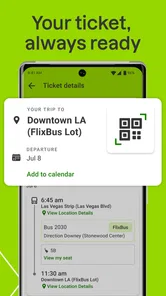
Booking a ticket on FlixBus is simple and user-friendly. Once you download the app, you can enter your desired destination and travel dates, then browse through available bus options. The app allows you to compare prices, select your preferred trip, and securely complete the booking process with various payment methods. Once booked, tickets are easily accessible on your mobile device.
Pros
- User-friendly interface.
- Extensive bus network.
- Affordable ticket prices.
- Real-time tracking available.
- Multiple payment options.
Cons
- Limited route availability.
- Occasional delays.
- In-app ads.
- No offline access.
- Limited customer support.











