Flight Tracker-Live Air Radar
- 127.00
- 3.2
- Installs
- 1.00M
- Price
- Free

Screenshots
Analysis by Reviewed
When I’m waiting for someone to land, the hardest part is often not knowing whether to leave for the airport yet. Flight Tracker-Live Air Radar is built around a useful answer to that small but common travel question: it follows flights on a live map and provides status updates. I find that visual approach more reassuring than repeatedly guessing from a departure time, especially when I’m coordinating a pickup or keeping an eye on a family member’s journey.
Why watching the flight matters
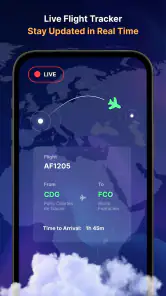
A map changes flight tracking from a line of text into something easier to understand at a glance. Rather than only checking a scheduled arrival, I can see the broader progress of a flight and use its status as a cue to check in again. That is the central appeal here: the app turns a moving trip into something you can follow from your phone, without making aviation knowledge a requirement.
It is worth treating a tracker as a planning aid, not as permission to cut timing too close. Airport procedures, baggage collection, traffic and last-minute changes still affect when a passenger actually meets you. I’d use the map to decide when to start getting ready, then confirm arrangements through the airline or airport when a detail has practical consequences.
A practical way to follow a journey
For a pickup, I would keep the flight details handy, open the tracker when the expected arrival gets closer, and check the status again before setting off. That simple routine can replace a string of anxious messages asking whether the plane has landed. If the person is changing flights or travelling across time zones, the map also gives a helpful sense of where the journey stands, though it cannot tell you how long they will spend getting through the airport.
One useful habit is to separate “the aircraft is moving” from “the passenger is ready to meet.” Those are not the same milestone. I would use flight progress to time the drive, but agree on a message after landing for the final pickup plan. This keeps the tracker useful without expecting it to solve issues such as a slow baggage carousel or a crowded arrivals area.
Following flights without the guesswork
So, I’ve been playing around with Flight Tracker-Live Air Radar for a bit now, and I must say, it feels like having a personal air traffic controller in my pocket. The app is designed to offer live updates on flights all around the world, and boy, does it deliver! With a user-friendly interface, even the least tech-savvy folks can navigate it with ease.
Features That Soar
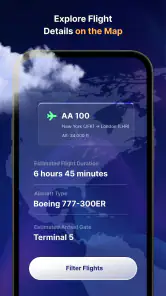
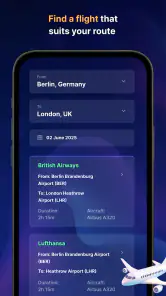
Let’s dive into what makes this app so special. First off, it’s got a real-time flight radar. Imagine watching tiny airplanes crawling across the map, each representing a real flight buzzing through the skies. It’s fascinating, and a bit addictive, if I'm honest. You can track flights by number or airline, and with a couple of taps, you’re in the know about any potential delays or changes.
More From Our News Desk

Weather by Xiaomi Review: Clear at a Glance, Less Clear Up Close

X Under Pressure: Can It Recover When Posting Goes Wrong?

Clash of Clans Is Won Between the Battles

Android Auto Makes the Case for Quieter Car Software

MobiOffice: Transforming Mobile Productivity with Seamless Integration

EA SPORTS FC™ Mobile Soccer: Redefining Mobile Sports Gaming
Another feature that’s worth mentioning is the ability to set notifications. This means you’ll get a ping whenever there’s an update on your flight. No more refreshing the airline’s website or anxiously checking the boards at the airport. Plus, the app supports multiple flight tracking, so if you’re a jet-setter or just have a lot of loved ones flying, you’re covered.
Making the map useful in everyday travel
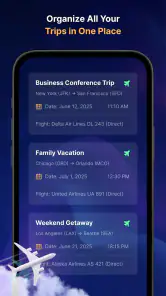
For a family coordinating more than one arrival, tracking several flights can be more practical than switching between separate airline pages. I’d label the flights in my own notes by traveller and pickup plan, then check each one as its arrival approaches. That small bit of organization matters when different people are landing at different times: a live map is most helpful when you already know which flight you’re looking at and what decision you need to make.
Compared with relying only on an airline’s app, this kind of tracker is useful when you want a broader, map-led view rather than staying inside one carrier’s travel tools. The airline remains the better place to handle booking-specific matters or confirm instructions that affect a passenger directly. I see the two approaches as complements: use a tracker to follow progress, and use the airline’s own channels for actions tied to the reservation.
Insights and More
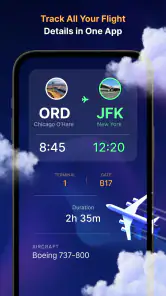
The app also offers comprehensive flight details. Think departure and arrival times, gate information, and even a nifty weather report for your destination. It’s like having a personal assistant whispering all the vital info right into your ear. The detailed maps and satellite views are a cherry on top, providing an engaging way to visualize your journey.
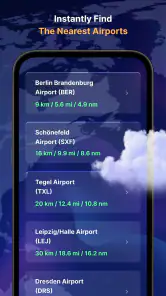
One of my favorite features is the airport information section. You can find out about services available at your departure or arrival airport, which is super handy if you’re trying to plan out your layover or find a good spot to grab a bite. It feels like the app is genuinely trying to make your travel experience smoother.
Where a tracker helps—and where it doesn’t
A realistic use case is meeting a friend after work when their arrival time may affect whether you leave immediately or finish one last task first. I’d check the flight’s progress before heading out, then build in a buffer for the drive and airport walk. That is a better use of live tracking than staring at the map continuously; a quick check at meaningful moments gives you the information you need without turning the trip into a constant screen-watching exercise.
There is a trade-off to the map-first experience: a moving plane is easy to follow, but it does not automatically answer every ground-level question. Even useful status and airport details should be treated as planning context, not a guarantee that a gate, connection or pickup arrangement will stay unchanged. If I were travelling myself and needed to act on a time-sensitive change, I would verify it through the airline or airport as well.
Getting more from flight updates
Notifications are most useful when they reduce unnecessary checking rather than become another source of interruption. I’d turn them on for a flight that affects a pickup or connection, then use the alerts as prompts to review the situation. For a journey that has no effect on my plans, opening the app only when I’m curious may be less distracting. The point is to let an update tell me when a decision might be needed, not to treat every notification as a reason to change plans immediately.
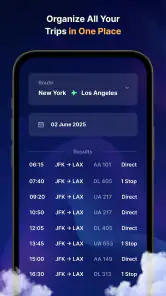
Searching by flight number is a practical starting point when someone sends you their itinerary, while searching by airline can help when you know the carrier but need to identify the relevant service. Before relying on any result, I’d compare the route and timing with the traveller’s details. This small check matters when there are similar flights or when plans have changed, and it prevents a perfectly clear map from giving confidence about the wrong journey.
There is also a useful difference between following one flight and monitoring several. A single arrival calls for occasional checks at a few decision points; multiple arrivals call for a simple routine so I don’t mix up who needs collecting and when. I’d keep a separate note of names and pickup arrangements outside the tracker. That is not extra busywork for its own sake: it keeps the map focused on aircraft progress while the note handles the human logistics.
Choosing the right source at the right moment
A dedicated tracker and an airline app answer different questions. The map is better for seeing a flight’s broader movement and quickly checking its status, while the airline is the sensible place to look for information tied to a booking or instructions for a passenger. Airport information can help with planning around a terminal, but I would still confirm important operational details through an official channel before changing a connection or making a time-critical decision.
Compared with checking a public departures board, a phone-based tracker is more convenient when I’m away from the terminal or following a traveller from home. A board can still be preferable once I’m at the airport and need to orient myself among local announcements and signs. I wouldn’t use any one source as the unquestioned authority for every part of the trip; I’d use the tracker for awareness, then verify details where a mistake could affect the passenger.
For someone who mainly wants to manage tickets, choose seats or handle a booking, the usual airline app is a better first download. For someone who wants to watch flights across carriers or follow a relative without navigating a booking account, the map-led approach is more appealing. I find the distinction clearer than trying to declare one tool universally better: the right choice depends on whether the immediate task is following progress or managing travel arrangements.
User Experience
Now, let’s chat about the user experience. The design is clean and intuitive, which I appreciate. It’s not bogged down with unnecessary frills or complicated menus. Everything you need is just a few taps away. The app runs smoothly, and I haven’t encountered any bugs or crashes, which is a huge plus in my book.
Also, it’s worth mentioning the developers seem to be on top of updates, regularly adding new features and improvements. It’s reassuring to know that the app is evolving and staying relevant with the fast-paced nature of air travel.
What to expect when plans shift
Travel plans rarely follow a neat line from departure to pickup, so I’d use the app as one part of a flexible plan. If an arrival changes, first check whether the new information affects when you should leave; then contact the traveller if the meeting point or timing needs to change. A map can show progress, but it cannot coordinate two people’s ground plans by itself. Keeping that distinction in mind makes the tracker useful without asking it to do more than follow the flight.
For a connection, the map can help a friend or family member understand where a flight stands, but it cannot tell me whether they will have enough time to reach the next gate or whether an airline will protect the onward journey. Those questions depend on the itinerary and the carrier’s arrangements. I’d treat the tracker as a way to notice that a connection may need attention, then ask the traveller to check the airline’s guidance directly.
People sometimes want to know whether a live map is worth opening when the scheduled arrival is already visible elsewhere. For me, the map earns its place when movement matters to a decision: whether to leave home, whether to pause an errand, or when to send a message. If I only need a simple reminder of a booked itinerary, a calendar entry or airline notification may be enough. This is a focused tool, and it is strongest when its visual progress answers a practical question.
Who should keep it close
People who regularly collect friends or relatives, follow several travellers, or simply enjoy seeing flight progress on a map are the ones most likely to get lasting value from this app. It is also a reasonable choice for someone who wants a dedicated travel tool without paying an upfront price: the app is free, while in-app purchases range from $2.99 to $29.99 per item. I would check what a paid option adds before spending, rather than assuming it is necessary for basic flight-following.
On the other hand, someone who only flies occasionally and is happy with airline notifications may not need another app to check. A traveller who wants booking management as the main feature should also start with the airline’s own app. Flight tracking is the strength to focus on here, not a replacement for every part of travel planning.
A measured recommendation
The mixed response from users is worth keeping in mind when deciding whether to make this a regular travel companion. It has an average rating of 3.2 from around 5,200 ratings, alongside roughly 127 written reviews. That does not tell me exactly how it will work for a particular person, but it does encourage a practical approach: try the free app with a flight you can independently check, and see whether its map and updates fit the way you plan.
Negroni is the developer, and the app is listed for Everyone and for devices running Android 5.0 or later. It has reached over 1 million installs and is currently at version 3.0. Those details make it accessible to a broad range of Android users, though the useful question for me is still whether I need a dedicated view of flight progress. If I often coordinate arrivals, that convenience has a clear purpose; if I rarely track flights, it may simply add another icon to my phone.
Final Thoughts
In a world where travel is becoming increasingly dynamic, having a reliable app like Flight Tracker-Live Air Radar is a game-changer. Whether you’re a frequent flyer, a meticulous planner, or just someone who loves to keep tabs on the skies, this app is a must-have. It’s packed with features that enhance the travel experience, and it’s presented in a way that’s accessible to everyone.
So, next time you’re heading to the airport or tracking a loved one’s flight, give it a whirl. Trust me, it’s like having a little slice of aviation heaven right on your phone.
Negroni’s travel app is rated Everyone and works on Android 5.0 and later; it is currently at version 3.0. It has an average rating of 3.2 from around 5,200 ratings, with roughly 127 written reviews and over 1 million installs. Those figures suggest that plenty of people have tried it, while the mixed average is a good reason to judge it by your own needs rather than expect a perfect fit. For me, its strongest case is simple: when a flight’s progress affects a real-world plan, a live map can make waiting more manageable.
Flight Tracker-Live Air Radar Frequently Asked Questions
Does Flight Tracker-Live Air Radar show a flight’s current status before I install it?
The app is designed to make flight information easier to follow, with real-time tracking, live maps, and flight status updates. After installing it, you can use those details to check the progress of a journey and follow changes as they appear. It is listed in the Travel & Local category and is available for free, with in-app purchases offered.
Who makes Flight Tracker-Live Air Radar, and is it widely used?
Flight Tracker-Live Air Radar is developed by Negroni. It has been installed over one million times and has an average rating of 3.2 from around 5,200 ratings, giving prospective users a broad sense of its reach and mixed reception. Those figures are useful context, but your experience may depend on what you need from a flight-tracking app.
What features does Flight Tracker-Live Air Radar offer?
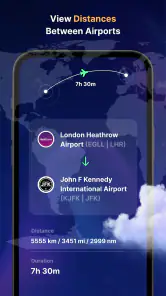
Flight Tracker-Live Air Radar provides real-time flight tracking with detailed information about flight status, departure and arrival times, and live updates. Users can view flight paths, check airport conditions, and receive notifications about flight changes. The app also includes a sleek and user-friendly interface, making it easy to navigate and access the information you need.
Is Flight Tracker-Live Air Radar free to use?
The app is free to download and offers a free version with basic features suitable for casual users. Some features may involve in-app purchases, priced from $2.99 to $29.99 per item. Review the purchase details shown in the app before buying so you can decide whether any paid options are worthwhile for your needs.
How accurate is the flight data provided by the app?
Flight Tracker-Live Air Radar uses multiple data sources, including airline and airport feeds, to provide up-to-date and accurate information. While the app strives for precision, occasional discrepancies may occur due to delays in data transmission or changes made by airlines. Users are encouraged to cross-check with official airline communications for critical updates.
Pros
- Real-time flight updates enhance travel planning.
- User-friendly interface for easy navigation.
- Covers global flight data comprehensively.
- Customizable alerts for flight status changes.
- Detailed airport information available.
Cons
- Occasional delays in data updates.
- Advertisements can be intrusive at times.
- Requires internet for full functionality.
- Some features are premium-only.
- Limited offline capabilities.
- Category
- Travel & Local
- Version
- 3.0