Flash Weather AI: Future Radar
- 50.00
- 3.8
- Installs
- 10.00K
- Price
- Free

Screenshots
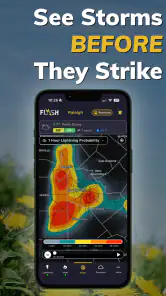
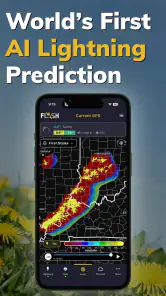
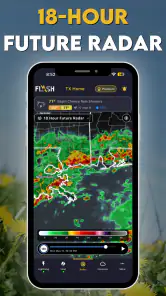
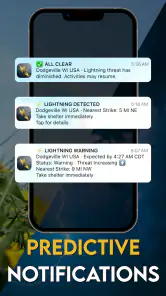
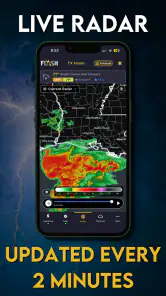
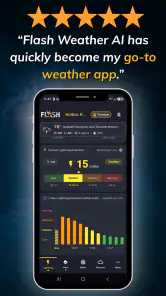
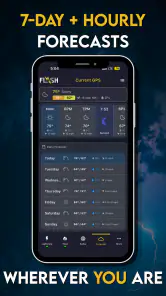
Analysis by Reviewed
Weather apps usually answer a simple question: what is happening outside, and what is likely to happen next? Flash Weather AI: Future Radar takes a narrower and more useful approach by focusing on lightning prediction and storm tracking. I found it most interesting on days when ordinary forecasts felt too broad—when the sky was changing quickly and I needed to decide whether to walk, drive, exercise outdoors, or wait before leaving.
Created by FLASH Weather AI, this free weather app is built around an AI-powered view of approaching storm activity. That does not make it a replacement for every weather tool on your phone, but it gives the app a clear purpose. Instead of treating weather as a long list of temperatures and percentages, it tries to help me understand the immediate risk from thunderstorms and lightning.
The app is available for users aged Everyone and works on devices running Android 7.0 or later. Its current version is 1.5.175, and it has passed the early experimental stage with over ten thousand installs. The average rating sits at 3.8 from around ninety ratings, which suggests a useful but not universally smooth experience. I would describe it as a focused tool worth testing alongside a familiar forecast, rather than an automatic replacement for one.
How Flash Weather AI fits into everyday weather decisions
I use Flash Weather AI as a prompt to make a decision before a storm disrupts the day, not as a guarantee about what the sky will do. In this section, I’ll focus on how to make that check useful without letting a single forecast dictate the whole plan. That practical distinction also helps explain which setup habits are worth checking first.
A storm-focused view instead of another general forecast
My first impression is that the app makes the most sense when weather is uncertain over a short period. A standard weather app may tell me that storms are possible during the afternoon, but that wording can cover a large time window. For real decisions, I often want to know whether the threat feels close enough to change my plans now.
That is where the storm-tracking angle matters. The app’s identity is not built around being a complete replacement for hourly forecasts, climate information, or long-range planning. Its job is to bring attention to lightning and storm movement. This makes it especially relevant for outdoor workers, runners, cyclists, parents arranging activities, travelers, and anyone who spends time away from immediate shelter.
I would not use a lightning prediction as permission to ignore common-sense safety rules. Weather prediction is inherently uncertain, and a calm-looking moment can change quickly. The most sensible workflow is to use the app as an extra warning layer: check it before going out, look again when conditions become unsettled, and treat any concerning signal as a reason to move indoors rather than as a challenge to stay outside.
More From Our News Desk

Weather by Xiaomi Review: Clear at a Glance, Less Clear Up Close

X Under Pressure: Can It Recover When Posting Goes Wrong?

Clash of Clans Is Won Between the Battles

Android Auto Makes the Case for Quieter Car Software

MobiOffice: Transforming Mobile Productivity with Seamless Integration

EA SPORTS FC™ Mobile Soccer: Redefining Mobile Sports Gaming
What the free access means for value
The app is free to download, which lowers the barrier to trying it during a stormy week or before a planned outdoor activity. That matters because a specialized weather tool has to prove its usefulness in your own area. Forecast quality can feel different from one location to another, so being able to start without paying makes experimentation easier.
There are in-app purchases ranging from $3.99 to $39.99 per item. I would therefore separate the decision into two stages. First, test the free experience during the kinds of weather situations that matter to you. Then decide whether any paid option genuinely improves your routine. The presence of a purchase range alone does not tell me that paying is necessary, and I would not treat the most expensive item as automatically better value.
This is an important distinction: the free entry point is a real advantage, while the value of paid access depends on what you personally need from the app and how often you use its storm information. Someone who only checks weather before occasional walks may be perfectly satisfied without spending anything. A person whose work depends on outdoor conditions may judge the paid value differently, but should still test the app first rather than buying on the promise of a more advanced experience.
A practical routine for a changing afternoon
Imagine I have planned a bike ride after work. The morning forecast says there is a chance of storms later, but that does not answer the question I actually have: should I leave now, shorten the route, or postpone it? I would open Flash Weather AI before setting off, check the storm-focused information, and use it to decide whether the ride should stay close to populated areas and reliable shelter.
If the sky darkens while I am out, I would check again rather than relying on the earlier forecast. The useful habit is not staring at the screen continuously. It is making the app part of a decision loop: check before leaving, reassess when conditions change, and stop the activity if lightning risk becomes a concern. That workflow is more valuable than simply having another weather icon on the home screen.
For parents, the same approach can help with outdoor play or a school pickup. For a gardener, it may help decide whether to start a task that cannot be interrupted easily. For someone traveling through an unfamiliar area, storm tracking can add context when the local sky looks different from the forecast seen earlier. In each case, the app’s benefit comes from timing and attention, not from replacing judgment.
Where it differs from ordinary weather apps
Most general weather apps are better at giving a broad daily picture. They commonly combine temperatures, wind, precipitation chances, forecasts by hour, and sometimes radar or alerts. That makes them the better first choice if I want to plan a full day, compare several weather details, or keep one all-purpose app for routine checking.
Flash Weather AI is more appealing when lightning and thunderstorms are the main concern. Its specialized purpose can make the information easier to act on during unsettled weather, especially if a general forecast feels too vague. The trade-off is focus: a storm tracker does not automatically become the best tool for every weather question.
I would use it beside a regular weather app rather than forcing one app to do everything. The general app can handle the morning overview, while this one can receive attention when storms become relevant. That two-app approach may feel unnecessary for people in mild or predictable climates, but it is reasonable for users who regularly deal with fast-changing thunderstorms.
Three less obvious ways to get more from it
The first useful insight is to check the app before you are already committed to an activity. If I wait until I am halfway through a long walk or already far from shelter, the information has less practical value. A quick check before leaving gives me the chance to change the route, bring a backup plan, or postpone the outing without inconvenience.
The second is to use it for comparing decisions, not for chasing certainty. I would not ask, “Can I safely stay outside?” as if the app could guarantee an answer. I would ask, “Does this information make the longer route a worse choice than the shorter one?” That framing respects the limits of prediction while still turning storm information into a concrete action.
The third is to build a personal threshold for stopping. For example, I might decide in advance that any concerning lightning-related signal means I will head indoors, even if rain has not started. Making that rule before the weather becomes dramatic prevents me from rationalizing a risky choice because I am already enjoying the activity. The app becomes a prompt for disciplined behavior rather than a way to negotiate with danger.
Where the experience may feel limited
The 3.8 average rating indicates that the app has room to improve or that its usefulness varies between users. I would pay attention to that before treating it as a polished, universal weather solution. A specialized app can be valuable in the right situation and still feel less satisfying when you want a complete forecast, a familiar interface, or highly predictable results.
Another limitation is the natural uncertainty of AI-assisted weather prediction. The phrase “AI-powered” may sound more definitive than the real-world experience can be. Storms are difficult to predict at a precise local level, and no app should be treated as a guarantee that lightning will or will not occur. The responsible use case is early awareness and better planning, not certainty.
There is also a possible cost decision after the free starting point. Since individual purchases range from $3.99 to $39.99, I would read each purchase screen carefully and consider how frequently I need the app. Someone who opens it only a few times each season may find paid access hard to justify. A frequent outdoor user may see more value, but only if the paid experience addresses a need that the free version does not already cover.
Finally, the app may not be the right answer for people who want a single dashboard covering every weather detail. If my priority is a weekly forecast, detailed temperature comparisons, travel planning, or a broad set of environmental readings, I would choose a more general weather service first. Flash Weather AI earns its place when storm awareness is the specific problem I am trying to solve.
Who is most likely to benefit?
I think the strongest audience is people whose plans are affected by thunderstorms at short notice. That includes outdoor recreation enthusiasts, delivery and maintenance workers, coaches, event organizers, and families who spend a lot of time in parks or on sports fields. The app’s focused purpose makes more sense when a storm can create a real disruption rather than just a minor inconvenience.
It can also help cautious planners who prefer to check more than one source before leaving home. The free download gives them a low-risk way to see whether the storm-tracking approach fits their location and habits. I would especially recommend testing it on several different days instead of judging it from one quiet afternoon.
People who should skip it are those seeking a complete all-in-one forecast and those who rarely encounter thunderstorms. If I only want tomorrow’s temperature or a simple rain check, a standard weather app is likely quicker. I would also skip paying for it immediately if I have not yet established a recurring need. The specialized focus is a strength only when that focus matches the user.
Device support, maturity, and expectations
Support for Android 7.0 or later makes the app accessible to people using older Android devices, which is helpful if a spare or budget phone is used for outdoor work. The current version, 1.5.175, shows that the product is being maintained through version updates, though a version number by itself does not guarantee that every device or location will feel equally well served.
The developer, FLASH Weather AI, has positioned the product around a clear weather problem rather than a broad collection of unrelated tools. I prefer that kind of focus because it makes the download easier to evaluate. I know what role I am testing: lightning prediction and storm tracking, not an entire replacement for every forecast service.
The age rating of Everyone also makes it suitable for general household use from a content-rating perspective. That does not remove the need for adults to teach children sensible lightning safety. A weather app can support a decision, but it should never replace supervision or established safety guidance during a storm.
My value judgement before spending money
For me, the free access is the strongest reason to try it. I can judge whether the storm information is useful in my area and whether I naturally remember to check it before outdoor plans. That practical test matters more than the app’s positioning or the appeal of AI as a label.
Paid value is harder to judge without a specific need. The purchase range is wide enough that I would avoid treating the app as a casual impulse purchase. I would first identify the problem I want to solve: earlier awareness, more frequent storm checks, or a workflow for repeated outdoor decisions. If the free experience already handles my occasional needs, I would keep using it without paying.
If I worked outside often, I would consider paid access only after repeated use showed that the app had become part of my routine. Even then, I would compare its practical benefit with the general weather tools I already use. The right question is not whether a specialized app sounds advanced; it is whether it changes my decisions in a useful way.
My final recommendation
Flash Weather AI: Future Radar is worth trying if lightning and thunderstorms are the weather problem you care about most. Its free starting point, focused storm-tracking purpose, and support for older Android versions make the initial decision easy. I like it best as a second layer beside a general forecast: one app for the broad plan, this one for closer attention when storms become relevant.
I would not recommend it as the only weather app for everyone, and I would not pay before testing how well it fits my location and routine. The 3.8 average rating and modest install base suggest a product that deserves a personal trial rather than automatic trust. Used thoughtfully, it can turn vague storm anxiety into a clearer check-and-decide habit.
My verdict: try the free version if outdoor plans and lightning risk regularly affect your day, but skip it—or keep it free—if you only need ordinary daily forecasts. Its best value is not in replacing every weather tool. It is in giving the right user a focused reason to pause, check the sky and storm information, and choose a safer plan.
Flash Weather AI: Future Radar Frequently Asked Questions
What devices and operating systems can run Flash Weather AI: Future Radar?
Flash Weather AI: Future Radar is available for Android devices running Android 7.0 or later. Before downloading, check your device’s operating-system version and make sure you have enough free storage for the app and its updates. The app is listed as suitable for everyone, though the experience and available features may vary by device.
Is Flash Weather AI: Future Radar suitable for everyday weather checks?
Yes. Flash Weather AI: Future Radar is a weather application intended to make forecasts and storm information easier to check as part of a daily routine. Its focus on lightning prediction and storm tracking may be useful when planning a commute or outdoor activity. As with any forecast, conditions can change, so use the information as guidance rather than a guarantee.
What is Flash Weather AI: Future Radar?
Flash Weather AI: Future Radar is a weather application designed to provide quick forecasts, radar-style precipitation tracking, and weather alerts in an easy-to-read interface. It focuses on helping users understand what conditions may develop over the next several hours, making it useful for planning commutes, outdoor activities, travel, and everyday routines. Available features and forecast accuracy may vary by location and device. Its short store description is “Flash Weather AI,” while the app’s central idea is AI-powered lightning prediction and storm tracking.
How accurate are the forecasts and future radar predictions?
The app can provide helpful short-term weather information, but no weather service can guarantee perfect accuracy. Forecast quality depends on your location, the data sources used by the application, local geography, and how quickly conditions change. Future radar and precipitation estimates are generally most useful for near-term planning, while longer-range forecasts should be treated as guidance rather than a certainty.
Does Flash Weather AI: Future Radar require my location?
Location access is typically useful because it allows the app to show current conditions, forecasts, radar activity, and alerts for your area automatically. You may be able to search for cities manually instead, depending on the version and device settings. If privacy is a concern, review the permission request carefully and choose approximate or limited location access when your operating system provides that option.
Pros
- AI forecasts provide quick
- easy-to-understand weather summaries.
- Future radar helps visualize approaching rain and storms at a glance.
- Clean interface makes essential weather information easy to find.
- Useful for planning commutes
- trips
- and outdoor activities.
- Supports proactive alerts for changing or severe weather conditions.
Cons
- Forecast accuracy may vary depending on location and local weather data.
- Some advanced features may require a subscription or in-app purchase.
- Frequent radar updates can increase battery and mobile data usage.
- AI summaries may overlook detailed meteorological information.
- Notifications can become distracting if too many alerts are enabled.
- Category
- Weather
- Version
- 1.5.175











